Underground Water Finder for Well Drilling and Geological Prospecting
1. 제품 오버view
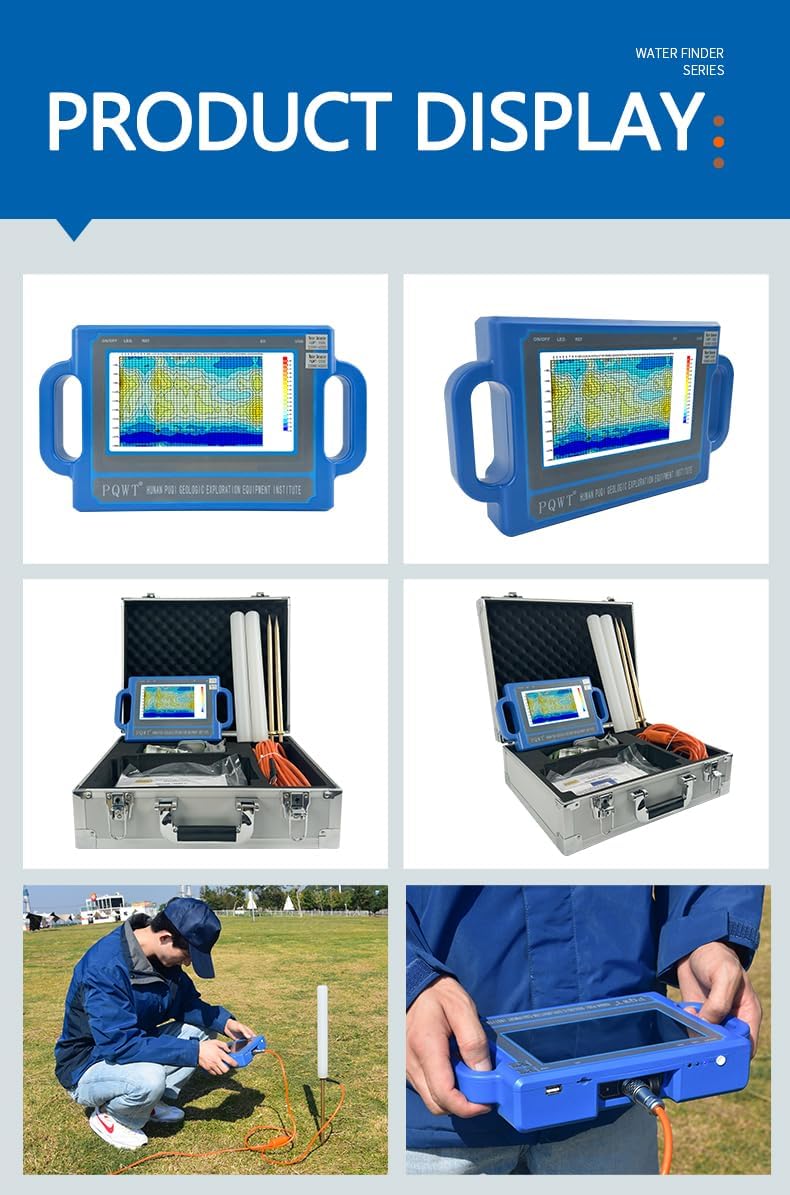
The PQWT S150 Water Detector is an advanced geological prospecting instrument designed for efficient underground water surveys and location. It features automatic mapping capabilities to clearly display geological structures and identify aquifers suitable for well drilling. This model offers a selectable detection depth of up to 150 meters.
Utilizing the natural electric field method, the instrument simplifies the process of groundwater exploration, making it accessible for various field survey needs.
2. 상자 안에 무엇이 들어있나요?
Upon unboxing your PQWT S150 Water Detector, please verify that all components listed below are present and in good condition.
Host Machine (Main Unit)
Electrode Rods (Alloy)
Copper Electrode Rods
Copper Screws
10 Meter Measuring Cable
Portable Instrument Case
품질관리 인증서
사후 서비스 카드
USB Disk (containing operation video and manual)
벨트
8.4V 충전기
Global Conversion Plug
USB 데이터 라인
Battery (2 Lithium Ion batteries required, included)
부품 목록
Image: All components of the PQWT S150 Water Detector laid out, including the main unit, cables, electrodes, and accessories.
Video: An unboxing video demonstrating the contents of the PQWT S Series Aquifer Mapping Geophysical Detector package.
3. 설정
3.1 Wiring the Electrodes
Prepare the Measurement Line: Select a tape measure (e.g., 50 meters) and extend it along a straight line in the area to be explored. Mark the starting point (0m).
Geophysical Wiring: The geophysical wiring typically involves a vertical structure. For open areas, a net-shape vertical crossing wiring method is used.
전극 연결:
Insert one electrode near the host machine into the tape position of 0 meters.
Insert the other electrode into the tape position of 10 meters.
초기 확인: Cross and put the two connected electrodes together before sampling. Then, click "Line Test" on the instrument. A green test light indicates the line is normal.
Image: Illustration of the wiring setup for the PQWT S150 Water Detector in a field, showing the main unit, electrodes, and measuring tape.
4. 사용 설명서
4.1 Power On and Interface Navigation
전원 켜기: Long press the start button on the host machine to enter the start interface.
Select Measurement Method: The instrument displays six options. For profile mapping, select "Profile Survey" to enter the measurement interface.
깊이 설정: Click "Options" and choose the desired depth (e.g., 150M for the S150 model).
4.2 데이터 수집
First Measurement Point:
Ensure electrodes are placed at 0m and 10m. The first measurement point is at 5m, in the middle of the two electrodes.
Click "Record" button for data acquisition.
Once data acquisition is complete, the instrument will display "Record Completed" with a voice prompt.
Subsequent Measurement Points:
Move both electrodes forward simultaneously by 1 meter. The second measurement point will be at 6m.
Repeat the "Record" process for each subsequent point.
Continue this process until the entire line is measured. It is suggested that one line should be measured more than 15 points for optimal results.
4.3 Data Analysis and Mapping
View Curve Chart: Once a line measurement is finished, the screen automatically displays the curve chart.
프로 생성file 지도: Click "Profile" to automatically draw the profile 지도.
Adjust Map: You can click "+" or "-" to adjust the map as needed for better visualization.
Measure Next Line: If you need to measure another line, adjust the line number (e.g., to "002") in the options and repeat the measurement steps.
Video: Detailed operation video for the PQWT S Series Automapping Geo Water Locator, demonstrating the measurement workflow.
5. 유지관리
Proper maintenance ensures the longevity and accuracy of your PQWT S150 Water Detector.
Keep the instrument clean and free from dust and moisture.
Store the device and accessories in the portable instrument case when not in use.
Regularly check cables and electrodes for any signs of wear or damage. Replace if necessary.
Ensure batteries are fully charged before each use and stored in a cool, dry place.
Avoid exposing the instrument to extreme temperatures or direct sunlight for prolonged periods.
6. 문제 해결 및 안전 예방 조치
6.1 안전 예방 조치
The electrode rod must not be shaken, and the copper electrode must not touch metal objects during recording.
Instruments are strictly prohibited for use during thunderstorms.
When wiring, avoid areas with high voltage lines and significant ground drops to prevent interference and ensure safety.
6.2 일반적인 문제
No Green Test Light: If the green test light does not illuminate during the "Line Test," check all cable connections and ensure electrodes are properly inserted into the ground. A faulty cable may need repair or replacement.
부정확한 판독: Ensure proper electrode spacing and stable ground contact. Environmental factors like extreme weather or nearby electrical interference can affect readings.
기기가 켜지지 않음: Check battery charge level. Ensure the charger is functioning correctly and the batteries are properly inserted.
7. 사양
특징
세부 사항
모델
PQWT-S150
깊이 측정
0-100M / 0-150M
주파수 측정
Single frequency, Three frequency, 36 frequency
전원 공급 장치
2 x 26650 #4000mAh Rechargeable Lithium Battery
A / D 변환
8-bit 1Msps
측정 범위
0mV-2000mV (Automatic range switching)
정확도 측정
0.001 mV
측정 채널
4채널
Unit of Measurement Data
Electric field components of earth electromagnetic field ΔVs(mv)
Industrial-grade 7-inch high-definition digital touch LCD screen
근무 시간
6-8시간
품목 무게
8.5 킬로그램
8. 보증 및 지원
The PQWT S150 Water Detector host machine is backed by a quality assurance period of 2 years and lifetime maintenance service.
For technical support, inquiries, or to send data for expert analysis, please contact:
Consulting Hotline: 0086-731-82237112
Alternative Contact: 008613548970999 (Mr. Frank)
Users can also send pictures of their survey data to our "geophysical water detecting exchange platform" through mobile phones to communicate online with our specialists in hydrogeology for improved well completion rates.
Video: An operational overview of the PQWT-S series water detector, including details on data analysis and support.
Ask a question about this manual
Ask about setup, troubleshooting, compatibility, parts, safety, or missing instructions. Manuals+ will review the question and use this page’s manual context to help answer it.