
Sharp B08H3STVWG
Sharp Digital Clock with Alarm and Dual USB FastCharge Charging Ports
Model: B08H3STVWG
브랜드 : 샤프
1. 제품 오버view
The Sharp Digital Clock is designed for simplicity and convenience, featuring a clear green LED display and dual USB FastCharge ports for charging your devices. It includes an alarm function and a battery backup system to retain settings during power outag에스.

그림 1: 전면 view of the Sharp Digital Clock, highlighting the large green LED display and dual USB charging ports.
2. 설정 가이드
2.1 전원 연결
Connect the provided power adapter to the DC IN jack located at the back of the clock. Plug the other end into a standard electrical outlet. The display will illuminate, and the clock will be ready for time setting.
2.2 배터리 백업(옵션)
For battery backup functionality, which retains time and alarm settings during a power outage, install two (2) AAA batteries (not included) into the battery compartment located on the bottom of the unit. During battery backup, the display will go blank to conserve power, but settings will be preserved.
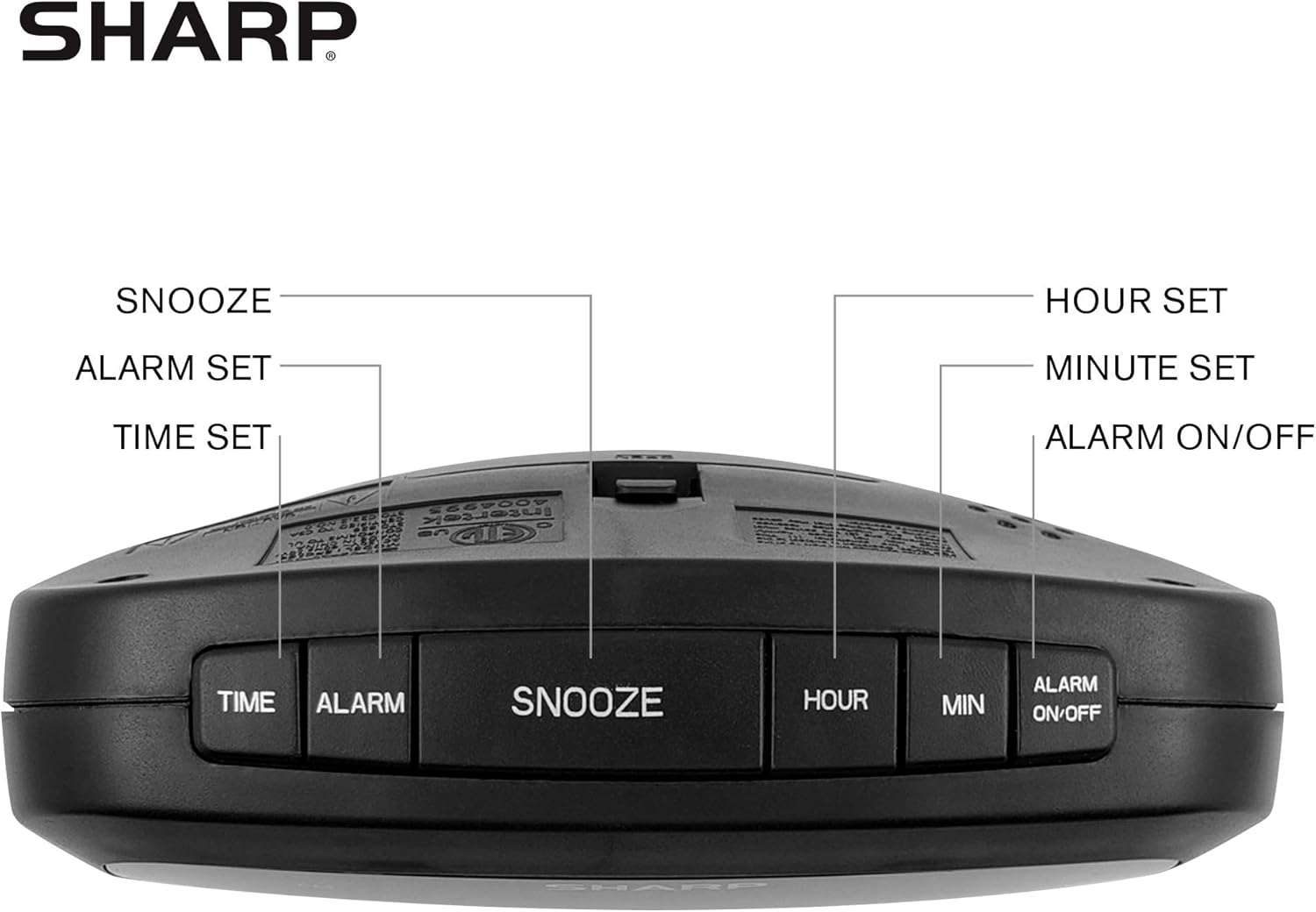
Figure 2: Underside of the clock with the battery compartment visible, requiring 2 AAA batteries for backup.
3. 사용 설명서
The clock features intuitive top-mounted buttons for easy operation.

Figure 3: Top panel of the clock with clearly labeled buttons for time, alarm, snooze/dimmer, hour, minute, and alarm on/off.
3.1 시간 설정
- 를 누르고 계세요 시간 시 숫자가 깜빡일 때까지 버튼을 누르세요.
- 를 누르세요 시간 button to adjust the hour. Pay attention to the PM indicator if setting a PM time.
- 를 누르세요 최소 버튼을 눌러 분을 조정합니다.
- 를 누르세요 시간 버튼을 다시 눌러 확인하고 시간을 절약하세요.
3.2 알람 설정
- 를 누르고 계세요 경보 알람 시간 숫자가 깜빡일 때까지 버튼을 누르세요.
- 를 누르세요 시간 버튼을 눌러 알람 시간을 조정합니다.
- 를 누르세요 최소 알람 시간을 조정하는 버튼입니다.
- 를 누르세요 경보 button again to confirm and save the alarm time.
- 알람을 활성화 또는 비활성화하려면 버튼을 누르십시오. 알람 ON / OFF 버튼을 누르면 알람이 작동될 때 디스플레이에 알람 표시등이 켜집니다.
3.3 Snooze and Dimmer Function
- 알람이 울리면 큰 버튼을 누르세요 스누즈/디머 이 버튼을 누르면 알람이 몇 분 동안 일시적으로 꺼집니다.
- To adjust the brightness of the green LED display, repeatedly press the 스누즈/디머 button when the alarm is not sounding. Cycle through bright, medium, and low brightness settings.
3.4 USB 충전 포트 사용 방법
The clock is equipped with two 2 AMP USB charging ports on the front, allowing you to conveniently charge your smartphone or other USB-powered devices directly from the clock.

Figure 4: The clock demonstrating its dual USB charging capability with two smartphones connected.
- Simply connect your device's USB charging cable to one of the USB ports on the front of the clock.
- Ensure your device is compatible with 2 AMP charging for optimal speed.
4. 유지관리
To ensure the longevity and proper functioning of your Sharp Digital Clock, follow these simple maintenance guidelines:
- 청소: Wipe the clock with a soft, dry cloth. Do not use abrasive cleaners, waxes, or solvents as they may damage the finish.
- 놓기: 시계를 직사광선, 열원 및 과도한 습기를 피해 안정적이고 평평한 곳에 놓으십시오.
- 배터리 교체: If using the battery backup, replace the AAA batteries annually or when the clock consistently loses time during power interruptions.
5. 문제 해결
| 문제 | 가능한 원인 | 해결책 |
|---|---|---|
| 시계 표시가 비어 있습니다. | 힘도 없고 힘도 없고tage. | Ensure the power adapter is securely plugged into the clock and a working electrical outlet. If there was a power outage, check if backup batteries are installed and functional. |
| 알람이 울리지 않습니다. | Alarm not set or not activated. | Verify that the alarm time is correctly set and that the alarm indicator light is visible on the display (press ALARM ON/OFF). |
| USB 포트는 기기 충전용이 아닙니다. | Device incompatibility or faulty cable. | 기기가 USB 충전과 호환되는지 확인하세요. 다른 USB 케이블을 사용해 보세요. 시계 전원이 켜져 있는지 확인하세요. |
| 디스플레이가 너무 밝거나 어둡습니다. | 밝기 설정을 조정해야 합니다. | Press the SNOOZE/DIMMER button repeatedly to cycle through brightness levels (bright, medium, low). |
6. 제품 사양
- 상표: 날카로운
- 모델: B08H3STVWG
- 디스플레이 유형: Digital Green LED
- 전원: 코드식 전기
- 배터리 백업 : AAA 배터리 2개 (포함되지 않음)
- USB 포트: 2 x 2 AMP USB FastCharge Ports
- 제품 크기: 폭 5.95인치 x 높이 2.3인치
- 품목 무게: 9.59 온스
- 색상: 녹색 LED
- 재료: 플라스틱
- 한국어: 049353005089
7. 보증 및 지원
This Sharp Digital Clock comes with a limited warranty. For detailed warranty information, product support, or to purchase accessories, please visit the official Sharp web사이트를 방문하거나 고객 서비스에 문의하세요. 또한 아마존의 샤프 스토어.
보증 청구를 위해 구매 영수증을 보관하세요.
Ask a question about this manual
Ask about setup, troubleshooting, compatibility, parts, safety, or missing instructions. Manuals+ will review the question and use this page’s manual context to help answer it.