
1. 서론
This manual provides detailed instructions for the IPEGA PG-SW023 Bluetooth Wireless Game Controller. This versatile controller is designed to enhance your gaming experience across multiple platforms, including N-S consoles, PlayStation 3 (PS3), Android devices, and personal computers running Windows 7, 8, or 10.
본 제품을 사용하기 전에 설명서를 꼼꼼히 읽어 올바른 작동 방법과 제품의 모든 기능을 활용하시기 바랍니다.
2. 제품 특징
- 다중 플랫폼 호환성: Suitable for gaming on N-S consoles, PS3, Android devices, and PCs (Windows 7/8/10).
- 향상된 게임 경험: Supports vibration feedback and a six-axis gyroscope function for immersive gameplay and precise control.
- Customizable Macro Function: Rear buttons can be configured as common keys or combination keys for simplified actions.
- Continuous TURBO Function: Features a dedicated TURBO button for rapid-fire actions, compatible with N-S Pro gamepads.
- 인체공학적 디자인: Engineered for comfort during extended gaming sessions, fitting securely in the palm.

Image: The IPEGA PG-SW023 Wireless Game Controller highlighting its key features: two vibrating motors, six-axis design, high-sensitive buttons, and Turbo function.
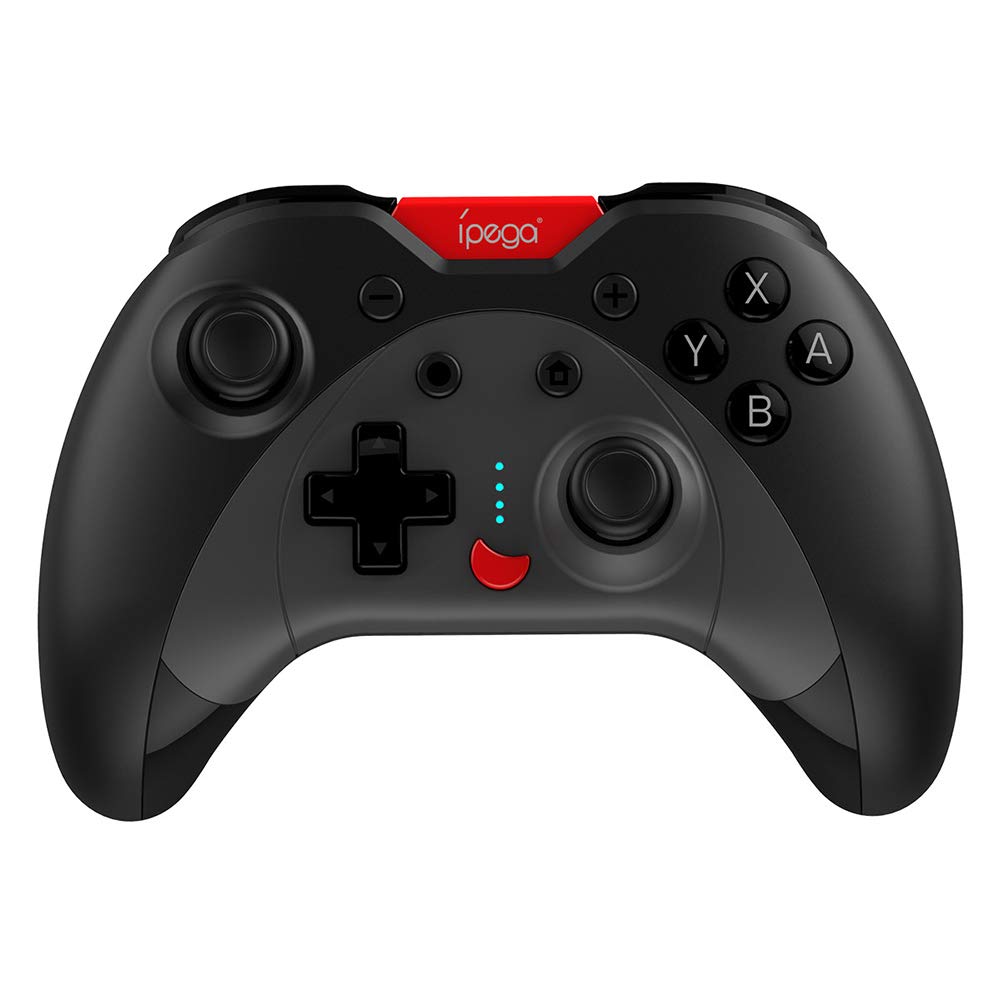
Image: A green IPEGA PG-SW023 controller illustrating its built-in six-axis gyroscope design for improved body feeling and accurate targeting.
3. 패키지 내용
패키지에 모든 품목이 들어 있는지 확인하세요.
- 1 x IPEGA PG-SW023 Wireless Game Controller
- 1 x Type-C 충전 케이블
- 1 x 사용자 설명서
4. 사양
| 특징 | 사양 |
|---|---|
| 상표 | 이페가 |
| 모델 | PG-SW023 |
| 색상 옵션 | Black, Green, Blue, Yellow |
| 운영 볼륨tage | 직류 3.7V |
| 작동 전류 | <30mA |
| 정적 전류 | <20uA |
| 연속 재생 시간 | 약 15시간 |
| 입력 Voltag전자/현재 | 직류 5V/500mA |
| 충전 시간 | 약 2시간 |
| 블루투스 버전 | 3.0 |
| 전송 거리 | ≤8미터 |
| 배터리 용량 | 400mAh |
| 제품 치수 | 15 x 10 x 5.5cm(5.91 x 3.94 x 2.17인치) |
| 제품 무게 | 약 215g (7.58온스) |
| 호환 장치 | N-S Console, PS3, Android, PC (Win 7/8/10) |
| 연결성 | 무선(블루투스) |
| 전원 | 배터리 구동 |
5. 설정
5.1 컨트롤러 충전
- 제공된 Type-C 충전 케이블을 컨트롤러의 충전 포트에 연결하십시오.
- 케이블의 다른 쪽 끝을 USB 전원(예: PC, USB 벽면 어댑터)에 연결합니다.
- The indicator lights on the controller will show charging status. Once fully charged (approx. 2 hours), the lights will indicate completion or turn off.
5.2 장치와의 페어링
The pairing method varies slightly depending on the device. Ensure the controller is sufficiently charged before attempting to pair.

Image: A blue IPEGA PG-SW023 controller positioned in front of a Nintendo Switch, PlayStation 3, and a laptop, illustrating its multi-platform compatibility.
5.2.1 Pairing with N-S Console
- On your N-S console, go to the HOME Menu.
- '컨트롤러' > '그립/순서 변경'을 선택하세요.
- Press and hold the pairing button on the IPEGA controller (refer to controller diagram for exact location) until the indicator lights begin to flash rapidly.
- The console will detect the controller. Once paired, the indicator light will become solid.
5.2.2 PS3와의 페어링
- Connect the controller to the PS3 console using the Type-C cable.
- 컨트롤러의 홈 버튼을 누르세요.
- Once recognized, you can disconnect the cable and the controller should remain paired wirelessly.
5.2.3 안드로이드 기기와의 페어링
- Android 기기에서 블루투스를 활성화합니다.
- On the controller, press and hold the Android pairing button combination (refer to controller diagram or quick start guide for specific button combination, usually 'A' + HOME or 'X' + HOME) until the indicator lights flash rapidly.
- On your Android device, search for new Bluetooth devices and select 'IPEGA PG-SW023' (or similar name) from the list.
- 페어링이 완료되면 컨트롤러의 표시등이 켜집니다.
5.2.4 Pairing with PC (Windows 7/8/10)
- PC에서 Bluetooth가 활성화되어 있는지 확인하세요.
- Go to 'Settings' > 'Devices' > 'Bluetooth & other devices' and click 'Add Bluetooth or other device'.
- '블루투스'를 선택하세요.
- On the controller, press and hold the PC pairing button combination (refer to controller diagram or quick start guide for specific button combination, usually 'L1' + HOME or 'Y' + HOME) until the indicator lights flash rapidly.
- Select 'IPEGA PG-SW023' (or similar name) from the list of available devices on your PC.
- 페어링이 완료되면 컨트롤러의 표시등이 켜집니다.
6. 사용 설명서
6.1 기본 버튼 기능
The controller features standard gaming buttons including directional pad, analog sticks, action buttons (A, B, X, Y), shoulder buttons (L1, R1), and triggers (L2, R2). Specific button mapping may vary by game and platform.

Image: Hands comfortably gripping a black IPEGA PG-SW023 controller, showcasing its ergonomic design for comfortable and convenient use.
6.2 터보 기능
The TURBO function allows for continuous rapid input of a selected button. This can be useful in games requiring fast, repeated button presses.
- To activate TURBO: Press and hold the desired action button (e.g., A, B, X, Y) and then press the TURBO button simultaneously. The button will now continuously input as long as it's held down.
- To deactivate TURBO: Repeat the same process (press the action button and TURBO button simultaneously).

Image: A yellow IPEGA PG-SW023 controller with its prominent TURBO button, shown with a Nintendo Switch console, illustrating the auto-fire feature.
6.3 매크로 함수
The macro function allows you to assign a sequence of button presses or a single common button to the programmable rear buttons. This can simplify complex in-game actions.
- Refer to the specific instructions provided in the quick start guide or on the manufacturer's website for detailed steps on programming macro buttons, as this process can vary.
6.4 진동 및 자이로스코프
The controller features dual motors for vibration feedback, providing tactile sensations that correspond to in-game events. The built-in six-axis gyroscope allows for motion control in supported games, offering a more immersive and precise aiming experience.

Image: A blue IPEGA PG-SW023 controller in use, with visual cues indicating its double motor vibrating design for immersive feedback during gameplay.
7. 유지관리
적절한 관리를 하면 컨트롤러의 수명을 연장할 수 있습니다.
- 청소: 부드럽고 마른 천을 사용하여 컨트롤러를 닦으세요. 잘 지워지지 않는 오염의 경우, 가볍게 두드리세요.amp천에 물이나 순한 세척액을 묻혀 닦으세요. 강한 화학 물질은 피하세요.
- 저장: 컨트롤러는 직사광선과 극한의 온도를 피해 서늘하고 건조한 곳에 보관하세요.
- 충격 방지: 컨트롤러를 떨어뜨리거나 강한 충격을 주지 마십시오. 내부 구성 요소가 손상될 수 있습니다.
- 액체 노출: 컨트롤러를 액체로부터 멀리하십시오. 액체가 닿았을 경우 즉시 전원을 끄고 완전히 건조시킨 후 다시 사용하십시오.
8. 문제 해결
If you encounter issues with your IPEGA PG-SW023 controller, try the following solutions:
- 컨트롤러가 연결되지 않음:
- 컨트롤러가 완전히 충전되었는지 확인하세요.
- 장치에서 Bluetooth가 활성화되어 있는지 확인하십시오.
- Try re-pairing the controller by following the setup instructions for your specific device.
- Move the controller closer to the device to ensure it is within the 8-meter transmission range.
- 컨트롤러와 게임 기기를 모두 재시작하세요.
- 버튼이 응답하지 않음:
- Check if the controller is properly connected and paired.
- 컨트롤러를 다른 게임이나 애플리케이션으로 테스트하여 소프트웨어 관련 문제가 아닌지 확인하십시오.
- 버튼 아래에 이물질이 끼지 않았는지 확인하세요.
- 진동이 작동하지 않음:
- Verify that the game or system settings have vibration enabled.
- 일부 게임은 진동 피드백을 지원하지 않을 수 있습니다.
- 배터리 수명이 짧음:
- 사용하기 전에 컨트롤러가 완전히 충전되었는지 확인하세요.
- Battery life can vary based on usage intensity (e.g., continuous vibration).
- 너무 덥거나 추운 환경에서는 충전하지 마세요.
9. 보증 및 지원
For warranty information, technical support, or service inquiries regarding your IPEGA PG-SW023 Bluetooth Wireless Game Controller, please refer to the product packaging or contact the manufacturer directly through their official web웹사이트 또는 고객 서비스 채널을 이용하십시오. 보증 청구를 위해서는 구매 영수증을 구매 증빙 자료로 보관하십시오.