
소개
The Moment Cinebloom Diffusion Filter is designed to enhance your photography and videography by providing a dreamy, cinematic aesthetic. This filter softens harsh edges, reduces digital sharpness, and introduces a natural glow to highlights, emulating the look of classic film.
Crafted with Schott B270 professional-grade optical glass, the filter ensures exceptional clarity, accurate color reproduction, and no image degradation. It is compatible with various camera lenses, including DSLR, mirrorless, and cinema lenses, that feature standard thread sizes from 37mm to 82mm. This specific model is a 37mm filter with 20% diffusion strength.
The Cinebloom filter can be stacked with other filters, such as Neutral Density (ND) and Variable Neutral Density (VND) filters, allowing for precise exposure control while maintaining the desired diffusion effect.
설정 및 설치
This section provides instructions for correctly attaching your Moment Cinebloom Diffusion Filter to your camera lens or mobile device setup.
Attaching to a Camera Lens
- Identify the filter thread size of your camera lens. This is typically marked on the front of the lens or in its specifications. Ensure it matches the 37mm size of your Cinebloom filter.
- Carefully align the filter with the threads on the front of your camera lens.
- Gently rotate the filter clockwise until it is securely fastened. Avoid overtightening to prevent damage to the filter or lens threads.

Image: A hand carefully screwing the Moment Cinebloom Diffusion Filter onto the front of a camera lens.
Attaching to a Mobile Device (with Moment Filter Mount)
If using with a mobile device, a compatible Moment Filter Mount (sold separately) is required.
- Ensure your mobile device is fitted with a Moment case that supports filter mounts.
- Attach the Moment Filter Mount to your phone case, aligning it with your phone's camera lens.
- Screw the Cinebloom Diffusion Filter onto the threads of the Moment Filter Mount.

Image: The Moment Cinebloom Diffusion Filter mounted on a mobile phone, ready for use.
필터 작동
The Cinebloom Diffusion Filter is designed to be used passively, modifying the light entering your lens to create specific visual effects. No active controls are present on the filter itself.
Understanding Diffusion Effects
This 20% diffusion filter provides a noticeable softening effect, reducing contrast and creating a subtle glow around light sources. This is ideal for achieving a vintage or dreamlike aesthetic in your images and videos.

Image: A side-by-side comparison demonstrating the visual impact of the Cinebloom Diffusion Filter on an image, showing softened highlights and reduced digital harshness.
Diffusion Strengths Overview
Moment Cinebloom filters are available in various strengths (5%, 10%, 20%) to offer different levels of diffusion. Your 20% filter provides the strongest effect among these options.
- 5% Diffusion: Offers a subtle softening, ideal for a delicate filmic touch.
- 10% Diffusion: Provides a balanced softening and glow, suitable for a classic cinematic look.
- 20% Diffusion: Delivers a pronounced softening and glow, perfect for a bold, vintag전자에서 영감을 받은 미학.
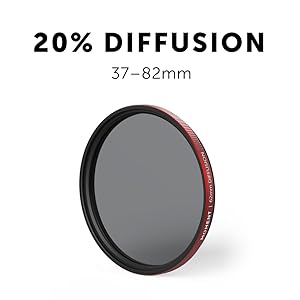
Image: The Moment Cinebloom 20% Diffusion Filter, illustrating its physical design.
Stacking with Other Filters
The Cinebloom filter can be combined with other filters, such as ND or VND filters, to achieve complex effects. Ensure that the combined thickness does not cause vignetting (darkening of image corners) or interfere with lens operation.
시각적 데모
Video: This video demonstrates the visual effects of Moment Cinebloom Diffusion Filters at 5%, 10%, and 20% strengths, showcasing how they soften highlights and create a cinematic look.
관리 및 유지 보수
Proper care will ensure the longevity and optimal performance of your Cinebloom Diffusion Filter.
필터 청소
- 안경 렌즈 전용으로 제작된 부드럽고 보풀 없는 극세사 천을 사용하십시오.
- For dust, gently blow it off with a lens blower or use a soft brush. Avoid wiping dry dust, as it can scratch the glass.
- For smudges or fingerprints, apply a small amount of lens cleaning solution to the microfiber cloth (not directly to the filter) and gently wipe in a circular motion from the center outwards.
- Avoid using harsh chemicals, abrasive materials, or paper products, as these can damage the filter's coating and glass.
저장
Always store the filter in its protective case when not in use. This prevents dust accumulation, scratches, and accidental damage.

Image: The Moment Cinebloom Diffusion Filter resting securely within its dedicated protective case.
문제 해결
This section addresses common issues you might encounter with your Cinebloom Diffusion Filter.
Image Appears Too Soft or Blurry
- 집중력 점검: Ensure your camera is properly focused. Diffusion filters soften the image but should not cause blurriness due to focus issues.
- Diffusion Strength: A 20% diffusion filter provides a strong effect. If you desire a more subtle look, consider a lower percentage filter (e.g., 5% or 10%).
- 필터 청소: Dust or smudges on the filter can exacerbate the softening effect or introduce unwanted artifacts. Clean the filter as per the maintenance instructions.
비네팅(어두운 모서리)
- 렌즈 호환성: Ensure the filter size (37mm) is appropriate for your lens. Wide-angle lenses are more prone to vignetting with filters.
- Stacking Filters: If multiple filters are stacked, their combined thickness can cause vignetting. Try removing additional filters to see if the issue resolves.
Filter Stuck on Lens
- 부드러운 압력: Apply firm, even pressure when twisting counter-clockwise.
- 고무 그립: If difficult, use a rubber jar opener or a specialized filter wrench for better grip.
- 힘을 피하십시오: Do not use excessive force, as this can damage the filter or lens threads.
명세서
| 특징 | 세부 사항 |
|---|---|
| 상표 | 순간 |
| 재료 | 알루미늄(프레임) |
| 사진 필터 스레드 크기 | 37 밀리미터 |
| 코팅 설명 | 멀티 코팅 |
| 사진 필터 효과 유형 | Diffusion (20%) |
| 방수 레벨 | 방수 |
| 제품 치수(L x W) | 1.46인치 길이 x 1.46인치 너비 |
| 한국어: | 810004743281 |
| 조각 수 | 1 |
| 내장 미디어 | 필터 케이스 |
| 제조업체 | 순간 |
| 호환 장치 | DSLR, mirrorless, cinema cameras, mobile rigs |
보증 정보
The Moment Cinebloom Diffusion Filter is covered by a 2년 제조업체 보증본 보증은 정상적인 사용 조건에서 발생하는 재료 및 제조상의 결함에 적용됩니다. 보증 청구를 위해서는 구매 증빙 자료를 보관해 주십시오.
Moment also generally offers a lifetime guarantee on its products, reflecting their commitment to quality and performance.
고객 지원
For further assistance, technical support, or warranty inquiries, please contact Moment customer service through their official web제품을 구매한 사이트 또는 소매업체.
추가 자료 및 연락처 정보는 다음 웹사이트를 방문하시면 확인하실 수 있습니다. Moment Store on Amazon.