
소개
This manual provides essential information for the safe and efficient operation of your QFX SBX-213 12-inch Portable Bluetooth Speaker. Please read it thoroughly before using the product and retain it for future reference.
안전 지침
안전한 작동을 보장하고 손상을 방지하려면 다음 안전 예방 조치를 준수하세요.
- 본 제품을 비, 습기 또는 극한의 온도에 노출시키지 마십시오.
- 스피커 c를 열지 마세요asing. 모든 서비스는 자격을 갖춘 담당자에게 의뢰하세요.
- Keep the speaker away from heat sources, direct sunlight, and open flames.
- Use only the specified power adapter and charging cable provided with the unit.
- 스피커 과열을 방지하기 위해 스피커 주변에 적절한 환기가 이루어지도록 하십시오.
- 스피커 위에 무거운 물건을 올려놓지 마십시오.
패키지 내용
포장을 풀 때 아래 나열된 모든 품목이 들어 있고 상태가 양호한지 확인하세요.
- QFX SBX-213 Portable Bluetooth Speaker
- 전원 케이블
- 원격 제어
- 사용 설명서 (본 문서)
제품 끝view
The QFX SBX-213 is a 12-inch portable speaker designed for versatile audio playback. It features Bluetooth connectivity for wireless streaming, an FM radio tuner, and a USB input for playing audio file플래시 드라이브에서.
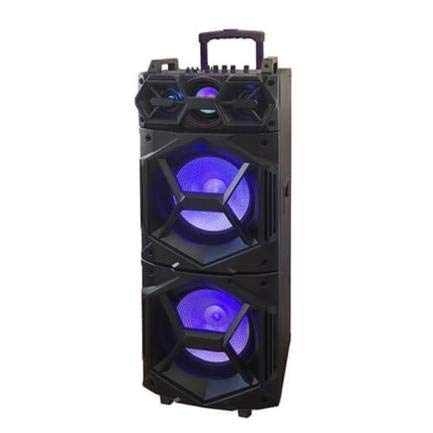
이미지: 앞면 view of the QFX SBX-213 Portable Bluetooth Speaker, showcasing its 12-inch driver and robust design. The speaker features a black finish and a protective grille over the main driver.
The speaker's control panel and ports typically include:
- 전원 켜기/끄기 스위치
- Mode Button (to switch between Bluetooth, FM, USB inputs)
- Volume Control Knobs or Buttons
- Play/Pause, Previous/Next Track Buttons
- 미디어 재생용 USB 포트
- Charging Port for power cable connection
- LED Indicator Lights for power, charging, and Bluetooth status
설정
- 스피커 충전: Before first use, connect the provided power cable to the speaker's charging port and plug it into a standard electrical outlet. Allow the speaker to fully charge. The charging indicator light will typically change color or turn off when charging is complete.
- 놓기: Place the speaker on a stable, flat surface. For optimal sound dispersion, avoid placing it in enclosed spaces or directly against walls.
작동 지침
1. 전원 켜기/끄기
To power on the speaker, locate the power switch, usually on the back or side panel, and slide it to the "ON" position. To power off, slide the switch to the "OFF" position.
2. 블루투스 페어링
- 스피커를 켜세요. 일반적으로 LED 표시등이 깜빡이고 음성 안내가 나오면 자동으로 블루투스 페어링 모드로 진입합니다.
- 모바일 기기(스마트폰, 태블릿 등)에서 Bluetooth를 활성화하세요.
- 검색 available Bluetooth devices. You should see "QFX SBX-213" or a similar name in the list.
- Select the speaker to pair. Once connected, you will hear a confirmation sound, and the LED indicator will stop flashing.
- 이제 스피커를 통해 기기의 오디오를 재생할 수 있습니다.
3. FM 라디오 작동
- Press the "MODE" button on the speaker or remote control until "FM" mode is selected.
- Press the "Play/Pause" button to initiate an automatic scan for FM stations. The speaker will save all found stations.
- 저장된 FM 방송국 사이를 이동하려면 "이전/다음 트랙" 버튼을 사용하세요.
4. USB 재생
- MP3 오디오가 포함된 USB 플래시 드라이브를 삽입하세요 file스피커의 USB 포트에 꽂으세요.
- Press the "MODE" button until "USB" mode is selected. The speaker will automatically begin playing audio fileUSB 드라이브에서.
- Use the "Play/Pause" and "Previous/Next Track" buttons to control playback.
5. 볼륨 조절
Adjust the master volume using the dedicated volume knob or buttons on the speaker. You can also control the volume from your connected Bluetooth device or the remote control.
유지
- 청소: Use a soft, dry cloth to clean the speaker's exterior. Do not use abrasive cleaners, waxes, or solvents, as these may damage the finish.
- 저장: 장시간 사용하지 않을 경우, 스피커를 직사광선과 극한의 온도를 피해 시원하고 건조한 곳에 보관하세요.
- 배터리 관리 : To prolong battery life, avoid fully discharging the battery frequently. Charge the speaker regularly, even if not in use for long periods, to maintain battery health.
문제 해결
If you encounter any issues with your QFX SBX-213 speaker, please refer to the following table for common problems and solutions:
| 문제 | 가능한 원인 | 해결책 |
|---|---|---|
| 전원이 없습니다 | Battery discharged; Power cable not connected securely | Charge the speaker fully; Ensure power cable is securely connected to both the speaker and the power outlet. |
| 블루투스 연결이 안됨 | Bluetooth not enabled on device; Speaker not in pairing mode; Device too far from speaker | Enable Bluetooth on your device; Put the speaker into Bluetooth pairing mode; Move your device closer to the speaker (within 10 meters). |
| 사운드 출력이 없습니다 | Volume too low; Incorrect mode selected; Device or speaker is muted | Increase the volume on both the speaker and your connected device; Press the MODE button to select the correct input (Bluetooth, USB, FM); Check if the speaker or device is muted. |
| FM 라디오 잡음 또는 수신 불량 | 약한 신호; 간섭 | Relocate the speaker to an area with better reception; Perform an auto-scan for stations again; Avoid placing near other electronic devices that may cause interference. |
명세서
- 상표: QFX
- 모델: SBX-213
- 스피커 크기: 12인치
- 연결 기술 : USB, 블루투스
- 특별 기능: Lightweight, Portable, FM Radio
- 장착 유형: 바닥 설치형, 탁상 설치형
- 컨트롤러 유형 : 원격 제어
- 전원: 전기 케이블
- 치수(높이 x 너비 x 깊이): 약 113×42×42 cm
- 무게: 약 4kg
- 한국어: 606540036341
- ASIN: B08GL3SHQP
보증 및 지원
QFX products are designed for reliability and performance. For detailed warranty information or technical support, please refer to the warranty card included with your purchase or visit the official QFX web사이트. 보증 청구를 위해 구매 증빙 자료를 보관하세요.
For further assistance, please contact QFX customer service through their official channels.