
1. 서론
1.1개 제품 이상view
The Renkforce RF-HC-100 is a compact 16-megapixel trail camera designed for outdoor monitoring. It features a time-lapse function, night vision capabilities, and a durable, camouflage brown housing. This camera is suitable for wildlife observation, property surveillance, and other outdoor recording needs.
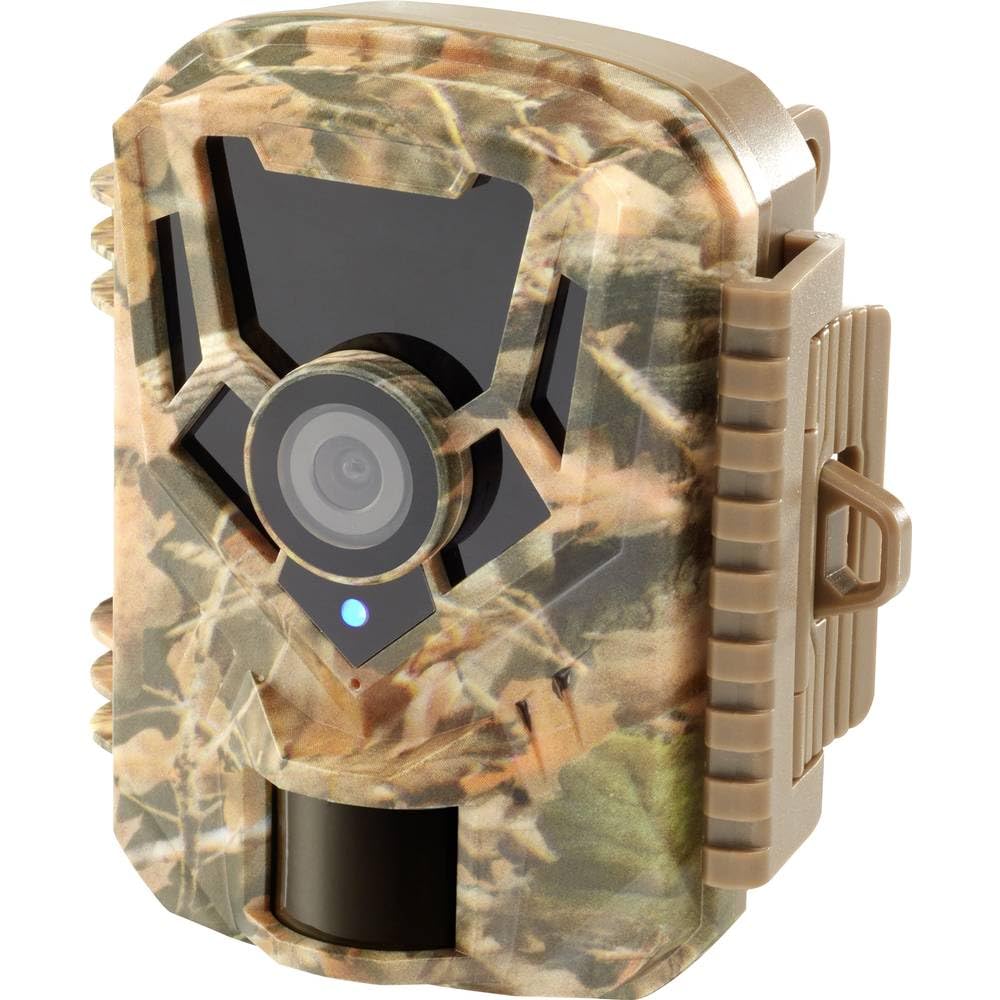
이미지: 앞면 view of the Renkforce RF-HC-100 Trail Camera, showcasing its compact design and camouflage pattern.

이미지: 앞면 view of the Renkforce RF-HC-100 Trail Camera, highlighting the main lens and motion sensor.
1.2 패키지 내용
- 1 x Renkforce RF-HC-100 Trail Camera Unit
- Note: Additional accessories such as mounting straps, USB cables, or user manuals may be included depending on the specific package.
2. 안전 정보
- 기기를 작동하기 전에 모든 지침을 주의 깊게 읽으세요.
- Do not expose the camera to extreme temperatures, direct sunlight for prolonged periods, or corrosive liquids.
- Ensure the battery compartment is properly sealed to maintain the IP65 weather resistance.
- 배터리는 해당 지역 규정에 따라 폐기하십시오. 오래된 배터리와 새 배터리, 또는 종류가 다른 배터리를 함께 사용하지 마십시오.
- 기기를 어린이의 손이 닿지 않는 곳에 보관하세요.
- 카메라를 분해하거나 개조하지 마십시오. 그렇게 하면 보증이 무효화되고 손상이 발생할 수 있습니다.
3. 제품 특징
The Renkforce RF-HC-100 Trail Camera offers the following key features:
- 고해상도 이미징: 16 Megapixel effective capture resolution for clear photos and 1080p video recording.
- 야간 투시경: Equipped with color night vision for monitoring in low-light conditions.
- 타임랩스 기능: Capture images at set intervals to observe long-term events.
- SD 카드 슬롯: Supports external SD cards for amp사진과 비디오의 저장.
- 내후성: IP65 international protection rating ensures durability in various outdoor environments.
- 컴팩트한 디자인: Miniature form factor with a camouflage brown finish for discreet placement.
- 와이드 앵글 View: 90-degree angle of view to cover a broad area.
- 연결성: Features wired connectivity (USB, AV ports) and Wi-Fi protocol for data transfer and control via application.
- 장착 옵션: Includes support for wall mounting.
4. 설정
4.1 배터리 설치
- 측면 클립의 잠금장치를 풀어 카메라 하우징을 엽니다.
- 배터리함을 찾습니다.
- Insert the required number of AA batteries (not included) according to the polarity markings (+/-).
- 배터리 칸을 단단히 닫으세요.
4.2 SD 카드 설치
- 카메라 본체를 열고 SD 카드 슬롯을 찾으세요.
- Insert a compatible SD card (up to 32GB, Class 10 recommended) into the slot with the metal contacts facing down until it clicks into place.
- 제거하려면 SD 카드를 다시 안쪽으로 밀어 넣어 튀어나오게 하세요.

Image: The Renkforce RF-HC-100 Trail Camera with its housing open, revealing the control panel, USB, AV, and DC ports, and the ON/SETUP/OFF switch.
4.3 카메라 장착
The camera can be mounted using a strap or a wall mount bracket (if included or purchased separately).
- 스트랩 장착: Thread a mounting strap through the slots on the back of the camera and secure it to a tree or pole.
- 벽면 장착: Use the integrated mounting points or a compatible wall mount bracket to attach the camera to a flat surface. Ensure the camera is stable and pointed in the desired direction.
5. 사용 설명서
5.1 전원 켜기/끄기 및 모드 선택
카메라 본체 내부에 있는 ON/SETUP/OFF 스위치를 찾으십시오.
- OFF : 카메라 전원을 끕니다.
- 설정: Enters setup mode, allowing you to configure settings via the internal display.
- 에: Activates the camera for recording based on the configured settings.
5.2 설정 구성
In SETUP mode, use the navigation buttons (if available) to access the menu and adjust parameters such as:
- 사진/동영상 해상도
- PIR 센서 감도
- 감지 지연
- 시간 경과 간격
- 날짜 및 시간
- Recording Mode (Photo, Video, Photo+Video, Time-Lapse)
5.3 데이터 검색
기록된 내용에 접근하려면 files:
- USB를 통해: Connect the camera to a computer using a USB cable. The camera will appear as a removable disk.
- SD 카드를 통해: Remove the SD card from the camera and insert it into a computer's card reader.
6. 유지관리
- 청소: Use a soft, dry cloth to clean the camera lens and housing. For stubborn dirt, a slightly damp 천을 사용할 수 있지만, 습기가 장치 내부로 들어가지 않도록 주의하세요.
- 배터리 교체: Replace batteries when the low battery indicator appears or when performance degrades.
- SD 카드 관리 : Regularly format the SD card (after backing up important data) to maintain optimal performance and prevent errors.
- 저장: 장기간 사용하지 않을 경우 배터리를 제거하고 카메라를 직사광선을 피해 서늘하고 건조한 곳에 보관하십시오.
7. 문제 해결
| 문제 | 가능한 원인 | 해결책 |
|---|---|---|
| 카메라의 전원이 켜지지 않습니다. | Low or dead batteries; incorrect battery installation; power switch in OFF position. | Replace batteries; ensure correct polarity; set switch to ON or SETUP. |
| 이미지/비디오 품질이 좋지 않습니다. | 렌즈가 더럽습니다. 조명 조건이 어둡습니다. 해상도 설정이 잘못되었습니다. | Clean the lens; ensure adequate lighting or use night vision; adjust resolution settings. |
| 카메라가 녹화 중이 아닙니다. | SD card full or faulty; incorrect mode selected; PIR sensor blocked. | Format or replace SD card; select appropriate recording mode; clear sensor path. |
| 컴퓨터에 연결할 수 없습니다. | Faulty USB cable; camera not in correct mode; driver issues. | Try a different USB cable; ensure camera is in connection mode (if applicable); try another computer or card reader. |
8. 사양
| 모델명 | RF-HC-100 (RF-4466574) |
| Effective Capture Resolution | 16메가픽셀 |
| 비디오 해상도 | 1080p |
| 치수(길이 x 너비 x 높이) | 21 x 12 x 9cm(8.27 x 4.72 x 3.54인치) |
| 무게 | 186그램(0.41파운드) |
| 연결 기술 | Wired (USB, AV), Wi-Fi Protocol (for control/transfer) |
| 특별 기능 | Local Recording, Night Vision (Color Night Vision) |
| 사용환경 | 집 밖의 |
| 국제 보호 등급 | IP65 |
| 전원 | Manual Operation (Battery-powered, batteries not included) |
| 왓tage | 1.5 와트 |
| View 각도 | 90도 |
| 색상 | Camouflage Brown |
| 재료 | Metal (internal) |
| 마운트 유형 | 벽걸이 지지대 |
9. 보증 및 지원
Renkforce provides support for its products. Spare parts availability is indicated for 1 year from the date of purchase. For technical assistance, troubleshooting beyond this manual, or warranty claims, please refer to the contact information provided with your product packaging or visit the official Renkforce web대지.