
1. 서론
The Korg SoundLink MW-1608 is a 16-channel hybrid mixer designed for a wide range of audio applications, including studio recording and live sound reinforcement. This mixer integrates both analog and digital processing to provide comprehensive control over audio signals. It features high-quality components such as HiVolt microphone preamps, Velvet Sound AD/DA converters, and ALPS faders.
Key functionalities include per-channel 3-band equalizers, 1-knob compressors, mute groups, a dedicated monitor section, feedback suppression, all-XLR speaker outputs, a built-in spectrum analyzer, and a suite of Korg digital effects. This manual provides essential information for the proper setup, operation, maintenance, and troubleshooting of your MW-1608 mixer.
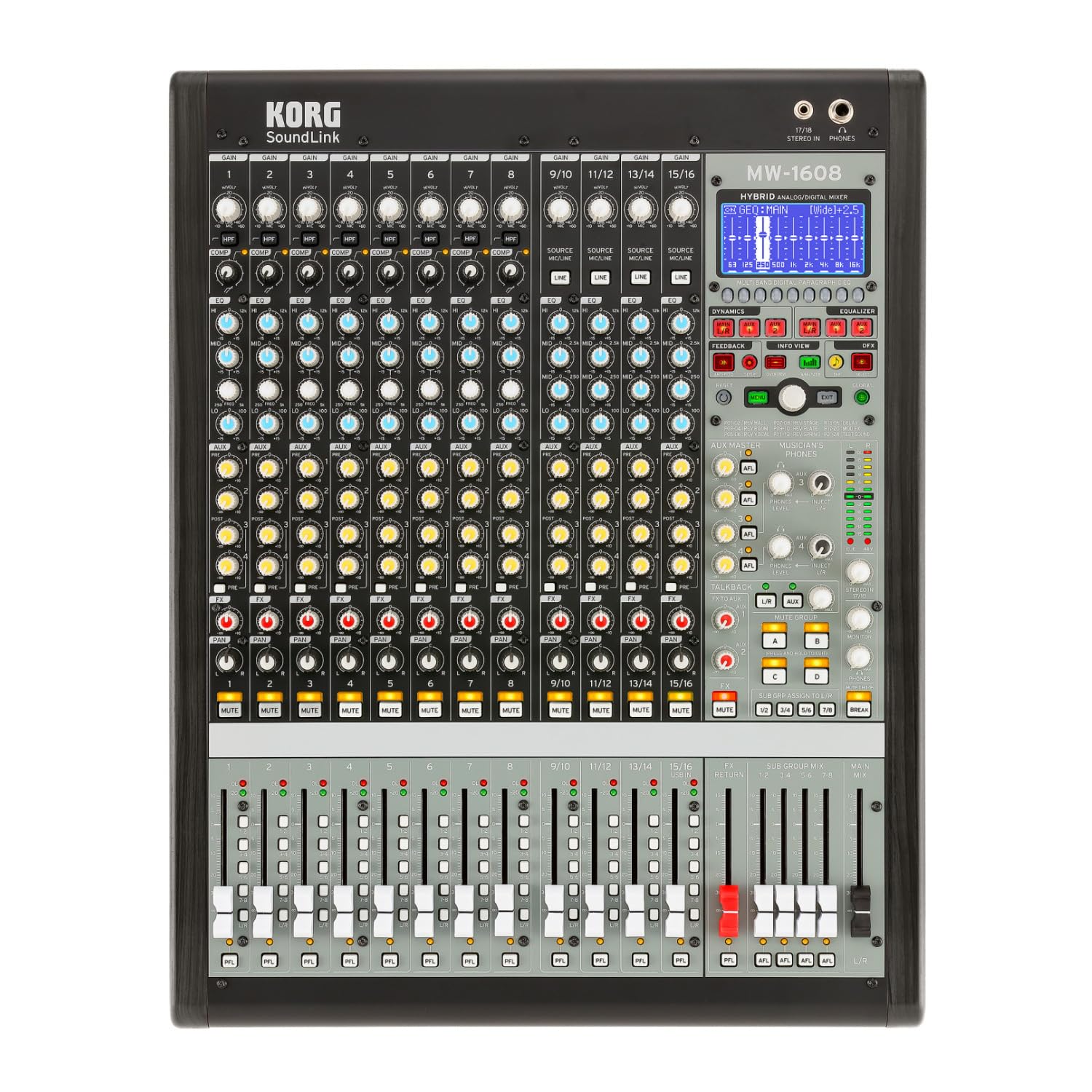
그림 1: 전면 view of the Korg SoundLink MW-1608 mixer, showing the control surface with faders, knobs, and display.
2. 설정
Before operating the Korg SoundLink MW-1608, ensure all connections are made correctly and securely. This section outlines the basic steps for setting up your mixer.
2.1 포장 풀기 및 배치
- Carefully remove the mixer from its packaging. Retain all packaging materials for future transport or storage.
- Place the mixer on a stable, flat surface with adequate ventilation. Avoid placing it near heat sources or in direct sunlight.
- Ensure sufficient space around the unit for cable connections and heat dissipation.
2.2 전원 연결
- The MW-1608 operates on a "Corded Electric" power source.
- Connect the supplied AC power cord to the mixer's power input on the rear panel.
- Plug the other end of the power cord into a suitable electrical outlet. Ensure the power switch is in the OFF position before connecting.
2.3 오디오 연결
The MW-1608 offers various input and output options. Refer to the rear panel diagram below for connection points.

그림 2: 후면 view of the Korg SoundLink MW-1608 mixer, showing various input and output connectors.
- 마이크 입력 : Connect microphones to the XLR inputs (channels 1-12, 15/16, 13/14, 11/12, 9/10, 7, 6, 5, 4, 3, 2, 1) using balanced XLR cables.
- 라인 입력: Connect line-level devices (e.g., keyboards, media players) to the 1/4-inch TRS or RCA line inputs.
- 주요 출력 : 메인 스피커 또는 전원을 연결하세요. amplifier to the MAIN OUT (XLR L/R) connectors. The mixer features "XLR" output connector type.
- 보조 출력: Use the AUX OUT (XLR) connectors for monitor mixes or external effects processors.
- Group Outputs: Utilize the GROUP OUT (XLR) for sub-mixes.
- USB 연결: The USB port allows for connection to a computer for recording or playback.
3. 사용 설명서
이 섹션에서는 다음을 제공합니다.view of the Korg SoundLink MW-1608's operational features and controls.
3.1 채널 제어
- 입력 이득: Adjust the input sensitivity for each channel to achieve optimal signal levels.
- 3밴드 EQ: Each channel features a 3-band equalizer for tone shaping. Adjust the HIGH, MID, and LOW frequency bands as needed.
- 1-Knob Compressor: Engage and adjust the built-in compressor on individual channels to control dynamics and add punch.
- 보조 전송: Route channel signals to auxiliary outputs for monitor mixes or external effects.
- 팬 제어: Position the channel's signal within the stereo field.
- 음소거 버튼: Silences the channel's output.
- 채널 페이더: Controls the volume level of the individual channel in the main mix.
3.2 마스터 섹션
- 메인 믹스 페이더: 스테레오 메인 믹스의 전체 출력 레벨을 조절합니다.
- 그룹 페이더: Adjust the output levels of the 8-bus groups.
- Monitor Section: Provides control over headphone and control room outputs. The "Musician's Phone Feature" allows for dedicated monitoring.
- 디지털 효과: Access and apply Korg's studio-quality digital effects to your mix.
- 피드백 억제: Utilize the integrated feedback suppression system to prevent unwanted audio feedback.
- 스펙트럼 분석기: The built-in spectrum analyzer provides visual feedback on the frequency content of your audio.
4. 유지관리
Proper maintenance ensures the longevity and optimal performance of your Korg SoundLink MW-1608 mixer.
- 청소: Use a soft, dry cloth to wipe down the exterior of the mixer. For stubborn dirt, a slightly damp 순한 비누를 묻힌 천으로 닦은 후 마른 천으로 물기를 제거하십시오. 연마성 세제나 용제는 사용하지 마십시오.
- 먼지 보호 : When not in use, cover the mixer with a dust cover to prevent dust and debris from accumulating on controls and inside the unit.
- 환경 조건: Operate and store the mixer in a clean, dry environment. Avoid extreme temperatures, high humidity, and direct exposure to liquids.
- 케이블 관리 : 커넥터와 포트가 손상되지 않도록 케이블을 깔끔하게 정리하고 과도한 장력이 가해지지 않도록 하십시오.
5. 문제 해결
This section addresses common issues you might encounter with your MW-1608 mixer. If the problem persists after attempting these solutions, contact Korg customer support.
- 전원 없음:
- Ensure the power cord is securely connected to both the mixer and a working electrical outlet.
- 후면 패널의 전원 스위치를 확인하십시오.
- 다른 장치를 연결해 전기 콘센트가 작동하는지 확인하세요.
- 사운드 출력 없음:
- 모든 입력 및 출력 케이블 연결 상태를 확인하십시오.
- Ensure channel faders, group faders, and main mix faders are raised.
- 채널이 음소거되어 있지 않은지 확인하십시오.
- Check the gain settings for each input channel.
- 연결된 스피커 또는 amp앰프는 전원이 켜져 있고 작동 중입니다.
- 왜곡된 오디오:
- Reduce input gain levels if the signal is clipping (indicated by peak LEDs).
- Check for damaged cables or faulty connectors.
- Ensure output levels are not overdriving connected devices.
- Channel or Group Functionality Issues:
- Verify routing assignments for channels to groups or main mix.
- Ensure mute buttons are disengaged for relevant channels/groups.
- Check if any effects or processing are inadvertently applied.
6. 사양
| 특징 | 세부 사항 |
|---|---|
| 모델 번호 | MW-1608 |
| 상표 | 코르그 |
| 채널 수 | 16 |
| 연결 기술 | 보조자 |
| 출력 커넥터 유형 | XLR |
| 전원 | 코드식 전기 |
| 품목 무게 | 3.41파운드 |
| 제품 크기(L x W x H) | 18.9 x 7.36 x 20.91 인치 |
| ASIN | B08FSYXMW9 |
7. 보증 및 지원
자세한 보증 정보는 제품에 동봉된 보증 카드를 참조하거나 Korg 공식 웹사이트를 방문하십시오. web사이트. 보증 약관은 지역에 따라 다를 수 있습니다.
For technical support, service, or additional product information, please visit the official Korg support website or contact their customer service department. Keep your product's model number (MW-1608) and serial number (if applicable) ready when seeking support.
코르그 공식 웹사이트 Web대지: www.korg.com