
Beatfoxx SDH-340/32
Beatfoxx SDH-340/32 Silent Disco V2 Set
사용자 설명서
1. 서론
Thank you for choosing the Beatfoxx SDH-340/32 Silent Disco V2 Set. This manual provides essential information for the proper setup, operation, and maintenance of your wireless stereo headphones and charging system. Please read this manual thoroughly before use to ensure optimal performance and longevity of your product.
중요 호환성 참고 사항: The Silent Disco V2 series is designed for exclusive compatibility with other Beatfoxx Silent Disco V2 devices. It is not compatible with first-generation Silent Disco products or the Silent Guide series. When purchasing additional components, ensure they explicitly carry the "V2" designation.
2. 패키지 내용
Your Beatfoxx SDH-340/32 Silent Disco V2 Set includes the following components:
- 32 x Beatfoxx SDH-340 V2 Wireless Stereo Headphones
- 2 x Multi-Headphone Charging System (consisting of 1 power supply and 4 distribution cables each)

Image: The Beatfoxx SDH-340 V2 wireless stereo headphones shown with the included charging cables and power adapter.
3. 제품 오버view
3.1 헤드폰 기능
- Wireless stereo headphones with 3 selectable channels.
- LED lighting indicates the currently selected channel (blue, red, green).
- Tactile channel selection switch.
- 볼륨 조절.
- 전원 켜기/끄기 스위치.
- LED lighting can be switched off.
- 3.5 mm stereo jack input for wired audio sources.
- Adjustable, elastic headband for comfortable fit.
- Very soft, rotatable ear pads for high wearing comfort.
- Integrated lithium-polymer battery (600 mAh).
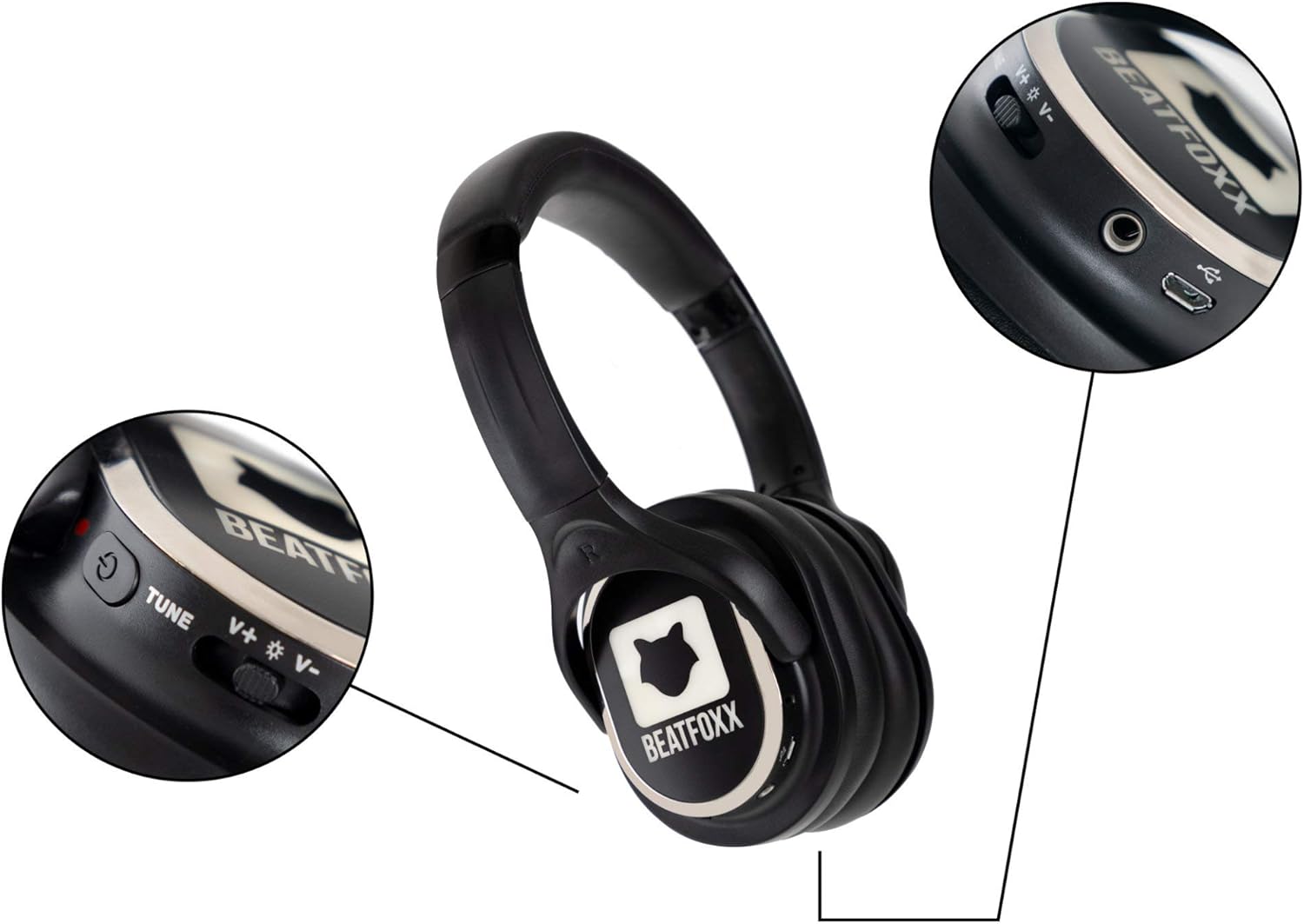
이미지: 자세한 view of the Beatfoxx SDH-340 V2 headphone's right earcup, highlighting the power switch, volume controls, channel tune button, and charging port.
3.2 Charging System Features
- Charging system includes 1 power supply and 4 distribution cables.
- Allows simultaneous charging of up to 16 headphones with a single power outlet.
- USB connection enables charging via PC or laptop.

Image: The components of the Beatfoxx charging system, including the power adapter and various charging cables, demonstrating its versatility.
4. 설정
4.1 헤드폰 충전
Before first use, fully charge all headphones. The integrated lithium-polymer battery provides an operating time of 8 to 10 hours, depending on usage and volume level. Charging takes approximately 4 hours.
- 전원 공급 장치를 벽면 콘센트에 연결합니다.
- Connect the distribution cables to the power supply.
- Plug the micro-USB connectors from the distribution cables into the charging port on each headphone.
- During charging, red and green LEDs on the headphones will indicate the charging status. Refer to the headphone's LED indicators for full charge status.

Image: A visual representation of the Beatfoxx headphones connected to various power sources (PC, power bank, wall adapter) for charging via USB cables.

Image: A diagram showing how multiple Beatfoxx headphones can be charged simultaneously using the provided charging system, connecting up to 16 headphones to a single power source.
4.2 Connecting to a Transmitter
The headphones receive a clear audio signal from any Beatfoxx SDT-40 Silent Disco V2 transmitter within a range of approximately 150 meters. UHF technology ensures clear, noise-free transmission.
- Ensure your Beatfoxx Silent Disco V2 transmitter is powered on and transmitting audio.
- Power on the headphones using the On/Off switch.
- Select the desired channel directly on the headphones using the channel selection switch. The headphone's LED lighting will indicate the currently selected channel (blue, red, or green) to match the transmitter's channel.

Image: Individuals at an outdoor event wearing Beatfoxx Silent Disco headphones, demonstrating their use in a group setting with a DJ.
5. 사용 설명서
5.1 전원 켜기/끄기
Locate the On/Off switch on the headphone. Slide the switch to the "On" position to power on the headphones. Slide it to the "Off" position to power them off.
5.2 채널 선택
The headphones support up to 3 distinct channels. Use the tactile channel selection switch on the headphone to cycle through the available channels. The LED lighting on the headphones will change color (blue, red, or green) to indicate the active channel, corresponding to the transmitter's channel.
5.3 볼륨 조절
Adjust the listening volume using the dedicated volume control located on the headphone. Rotate the control to increase or decrease the volume to your preferred level.
5.4 유선 연결 (선택 사항)
The headphones feature a 3.5 mm stereo jack input, allowing them to be used with cable-bound audio sources such as smartphones, tablets, or laptops, even without a wireless transmitter.
- Connect one end of a 3.5mm audio cable (not included) to the headphone's 3.5mm jack.
- Connect the other end of the cable to the audio output of your device.
- Ensure the headphones are powered on for optimal sound, though passive listening may be possible.

Image: A woman wearing Beatfoxx headphones, connected via a cable to a smartphone, illustrating the wired connection capability.
6. 유지관리 및 관리
- 청소: Use a soft, dry cloth to clean the headphones and charging system. Do not use abrasive cleaners or solvents.
- 저장: Store the headphones and charging system in a cool, dry place when not in use. Avoid extreme temperatures and direct sunlight.
- 배터리 관리 : To prolong battery life, avoid fully discharging the headphones frequently. If storing for an extended period, charge the battery to approximately 50% every few months.
- 방수 기능: The product is water-resistant, but not waterproof. Avoid submerging the headphones in water or exposing them to heavy rain.
7. 문제 해결
- 소리 없음:
- 헤드폰이 켜져 있고 충전 중인지 확인하십시오.
- Verify the selected channel on the headphones matches the transmitter's channel.
- Check the volume level on both the headphones and the audio source/transmitter.
- Ensure the transmitter is powered on and receiving an audio signal.
- 신호 불량/간섭:
- Ensure headphones are within the 150m range of the transmitter.
- Minimize obstacles between the headphones and the transmitter.
- Check for other strong RF signals in the area that might cause interference.
- 헤드폰이 충전되지 않음:
- Verify the charging cables are securely connected to both the headphones and the power source.
- Ensure the power adapter is properly plugged into a working outlet.
- Check if the charging indicator LEDs on the headphones are active.
8. 사양
| 특징 | 사양 |
|---|---|
| 모델 | SDH-340 V2 |
| 연결 기술 | Wireless (RF), Wired (3.5 mm jack) |
| 튜너 기술 | 초고주파 |
| 채널 수 | 3 |
| 주파수 범위 | 20~15,000Hz |
| 신호 대 잡음비 (SNR) | >80dB |
| 총 고조파 왜곡률(THD) | <1% |
| 스피커 직경 | 38mm mylar diaphragm |
| 배터리 유형 | Integrated Lithium-Polymer (600 mAh) |
| 배터리 작동 시간 | 8 - 10 hours (usage dependent) |
| 배터리 충전 시간 | 약 4시간 |
| 헤드폰 무게 | 225g |
| 재료 | 인조가죽 |
| 방수 레벨 | 방수 |
9. 보증 및 지원
Beatfoxx products are designed for reliability and performance. For information regarding warranty coverage, technical support, or service, please refer to the warranty card included with your product or visit the official Beatfoxx web사이트. 보증 청구에 대비해 구매 증빙 자료로 구매 영수증을 보관하세요.
Ask a question about this manual
Ask about setup, troubleshooting, compatibility, parts, safety, or missing instructions. Manuals+ will review the question and use this page’s manual context to help answer it.