
HUMAX R8716
Humax Digital HD Fox R8716 위성 수신기 사용 설명서
1. 서론
This manual provides essential information for the setup, operation, and maintenance of your Humax Digital HD Fox R8716 satellite receiver. Please read these instructions carefully before using the device to ensure proper functionality and to maximize your view경험.

The Humax HD Fox digital satellite receiver, shown with its accompanying remote control, designed for high-definition television reception.
The Humax HD Fox R8716 is a DVB-S2 satellite receiver capable of receiving free-to-air satellite programs in high definition (up to 1080i/1080p). It features a pre-installed channel list for quick setup and offers versatile connectivity options, including HDMI and Scart, to support both modern and older television sets. The device also includes a 12V power input, making it suitable for mobile use, such as in camp환경.
2. 패키지 내용
다음 품목이 모두 패키지에 포함되어 있는지 확인하세요.
- Humax HD Fox R8716 Satellite Receiver
- 원격 제어
- AAA 배터리(2개)
- 전원 어댑터(12V)
- 사용자 설명서(영어)

An illustration of the items included in the package: the Humax HD Fox satellite receiver, its remote control, and the power adapter.
3. 설정
3.1 수신기 연결
위성 수신기를 텔레비전과 위성 안테나에 연결하려면 다음 단계를 따르십시오.
- 위성 연결: Connect the satellite cable from your dish to the 'LNB IN' port on the rear of the receiver.
- 영상/음성 연결:
- For HD TVs: Connect an HDMI cable from the 'HDMI OUT' port on the receiver to an available HDMI input on your TV.
- For older TVs: Connect a Scart cable from the 'SCART' port on the receiver to the Scart input on your TV.
- 전원 연결: Connect the provided 12V power adapter to the '12V DC' input on the receiver and then plug the adapter into a power outlet.
- USB 연결(선택 사항): If you plan to use PVR functions, connect a USB storage device to the 'USB' port on the front panel.

상세한 view of the rear panel connections, including satellite input, HDMI output, optical audio output, Scart port for older TVs, and the 12V DC power input.
3.2 첫 번째 설치
Upon first power-on, the receiver will guide you through an initial setup process. The Humax HD Fox R8716 comes with a pre-installed channel list for Astra satellites, allowing for immediate use without a lengthy channel scan. If you are connecting to a different satellite or wish to perform a new scan, follow the on-screen prompts to access the installation menu and initiate a channel search.

The Humax HD Fox receiver positioned with a satellite dish in the background, illustrating its primary function for receiving satellite television signals.
Note: The transition from SD to HD broadcasting is ongoing. Modern HD-capable receivers like the Humax HD Fox R8716 are designed to continue receiving public-service programs after the SD shutdown, which is scheduled for January 7, 2025.

This image highlights the SD shutdown on January 7, 2025, and confirms that modern HD-capable receivers will continue to receive public-service programs.
4. 수신기 작동
4.1 기본 기능
- 전원 켜기/끄기: 를 누르세요 힘 리모컨이나 전면 패널의 버튼을 눌러 수신기를 켜거나 끌 수 있습니다.
- 채널 선택: 사용하세요 채널+ / 채널- buttons to navigate through channels. Alternatively, enter the channel number directly using the numeric keypad.
- 볼륨 조절: 를 사용하여 볼륨을 조정합니다. VOL + / VOL- 버튼.
- 메뉴 접근: 를 누르세요 메뉴 설정 및 기능 메뉴에 접근하려면 이 버튼을 클릭하세요.
4.2 리모콘 기능
The remote control provides full access to all receiver functions. Familiarize yourself with the button layout:

The remote control for the Humax HD Fox receiver, featuring buttons for power, channel selection, volume control, menu navigation, and other functions.
- 숫자 키패드(0-9): 직접 채널 진입.
- 확인 버튼: Confirms selections in menus and displays channel information.
- 화살표 버튼: 메뉴와 채널 목록을 탐색하세요.
- 종료 버튼: 메뉴를 종료하거나 이전 화면으로 돌아갑니다.
- 정보 버튼: 프로그램 정보를 표시합니다.
- EPG 버튼: 전자 프로그램 가이드에 접속합니다.
- 색상 버튼(빨간색, 녹색, 노란색, 파란색): Used for specific functions as indicated on-screen.
4.3 PVR Ready Functionality
The Humax HD Fox R8716 is PVR Ready. This means you can record television programs by connecting an external USB storage device (e.g., a USB hard drive or flash drive) to the USB port on the front panel. Once connected, you can typically schedule recordings via the EPG or initiate instant recordings. Refer to the on-screen menu for detailed PVR setup and operation instructions.
4.4 오디오 출력
The receiver supports Dolby Digital audio output, providing enhanced sound quality. Ensure your audio system or television is configured to receive and process Dolby Digital signals for optimal audio experience.

The satellite receiver includes a pre-installed channel list and Dolby Digital audio output for an enhanced view경험.
5. 유지관리
To ensure the longevity and optimal performance of your Humax HD Fox R8716 receiver, follow these simple maintenance guidelines:
- 청소: Use a soft, dry cloth to clean the exterior of the receiver. Do not use liquid cleaners, aerosols, or abrasive materials, as these can damage the finish or internal components.
- 통풍: Ensure the receiver is placed in a well-ventilated area. Do not block the ventilation openings on the device, as this can lead to overheating.
- 전원 끄기 : 수신기를 장시간 사용하지 않을 경우, 전원 콘센트에서 플러그를 뽑아두는 것이 좋습니다.
6. 문제 해결
수신기에 문제가 발생하면 다음의 일반적인 문제와 해결 방법을 참조하세요.
| 문제 | 가능한 원인 | 해결책 |
|---|---|---|
| 그림이나 소리가 나지 않습니다 | Loose cable connections, incorrect input selected on TV, receiver not powered on. | Check all cable connections (satellite, HDMI/Scart, power). Ensure your TV is set to the correct input source (e.g., HDMI 1, AV). Press the power button on the receiver or remote. |
| "신호 없음" 메시지 | Satellite dish misalignment, LNB issue, satellite cable disconnected. | Check the satellite cable connection to the receiver. Ensure the satellite dish is correctly aligned. If the problem persists, contact a qualified technician. |
| 리모컨이 작동하지 않습니다 | Dead batteries, obstruction, remote not pointed at receiver. | Replace the batteries in the remote control. Ensure there are no obstructions between the remote and the receiver. Point the remote directly at the receiver's front panel. |
| Channels missing or scrambled | Outdated channel list, satellite signal issues. | Perform a new channel scan through the receiver's menu. Check satellite signal strength and quality in the settings. |
If these solutions do not resolve the issue, please contact Humax customer support for further assistance.
7. 사양
Technical specifications for the Humax Digital HD Fox R8716 satellite receiver:
| 특징 | 세부 사항 |
|---|---|
| 모델 번호 | R8716 |
| 상표 | 휴맥스 |
| 색상 | 검은색 |
| 치수(D x W x H) | 9.6cm x 15cm x 3.6cm |
| 무게 | 374그램 |
| 연결 기술 | HDMI, Scart |
| 총 HDMI 포트 | 1 |
| 총 USB 포트 | 1 |
| 오디오 출력 모드 | Digital Dolby |
| 지원되는 오디오 형식 | 돌비 디지털 |
| 호환 장치 | 텔레비전 |
| 전원 공급 장치 | 12V DC (c에 적합)amp잉) |
| PVR 기능 | PVR Ready (requires external USB storage) |
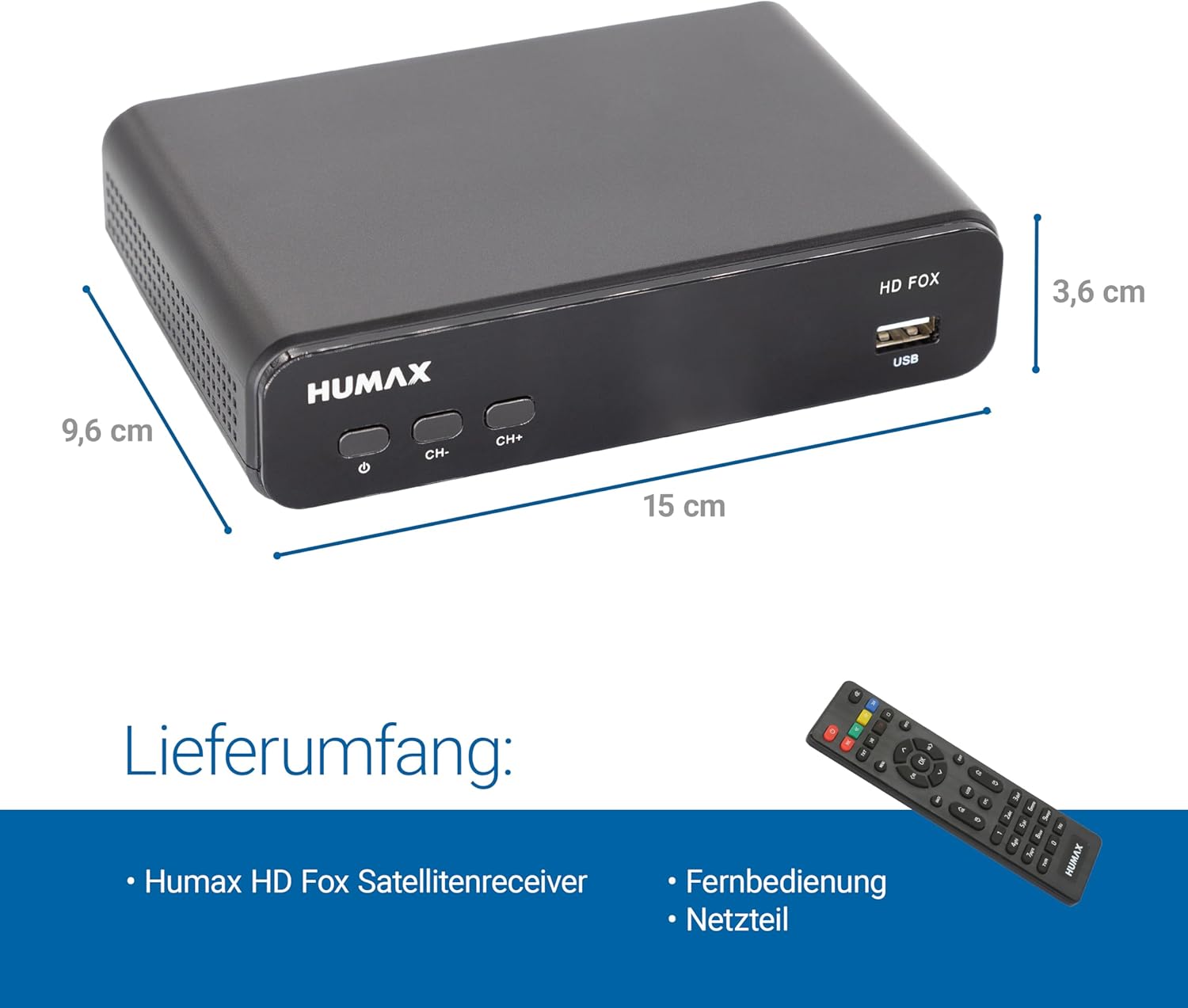
The Humax HD Fox receiver displaying its compact dimensions, measuring 9.6 cm in depth, 15 cm in width, and 3.6 cm in height.
8. 보증 및 지원
For warranty information, please refer to the documentation provided at the time of purchase or visit the official Humax website. If you require technical support or have questions not covered in this manual, please contact Humax customer service through their official channels.
Ask a question about this manual
Ask about setup, troubleshooting, compatibility, parts, safety, or missing instructions. Manuals+ will review the question and use this page’s manual context to help answer it.