
PowerPac PPFS212B 2-in-1 Dual-Usage Stand Fan Instruction Manual
Model: PPFS212B
1. 중요한 안전 정보
이 제품을 사용하기 전에 모든 지침을 주의 깊게 읽고 나중에 참조할 수 있도록 보관하십시오. 이 지침을 따르지 않으면 감전, 화재 또는 심각한 부상이 발생할 수 있습니다.
- 볼륨을 확보하세요tag정격 라벨에 표시된 e가 주 전원 공급 볼륨과 일치합니다.tage.
- 팬, 플러그 또는 코드를 물이나 다른 액체에 담그지 마십시오.
- Unplug the fan from the power outlet before cleaning, assembling, or disassembling parts.
- 선풍기가 작동 중일 때는 손가락, 연필 또는 기타 물체를 선풍기 통풍구에 넣지 마십시오.
- 손상된 코드나 플러그로 선풍기를 작동하지 마십시오. 수리를 위해서는 자격을 갖춘 서비스 담당자에게 문의하십시오.
- This appliance is equipped with thermal fuse protection against overheating. If the fan stops working unexpectedly, unplug it and allow it to cool before attempting to restart.
- 본 기기는 신체적, 감각적 또는 정신적 능력이 저하된 사람(어린이 포함)이나 경험 및 지식이 부족한 사람이 사용하도록 의도된 것이 아니며, 안전을 책임질 사람으로부터 기기 사용에 관한 감독이나 지시를 받은 경우에만 사용할 수 있습니다.
2. 제품 오버view
The PowerPac PPFS212B is a versatile 2-in-1 dual-usage stand fan designed for efficient cooling in indoor environments. It features 7 blades for maximum airflow, 3-speed settings, and an oscillation function for wider air distribution. The fan is equipped with thermal fuse protection for enhanced safety.
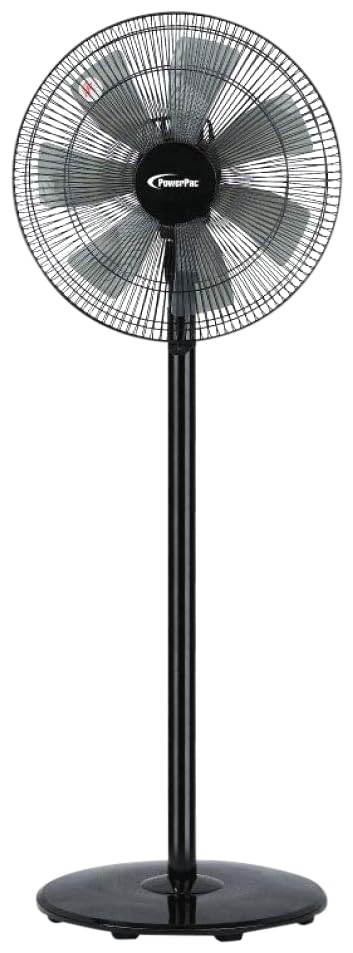
Image: PowerPac PPFS212B 2-in-1 Dual-Usage Stand Fan, showcasing its black finish and stand configuration.
3. 패키지 내용
포장을 개봉하신 후 모든 구성품이 있는지, 손상되지 않았는지 확인해 주십시오.
- 1 x PowerPac PPFS212B Stand Fan (includes fan head, stand pole, and base)
4. 조립 설명서
Follow these steps to assemble your PowerPac PPFS212B fan:
- 모든 구성품을 포장에서 조심스럽게 꺼내세요.
- Attach the stand pole to the fan base. Ensure it is securely fastened according to the markings or locking mechanism.
- Mount the fan head assembly onto the top of the stand pole. Align the connection points and secure it firmly.
- Ensure all screws and fasteners are tightened to prevent wobbling during operation.
- 조립된 선풍기를 안정적이고 평평한 표면에 놓으십시오.
Image: Illustrative diagram of the PowerPac PPFS212B fan assembly, showing the base, stand, and fan head components.
5. 사용 설명서
To operate your PowerPac PPFS212B fan:
- 전원 코드를 적합한 콘센트에 꽂으세요.
- 전원 켜기/끄기: Press the 'ON/OFF' button (or corresponding button) on the control panel to turn the fan on or off.
- 속도 조정 : Press the 'SPEED' button repeatedly to cycle through the 3 available speed settings (Low, Medium, High).
- 진동 기능 : Press the 'OSC' button (or corresponding button) to activate or deactivate the oscillation feature, which allows the fan head to sweep from side to side.
- When finished, press the 'ON/OFF' button to turn off the fan and unplug it from the power outlet.
6. 유지관리 및 청소
Regular cleaning and maintenance will help ensure optimal performance and longevity of your fan:
- 청소하기 전에 항상 전원 공급 장치에서 팬 플러그를 뽑으십시오.
- 부드러운 d를 사용하세요amp cloth to wipe the exterior surfaces of the fan. Do not use abrasive cleaners, solvents, or harsh chemicals.
- To clean the fan blades, carefully remove the front grille (if detachable) according to the product design. Wipe the blades with a soft cloth. Ensure all parts are dry before reassembling.
- 모터 하우징에 물이 떨어지지 않도록 하십시오.
- 장기간 사용하지 않을 때는 선풍기를 서늘하고 건조한 곳에 보관하십시오.
7. 문제 해결
If you encounter issues with your fan, refer to the following table for common problems and solutions:
| 문제 | 가능한 원인 | 해결책 |
|---|---|---|
| 팬이 켜지지 않습니다. | 전원 공급이 없습니다. Thermal fuse activated. | 플러그가 콘센트에 단단히 꽂혀 있는지 확인하세요. 전원 콘센트가 작동하는지 확인하세요. Unplug and allow the fan to cool down for 30 minutes before restarting. |
| 공기 흐름이 약하거나 전혀 없습니다. | 팬 속도가 너무 낮게 설정되었습니다. 선풍기 날개가 더럽습니다. | 팬 속도 설정을 높이세요. Unplug the fan and clean the blades as per maintenance instructions. |
| 팬이 진동하지 않습니다. | 진동 기능이 꺼져 있습니다. | Press the 'OSC' button to activate oscillation. |
| 작동 중 비정상적인 소음이 발생합니다. | 느슨한 부품. 방해. | Unplug the fan and check for any loose components or obstructions around the blades or motor. Tighten any loose parts. |
이러한 해결 방법을 시도한 후에도 문제가 지속되면 고객 지원팀에 문의하세요.
8. 사양
| 특징 | 사양 |
|---|---|
| 상표 | 파워팩 |
| 모델 번호 | PPFS212B |
| 유형 | 2-in-1 Dual-Usage Stand Fan |
| 블레이드 수 | 7 |
| 속도의 수 | 3 |
| 전원 | 코드식 전기 |
| 왓tage | 50 와트 |
| 제어 방법 | 푸시 버튼 |
| 특별 기능 | Oscillating, Thermal Fuse Protection |
| 재료 | 플라스틱 |
| 실내/실외 사용 | 실내 |
| 색상 | 검은색 |
9. 보증 및 지원
This PowerPac PPFS212B fan comes with a 2년 보증 구매일로부터. 본 보증은 정상적인 사용 조건에서 발생한 제조상의 결함에 적용됩니다.
For warranty claims, technical support, or any inquiries regarding your product, please contact PowerPac customer service. Keep your proof of purchase for warranty validation.