
소개
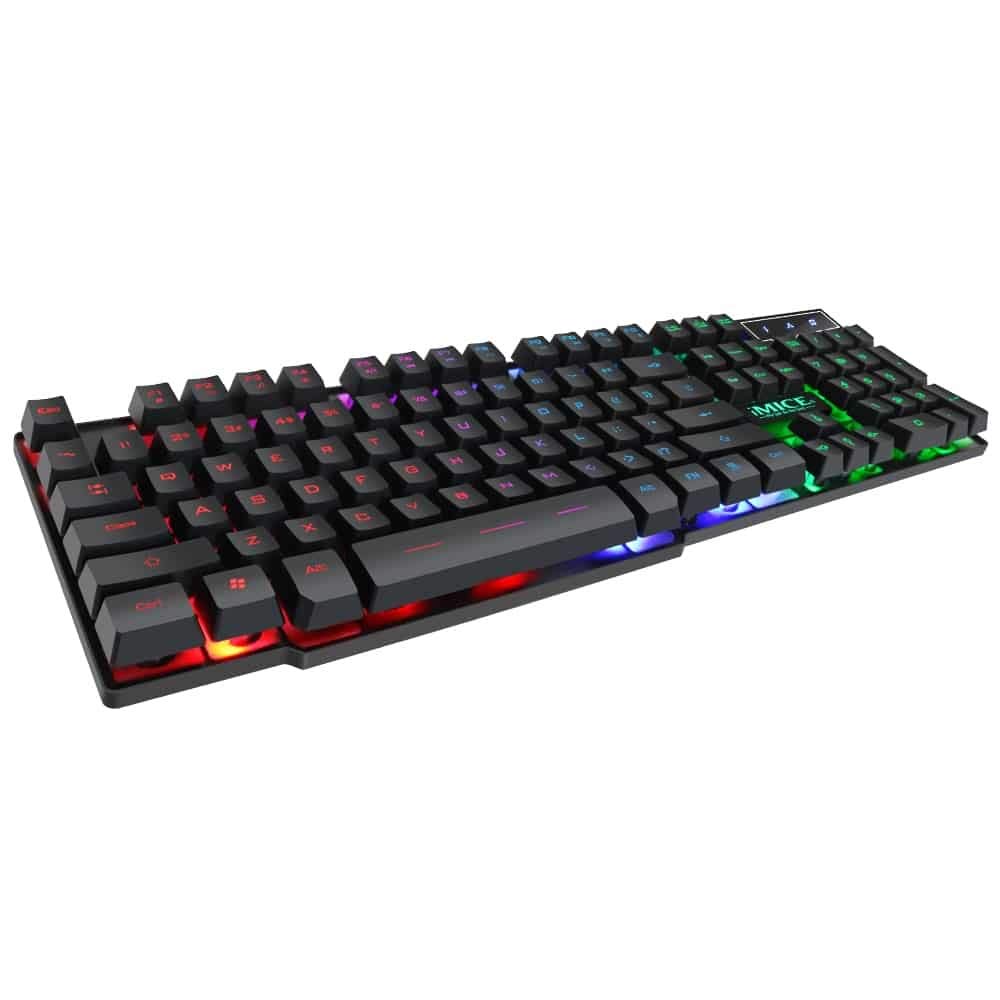
This manual provides instructions for the iMICE AK-600 Backlit USB Wired Gaming Keyboard. It covers setup, operation, maintenance, and troubleshooting to ensure optimal performance and longevity of your device. Please read this manual thoroughly before using the keyboard.
설정
상자 안에 무엇이 들어있나요?
The iMICE AK-600 keyboard package includes:
- iMICE AK-600 Backlit USB Wired Gaming Keyboard (with integrated USB cable)
키보드 연결
To connect your iMICE AK-600 keyboard:
- 컴퓨터에서 사용 가능한 USB 포트를 찾습니다.
- Plug the integrated USB cable from the keyboard into the USB port.
- The keyboard is plug-and-play and should be automatically recognized by your operating system without requiring additional drivers for basic functionality.
작동 지침
기본 키보드 기능
The iMICE AK-600 features a standard 104-button layout, providing all essential keys for typing and gaming.
백라이트 제어
The keyboard is equipped with a three-color backlight system (red, blue, green). The key characters are illuminated for visibility in low-light conditions.
- To change the backlight color or cycle through modes, use the dedicated backlight control key (often labeled with a light bulb icon or similar).
- Pressing the key repeatedly will switch between red, blue, green, and off modes.
멀티미디어 키
The keyboard includes 12 groups of multimedia function keys, typically accessed by pressing the Fn F1-F12 키와 함께 사용하면 볼륨 조절, 미디어 재생 등의 기능에 빠르게 접근할 수 있습니다.
안티 고스팅
The iMICE AK-600 supports 19-key anti-ghosting. This feature ensures that multiple key presses are registered simultaneously and accurately, preventing input conflicts during fast-paced gaming or typing.
유지 보수 및 관리
Proper maintenance will extend the life of your keyboard:
- 청소: Regularly wipe the keyboard surface with a soft, dry, lint-free cloth to remove dust and debris. For deeper cleaning, use a slightly damp 액체가 키보드 안으로 들어가지 않도록 부드러운 비누를 묻힌 천으로 닦으세요.
- 액체 유출: The keyboard features an integrated liquid guide hole design to help with minor spills. However, it is not fully waterproof. In case of a spill, immediately disconnect the keyboard from your computer and allow it to dry completely before reconnecting.
- 가혹한 화학 물질을 피하세요: Do not use abrasive cleaners, solvents, or strong detergents, as these can damage the keyboard's finish and key legends.
- 케이블 관리: Ensure the USB cable is not excessively bent, twisted, or placed under heavy objects, which could damage the internal wires.
문제 해결
키보드가 응답하지 않음
- USB 케이블이 키보드와 컴퓨터의 활성 USB 포트에 제대로 연결되어 있는지 확인하십시오.
- 키보드를 컴퓨터의 다른 USB 포트에 연결해보세요.
- 컴퓨터를 다시 시작하세요.
- 키보드가 문제인지 아니면 컴퓨터의 USB 포트/드라이버 문제인지 확인하려면 다른 컴퓨터에서 키보드를 테스트해 보세요.
백라이트가 작동하지 않음
- Verify that the keyboard is properly connected and receiving power.
- Press the backlight control key (often labeled with a light bulb icon) to cycle through backlight modes and ensure it is not turned off.
특정 키가 등록되지 않음
- Gently clean around the affected keys to remove any dust or debris that might be obstructing the key mechanism.
- 문제가 지속되면 추가 지원을 위해 고객 지원팀에 문의하세요.
명세서
| 특징 | 세부 사항 |
|---|---|
| 상표 | OEM (iMICE) |
| 모델 | AK-600 |
| 연결 기술 | USB(유선) |
| 키보드 설명 | 노름 |
| 특징 | Backlit (Red, Blue, Green) |
| 재료 | 플라스틱 |
| 포함된 구성 요소 | 통합 USB 케이블 |
| 스위치 유형 | 촉각적 |
| 손의 방향 | 양손잡이 |
| 버튼/키 개수 | 104 |
| 호환되는 운영 체제 | Windows (XP/2000/Vista/7/8/10), Android, Linux |
| 케이블 길이 | 1.3 미터 |
| 키 수명 | 최대 5천만 번 프레스 |
보증 및 지원
For information regarding product warranty, returns, or technical support, please refer to the retailer's policy where the product was purchased. It is recommended to retain your purchase receipt as proof of purchase for any warranty claims. For direct manufacturer support, please visit the official OEM or iMICE web대지.