
소개
구매해주셔서 감사합니다asing the ThermoPro TP53 Indoor Hygrometer Thermometer. This device is designed to provide accurate measurements of indoor temperature and humidity, helping you maintain a comfortable and healthy living environment. Please read this manual carefully before use to ensure proper operation and to maximize the product's lifespan.
제품 특징
- Touch-Sensitive Backlight: Features a touch backlight button on the frame for easy screen illumination in dark conditions.
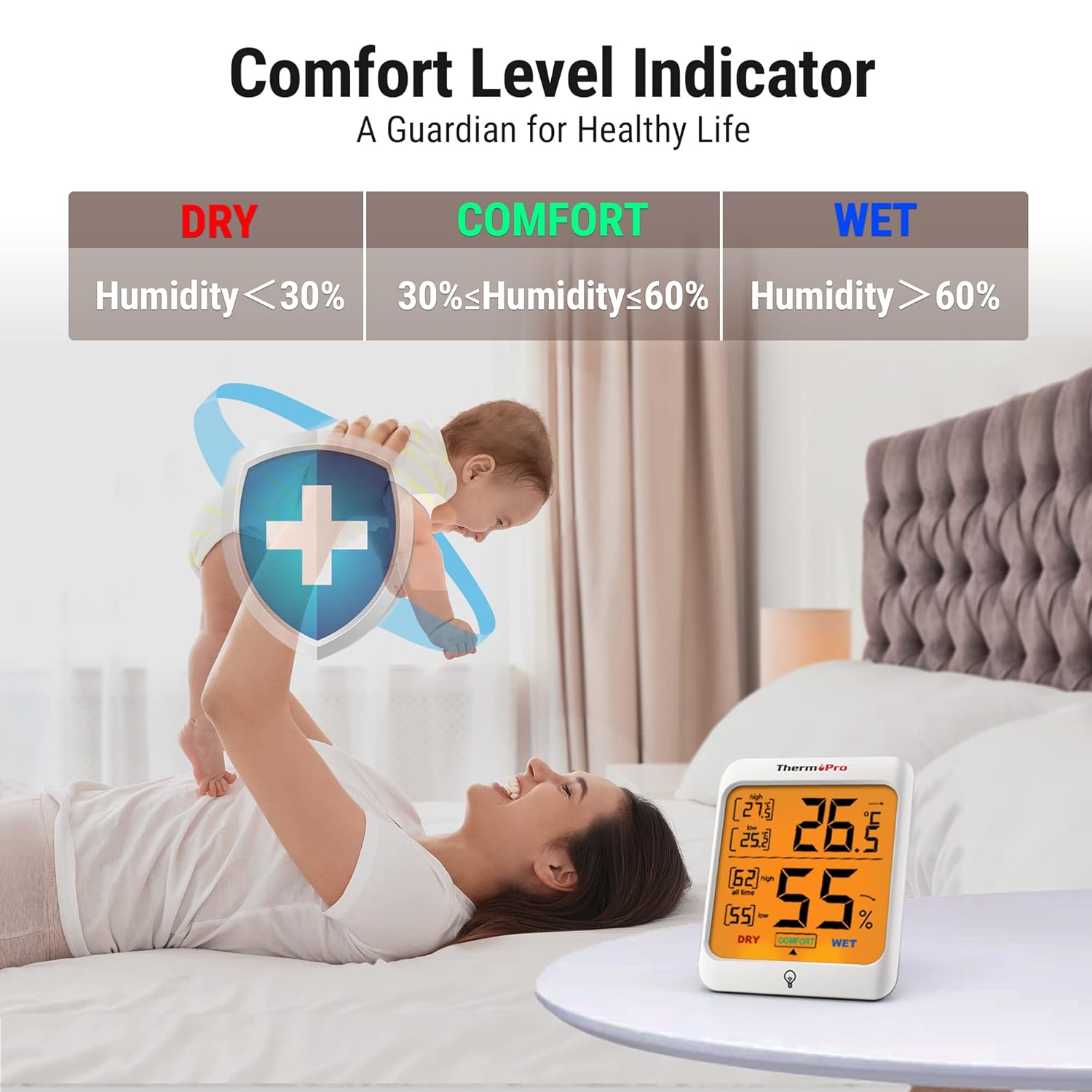
- 공기 쾌적 표시기: Displays the comfort level (DRY, COMFORT, WET) based on current humidity, keeping you informed of indoor conditions.
- 맥스 앤 민 레코드: Stores and displays all-time or 24-hour maximum and minimum temperature and humidity records.
- 다중 장착 옵션: Designed for tabletop placement, wall mounting, or magnetic attachment for versatile positioning.
- 다양한 용도: Provides essential temperature and humidity control for various environments such as baby rooms, nurseries, basements, warehouses, and greenhouses.

패키지 내용
- 2 x ThermoPro TP53 Indoor Hygrometer Thermometer
- AAA 배터리 4개
- 1 x 사용자 설명서
주요 구성 요소

전면 디스플레이:
- 실내 온도: 현재 온도 판독값.
- 실내 습도: Current humidity reading.
- 최대/최소 온도: Highest/lowest temperature recorded.
- MAX/MIN Humidity: Highest/lowest humidity recorded.
- 편안함 수준 표시기: Shows DRY, COMFORT, or WET.
- Temperature Trend Arrow: Indicates rising, falling, or stable temperature.
- Humidity Trend Arrow: Indicates rising, falling, or stable humidity.
- Touch Backlight Button: Located at the bottom center of the display.
뒷면 버튼:
- °C/°F Switcher: 섭씨와 화씨 사이를 전환합니다.
- ALL TIME/24HRS Button: Switches between all-time and 24-hour MAX/MIN records.
설정
- 배터리 삽입: Open the battery compartment on the back of the unit. Insert 2 AAA batteries, ensuring correct polarity (+/-). Close the battery compartment. The device will power on automatically.
- 온도 단위 선택: On the back of the unit, press the '°C/°F' button to switch between Celsius and Fahrenheit as desired.
- 놓기: Place the hygrometer in your desired location. It can stand on a tabletop using its integrated stand, be mounted on a wall using the hanging hole, or attached to a metallic surface via its powerful magnets. Allow approximately 10-15 minutes for the sensor to stabilize and provide accurate readings.

작동 지침
온도 및 습도 측정:
The current indoor temperature and humidity are displayed prominently on the large LCD screen.
백라이트 사용:
Touch the backlight button located on the front frame of the unit to activate the backlight. The backlight will remain on for approximately 15 seconds before automatically turning off to conserve battery life.

View최대/최소 기록:
Press the 'ALL TIME/24HRS' button on the back of the unit to cycle through the maximum and minimum records. You can view records for the past 24 hours or all-time since the last reset/battery change.

Understanding the Comfort Level Indicator:
The comfort level indicator provides a quick visual reference for your indoor environment:
- 마른: Humidity below 30% RH
- 편안: Humidity between 30% and 60% RH
- 젖은: Humidity above 60% RH
Understanding Trend Arrows:
온도와 습도 수치 옆에 있는 화살표는 추세를 나타냅니다.
- 위쪽 화살표(↑): 상승 추세
- 아래쪽 화살표(↓): 하락 추세
- 수평 화살표(→): Stable trend
유지
- 청소: 부드러운 천으로 기기를 닦으십시오. damp 천으로 닦아주세요. 연마성 세제를 사용하거나 기기를 물에 담그지 마세요.
- 배터리 교체: When the battery indicator appears on the display, replace the AAA batteries. Ensure correct polarity.
- 저장: If storing the unit for an extended period, remove the batteries to prevent leakage. Store in a dry place away from extreme temperatures.
문제 해결
디스플레이가 없거나 희미함:
- 배터리가 올바른 극성으로 올바르게 삽입되었는지 확인하세요.
- 새 AAA 배터리로 교체하십시오.
부정확한 판독:
- Ensure the unit is placed in a location away from direct sunlight, heat sources, or drafts, which can affect readings.
- Allow 10-15 minutes for the sensor to stabilize after initial setup or relocation.
- If readings seem consistently off, try replacing the batteries.
명세서
| 상표 | ThermoPro |
| 모델 번호 | TP53 |
| 색상 | 하얀색 |
| 온도 범위 | -50°C ~ 70°C (-58°F ~ 158°F) |
| 온도 정확도 | ±0.5°C (±1.0°F) |
| 습도 범위 | 상대습도 10% ~ 99% |
| 습도 정확도 | ±2-3% 상대습도 |
| 새로 고침 빈도 | 10초 |
| 전원 | AAA 배터리 2개 |
| 치수(폭 x 높이 x 깊이) | 7.1 cm x 8.4 cm x 6.2 cm (approximate, based on visual representation) |


보증
ThermoPro provides a 3-year warranty for this product from the date of purchase. This warranty covers defects in materials and workmanship under normal use. It does not cover damage caused by misuse, accidents, unauthorized modifications, or normal wear and tear. Please retain your proof of purchase for warranty claims.
지원하다
For any questions, assistance, or warranty claims, please contact ThermoPro Customer Service. Refer to the contact information provided on the ThermoPro official web사이트 또는 제품 포장.