
1. 서론
This manual provides essential information for setting up, operating, maintaining, and troubleshooting your AVITA Essential NE14A2INC433-MB laptop. Please read this manual thoroughly before using your device to ensure proper functionality and longevity.
2. 제품 오버view
The AVITA Essential NE14A2INC433-MB is a thin and light 14-inch laptop designed for everyday use. It features an aluminum body and a unique cloth design on the palm rest.

Figure 2.1: AVITA Essential Laptop (Matt Black) with screen and keyboard visible.
2.1 디스플레이 기능
The laptop is equipped with a 14-inch Full HD (1920x1080) anti-glare IPS display. The ultra-narrow bezels provide an immersive view경험.

Figure 2.2: Close-up of the AVITA Essential display, showcasing the FHD IPS Anti-Glare Panel and 4mm Narrow Bezels.
2.2 포트 및 연결
The AVITA Essential laptop offers various ports for connectivity, including two USB 3.0 Type A ports, one full-size HDMI port, and a Micro SD card reader.
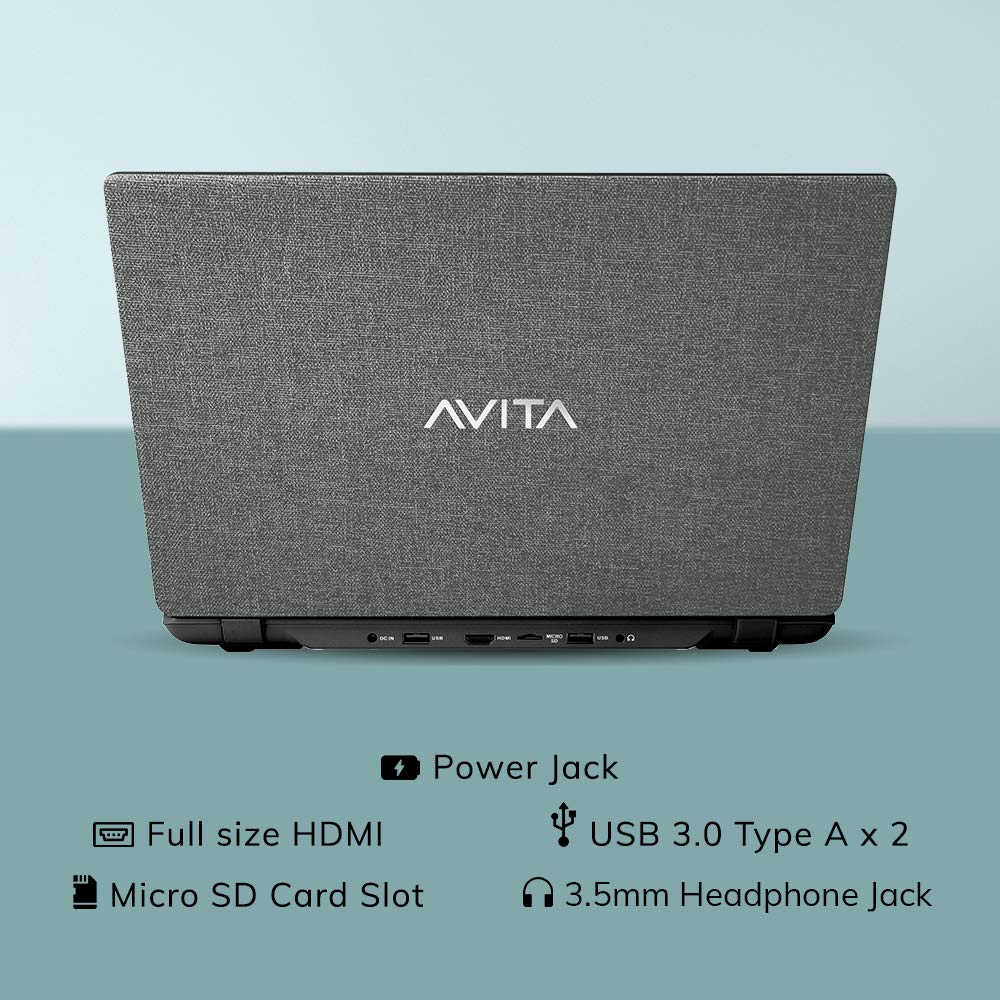
그림 2.3: 후면 view of the laptop detailing the available ports for external devices and power.
2.3 Keyboard and Web캠
The laptop features a full-size island-style keyboard for comfortable typing and an integrated web화상회의용 캠.

그림 2.4: 상향식 view of the laptop's island-style keyboard and integrated web캠.
2.4 디자인
The AVITA Essential boasts a unique cloth design, contributing to its aesthetic appeal.

Figure 2.5: The laptop in a closed position, highlighting its distinctive cloth design.
3. 설정
- 언박싱: 노트북과 모든 액세서리를 포장에서 조심스럽게 꺼내십시오. "구성품" 목록에 있는 모든 품목이 있는지 확인하십시오.
- 초기 청구 : Connect the AC adapter to the laptop's power jack and then to a power outlet. Allow the laptop to charge for at least 30 minutes before the first use, or until the battery indicator shows a sufficient charge.
- 전원 켜기: Open the laptop lid and press the power button. The laptop will begin the initial boot process.
- Windows 10 Home in S Mode Setup: Follow the on-screen instructions to complete the Windows 10 Home in S Mode setup. This includes selecting your region, language, connecting to a Wi-Fi network, and creating a user account.
- 소프트웨어 업데이트: After initial setup, connect to the internet and allow Windows to download and install any available updates. This ensures optimal performance and security.
4. 사용 설명서
4.1 S 모드의 Windows 10 Home
Your AVITA Essential laptop comes with Windows 10 Home in S Mode, which is designed for security and performance. In S Mode, you can only install apps from the Microsoft Store and must use Microsoft Edge for safe browsing. You can switch out of S Mode to regular Windows 10 Home at any time, but you cannot switch back.
The laptop is eligible for a free upgrade to Windows 11 when available. The upgrade rollout plan is scheduled to begin late in 2021 and continue into 2022, with specific timing varying by device.
4.2 성능 및 스토리지
Powered by an Intel Celeron N4000 processor and 4GB DDR4 RAM, combined with a 128GB SSD, the laptop offers responsive performance for daily tasks. The Solid State Drive (SSD) ensures faster boot times and quicker application loading compared to traditional hard disk drives.
Video 4.1: This video highlights key features of the AVITA Essential laptop, including its FHD IPS display, narrow bezels, island-style keyboard, integrated webcam, and fast SSD storage. It demonstrates the laptop's sleek design and quick performance for everyday computing tasks.
Video 4.2: This video illustrates the benefits of a modern PC with Windows 10 and an SSD, emphasizing thin and light design, faster startups, improved efficiency, longer battery life, and enhanced durability and security due to fewer moving parts.
5. 유지관리
- 청소: 부드럽고 보풀 없는 천으로 화면과 외부를 닦으세요. 잘 지워지지 않는 얼룩은 살짝 두드려 닦아내세요.amp천에 물이나 화면에 안전한 세척제를 묻혀 닦아주세요. 강한 화학 물질은 피하세요.
- 배터리 관리 : To maximize battery life, avoid fully discharging the battery frequently. It is recommended to keep the battery charged between 20% and 80%. Store the laptop in a cool, dry place when not in use for extended periods.
- 소프트웨어 업데이트: 최적의 성능과 보안을 유지하려면 운영 체제 및 드라이버 업데이트를 정기적으로 확인하고 설치하십시오.
- 스토리지 관리: 주기적으로 다시view 그리고 불필요한 것을 삭제하세요 files to free up storage space on the 128GB SSD. Consider using external storage or cloud services for large files.
- 통풍: 노트북의 통풍구가 막히지 않도록 하여 과열을 방지하십시오. 노트북은 푹신한 가구보다는 딱딱하고 평평한 표면에 놓고 사용하십시오.
6. 문제 해결
6.1 일반적인 문제 및 해결 방법
- 노트북 전원이 켜지지 않음:
- AC 어댑터가 노트북과 작동하는 전원 콘센트에 모두 단단히 연결되어 있는지 확인하세요.
- 다른 장치를 연결하여 전원 콘센트가 작동하는지 확인하세요.
- If the battery is completely drained, allow it to charge for some time before attempting to power on.
- 느린 성능:
- 백그라운드에서 실행 중인 불필요한 애플리케이션을 닫으세요.
- 보류 중인 Windows 업데이트를 확인하고 설치하세요.
- SSD에 충분한 여유 공간을 확보하세요.
- 악성 소프트웨어나 바이러스에 대한 시스템 검사를 실행하세요.
- Wi-Fi 연결 문제:
- 와이파이 공유기와 노트북을 재시작하세요.
- Windows 설정에서 Wi-Fi가 활성화되어 있는지 확인하세요.
- Update Wi-Fi drivers from the AVITA support web대지.
- Windows 10 S Mode App Restrictions:
- Remember that in S Mode, only apps from the Microsoft Store can be installed.
- If you need to install apps from other sources, you must switch out of S Mode. This is a one-way process.
7. 사양
| 특징 | 세부 사항 |
|---|---|
| 상표 | AVITA |
| 모델명 | 필수적인 |
| 모델 번호 | NE14A2INC433-MB |
| 화면 크기 | 14인치(35cm) |
| 디스플레이 해상도 | 1920 x 1080(풀HD) |
| 디스플레이 유형 | FHD Anti-Glare IPS LED |
| 프로세서 | Intel Celeron N4000 (1.10 GHz base, 2.60 GHz Max) |
| 램 메모리 | 4GB DDR4 |
| 저장 | 128GB SSD |
| 운영 체제 | S 모드의 Windows 10 Home |
| 제도법 | 인텔 통합 UHD 그래픽 600 |
| 배터리 수명 | Up to 6 Hours (as per MobileMark) |
| 무게 | 1.37kg |
| 포트 | 2x USB 3.0 Type A, 1x Full Size HDMI, Micro SD Card Reader |
| 무선 연결 | 802.11 b/g/n/ac Wi-Fi, Bluetooth 4.0 |
| Web캠 | Integrated Front Camera |
8. 보증 및 지원
8.1 보증 정보
Your AVITA Essential laptop comes with an 18+6 months onsite domestic warranty from AVITA. This warranty covers manufacturing defects and does not cover physical damage. For detailed terms and conditions, please refer to the warranty section provided with your product or visit the official AVITA support web대지.
8.2 상자 내용물
포장을 풀면 다음 항목이 있어야 합니다.
- AVITA Essential Laptop
- AC 어댑터
- 사용자 가이드
- 매뉴얼