
1. 서론
Thank you for choosing the NJSJ H112 Computer Speakers. These 2.0 wired desktop speakers are designed to provide enhanced stereo sound and dynamic RGB lighting for your PC, laptop, and other compatible devices. This manual provides detailed instructions for setup, operation, maintenance, and troubleshooting to ensure optimal performance and longevity of your speakers.
2. 패키지 내용
모든 품목이 들어 있는지 확인하려면 패키지를 확인하세요.
- 2 × Wired Speakers
- 1 × 사용자 설명서
3. 제품 특징
- 뛰어난 음질 : Equipped with a 10W advanced sound drive unit, delivering full-range 2.0 channel enhanced stereo audio. Ideal for online meetings, video chats, music, audiobooks, gaming, and movies.
- Automatically Cycle RGB Lights: Speakers feature RGB cycle lights that automatically change colors during use, enhancing the atmosphere. The lights can be turned on/off via a dedicated switch, but individual color customization is not available.
- Plug and Play & Broad Compatibility: Comes with a 5.24 ft USB cable for power and a 3.5mm AUX cable for audio. No drivers are required. Compatible with any device featuring a standard 3.5mm headphone jack, including desktops, laptops, cellphones, tablets, Mac, projectors, monitors, TVs, Echo Dot, Xbox, and PS4.
- Space-saving Size: Each speaker measures 4.1 x 3.2 x 3.6 inches (LxWxH), making them compact and suitable for placement under computer screens to maintain a tidy desktop. The cable connecting the right and left speakers is 100cm/39.4 inches.

Image: NJSJ H112 Speakers showcasing dynamic RGB lighting effects.
4. 설정 지침
Follow these steps to connect your NJSJ H112 Computer Speakers:
- 전원 연결: Insert the USB plug into an available USB port on your computer, laptop, or a 5V/2A USB power adapter.
- 오디오 연결: Insert the 3.5mm AUX audio plug into the headphone jack of your computer, laptop, cellphone, or other audio source.
- 스피커 위치: Place the speakers on either side of your monitor or device, ensuring the cables are not strained.
- 전원 켜기: Use the in-line control box to turn on the speakers.
- 볼륨 조절: Adjust the volume using the in-line controller or your device's volume controls.

Image: Illustration of connecting the USB and 3.5mm AUX cables for power and audio.
Video: A demonstration of the NJSJ H112 Desktop Speakers, showing their design and functionality.
5. 사용 설명서
The NJSJ H112 speakers feature a convenient in-line control box for easy operation:
- 전원 켜기/끄기 버튼: Press this button to turn the speakers on or off.
- LED 조명 켜기/끄기 버튼: Press this button to toggle the RGB cycle lights on or off.
- Volume Controller: Slide the wheel up or down to adjust the audio volume.
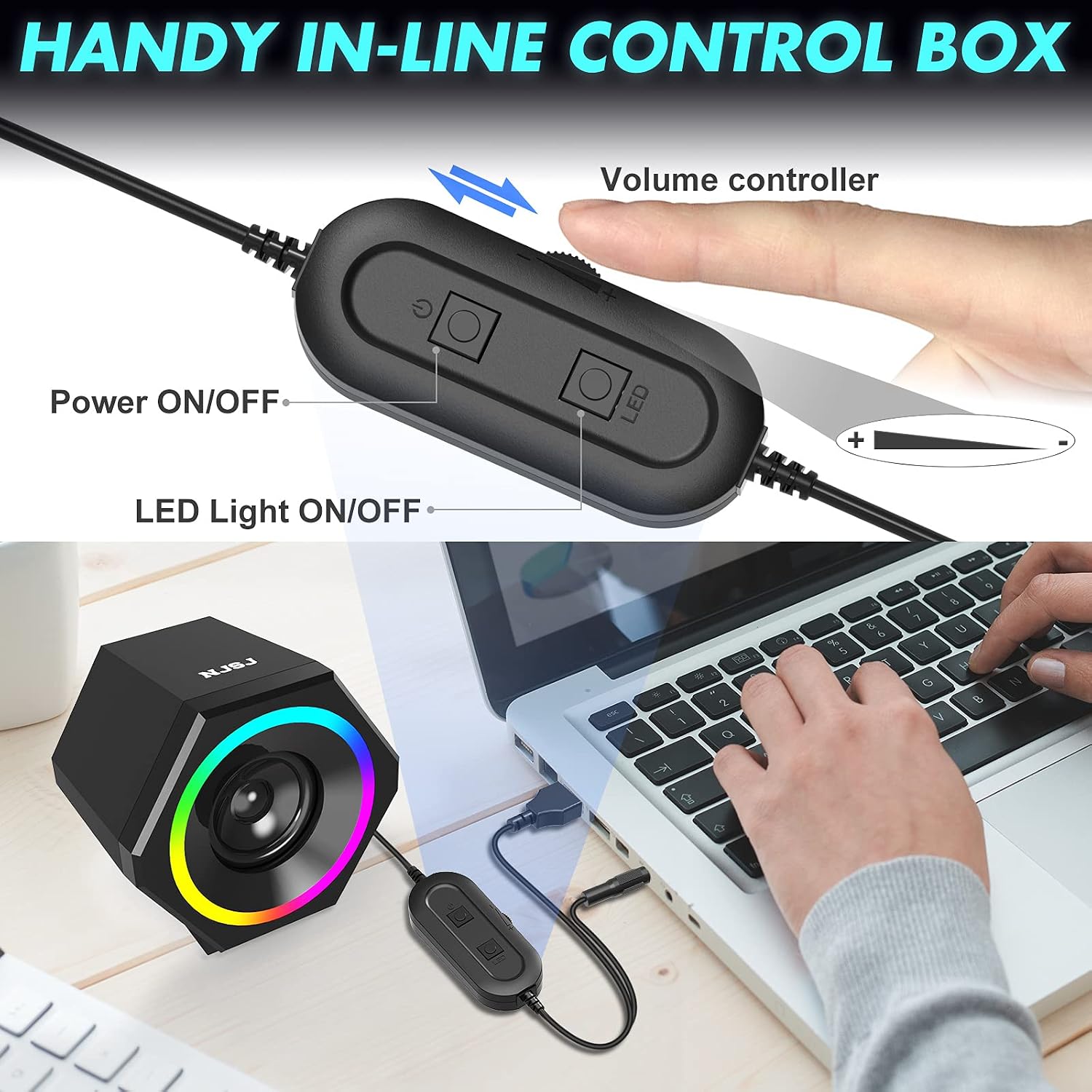
Image: Close-up of the in-line control box, highlighting the power, LED light, and volume controls.
Video: A demonstration of the NJSJ V-138 RGB Computer Speaker, showcasing its features and controls.
6. 유지관리
스피커의 수명 연장과 최적의 성능을 보장하려면 다음 유지 관리 지침을 따르십시오.
- 청소: Use a soft, dry cloth to clean the speaker surfaces. Avoid using abrasive cleaners, solvents, or harsh chemicals.
- 액체 노출: Keep the speakers away from water and other liquids. Do not immerse them in water.
- 저장: 사용하지 않을 때는 스피커를 서늘하고 건조한 곳에 보관하십시오. 극한의 온도 변화를 피하십시오.
- 손질: 스피커를 조심스럽게 다루십시오. 떨어뜨리거나 강한 충격을 가하지 마십시오.
7. 문제 해결
If you encounter any issues with your NJSJ H112 speakers, please refer to the following troubleshooting tips:
| 문제 | 가능한 원인 | 해결책 |
|---|---|---|
| 스피커에서 소리가 나지 않음 |
|
|
| RGB 조명이 작동하지 않습니다 |
|
|
| 왜곡되거나 음질이 좋지 않음 |
|
|
8. 사양
| 특징 | 사양 |
|---|---|
| 상표 | NJSJ |
| 모델명 | H112 |
| 스피커 유형 | 듀얼 스피커 |
| 연결 기술 | 보조, USB |
| 오디오 출력 모드 | 스테레오(2.0채널) |
| 스피커 최대 출력 전력 | 10 와트 |
| 입력 Voltage | 5 볼트 |
| 특징 | LED Light (Cycle RGB) |
| 제품 치수 | 4.1인치 깊이 x 3.19인치 너비 x 3.62인치 높이 |
| 품목 무게 | 1.33파운드 |
| 호환 장치 | Laptop, Personal Computer, Projector, Smartphone, Television |
| 장착 유형 | 탁상 마운트 |
9. 보증 및 지원
NJSJ provides a 24-month product after-sales support for your H112 Computer Speakers. If you have any questions, concerns, or require assistance with your speakers, please contact NJSJ customer service. Refer to the product packaging or the official NJSJ web구체적인 연락처 정보는 해당 사이트를 참조하세요.