
1. 서론
This manual provides detailed instructions for the setup, operation, and maintenance of your Metronic 477039 Digital Alarm Clock. Please read this manual thoroughly before using the device to ensure proper function and to maximize your user experience. Keep this manual for future reference.
2. 안전 정보
- 전원 어댑터가 해당 지역의 전원 공급 장치와 호환되는지 확인하세요.
- 기기를 물, 습기 또는 극한 온도에 노출시키지 마세요.
- 열원 근처나 직사광선에 장치를 두지 마십시오.
- 직접 분해하거나 수리하지 마십시오. 모든 정비는 자격을 갖춘 기술자에게 맡기십시오.
- 어린이의 손이 닿지 않는 곳에 보관하세요.
- Use only the specified battery type (2 x AAA LR3, 1.5V) for backup. Ensure correct polarity when inserting batteries.
3. 패키지 내용
패키지에 모든 품목이 들어 있는지 확인하세요.
- Metronic 477039 Digital Alarm Clock
- 전원 어댑터
- 사용 설명서 (본 문서)
Note: AAA LR3 batteries for backup are not included and must be purchased separately.
4. 제품 오버view 및 기능
The Metronic 477039 is a versatile digital alarm clock designed for convenience and functionality. Key features include:
- AM/FM 튜너: Access up to 10 preset FM radio stations (frequency: 87.5 to 108.0MHz) with automatic search.
- 180° Projector: Project the time onto a wall or ceiling. The projection angle is adjustable from -90° to 90° for optimal view주고받음.
- 이중 경보: Set two independent alarms, choosing to wake up to a traditional buzzer or your favorite radio station.
- Sleep/Snooze Functions: The sleep timer allows you to fall asleep to the radio, which will automatically turn off after a set duration (10 to 90 minutes). The snooze function provides temporary alarm suspension.
- 조정 가능한 백라이트: The large red LED display offers adjustable brightness settings (strong, medium, or off) for comfortable view주고받음.
- 배터리 백업 : Optional 2x AAA LR3 (1.5V) batteries (not included) preserve time and alarm settings during power outag에스.

그림 1: 전면 view of the Metronic 477039 Digital Alarm Clock, displaying the time 8:00 in red LED digits.
5. 설정
5.1 전원 연결
- Connect the provided power adapter to the DC input port on the back of the alarm clock.
- 전원 어댑터를 일반 콘센트에 꽂으세요. 디스플레이에 불이 들어옵니다.
5.2 배터리 백업 설치
For uninterrupted timekeeping during power interruptions, install backup batteries:
- 장치 하단에서 배터리 칸을 찾으세요.
- 배터리 덮개를 엽니다.
- Insert two (2) AAA LR3 (1.5V) batteries, observing the correct polarity (+/-) as indicated inside the compartment.
- 배터리 덮개를 단단히 닫으세요.
Note: Batteries are for backup only and do not power the main functions of the clock.
5.3 초기 시간 설정
처음 전원을 켤 때 또는 장시간 전원이 꺼진 후tage without backup batteries, you may need to set the time:
- 를 누르고 계세요 시간 설정 button (location may vary, refer to device diagram if available).
- 잡고 있는 동안 시간 설정, 사용하다 시간 그리고 분 시간과 분을 각각 조절하는 버튼(종종 화살표나 +/-로 표시됨)입니다.
- 릴리스하다 시간 설정 버튼을 눌러 시간을 확인합니다.
6. 사용 설명서
6.1 Time Display and Brightness
- The current time is displayed on the large red LED screen.
- To adjust display brightness, press the 주차 button (or similar labeled button). Cycle through strong, medium, and off settings.
6.2 라디오 작동 (AM/FM)
- 켜기/끄기: 를 누르세요 라디오 라디오를 켜거나 끄는 버튼입니다.
- 밴드 선택: 해당하는 경우 밴드 button to switch between AM and FM. (This model specifies FM only, 87.5-108.0MHz).
- 자동 역 검색: 를 누르고 계세요 주사 or 조정 +/- button for a few seconds to automatically search for and store available FM stations. The device can store up to 10 stations.
- 수동 조정 : 짧게 누르세요 조정 +/- 주파수를 수동으로 조절하는 버튼입니다.
- 프리셋 불러오기: 를 누르세요 사전 설정 or 메모리 버튼을 누른 다음 조정 +/- 저장된 스테이션들을 순환하며 이용합니다.
- 볼륨 조절: 사용하세요 볼륨 +/- dial or buttons to adjust the sound level.
6.3 알람 설정
The device supports two independent alarms (AL1 and AL2).
- 알람 시간 설정:
- 를 누르고 계세요 경보 1 or 경보 2 단추.
- 사용하세요 시간 그리고 분 원하는 알람 시간을 설정하려면 버튼을 누르세요.
- Release the alarm button to confirm.
- Select Alarm Source (Buzzer/Radio):
- After setting the alarm time, briefly press the 경보 1 or 경보 2 button repeatedly to cycle through alarm modes: Buzzer, Radio, or Off. An indicator icon (e.g., bell for buzzer, radio tower for radio) will appear on the display.
- 스누즈 기능 : 알람이 울리면 버튼을 누르세요. 선잠 button to temporarily silence it. The alarm will sound again after a few minutes (typically 9 minutes).
- 알람 중지: 다음 설정 시간까지 알람을 완전히 끄려면 버튼을 누르세요. 알람 꺼짐 button or the corresponding 알람 1/2 버튼을 한 번 누릅니다.
6.4 투영 함수
The integrated projector displays the time onto a surface.

Figure 2: The alarm clock projecting the time onto a surface, illustrating the projection feature.
- 활성화/비활성화: 를 누르세요 영사기 button (or similar icon) to turn the projection on or off.
- 각도 조정: Manually rotate the projector lens barrel (located on top of the unit) to adjust the projection angle up to 180 degrees.
- 초점 조정: 프로젝터 렌즈 주변의 초점 링을 돌려 투사된 이미지를 선명하게 하십시오.

그림 3: 클로즈업 view of the projector lens on the Metronic 477039, showing the adjustable focus ring.
6.5 슬립 타이머
슬립 타이머를 사용하면 라디오를 일정 시간 동안 재생한 후 자동으로 꺼집니다.
- 라디오가 재생되는 동안 잠 버튼을 반복해서 누르면 사용 가능한 슬립 타이머 시간(예: 10, 20, 30, 60, 90분 또는 꺼짐)을 순환하며 선택할 수 있습니다.
- 설정한 시간이 지나면 라디오가 자동으로 꺼집니다.
7. 유지관리
- 청소: 부드럽고 마른 천으로 닦으세요. 연마성 세제나 용제는 사용하지 마세요.
- 배터리 교체: If using backup batteries, replace them annually or when the display shows signs of instability during power outag에스.
- 저장: 장기간 보관할 경우 누액 방지를 위해 백업 배터리를 제거하십시오.
8. 문제 해결
| 문제 | 가능한 원인 | 해결책 |
|---|---|---|
| 화면이 표시되지 않거나 기기가 켜지지 않습니다. | 전원 어댑터가 연결되지 않았거나 고장났습니다. 전원 콘센트가 작동하지 않습니다. | 전원 어댑터 연결 상태를 확인하십시오. 다른 콘센트에 연결해 보십시오. |
| 알람이 울리지 않습니다 | Alarm not activated. Alarm volume too low (if radio alarm). Incorrect alarm time set. | Ensure alarm is set to Buzzer or Radio mode. Increase radio volume. Verify alarm time. |
| 라디오 수신 불량 | Antenna not extended or positioned correctly. Interference from other electronics. | Extend and adjust the FM wire antenna for better reception. Move the unit away from other electronic devices. |
| Projected time is blurry | Projection focus not adjusted. | Rotate the focus ring around the projector lens until the image is clear. |
| 시간은 정확성을 잃습니다. | 내부 클럭 드리프트. | This may indicate a unit defect. If persistent, contact customer support. Regularly reset the time if necessary. |
9. 사양
| 모델 번호 | 477039 |
| 상표 | 메트로 닉 |
| 디스플레이 유형 | 디지털 LED(적색) |
| 고주파 | FM: 87.5 - 108.0 MHz |
| 전원 | AC Power Adapter (main), 2 x AAA LR3 1.5V batteries (backup, not included) |
| 제품 크기(L x W x H) | 18.8 x 6.2 x 8.2cm (대략) |
| 무게 | 440g(대략) |
| 특별 기능 | 180° Projector, Dual Alarm, Sleep Timer, Snooze Function, Adjustable Display Brightness, 10 FM Presets |
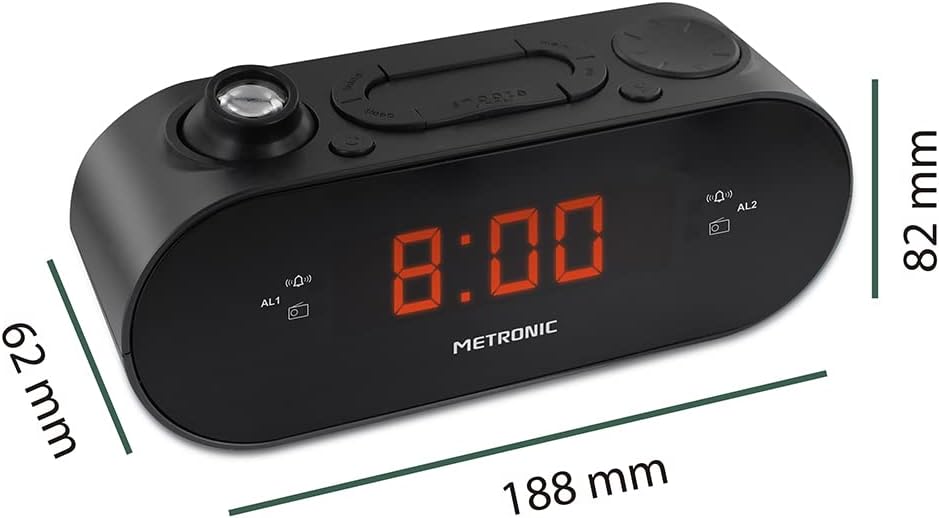
Figure 4: Diagram showing the dimensions of the Metronic 477039 Digital Alarm Clock: 188mm length, 62mm width, and 82mm height.
10. 보증 및 지원
Metronic products are designed for reliability and performance. For warranty information or technical support, please refer to the warranty card included with your purchase or visit the official Metronic web해당 사이트입니다. 고객 지원팀에 문의하실 때는 모델 번호(477039)와 구매 정보를 준비해 주시기 바랍니다.
추가 지원이 필요하면 다음을 방문하세요. Metronic Brand Store on Amazon.