
LifeSmart LS101SL
LifeSmart LS101GS 스마트 도어락 사용 설명서
Model: LS101SL
1. 서론
The LifeSmart LS101GS Smart Door Lock (Classic) is designed to enhance your home security and user experience. It incorporates an independent encryption security zone and an advanced fingerprint acquisition device, ensuring both robust protection and convenient access to your private space.
This manual provides detailed instructions for the installation, operation, and maintenance of your smart door lock. Please read it carefully before use to ensure proper functionality and safety.
2. 주요 특징
- 다양한 접근 방법: Unlock your door using a password, fingerprint, NFC, or a traditional physical key.
- 세련된 디자인: Features a frameless screen and a durable tempered panel.
- Advanced Security Alarms: Equipped with a duress alarm and an intrusion alarm for enhanced safety.
- Secure Password Entry: Includes a secure mode for password input to prevent unauthorized access.
- Lock Mode Functionality: Provides a dedicated lock mode for added security.
- 스마트 홈 통합: Recommended for use with a Smart Station for expanded smart home capabilities.
3. 제품 오버view
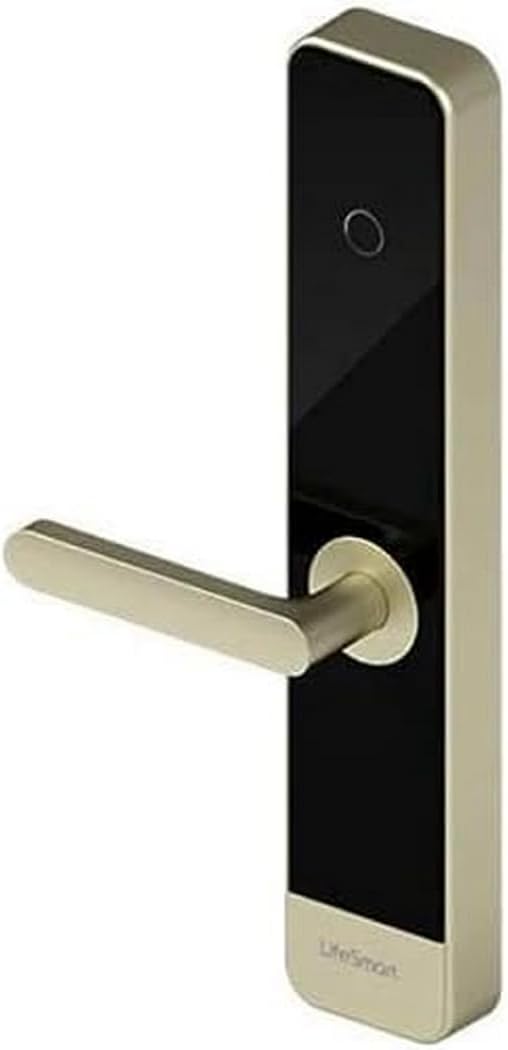
This image displays the LifeSmart LS101GS Smart Door Lock. It features a sleek, modern design with a gold-colored handle extending horizontally from a vertical black panel. The panel has a circular fingerprint sensor near the top and the 'LifeSmart' logo at the bottom. The overall structure is rectangular with rounded edges, indicating a contemporary aesthetic suitable for various door types.
4. 설정 및 설치
Proper installation is crucial for the optimal performance and security of your LifeSmart LS101GS Smart Door Lock. It is recommended to seek professional assistance if you are unsure about any steps.
4.1. 포장 풀기 및 준비
- 모든 구성품을 조심스럽게 꺼내어 포장 목록과 대조하여 확인하십시오.
- Ensure you have the necessary tools: screwdriver, measuring tape, drill (if required).
- Check your door's compatibility with the lock's dimensions (385 x 75 x 33 mm).
4.2. 배터리 설치
The lock requires 8 AA batteries for power. Locate the battery compartment, typically on the interior unit of the lock. Insert the batteries, ensuring correct polarity.
4.3. 물리적 설치
Follow the detailed instructions provided in the separate installation guide for mounting the lock on your door. This typically involves:
- Preparing the door (drilling holes if necessary).
- Installing the mortise lock.
- Mounting the exterior and interior lock units.
- Connecting internal cables.
- Securing all screws.
4.4. 초기 구성
After physical installation, power on the lock. Follow the on-screen prompts or refer to the quick start guide to set up an administrator password and register initial fingerprints or NFC cards.
5. 사용 설명서
5.1. 문 잠금 해제
- 지문: 등록된 손가락을 지문 센서에 대세요. 인식이 성공하면 잠금이 해제됩니다.
- 비밀번호: Enter your registered password on the keypad. For secure mode, you may enter random digits before and after your actual password to obscure it. Press the '#' key to confirm.
- NFC : Present your registered NFC device (e.g., smartphone, NFC card) to the NFC reader area on the lock.
- 열쇠: 물리적 키를 비상 열쇠 구멍에 넣고 돌려서 잠금을 해제하십시오.
5.2. 문 잠그기
The lock typically auto-locks after a set period once the door is closed. You can also manually lock it by lifting the handle or pressing a dedicated lock button on the interior unit, depending on the specific model configuration.
5.3. 알람 기능
- Duress Alarm: If you are forced to unlock the door under duress, entering a pre-set duress code will unlock the door silently while simultaneously sending an alert to your connected Smart Station or emergency contacts.
- 침입 경보: The lock will trigger an alarm if forced entry is detected or if multiple incorrect access attempts are made.
5.4. 사용자 관리
Access the lock's menu (usually by entering the administrator password) to add, modify, or delete user fingerprints, passwords, or NFC devices. Refer to the on-screen menu for specific navigation.
6. 유지관리
Regular maintenance ensures the longevity and reliable operation of your smart door lock.
- 배터리 교체: Replace all 8 AA batteries when the low battery indicator appears. Do not mix old and new batteries.
- 청소: Wipe the lock's surface and fingerprint sensor with a soft, dry cloth. Avoid using abrasive cleaners, solvents, or excessive moisture, as these can damage the electronic components or finish.
- 기계적 점검: Periodically check that all screws are secure and that the handle operates smoothly.
- 소프트웨어 업데이트: If connected to a Smart Station, ensure the lock's firmware is updated regularly for optimal performance and security features.
7. 문제 해결
If you encounter issues with your LifeSmart LS101GS Smart Door Lock, refer to the following common problems and solutions:
| 문제 | 가능한 원인 | 해결책 |
|---|---|---|
| 잠금이 응답하지 않습니다. | 배터리가 방전되었습니다. | AA건전지 8개를 모두 교체하세요. |
| 지문을 인식할 수 없습니다. | 손가락이 더럽거나 젖었거나, 센서가 더럽거나, 지문이 제대로 등록되지 않았습니다. | 손가락과 센서를 깨끗하게 닦으십시오. 문제가 지속되면 지문을 다시 등록하십시오. |
| 비밀번호가 유효하지 않습니다. | Incorrect password entered, or secure mode entry error. | Ensure correct password. Re-enter carefully, paying attention to secure mode sequence if applicable. |
| 경보가 예기치 않게 울렸습니다. | Sensitivity settings too high, or actual intrusion attempt. | Check sensitivity settings in the lock's menu. Investigate for signs of tamp에링. |
| Lock is unresponsive after power loss. | 일시적인 전자적 오류입니다. | Remove batteries for 1 minute, then reinsert. If possible, use the physical key. |
이러한 해결 방법을 시도한 후에도 문제가 지속되면 고객 지원팀에 문의하세요.
8. 기술 사양
| 사양 | 값 |
|---|---|
| 제조업체 | 라이프스마트 |
| 모델 번호 | LS101SL |
| 치수(길이 x 너비 x 높이) | 38.5 x 7.5 x 3.3cm(15.16 x 2.95 x 1.3인치) |
| 무게 | 1킬로그램(2.2파운드) |
| 재료 | 금속 |
| 전송 거리 | Up to 100 meters in open field |
| 빈도 | GFSK 433 MHz |
| 무선 프로토콜 | 코스 |
| 잠금 해제 방법 | Fingerprint, Password, NFC, Keys |
| 전원 공급 장치 | AA 배터리 8개 (포함되지 않음) |
| 작동 온도 | -30 ° C ~ + 60 ° C (-22 ° F ~ + 140 ° F) |
| 작동 습도 | 20 ~ 90 % (비 응축) |
9. 보증 및 지원
Your LifeSmart LS101GS Smart Door Lock comes with a warranty provided by the seller, Eternal Security.
반품 정책: If the product is found to be defective, customers have up to 30 days from the date of purchase to return it for a 100% refund.
For any technical questions, incidents, or warranty claims, please contact Eternal Security directly. They are committed to providing quality products and excellent service, with customer satisfaction as their top priority.
Ask a question about this manual
Ask about setup, troubleshooting, compatibility, parts, safety, or missing instructions. Manuals+ will review the question and use this page’s manual context to help answer it.