
1. 서론
This manual provides detailed instructions for the safe and effective use of the Walfront PM6508 Digital Temperature Humidity Meter. This device is designed for high-precision measurement of ambient temperature and relative humidity, offering features such as data hold, backlight display, and wet bulb/dew point temperature calculations. It is suitable for various applications including home, office, industrial settings, and environmental monitoring.
2. 안전 정보
Please read and understand all safety warnings and operating instructions before using this instrument. Failure to follow these instructions may result in electric shock, fire, or injury.
- 미터기가 손상된 것처럼 보이거나 배터리 덮개가 제대로 닫히지 않은 경우 작동하지 마십시오.
- Avoid exposing the meter to extreme temperatures, direct sunlight, or high humidity for prolonged periods.
- 계량기를 직접 수리하거나 개조하지 마십시오. 모든 서비스는 자격을 갖춘 전문가에게 맡기십시오.
- 장기간 사용하지 않을 경우 누액을 방지하기 위해 배터리를 제거하십시오.
- Keep the sensor area clean and free from obstructions to ensure accurate readings.
3. 제품 오버view
The Walfront PM6508 is a compact and portable digital meter designed for accurate environmental measurements. It features an easy-to-read LCD display with backlight and intuitive button controls.

그림 3.1: 앞쪽 view of the Walfront PM6508 meter with key components labeled. This includes the temperature and humidity sensor at the top, the HD display, various control buttons (Power, Max/Min, Data Hold, Data Storage, Unit Switch, Backlight), and an anti-fall protective sleeve.
3.1 주요 특징
- 고정밀 센서: 정확한 온도와 습도 측정값을 제공합니다.
- 백라이트가 있는 LCD 디스플레이: 다양한 조명 조건에서도 선명한 가독성을 보장합니다.
- 데이터 홀드 기능: 디스플레이에 현재 판독값을 고정합니다.
- 데이터 저장: Stores up to 100 groups of measurement data.
- Wet Bulb & Dew Point Temperature: Calculates and displays these critical environmental parameters.
- 단위 전환: 섭씨(°C)와 화씨(°F)를 쉽게 전환할 수 있습니다.
- 자동 종료: 배터리 수명을 보존합니다.
- 저전력 표시기: 배터리 교체가 필요할 때 알림을 보냅니다.
3.2 패키지 내용

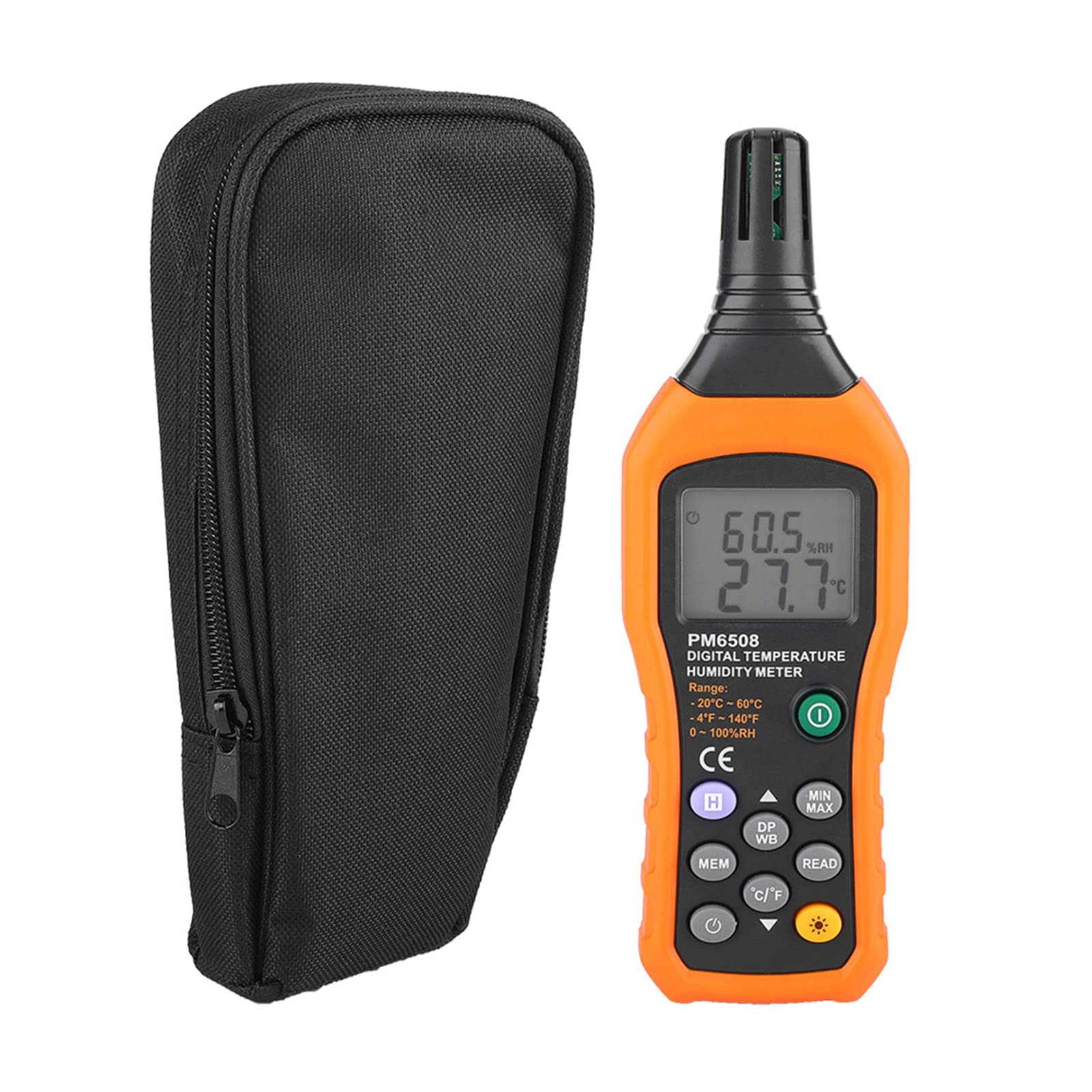
그림 3.2: The Walfront PM6508 meter shown alongside its portable storage bag, indicating typical package contents.
- Walfront PM6508 Digital Temperature Humidity Meter
- 휴대용 보관 가방
- 사용자 설명서
4. 설정
4.1 배터리 설치
The PM6508 meter requires 4 x 1.5V AAA batteries (not included) for operation.
- 측정기 뒷면에서 배터리 덮개를 찾으세요.
- 배터리 덮개를 아래로 밀어서 엽니다.
- AAA 배터리 4개를 넣을 때, 배터리함 안쪽에 표시된 극성(+와 -)을 정확히 맞춰주세요.
- 배터리 덮개를 다시 밀어서 제자리에 고정하고 딸깍 소리가 날 때까지 밀어 넣습니다.
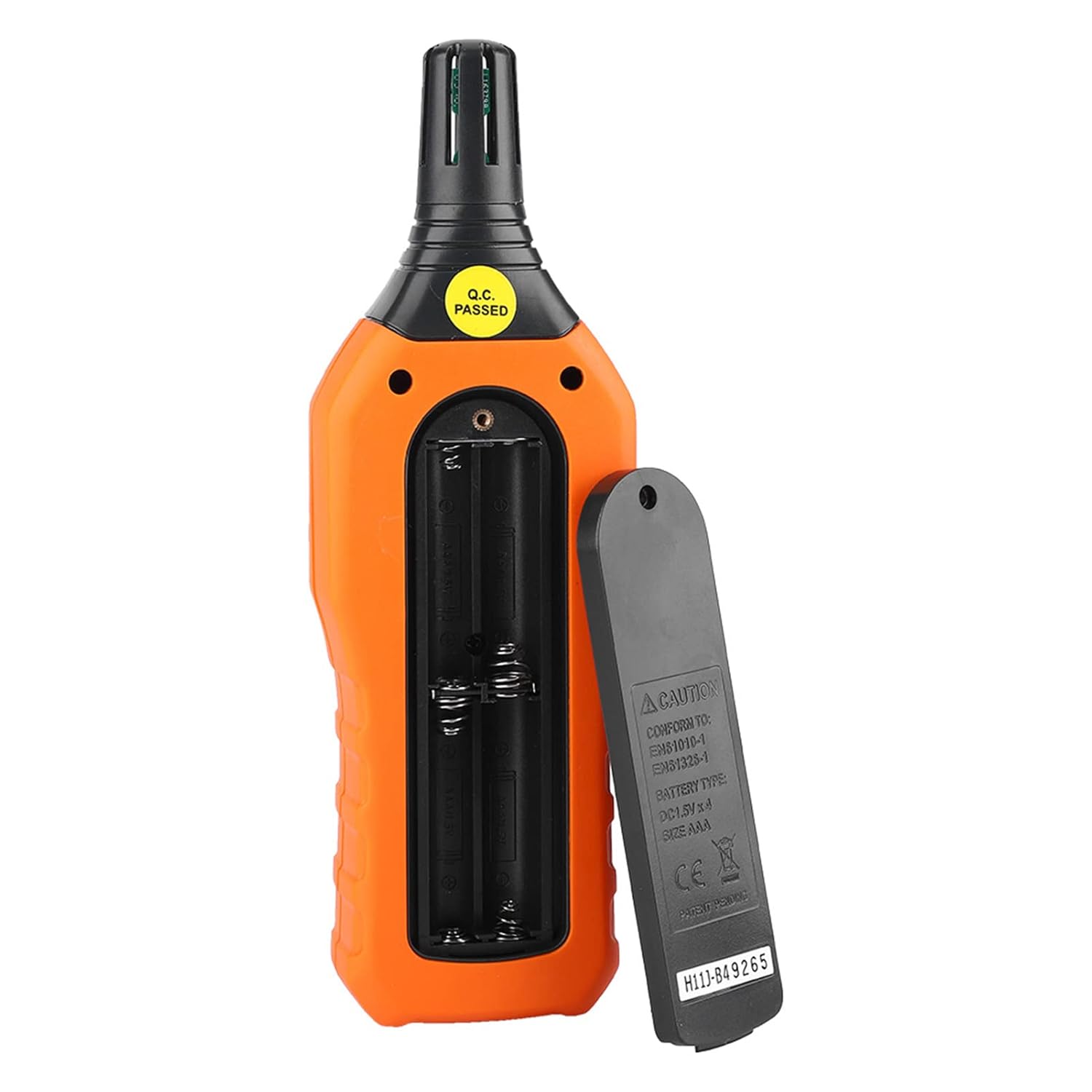
그림 4.1: 뒤쪽 view of the meter showing the open battery compartment for AAA battery installation.
5. 사용 설명서
5.1 전원 켜기/끄기
- 를 누르세요 green power button (
 ) to turn the meter on.
 - 를 누르고 계세요 gray power button () for approximately 2 seconds to turn the meter off. The meter also features an automatic shut-down function to conserve battery life.
5.2 측정하기
Once powered on, the meter will immediately begin displaying real-time temperature and humidity readings on the LCD screen. Ensure the sensor at the top of the device is exposed to the environment you wish to measure.

그림 5.1: The meter in use, displaying temperature and humidity readings on its LCD screen.
5.3 단위 전환(°C/°F)
섭씨(°C)와 화씨(°F) 온도 단위를 전환하려면 다음 단계를 따르세요.
- 를 누르세요 °C/°F 버튼 () located on the keypad. The display will update to show readings in the selected unit.
5.4 백라이트 기능
To activate or deactivate the display backlight:
- 를 누르세요 백라이트 버튼 () to toggle the backlight on or off. This is useful for reading in low-light conditions.
5.5 데이터 홀드(H)
디스플레이에 표시되는 현재 값을 고정하려면:
- 를 누르세요 H 버튼 (). The "H" icon will appear on the display, indicating that the data is held.
- 를 누르세요 H 버튼 again to release the data hold and resume real-time measurements.
5.6 Maximum/Minimum (MIN/MAX) Measurement
에게 view the maximum or minimum recorded values:
- 를 누르세요 최소/최대 버튼 () once to display the maximum temperature and humidity recorded since the meter was powered on or the function was reset.
- 를 누르세요 최소/최대 버튼 again to display the minimum temperature and humidity.
- 를 누르세요 최소/최대 버튼 a third time to exit the MIN/MAX mode and return to real-time readings.
5.7 Data Storage (MEM) and Retrieval (READ)
The meter can store up to 100 groups of measurement data.
- To Store Data: 를 누르세요 MEM 버튼 () to save the current temperature and humidity readings. The display will briefly show a memory location number.
- To Retrieve Data: 를 누르세요 읽기 버튼 () to enter data retrieval mode. Use the MEM 버튼 to scroll through stored data records.
- To Exit Retrieval: 를 누르세요 읽기 버튼 again to exit data retrieval mode.
5.8 Wet Bulb (WB) and Dew Point (DP) Temperature
To display Wet Bulb or Dew Point temperatures:
- 를 누르세요 DP/WB button () once to display the Dew Point temperature.
- 를 누르세요 DP/WB button again to display the Wet Bulb temperature.
- 를 누르세요 DP/WB button a third time to return to standard temperature and humidity display.
6. 유지관리
6.1 청소
- 계량기의 c를 닦으세요asing는 부드러운 d로 발음합니다.amp 천. 연마성 세척제나 용매를 사용하지 마십시오.
- Keep the sensor area clean and free from dust or debris to ensure accurate readings. Do not insert any objects into the sensor opening.
6.2 보관
- When not in use for extended periods, remove the batteries to prevent leakage and damage to the device.
- 측정기는 직사광선과 극한의 온도를 피해 서늘하고 건조한 곳에 보관하세요.
- Utilize the provided portable storage bag for protection during storage and transport.
7. 문제 해결
| 문제 | 가능한 원인 | 해결책 |
|---|---|---|
| 미터의 전원이 켜지지 않습니다. |
|
|
| 부정확한 판독값. |
|
|
| 디스플레이가 어둡거나 깜빡입니다. |
|
|
| Cannot store or retrieve data. |
|
|
8. 사양
The following table outlines the technical specifications for the Walfront PM6508 Digital Temperature Humidity Meter.


그림 8.1: Detailed technical specifications including ranges, resolution, and precision for temperature, humidity, wet bulb, and dew point measurements, along with general parameters.
| 매개변수 | 값 |
|---|---|
| 모델 | 오후 6508 |
| 주변 온도 범위 | -20 ~ 60 °C (-4 ~ 140 °F) |
| 주변 온도 정밀도 | ±1.5 °C (-20 to 0 °C, 45 to 60 °C), ±0.5 °C (0 to 45 °C) |
| 상대 습도 범위 | 0% - 100% 상대습도 |
| Relative Humidity Precision | ±4.0% (0-20%, 80-100%), ±3.0% (20-80%) |
| 습구 온도 범위 | -20 ~ 60 °C (4 ~ 140 °F) |
| Wet Bulb Temperature Precision | ±1.5 °C (-20 to 0 °C, 45 to 60 °C), ±0.5 °C (0 to 45 °C) |
| 이슬점 온도 범위 | -50 ~ 60 °C (-58 ~ 140 °F) |
| Dew Point Temperature Precision | ±1.5 °C (-50 to 0 °C, 45 to 60 °C), ±0.5 °C (0 to 45 °C) |
| 해결 | 0.1 °C / °F / %RH |
| 데이터 저장 | 100개 그룹 |
| 전원 공급 장치 | 4 x 1.5V AAA Battery (not included) |
| 치수(길이 x 너비 x 높이) | 180 x 60 x 29mm(7.1 x 2.4 x 1.1인치) |
| 무게 | 254g(9온스) |
| 작동 습도 | 0% - 100% (비응축) |
9. 응용 프로그램
The Walfront PM6508 is suitable for a wide range of applications requiring accurate temperature and humidity monitoring.

그림 9.1: Examples of environments where the PM6508 meter can be effectively used for temperature and humidity monitoring.
- Residential and Office Environments: Monitoring indoor climate for comfort and health.
- Industrial Production: Ensuring optimal conditions for manufacturing processes.
- Warehousing and Storage: Protecting goods sensitive to temperature and humidity, such as in wine cellars or general storage.
- 농업: Monitoring conditions in planting sheds, greenhouses, and aquaculture.
- Research and Development Laboratories: Maintaining precise environmental controls for experiments.
- HVAC 시스템: Assisting in the evaluation and maintenance of heating, ventilation, and air conditioning systems.
10. 보증 및 지원
Walfront products are designed for reliability and performance. For warranty information, technical support, or service inquiries, please refer to the contact information provided with your purchase or visit the official Walfront web사이트. 보증 청구를 위해 구매 증빙 자료를 보관하세요.