
1. 서론
The D-Link DGS-1100-05PDV2 is a 5-Port Gigabit Smart Managed PoE Powered Switch/Extender designed for small, medium, and enterprise network environments. This switch is unique as it receives its power via Power over Ethernet (PoE) from an upstream PoE switch or injector, eliminating the need for a local AC power source. It also features PoE Pass-through capabilities, allowing it to supply power to one or two downstream PoE-enabled devices. The DGS-1100-05PDV2 incorporates energy-saving technologies like IEEE 802.3az Energy Efficient Ethernet and D-Link Green, ensuring efficient operation. Management is facilitated through an intuitive web-based interface, providing comprehensive control over network settings and features.
2. 주요 특징
- PoE Powered Operation: Receives power from an upstream PoE Switch or PoE injector, eliminating the need for a dedicated AC power supply.
- PoE Pass-through: Provides PoE power to one or two downstream devices, extending network and power reach.
- 5개의 기가비트 포트: Offers high-speed network connectivity for various devices.
- Smart Managed Capabilities: Features include 802.1Q VLAN support, Quality of Service (QoS), and Bandwidth Limiting for optimized network performance.
- 고급 보안 기능: Includes Static MAC, Storm Control, and IGMP Snooping to enhance network security and stability.
- 에너지 효율성: Compliant with IEEE 802.3az Energy Efficient Ethernet (EEE) and D-Link Green technology for reduced power consumption.
- 간편한 관리: Configurable via an intuitive web-based management interface for simplified network administration.
- 진단 도구: Features Loopback Detection and Cable Diagnostics to assist in quickly identifying and resolving network issues.
- 팬리스 디자인: Ensures silent operation and contributes to a longer product lifespan.
- 유연한 장착: Supports both desktop and wall mount placement.
- 평생 보증: Backed by a D-Link Lifetime Warranty for long-term reliability.
3. 패키지 내용
패키지에 다음 품목이 포함되어 있는지 확인하십시오.
- DGS-1100-05PDV2 Gigabit Switch
- 고무 발
- 장착 나사
- 빠른 설치 가이드
- 보증서
Note: A PoE injector or an upstream PoE switch is required to power the DGS-1100-05PDV2 and is not included in the package.
4. 설정 지침
4.1 물리적 설치
The DGS-1100-05PDV2 switch is designed for flexible placement, supporting both desktop and wall mounting. Ensure the installation location provides adequate ventilation and is free from excessive heat or moisture.

그림 4.1: 전면 view of the D-Link DGS-1100-05PDV2 switch, showing five Gigabit Ethernet ports and LED indicators.
4.2 스위치 전원 공급
This switch is PoE-powered. It receives power from an upstream PoE switch or a PoE injector. Connect an Ethernet cable from a PoE-enabled port on your upstream device to any of the five ports on the DGS-1100-05PDV2. The switch will draw power through this connection.
The switch also features a grounding screw for enhanced safety. If required by your installation environment, connect a grounding wire to the "SWITCH GND" terminal on the rear panel of the device.

그림 4.2: 예ample network diagram illustrating PoE power input and connections to various devices.
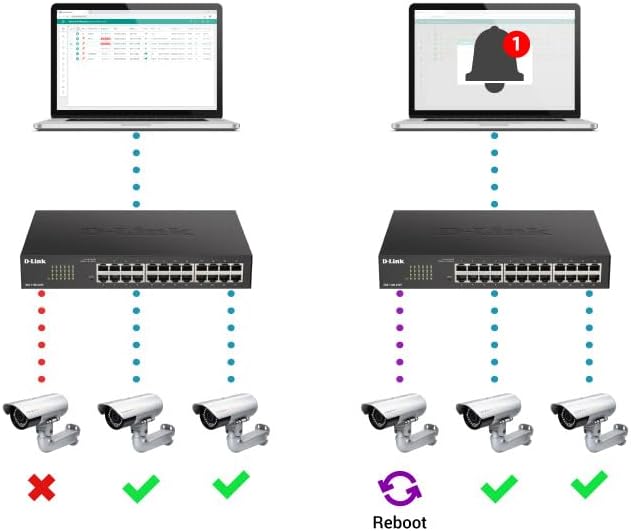
Figure 4.3: Rear panel of the switch, highlighting the "SWITCH GND" terminal for grounding.
4.3 초기 구성 (Web-Based Management)
The DGS-1100-05PDV2 can be managed via a web-based interface. By default, the switch may have a static IP address (e.g., 10.90.90.90) or obtain one via DHCP. To access the web 인터페이스:
- 컴퓨터를 스위치의 이더넷 포트 중 하나에 직접 연결하십시오.
- Configure your computer's IP address to be in the same subnet as the switch's default IP (e.g., if the switch is 10.90.90.90, set your computer to 10.90.90.x with a subnet mask of 255.255.255.0).
- 열기 web browser and enter the switch's default IP address (e.g., http://10.90.90.90).
- Log in using the default credentials (typically username: 관리자, 비밀번호: 관리자 or blank). Refer to the Quick Installation Guide for specific default credentials.
- Once logged in, you can configure network settings, including changing the IP address to DHCP or a different static IP, and enable desired features. Remember to save your configuration changes to ensure they persist after a reboot.
5. 스위치 작동
The DGS-1100-05PDV2 is a Smart Managed switch, offering various functionalities to optimize your network. After initial setup, you can utilize the web-based management interface to configure and monitor the switch.
5.1 PoE Pass-through Functionality
The switch supports PoE Pass-through on ports 1 and 2. This means that if the switch itself is powered by PoE (e.g., from an 802.3at source), it can then provide power to up to two downstream PoE-enabled devices connected to ports 1 and 2. The maximum PoE budget available for downstream devices depends on the input power received by the switch.
5.2 네트워크 관리 기능
를 통해 web interface, you can configure advanced Layer 2 features:
- VLAN(가상 근거리 통신망): Segment your network for improved security and performance (e.g., 802.1Q VLAN support, Voice VLAN, Surveillance VLAN).
- 서비스 품질(QoS): Prioritize network traffic for critical applications like VoIP and video streaming.
- 대역폭 제어: Manage bandwidth allocation per port to prevent network congestion.
- Static MAC: Manually assign MAC addresses to ports for enhanced security.
- 폭풍 통제: 브로드캐스트, 멀티캐스트 또는 알 수 없는 유니캐스트 폭주로 인한 네트워크 중단을 방지합니다.
- IGMP 스누핑: IPTV 및 기타 멀티캐스트 애플리케이션에 유용한 멀티캐스트 트래픽 전달을 최적화합니다.
- 포트 미러링: 한 포트에서 다른 포트로 패킷 사본을 전송하여 네트워크 트래픽을 모니터링합니다.
- 스패닝 트리 프로토콜(STP/RSTP): Prevent network loops in complex topologies.
6. 유지관리
The DGS-1100-05PDV2 is designed for minimal maintenance due to its fanless operation, which reduces moving parts and potential points of failure. However, regular checks and best practices are recommended:
- 펌웨어 업데이트: Periodically check the D-Link support web최적의 성능, 보안 및 새로운 기능 이용을 보장하기 위한 펌웨어 업데이트 사이트입니다.
- 물리적 검사: Ensure the switch is placed in a well-ventilated area, free from dust and obstructions that could impede airflow. Keep the device clean using a soft, dry cloth.
- 케이블 관리 : Ensure all Ethernet cables are securely connected and properly routed to prevent accidental disconnections or damage.
- 구성 백업: Regularly back up your switch configuration settings through the web 인터페이스입니다. 이를 통해 실수로 설정이 변경되거나 기기를 교체한 경우에도 신속하게 복원할 수 있습니다.
7. 문제 해결
This section provides solutions to common issues you might encounter with your DGS-1100-05PDV2 switch.
7.1 No Power / Switch Not Turning On
- Verify that the switch is connected to a functioning PoE source (e.g., a PoE switch or PoE injector).
- Ensure the PoE source is active and providing sufficient power (e.g., 802.3at for full functionality, or 802.3af for basic operation).
- Check the Ethernet cable connecting the switch to the PoE source for damage or improper connection.
7.2 접근할 수 없습니다 Web 관리 인터페이스
- IP 주소 불일치: Ensure your computer's IP address is in the same subnet as the switch's IP address. If the switch is at its default static IP (10.90.90.90), configure your computer with a static IP like 10.90.90.x (where x is not 90) and a subnet mask of 255.255.255.0.
- DHCP Issue: If the switch is configured for DHCP, use an IP scanner tool or check your router's DHCP client list to find the IP address assigned to the switch.
- Incorrect Credentials: Double-check the username and password. Default credentials are often 관리자 둘 다에게요.
- 브라우저 호환성: Try accessing the interface with a different web 브라우저.
- 공장 기본값으로 재설정: If all else fails, perform a factory reset. Locate the 'Reset' button on the front panel (often recessed, requiring a paperclip to press) and hold it for approximately 5-10 seconds until the LEDs indicate a reset. 경고: 이렇게 하면 모든 사용자 지정 설정이 삭제됩니다.
7.3 네트워크 연결 문제
- 케이블 진단: Utilize the built-in Cable Diagnostics feature via the web interface to test the integrity of connected Ethernet cables.
- 루프백 감지: If enabled, this feature can detect and prevent network loops. Check the switch logs for loopback events.
- LED 표시등: Observe the Link/Act LEDs on the switch ports. A solid green or amber light indicates a valid link, while a blinking light indicates activity. No light suggests a cable issue or a problem with the connected device.
- VLAN 구성: Ensure devices are assigned to the correct VLANs if VLANs are configured on the switch.
8. 기술 사양
| 기인하다 | 세부 사항 |
|---|---|
| 모델 번호 | DGS-1100-05PDV2 |
| 포트 수 | 5개의 기가비트 이더넷 포트 |
| PoE 지원 | PoE Powered (Input), PoE Pass-through on ports 1 & 2 (Output) |
| 데이터 전송 속도 | 10/100/1000Mbps(기가비트) |
| 인터페이스 유형 | RJ45 |
| 케이스 소재 | 금속 |
| 제품 크기(LxWxH) | 10.16" x 8.26" x 2.79"(25.8cm x 21cm x 7.1cm) |
| 품목 무게 | 0.5파운드(약 227그램) |
| 작동 온도 | 화씨 32도에서 화씨 104도(섭씨 0도에서 40도) |
| 에너지 효율성 | IEEE 802.3az 에너지 효율 이더넷(EEE) |
| 관리 | Web-based GUI, D-Link Network Assistant |
| VLAN 지원 | 802.1Q VLAN, Voice VLAN, Surveillance VLAN |
| 보증 | 평생 보증 |

Figure 8.1: Dimensions of the DGS-1100-05PDV2 switch.
9. 보증 및 기술 지원
9.1 평생 보증
The D-Link DGS-1100-05PDV2 is backed by a 평생 보증, which includes Next Business Day (NBD) hardware replacement. This warranty provides long-term confidence in the product's reliability. Please refer to the included warranty card or the D-Link official web전체 이용 약관에 대한 사이트.
9.2 기술 지원
For technical assistance, product documentation, and firmware updates, please visit the official D-Link support web대지:
- 미국 지원: http://support.dlink.com
- 캐나다 지원: http://support.dlink.ca
D-Link Systems, Inc. is located at 14420 Myford Road, Suite 100, Irvine, CA 92606, USA.