1. 소개 및 이상view
The WANPTEK DPS3010U is a high-precision, adjustable DC power supply designed for various applications requiring stable and reliable power. It features a clear 4-digit LED display that simultaneously shows voltage, 전류 및 전력 출력.
- USB 빠른 충전: Equipped with a built-in fast charging protocol identification chip, supporting USB fast charging for compatible devices.
- 안전한 작동 : Incorporates multiple protection mechanisms including Over-Voltage Protection (OVP), Over-Current Protection (OCP), Over-Temperature Protection, and an enhanced short-circuit alarm function.
- 조정 가능한 출력: Both output voltage and current can be continuously adjusted from 0 up to their nominal values, with options for fine and coarse adjustments for precise control.
- 명확한 전시: The 4-digit LED display provides high accuracy readings for voltage, current, and power, ensuring easy monitoring during operation.
- 다양한 용도: Suitable for a broad range of uses, including mobile phone and computer repair, electrical maintenance, scientific research in laboratories, and industrial production lines.

그림 1.1: 전면 view of the WANPTEK DPS3010U DC Power Supply, showing the LED display and control knobs.
2. 설정
2.1 풀기 및 검사
Carefully remove the power supply and all accessories from the packaging. Inspect all components for any signs of damage during transit. If any damage is found, contact your supplier immediately.
2.2 패키지 내용
The standard package for the DPS3010U includes:
- 1 × WANPTEK DPS3010U DC Power Supply Unit
- 1 × 전원 코드
- 1 × Alligator Clip Test Lead
- 사용자 설명서 1부 (영문)

Figure 2.1: The DPS3010U power supply shown with its standard accessories: power cord, alligator clip test leads, and user manual.
2.3 전원 연결
- Ensure the power supply's input voltag후면 패널의 e 스위치가 올바른 볼륨으로 설정되어 있습니다.tag해당 지역의 전압(115V 또는 230V)을 확인하세요.
- Connect the provided power cord to the power socket on the rear panel of the unit.
- 전원 코드의 다른 쪽 끝을 접지된 AC 전원 콘센트에 꽂습니다.

Figure 2.2: Rear panel details, highlighting the cooling fan, input voltage switch (115V/230V), power socket, and fuse box.
3. 사용 설명서
3.1 전면 패널 컨트롤
Familiarize yourself with the front panel controls and indicators:
- 디스플레이 화면: 쇼 Voltag전압(V), 전류(A), 전력(W).
- V-COARSE / V-FINE: Knobs for coarse and fine adjustment of output voltage.
- A-COARSE / A-FINE: Knobs for coarse and fine adjustment of output current.
- Quick Charge (USB): USB port for fast charging compatible devices.
- C.V. / C.C. Indicators: LEDs indicating Constant Voltage (C.V.) or Constant Current (C.C.) operating mode.
- OCP 지표: LED indicating Over-Current Protection is active.
- 전원 스위치: 기기를 켜거나 끕니다.
- 출력 단자: Positive (+, Red), Negative (-, Black), and Ground (GND, Green) terminals for connecting loads.
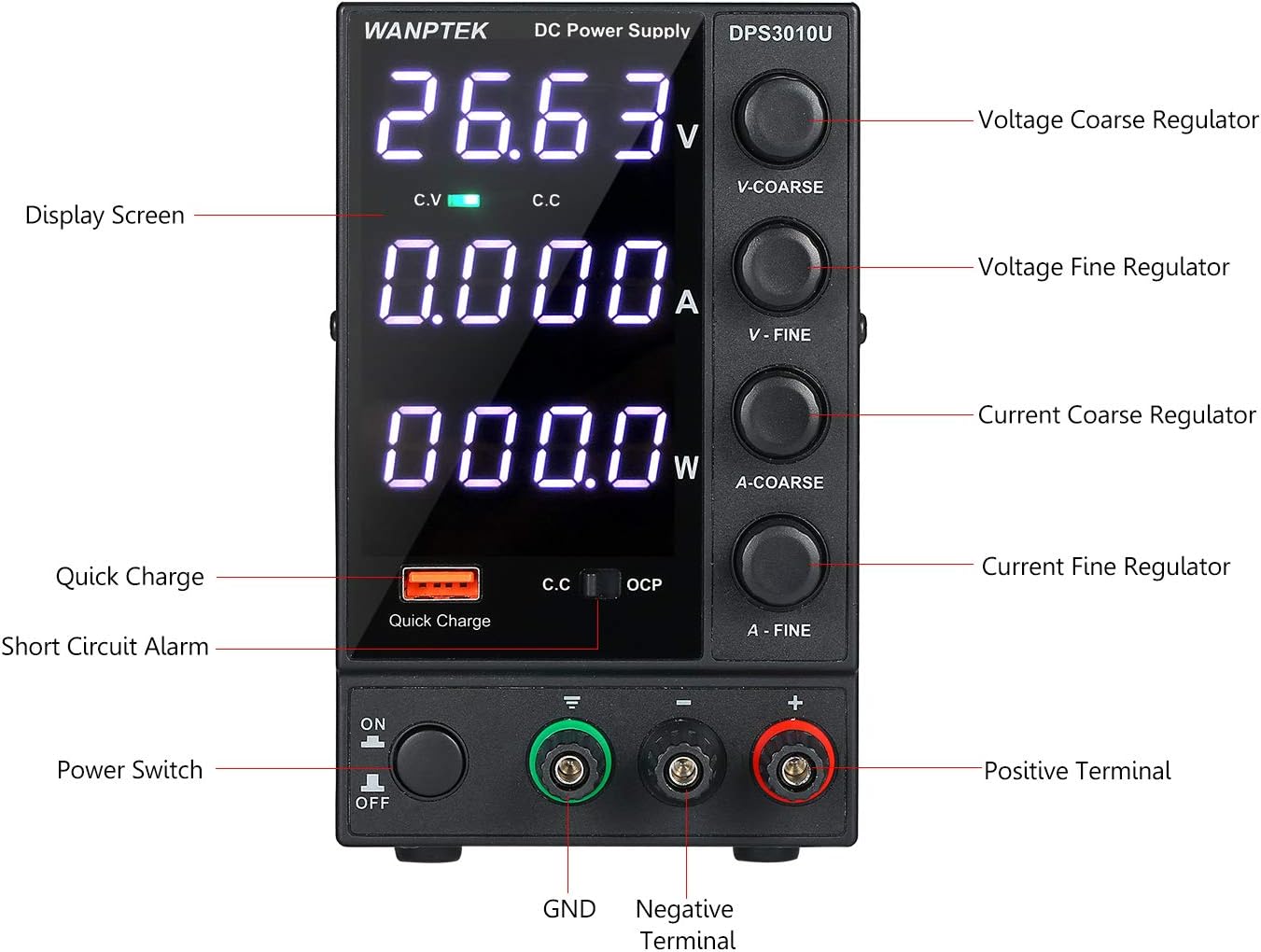
그림 3.1: 상세 view of the front panel with labels for all controls and indicators.
3.2 기본 작업
- 전원 켜기: Press the Power Switch to turn on the unit. The LED display will illuminate.
- 볼륨 조정tage: Use the V-COARSE knob for large voltage adjustments and the V-FINE knob for precise adjustments. Observe the voltag디스플레이에 표시되는 내용입니다.
- Adjust Current Limit: Use the A-COARSE knob for large current limit adjustments and the A-FINE knob for precise adjustments. This sets the maximum current the power supply will deliver.
- 연결 부하: Connect your device or circuit to the output terminals. Ensure correct polarity (Positive to Positive, Negative to Negative).
- 모니터 출력 : The display will show the actual voltage, current, and power being delivered to the load. The C.V. or C.C. indicator will light up to show the operating mode.
- USB 빠른 충전: For fast charging, connect your USB-compatible device to the Quick Charge port. The power supply's built-in chip will identify the fast charging protocol.
4. 유지관리
4.1 일반 관리
- Keep the power supply clean and free from dust. Use a soft, dry cloth for cleaning. Do not use liquid cleaners or solvents.
- Avoid operating the unit in environments with excessive dust, humidity, or extreme temperatures.
- 통풍구를 막지 마십시오. 기기 주변에 충분한 공기 흐름이 확보되도록 하십시오.
4.2 냉각 시스템
The DPS3010U is equipped with an internal cooling fan to dissipate heat during operation. Ensure the fan intake and exhaust vents are clear of obstructions to maintain optimal performance and prevent overheating.

그림 4.1: 측면 view illustrating the cooling fan and intended airflow path for heat dissipation.
4.3 퓨즈 교체
If the unit fails to power on, check the fuse located in the fuse box on the rear panel. Replace it with a fuse of the same type and rating (3 Amp오히려).
5. 문제 해결
5.1 보호 모드
The power supply incorporates several protection features to safeguard both the unit and the connected load:
- 전류 제한 보호: When the load current exceeds the set current limit, the power supply will enter Constant Current (C.C.) mode, limiting the output current to the set value.
- Short Circuit Alarm Stop Output and Self-Recovery: In case of a short circuit at the output terminals, the unit will stop outputting power and trigger an alarm. Once the short circuit is removed, the unit will automatically recover and resume normal operation.
- 오버볼tage Protection (OVP) / Over-Current Protection (OCP) / Over-Temperature Protection: These internal protections will shut down the output if voltage, current, or internal temperature exceed safe limits.

Figure 5.1: Visual representation of the USB Quick Charging and Short Circuit Protection features.
5.2 일반적인 문제 및 해결 방법
| 문제 | 가능한 원인 | 해결책 |
|---|---|---|
| 전원을 켜도 전원이 들어오지 않습니다 | Power cord not connected, fuse blown, input voltage 스위치가 잘못되었습니다. | Check power cord connection. Replace fuse if blown. Verify input voltage 스위치 설정. |
| 출력 볼륨 없음tag현재 | 출력 단자가 연결되지 않았습니다. 볼륨tage/current set to zero, protection mode active. | 부하가 제대로 연결되었는지 확인하십시오. 볼륨을 조절하십시오.tage/current knobs. Check for short circuits or overloads. |
| 장치 과열 | 환기가 막혀 있고, 부하가 너무 큽니다. | Ensure vents are clear. Reduce load or operate within specified limits. |
6. 사양
Detailed technical specifications for the WANPTEK DPS3010U:
| 매개변수 | 값 |
|---|---|
| 모델 | DPS3010U |
| 출력 볼륨tage | 0-30V |
| 출력 전류 | 0-10A |
| 출력 전력 | 300와트 |
| 보조 출력 | USB Quick Charging 18W (supports multiple fast charging protocols) |
| 입력 Voltage | AC 230V ± 10%, 50Hz; AC 115V ± 10%, 60Hz |
| 작동 온도 | 0~40°C; Humidity: <80% RH |
| 보관 온도 | -10~70°C; Humidity: <70% RH |
| 권tage 안정성(CV) | 0.1% ± 3mV 이하 |
| 부하 안정성(CV) | 0.1% ± 3mV 이하 |
| Ripple Noise (CV) | ≤20mVrms (Effective value) |
| 전류 안정성(CC) | ≤0.1% ± 3mA |
| 하중 안정성(CC) | ≤0.2% ± 3mA |
| Ripple Noise (CC) | ≤5mA (Effective value) |
| 보호 모드 | Current limiting protection / short circuit alarm stop output and self-recovery |
| 표시하다 | Four-digit digital tube, three-window display (Voltag예: 전류, 전력) |
| 디스플레이 정확도 | 0.5% ± 3자리 |
| 디스플레이 해상도(볼륨)tage) | 0.01V |
| 디스플레이 해상도(현재) | 0.001A |
| 퓨즈 | 3A |
| 제품 치수(L×W×H) | 246 × 90 × 152mm (9.68 × 3.54 × 5.98 인치) |
| 제품 무게 | 1571그램(55.42온스) |

Figure 6.1: Manufacturer's specification table for DPS series power supplies, including the DPS3010U.

Figure 6.2: Dimensional drawing of the DPS3010U, showing length, width, and height measurements.
7. 보증 및 지원
Information regarding product warranty and customer support was not provided in the available product data. Please refer to the documentation included with your purchase or contact the manufacturer directly for warranty details and technical assistance.