
iKiKin M16
iKiKin M16 HUD Car Head-Up Display User Manual
Model: M16 | Brand: iKiKin
1. 서론
The iKiKin M16 Head-Up Display (HUD) is an advanced vehicle accessory designed to enhance driving safety and convenience by projecting essential driving data directly into the driver's line of sight. Utilizing GPS technology, it provides accurate information such as vehicle speed, compass direction, altitude, driving time, and mileage. The M16 features a 3.5-inch HD display with integrated shading for clear readability in various lighting conditions and includes intelligent alarm functions to alert drivers to potential hazards.

Figure 1.1: iKiKin M16 HUD device displaying speed and compass information.
2. 제품 오버view
2.1 주요 특징
- 3.5인치 HD 디스플레이: Clear and bright display with integrated lens cover to prevent image duplication.
- 자동 밝기 조절: Built-in light sensor adjusts display brightness based on ambient light.
- GPS Data Display: Shows speed, GPS compass, altitude, mileage, and driving time.
- 안전 알람: Includes over-speed alarm and fatigue driving reminder.
- 보편적 인 호환성 : Works with all vehicle types (cars, trucks, motorcycles, new energy vehicles, hybrid cars).
- 내구성 있는 소재: Constructed from PC + ABS material, resistant to extreme temperatures (-100°F to 170°F).
- USB 전원 공급 장치: Low power consumption, no power theft when vehicle is turned off.
2.2 패키지 내용
다음 품목이 패키지에 포함되어 있는지 확인하세요.
- iKiKin M16 HUD Unit
- USB 전원 케이블
- 미끄럼 방지 매트
- Reflective Film (optional for clearer projection)
- 사용 설명서 (본 문서)

Figure 2.1: The iKiKin M16 HUD is designed for universal compatibility across various vehicle types.
3. 설정 및 설치
Follow these steps to properly set up and install your iKiKin M16 HUD:
- 놓기: 대시보드에서 HUD가 시야를 가리지 않는 적절한 평평한 표면을 선택하세요. view of the road. Ensure the surface is clean and dry.
- 기기를 안전하게 보호하세요: Place the provided anti-slip mat on the chosen dashboard location. Then, place the iKiKin M16 HUD unit on the mat to secure it.
- 전원 연결: Connect the supplied USB power cable to the HUD unit's power input port. Plug the other end of the USB cable into your vehicle's USB port or a 5V USB car charger (not included). The device will power on automatically with the vehicle's ignition.
- 반사 필름(선택 사항): If you experience a double image or prefer a clearer projection, you can apply the reflective film to your windshield.
- Clean the windshield area where the HUD will project.
- Peel off the protective layer from the reflective film.
- Carefully apply the film to the windshield, ensuring no air bubbles. Use a card to smooth it out.
- 위치: Adjust the angle of the HUD unit so that the display is clearly visible and aligned with your driving position.
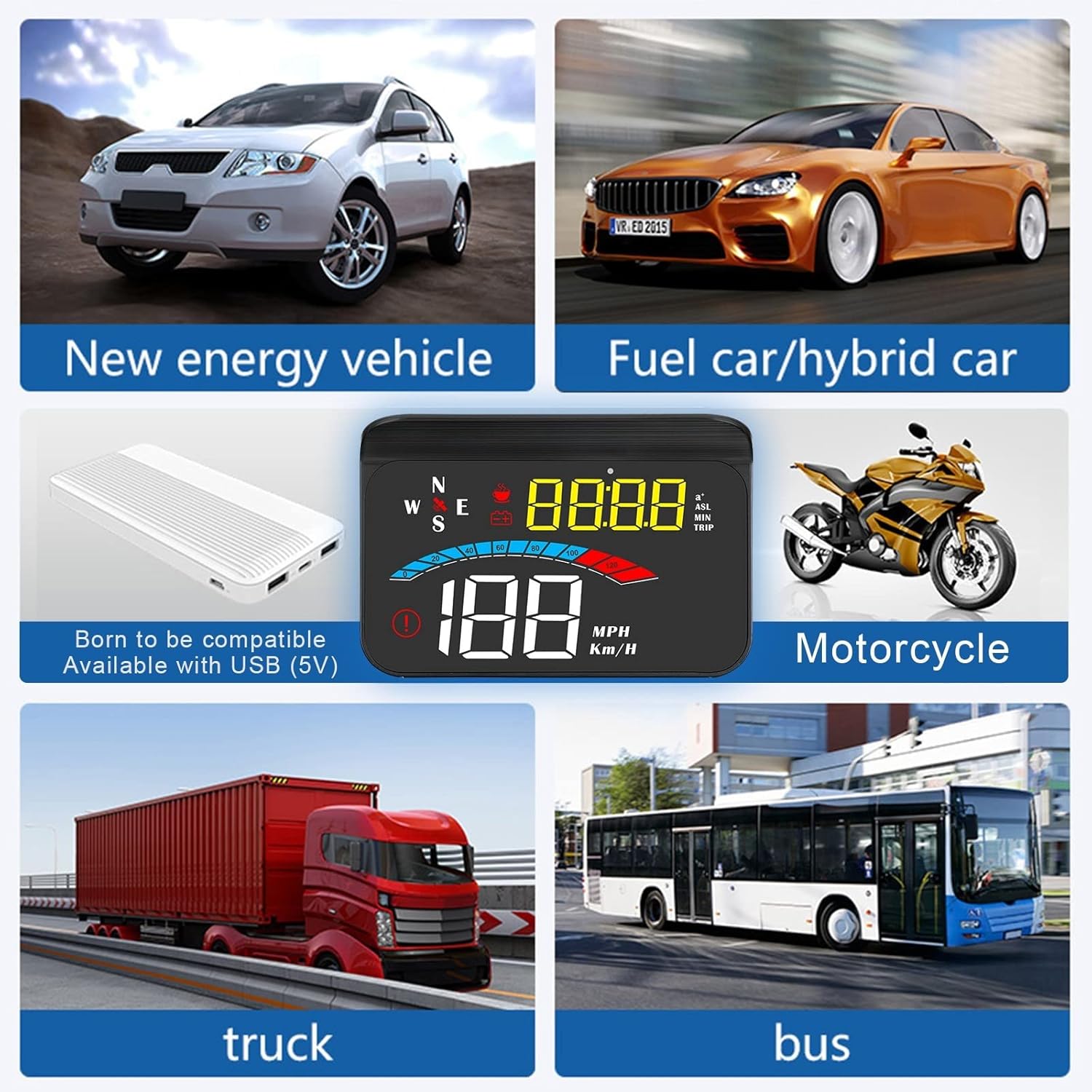
Figure 3.1: The iKiKin M16 HUD is compatible with a wide range of vehicles, connecting via USB (5V).
4. 사용 설명서
The iKiKin M16 HUD provides various driving data and functions. The device automatically adjusts brightness based on ambient light, but manual adjustment is also possible.
4.1 표시 모드 및 데이터
The HUD can display multiple types of data. Use the control button (usually a scroll wheel or button on the side/back) to cycle through display modes.
- 속도: Displays current vehicle speed in MPH or Km/H.
- GPS 나침반: Shows current driving direction (N, S, E, W, NE, NW, SE, SW).
- 고도: Displays current altitude based on GPS data.
- 사용량: Tracks trip mileage. This resets when the device is powered off.
- 운전 시간: Shows the duration of the current trip. This also resets when the device is powered off.
- 시스템 시간: Displays the current time, synchronized via satellite.
- 100km Acceleration Test: Measures the time it takes to accelerate from 0 to 100 km/h.
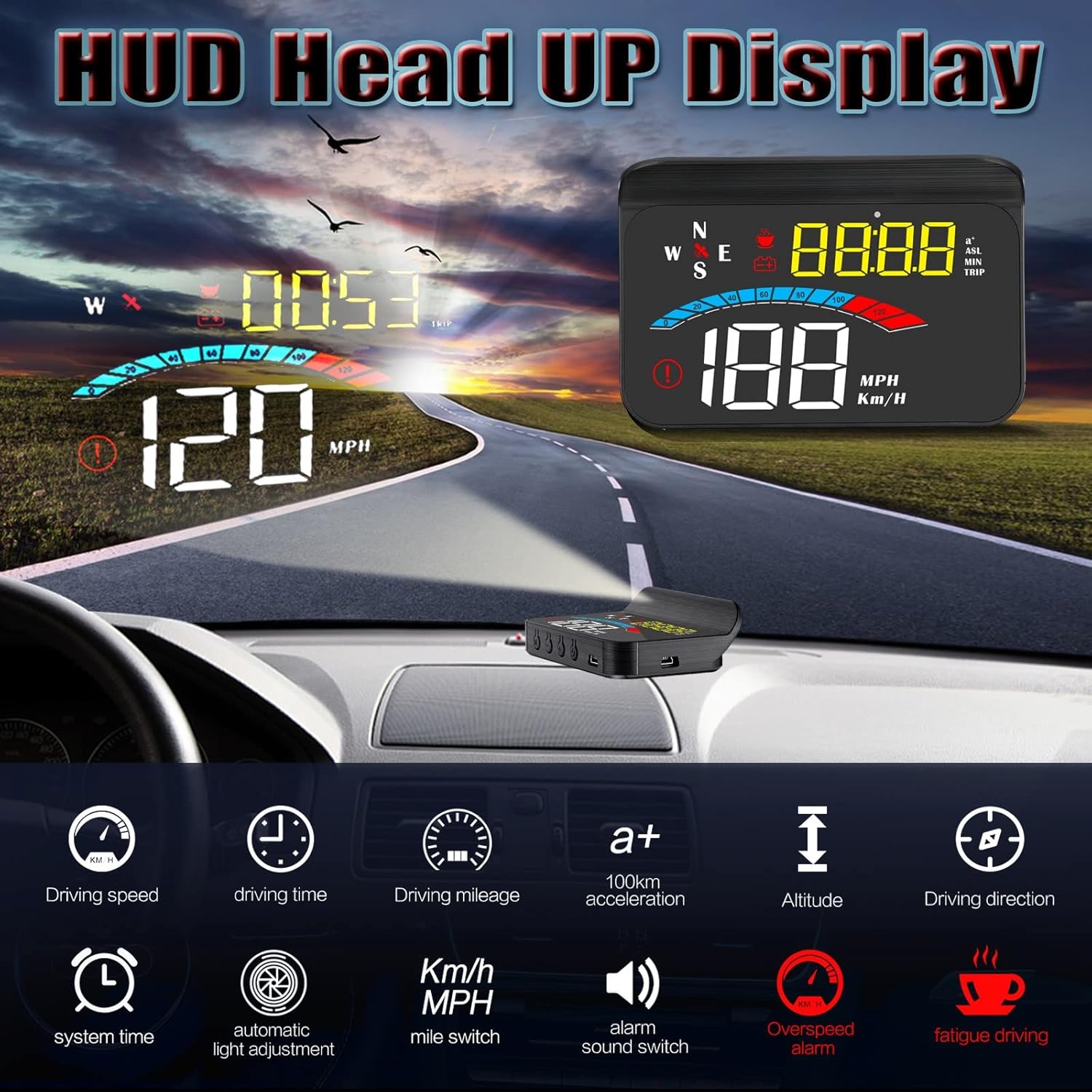
그림 4.1: 이상view of data display modes and functions available on the iKiKin M16 HUD.
4.2가지 알람 기능
The M16 HUD includes two important safety alarm functions:
- 과속 경보: The device will emit an audible alert and/or visual warning if your vehicle exceeds a preset speed limit. This limit can typically be adjusted in the settings.
- 피로 운전 알림: After a continuous period of driving (e.g., 4 hours), the device will remind you to take a break to prevent fatigue.

Figure 4.2: The iKiKin M16 HUD provides both over-speed and fatigue driving alarm functions for enhanced safety.
4.3 Settings Adjustment
To access and adjust settings (e.g., speed unit, alarm thresholds, brightness):
- Locate the control button/wheel on the device.
- Press and hold the button (or follow specific instructions in the quick start guide if provided with the product) to enter the settings menu.
- Use the button/wheel to navigate through options and adjust values.
- Press and hold again (or short press to confirm and exit) to save changes and exit the settings menu.
Note: Specific button functions and menu navigation may vary slightly. Refer to the quick start guide included with your product for detailed button operations.
5. 유지관리
Proper care and maintenance will ensure the longevity and optimal performance of your iKiKin M16 HUD.
- 청소: Use a soft, dry cloth to wipe the display and exterior of the unit. Do not use abrasive cleaners, solvents, or chemical sprays, as these can damage the device.
- 온도: While the device is designed for wide temperature ranges, avoid exposing it to extreme heat or cold for prolonged periods when not in use.
- 저장: 장기간 기기를 보관할 경우 전원을 끄고 서늘하고 건조한 곳에 보관하세요.
- 물을 피하세요: The device is not waterproof. Keep it away from water and excessive moisture.
6. 문제 해결
If you encounter issues with your iKiKin M16 HUD, please refer to the following common problems and solutions:
| 문제 | 가능한 원인 | 해결책 |
|---|---|---|
| 화면이 표시되지 않음/기기 전원이 켜지지 않음 | No power supply; Loose cable connection; Vehicle's USB port not active. | Check USB cable connection. Ensure vehicle's ignition is on. Try a different USB port or 5V car charger. |
| 부정확한 속독 | GPS signal interference; Speed calibration needed. | 명확한 보장 view of the sky for GPS signal. Calibrate speed in settings if discrepancy persists (refer to quick start guide for calibration steps). |
| Double image on windshield | 앞유리 재질; 반사 필름 미적용. | Apply the provided reflective film to the windshield. Adjust the angle of the HUD unit. |
| GPS signal not found/slow to connect | 방해됨 view of sky; Device moved during startup. | 장치에 명확한 내용이 있는지 확인하십시오. view of the sky. Wait a few minutes after starting the vehicle for GPS acquisition. Avoid moving the device during startup. |
| 디스플레이가 너무 어둡거나 밝음 | Automatic brightness sensor issue; Manual brightness setting. | Ensure the light sensor on the device is not obstructed. Adjust brightness manually through the settings menu. |
이러한 해결 방법을 시도한 후에도 문제가 지속되면 고객 지원팀에 문의하세요.
7. 사양
| 특징 | 세부 사항 |
|---|---|
| 모델 번호 | M16 |
| 상표 | 아이키킨 |
| 디스플레이 크기 | 3.5인치 |
| 치수(길이 x 너비 x 높이) | 14.2 x 9.2 x 5.2cm(5.59 x 3.62 x 2.05인치) |
| 무게 | 180그램(0.4파운드) |
| 재료 | 아크릴로니트릴 부타디엔 스티렌(ABS) |
| 전원 공급 장치 | USB(5V) |
| 작동 온도 | -100°F ~ 170°F (약 -73°C ~ 77°C) |
| GPS 모듈 | 예 |
| 한국어: | 724873493591 |
8. 보증 및 지원
8.1 보증 정보
iKiKin provides a 1년 보증 for the M16 HUD Car Head-Up Display from the date of purchase. This warranty covers manufacturing defects and malfunctions under normal use. Additionally, a 90-day free refund or replacement is offered for product issues.
보증은 다음으로 인한 손상을 보장하지 않습니다.
- Accident, misuse, abuse, or improper operation.
- 무단 수리 또는 개조.
- Damage from natural disasters or external causes.
8.2 고객 지원
For any questions regarding the product, accessories, or if you encounter any issues not covered in the troubleshooting section, please contact iKiKin customer support. Please have your purchase details and product model number (M16) ready when contacting support.
Contact information for iKiKin customer support can typically be found on the product packaging, official web사이트나 구매처를 통해 구매할 수 있습니다.
Ask a question about this manual
Ask about setup, troubleshooting, compatibility, parts, safety, or missing instructions. Manuals+ will review the question and use this page’s manual context to help answer it.