
1. 서론
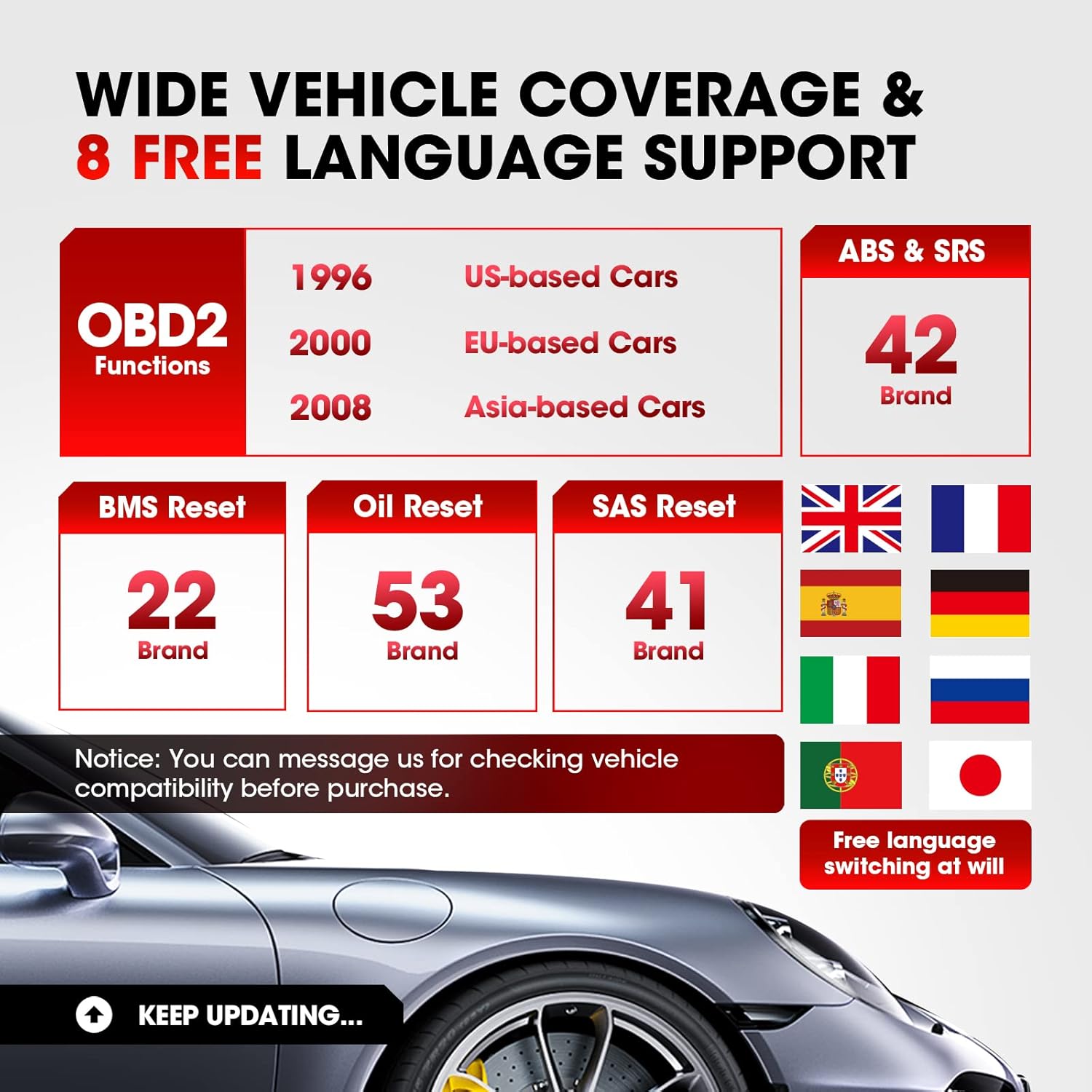
The LAUNCH CR629 is an advanced automotive diagnostic tool designed to assist in vehicle maintenance and troubleshooting. It provides comprehensive diagnostic functions for ABS (Anti-lock Braking System) and SRS (Supplemental Restraint System), including active tests, along with full OBD2 functions and three essential reset services: Oil Reset, Steering Angle Sensor (SAS) Reset, and Battery Management System (BMS) Reset. This manual provides detailed instructions for setting up, operating, and maintaining your CR629 device.
2. 안전 정보
- 자동차 테스트는 항상 환기가 잘 되는 곳에서 실시하십시오.
- Wear safety eye protection and clothing that meets safety standards.
- 기기를 건조하고 깨끗하게 유지하십시오. 극한의 온도나 습도에 노출시키지 마십시오.
- 뜨거운 엔진 부품이나 움직이는 부품과의 접촉을 피하십시오.
- Do not connect or disconnect the device while the vehicle's ignition is on, unless instructed otherwise.
- Refer to the vehicle's service manual for specific service procedures and precautions.
3. 설정
3.1 차량에 연결하기
- 차량의 16핀 데이터 링크 커넥터(DLC)를 찾으십시오. 일반적으로 운전석 쪽 대시보드 아래에 있습니다.
- 차량의 시동이 꺼져 있는지 확인하십시오.
- Plug the CR629's diagnostic cable into the vehicle's DLC. Ensure a secure connection.
- Turn the vehicle's ignition to the ON position (engine off). The CR629 will power on automatically.
3.2 초기 전원 켜기 및 언어 선택
Upon first use, the device may prompt you to select your preferred language. Use the navigation buttons to select your language and press the 'OK' button to confirm.
3.3 Software Update Process
It is recommended to update the device software regularly to ensure compatibility with the latest vehicle models and diagnostic functions. The CR629 offers lifetime free updates.
- Download and install the update tool on your PC from the official LAUNCH web대지.
- Connect the CR629 scanner to your PC using the provided USB cable.
- Follow the on-screen instructions on the update tool to register your scanner and download the latest software package.
- Copy the update package to the memory card (if applicable) or directly to the device as prompted.
- Disconnect the device safely from the PC and restart it to complete the update.
4. 사용 설명서
4.1 ABS & SRS Diagnostics with Active Test
The CR629 can diagnose issues within the Anti-lock Braking System (ABS) and Supplemental Restraint System (SRS), including performing active tests to pinpoint problems.
- DTC 읽기/지우기: Access the 'Scan' menu, select 'ABS/SRS', then choose 'Read Codes' to view diagnostic trouble codes or 'Erase Codes' to clear them.
- View 라이브 데이터 스트림: From the 'Scan' menu, select 'ABS/SRS', then 'Data Stream' to view real-time sensor data in graphical or text format.
- Perform Active Test: Within the 'ABS/SRS' menu, select 'Active Test' to command specific components on and off, verifying their functionality. Note: Active tests are supported for 20 car brands.

4.2 3 재설정 서비스
The CR629 offers three common reset functions to assist with routine maintenance tasks.
- 오일 리셋: Resets the oil life monitoring system after an oil change. Navigate to 'Service' > 'Oil Reset' and follow the prompts.
- SAS 리셋(스티어링 각도 센서): Calibrates the steering angle sensor after suspension or steering component replacement. Access 'Service' > 'SAS Reset' and follow the instructions.
- BMS 재설정(배터리 관리 시스템): Re-matches the battery control module and monitoring sensor after battery replacement. Select 'Service' > 'BMS Reset' and proceed as guided.

4.3 전체 OBD2 기능
The device supports all 10 modes of OBD2 tests for most post-1996 OBD2/CAN compliant vehicles.
- 코드 읽기: 일반 코드(P0, P2, P3, U0)와 제조업체별 코드(P1, P3, U1)를 검색합니다.
- 코드 지우기: Clears Diagnostic Trouble Codes (DTCs) and resets monitors.
- I/M 준비: 배출 모니터링 시스템의 준비 상태를 점검합니다.
- 데이터 스트림 : Displays live data from the vehicle's sensors.
- 정지 화면: 배출 관련 오류 발생 당시의 작동 상태를 보여주는 스냅샷입니다.
- O2 센서 테스트 : O2 센서 모니터 테스트 결과를 검색합니다.
- 온보드 모니터링: 배출 관련 파워트레인 구성 요소 및 시스템에 대한 테스트 결과를 검색합니다.
- 구성 요소 테스트: 특정 구성 요소 또는 시스템을 테스트할 수 있습니다.
- 차량 정보: 차량 식별 번호(VIN), 교정 ID(CALID), 교정 확인 번호(CVN)를 검색합니다.
4.4 User-Friendly Features
- 3.5-inch LCD Color Display: 명확하고 읽기 쉬운 진단 정보를 제공합니다.
- Hotkeys (F1/F2/F3): Quick access to frequently used functions directly from the main menu.
- DTC 조회: Built-in library to quickly identify the meaning of diagnostic trouble codes without needing external resources.
- PC Printing: Allows printing of diagnostic reports by connecting the device to a PC.
- Review 데이터: Access historical DTCs, data streams, and freeze frame data for later analysis.


5. 유지관리
5.1 장치 청소
To maintain the device's performance and appearance, clean it regularly with a soft, damp 천. 연마성 세척제나 용매를 사용하지 마십시오.
5.2 소프트웨어 업데이트
Regular software updates ensure your CR629 remains compatible with the latest vehicle models and diagnostic protocols. Refer to section 3.3 for detailed update instructions. Updates are free for the lifetime of the product.
6. 문제 해결
If you encounter issues with your LAUNCH CR629, refer to the following common problems and solutions:
- 기기의 전원이 켜지지 않습니다: Ensure the diagnostic cable is securely connected to the vehicle's DLC and the vehicle's ignition is ON. Check the vehicle's battery voltage.
- 통신 오류: Verify the vehicle is OBD2 compliant. Check for loose connections. Turn the ignition off and then on again. Try the device on another vehicle to rule out a vehicle-specific issue.
- No fault codes found: If the Check Engine Light (MIL) is not illuminated, there may be no current fault codes. Check I/M Readiness status for pending codes.
- 업데이트 문제: Ensure a stable internet connection and follow the update instructions precisely. Contact customer support if problems persist.
7. 사양
| 특징 | 세부 사항 |
|---|---|
| 상표 | 시작하다 |
| 모델 번호 | CR629 |
| 전원 | 배터리 전원 공급 (OBD2 포트 경유) |
| 제품 치수 | 4.49인치 길이 x 1.36인치 너비 x 8.46인치 높이 |
| 화면 크기 | 3.5 인치 |
| 네이티브 해상도 | 320 x 480 |
| 운영 체제 | Windows 7 (for PC connection/updates) |
| 지원 언어 | English, French, German, Spanish, Portuguese, Russian, Japanese, Italian |
8. 보증 및 지원
The LAUNCH CR629 comes with a 5-year warranty from the manufacturer. For any technical assistance, warranty claims, or product inquiries, please contact LAUNCH customer service.
- 고객 서비스 전화: 1-888-756-2936(월~금 오전 9시~오후 6시(EST))
- 고객 서비스 이메일: launch-aftersales@outlook.com
- Return & Replacement Policy: 구매 후 60일 이내에 구매 가능합니다.