
1. 서론
Thank you for choosing the ALPHAMED UFR103 Infrared Forehead Digital LCD Thermometer. This device is designed for fast, accurate, and non-contact temperature measurement of the human body, objects, and ambient room temperature. It features a backlit digital LCD display for easy reading and is suitable for all ages.
주요 특징은 다음과 같습니다.
- Infrared thermometer with backlit digital LCD display.
- Fast 1-second reading with high-precision sensor and advanced infrared technology.
- Memory function stores up to 20 measurements to monitor body temperature changes and assist in fever diagnosis.
- Automatic shutdown after 60 seconds of inactivity to conserve energy.
- Measures ambient, body, and object temperatures.

Image 1: ALPHAMED Infrared Forehead Thermometer UFR103 and its packaging.
2. 안전 정보
Please read all instructions carefully before using this device. Failure to follow these instructions may result in inaccurate readings or product damage.
- 외부에서만 사용하세요.
- 눈과의 접촉을 피하세요.
- Keep away from direct open flame or heat sources.
- 장치를 물이나 다른 액체에 담그지 마십시오.
- Do not drop the thermometer or expose it to strong mechanical shock.
- 어른의 감독 없이 어린이의 손이 닿지 않는 곳에 보관하십시오.
- 체온 측정 결과에 대해 우려되는 점이 있다면 의사와 상담하십시오.
3. 제품 오버view
The ALPHAMED UFR103 thermometer is designed for user-friendly operation. Familiarize yourself with its components and features:

Image 2: Diagram illustrating key features of the thermometer.

이미지 3: 앞면과 측면 view of the ALPHAMED UFR103 thermometer.
The device incorporates an integrated precision probe for accurate readings, supported by a smart chip and non-contact infrared technology.

Image 4: Integrated precision probe and technological features.
4. 설정
Before first use, or when the low battery indicator appears, install or replace the batteries.
4.1 배터리 설치
- 온도계 손잡이에서 배터리 덮개를 찾으세요.
- Slide the cover open according to the arrow indicator.
- 두 개(2)의 AAA 배터리를 올바른 극성(+ 및 -)에 맞춰 삽입합니다.
- 배터리 덮개를 단단히 닫으세요.
The thermometer requires 2 AAA batteries for operation.
5. 사용 설명서
5.1 전원 켜기/끄기
Press the measurement button (trigger) to turn on the thermometer. The device will perform a self-test and display the last measurement. The thermometer will automatically shut down after approximately 60 seconds of inactivity to conserve battery life.
5.2 측정 모드 선택
The thermometer can measure body temperature, object temperature, and ambient room temperature. Use the 'MODE' button (if available, refer to device buttons) to cycle through these modes. The selected mode will be indicated on the LCD display.
5.3 측정하기
- Ensure the correct measurement mode is selected (e.g., Body mode for human temperature).
- Point the thermometer at the center of the forehead from a distance of 3-5 cm (1.2-2 inches) for body temperature. For object temperature, point at the desired surface.
- Press and release the measurement button (trigger).
- The temperature reading will be displayed on the LCD screen within 1 second. A beep sound will indicate the completion of the measurement (if not muted).
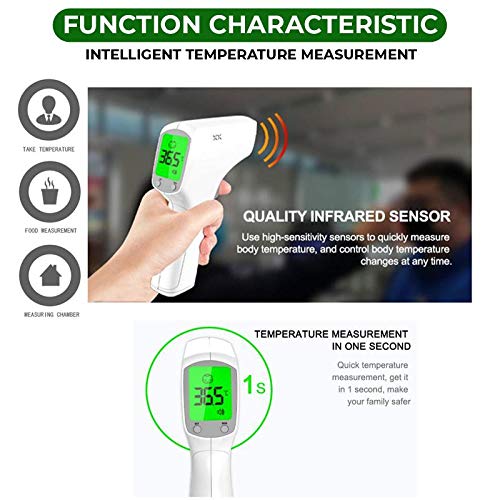
Image 5: Taking a non-contact forehead temperature measurement.

Image 6: Thermometer in use, highlighting 1-second fast reading.
5.4 온도 단위 전환 (°C/°F)
With the device powered on, press the 'SET' button (or similar button indicated on your device) to switch between Celsius (°C) and Fahrenheit (°F). The selected unit will be displayed on the screen.
5.5 메모리 기능
The thermometer can store up to 20 previous temperature readings. To access the memory, press the 'MEM' button. Each press will cycle through the stored readings. This feature helps in tracking temperature changes over time.
5.6 Fever Alarm Function
The device is equipped with a fever alarm function. If a body temperature reading exceeds a predefined threshold (e.g., 99.5°F or 37.5°C), the thermometer may emit a specific alarm sound or change the backlight color to indicate a potential fever.

Image 7: Visual representation of the fever alarm function.
5.7 음소거 기능
Some models may include a mute function to silence the beep sounds. Refer to the device's buttons or settings for this option, often indicated by a speaker icon with a cross through it.

Image 8: Versatile design and ease of use features, including mute function.
6. 유지관리
6.1 청소
- 부드럽고 마른 천으로 체온계 본체를 닦으십시오.
- 프로브와 렌즈는 알코올을 살짝 묻힌 면봉으로 부드럽게 닦아주세요. 완전히 건조시킨 후 사용하십시오.
- 연마성 세척제를 사용하거나 기기를 물에 담그지 마세요.
6.2 보관
- 온도계를 서늘하고 건조한 곳에 보관하고 직사광선과 극한 온도 변화를 피하십시오.
- 장기간 기기를 사용하지 않을 경우 배터리 누출을 방지하기 위해 배터리를 제거하세요.
7. 문제 해결
If you encounter issues with your thermometer, refer to the following common solutions:
- 전원 없음: 배터리가 제대로 삽입되었고 방전되지 않았는지 확인하세요. 필요한 경우 배터리를 교체하세요.
- 부정확한 판독: Ensure the probe is clean. Make sure the measurement distance is correct (3-5 cm for forehead). Avoid taking measurements in environments with strong airflow or extreme temperature changes. Allow the thermometer to acclimatize to room temperature for 30 minutes if moved from a different environment.
- 화면에 표시되는 오류 메시지: Refer to the specific error code in the full product manual (if available) or contact customer support. Common errors might indicate ambient temperature outside operating range or sensor issues.
- 경고음 없음: 음소거 기능이 활성화되어 있는지 확인하세요.
8. 사양
| 모델 번호 | UFR103 |
| 상표 | 알파메드 |
| 디스플레이 유형 | 액정표시장치 |
| 연결 기술 | 적외선 |
| 전원 | 배터리 구동 |
| 필요한 배터리 | 2 AAA (Type of battery needed) |
| 외부 자료 | 플라스틱 |
| 색상 | 하얀색 |
| 특징 | 높은 정밀도 |
| 단위 수 | 1개 단위 |
| 치수 | 19.05 x 11.43 x 5.08 cm; 204.12 grams (Package Dimensions) |
9. 보증 및 지원
For warranty information or technical support, please refer to the documentation included with your purchase or contact ALPHAMED customer service directly. Contact details can typically be found on the product packaging or the manufacturer's official web대지.