
1. 소개 및 이상view
The KYY 15.6-inch FHD 1080P Portable Monitor (Model K3) is designed to enhance your productivity and entertainment experience. Featuring an IPS panel with 1920 x 1080 resolution at 60Hz, 178° viewing angles, and a 1000:1 contrast ratio, it delivers vibrant colors and clear visuals. Its ultra-slim and lightweight design makes it ideal for travel and on-the-go use. The monitor supports HDR and Scene modes for optimized viewing across various applications, from multi-tasking to gaming.

Image 1.1: KYY 15.6-inch Portable Monitor showcasing its 1080P FHD IPS screen with key display specifications.
2. 상자 안에 무엇이 들어있나요?
Upon unboxing your KYY Portable Monitor, please ensure all the following items are present:
- 15.6인치 휴대용 모니터 1대
- 1 x 스마트 커버
- 1 x USB-C-USB-A 케이블
- 1 x USB-C to USB-C 케이블
- 1 x Mini-HDMI-HDMI 케이블
3. 제품 특징
3.1. 디스플레이 품질
The monitor features a 15.6-inch Full HD (1920x1080) IPS panel, offering a wide 178° viewing angle and a 60Hz refresh rate. With 300 nits brightness and a 1000:1 contrast ratio, it delivers clear and vibrant images. HDR mode is supported for enhanced visual experience.
3.2. 연결성
Equipped with 2 USB-C ports, a Mini-HDMI port, and a 3.5mm audio input, the monitor offers versatile connectivity. It is compatible with laptops, smartphones, PCs, PS4, Xbox, and Nintendo Switch without requiring additional drivers.
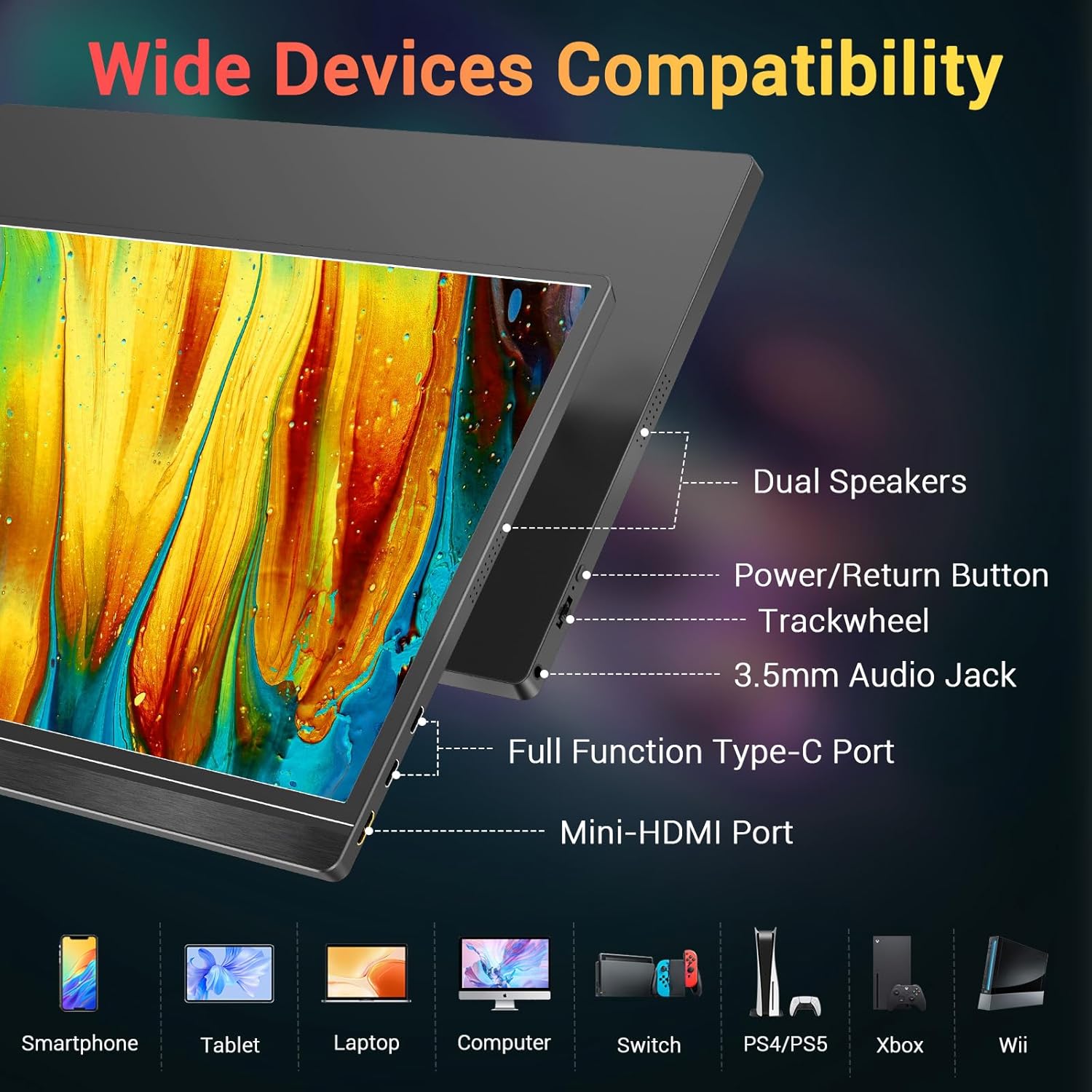
이미지 3.1: 이상view of the monitor's ports and controls, including dual speakers, power button, trackwheel, audio jack, USB-C, and Mini-HDMI.
3.3. 휴대성 및 디자인
Weighing approximately 1.7 lbs and only 0.3 inches thin, this monitor is designed for maximum portability. Its durable metal frame ensures longevity, making it an excellent travel companion.

Image 3.2: The KYY portable monitor demonstrating its lightweight and ultra-slim profile.
3.4. Smart Cover and Stand
The included smart cover is made of high-quality PU leather, offering scratch-proof protection. It doubles as a stable foldable stand, allowing for multiple viewing angles to suit your needs.

Image 3.3: The 2-in-1 magnetic smart cover functioning as a stand for the KYY portable monitor.
4. 설정 지침
4.1. 초기 연결
Connect the monitor to your device (laptop, smartphone, console) using the appropriate cable (USB-C to USB-C or Mini-HDMI to HDMI). For devices with a full-function USB-C port, a single cable can provide both power and video. For other connections, ensure the monitor receives external power via the USB-C to USB-A cable and a power adapter (not included).

Image 4.1: Illustrates a single USB-C cable connection for power and video from a smartphone to the KYY portable monitor.
4.2. Using the Smart Cover as a Stand
Fold the smart cover into a triangular shape to create a stable stand. The magnetic design allows for easy adjustment to various viewing angles. Ensure the monitor is securely placed in the grooves of the cover base.
4.3. Driver Installation (If Needed)
The monitor is generally plug-and-play. However, if your operating system does not automatically recognize the monitor, refer to your device's display settings or the KYY support website for potential driver downloads.
4.4. Video Demonstration: Setup and Connectivity
Video 4.1: A seller-provided video demonstrating the physical setup and various connectivity options of the KYY portable monitor with a laptop, including USB-C and HDMI connections.
5. 사용 설명서
5.1. 전원 켜기/끄기
Press and hold the power button located on the side of the monitor to turn it on or off. A brief press may activate the On-Screen Display (OSD) menu.
5.2. OSD(화면 디스플레이) 메뉴 탐색
Use the trackwheel/buttons on the side of the monitor to navigate the OSD menu. This menu allows you to adjust settings such as brightness, contrast, color temperature, HDR mode, and input source.
5.3. 디스플레이 모드
이 모니터는 컴퓨터에 연결했을 때 다양한 표시 모드를 지원합니다.
- 미러 모드: Duplicates your primary screen's content.
- 확장 모드: Extends your desktop space, allowing for multi-tasking.
- 보조 화면 모드: 휴대용 모니터를 유일한 디스플레이로 사용합니다.
You can also switch between landscape and portrait orientation based on your preference and device settings.

Image 5.1: Visual representation of Mirror, Extended, and Second Screen display modes.
5.4. 오디오 출력
The monitor includes built-in stereo speakers. For private listening, connect headphones or external speakers to the 3.5mm audio jack.
5.5. Video Demonstration: Portability and Usage
Video 5.2: A seller-provided video highlighting the monitor's portability, ease of setup, and usage in various scenarios, including its integrated stand and single-cable connectivity.
6. 사양
| 특징 | 사양 |
|---|---|
| 모델 번호 | K3 |
| 화면 크기 | 15.6 인치 |
| 해결 | 1920 x 1080 픽셀(FHD 1080p) |
| 패널 유형 | IPS |
| 종횡비 | 16시 9분 |
| 이미지 밝기 | 300 칸델라 |
| 대비율 | 1000시 1분 |
| View잉 앵글 | 178° |
| 총 USB 포트 | 2(USB-C) |
| 비디오 입력 | USB-C, Mini-HDMI |
| 오디오 출력 | 3.5mm Audio Jack, Built-in Speakers |
| 품목 무게 | 4.13파운드 |
| 권tage | 5 볼트 |
| 화면 표면 | 매트 |
7. 유지관리
KYY 휴대용 모니터의 수명 연장 및 최적 성능 유지를 위해 다음 유지 관리 지침을 따르십시오.
- 청소: 부드럽고 보풀 없는 천으로 화면을 살살 닦아주세요. 잘 지워지지 않는 얼룩은 가볍게 두드려 닦아주세요.amp천에 물이나 화면에 안전한 세척액을 묻혀 닦아주세요. 강한 화학 물질이나 연마재는 사용하지 마세요.
- 저장: 사용하지 않을 때는 모니터를 스마트 커버에 넣어 화면에 흠집이나 먼지가 쌓이는 것을 방지하세요.
- 손질: Handle the monitor with care to prevent drops or impacts, which can damage the screen or internal components.
- 케이블 관리 : Avoid excessive bending or tugging on cables to prevent damage to the connectors and ports.
8. 문제 해결
If you encounter issues with your KYY Portable Monitor, try the following basic troubleshooting steps:
- 디스플레이/신호 없음:
- 모든 케이블(USB-C, HDMI)이 모니터와 기기에 제대로 연결되어 있는지 확인하십시오.
- Verify that the monitor is receiving power. If using a single USB-C cable for power and video, confirm your device's USB-C port supports full-function output. Otherwise, connect the external power supply.
- Check your device's display settings to ensure the external monitor is detected and configured correctly (e.g., extended, duplicate).
- 가능하다면 다른 케이블이나 포트를 사용해 보세요.
- 화면 깜빡임:
- 기기의 디스플레이 설정에서 새로 고침 빈도를 조정하세요.
- Ensure the monitor is receiving stable power.
- 오디오 없음:
- 모니터와 연결된 기기의 볼륨 설정을 확인하세요.
- 컴퓨터에서 올바른 오디오 출력 장치가 선택되어 있는지 확인하십시오.
- 외부 스피커나 헤드폰을 사용하는 경우 3.5mm 오디오 잭에 제대로 연결되어 있는지 확인하십시오.
- Buttons/Trackwheel Unresponsive:
- Restart the monitor by powering it off and on.
For persistent issues, please contact KYY customer support.
9. 보증 및 지원
For warranty information, technical support, or service inquiries, please refer to the documentation included with your product or visit the official KYY web사이트. 보증 청구를 위해 구매 증빙 자료로 구매 영수증을 보관하세요.