
SENTRY KX200
Sentry Industries Inc. HPXKX200 Gaming Keyboard + Mouse 2 Pack
Model: KX200 User Manual
소개
구매해주셔서 감사합니다asing the Sentry Industries Inc. HPXKX200 Gaming Keyboard and Mouse 2 Pack. This combo kit is designed to enhance your gaming and computing experience with its responsive keyboard and precise mouse. The keyboard features 104 keys with RGB backlighting, while the mouse offers 7200 DPI sensitivity and RGB lighting. Both devices connect via USB for reliable performance.
This manual provides detailed instructions for setup, operation, maintenance, and troubleshooting to ensure optimal use of your new gaming peripherals.
패키지 내용
- 1 x Sentry HPXKX200 104-Key RGB USB Gaming Keyboard
- 1 x Sentry HPXKX200 7200 DPI RGB Gaming Mouse
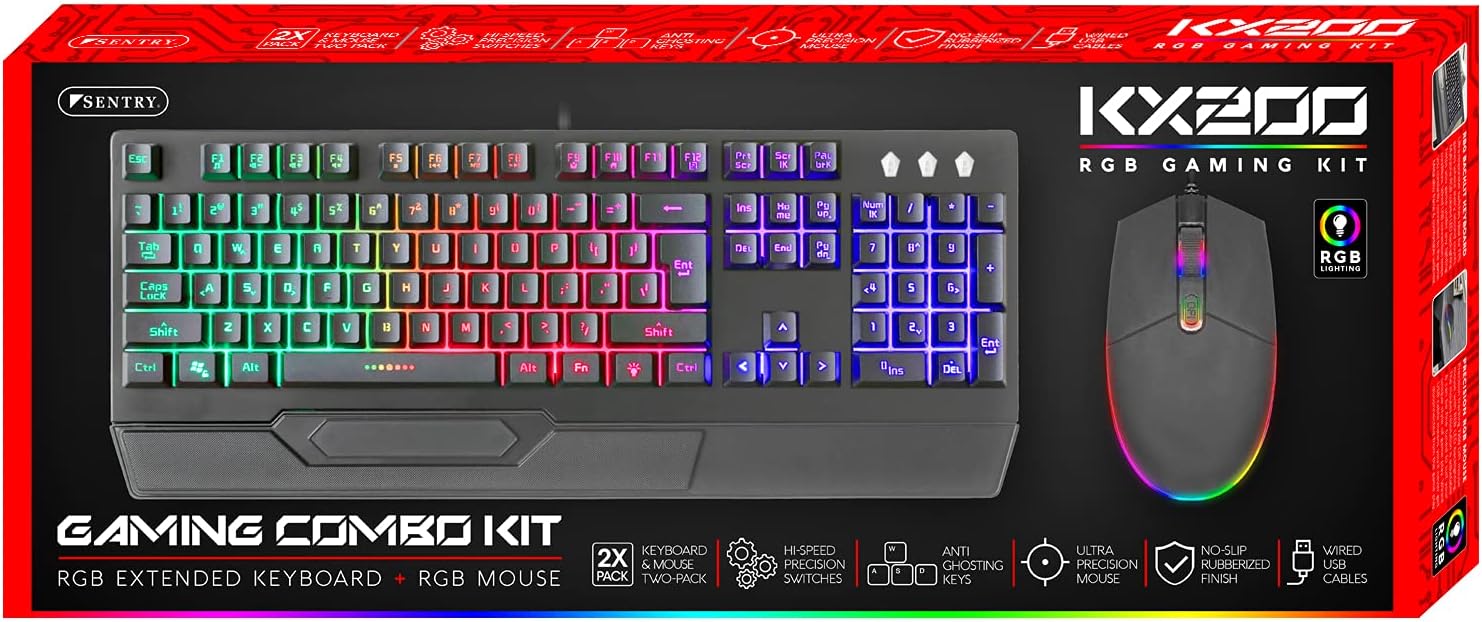
Image: The retail packaging for the Sentry HPXKX200 Gaming Keyboard and Mouse combo kit, showing both devices and key features.
설치 지침
Follow these steps to connect your Sentry HPXKX200 Gaming Keyboard and Mouse to your computer:
- 기기들을 개봉하세요: 키보드와 마우스를 포장에서 조심스럽게 꺼내세요.
- 키보드 연결: 컴퓨터에서 사용 가능한 USB 포트를 찾으세요. 키보드의 USB 커넥터를 해당 USB 포트에 단단히 꽂으세요.
- 마우스 연결: Locate another available USB port on your computer. Insert the USB connector of the mouse firmly into the USB port.
- 드라이버 설치: 사용 중인 운영 체제(예: Windows)가 필요한 드라이버를 자동으로 감지하고 설치합니다. 이 과정은 다소 시간이 걸릴 수 있습니다.
- 연결 확인: Once drivers are installed, the keyboard and mouse RGB lighting should illuminate, indicating they are ready for use.

Image: The Sentry HPXKX200 Gaming Keyboard, showcasing its full layout and attached USB cable for connection.

Image: The Sentry HPXKX200 Gaming Mouse, highlighting its ergonomic design and attached USB cable.

이미지: 클로즈업 view of a standard USB-A connector, which is used to connect both the keyboard and mouse to a computer.
작동 지침
키보드 사용
The 104-key layout provides a full range of standard typing and function keys. The RGB backlighting enhances visibility and aesthetics.
- 타자: 표준 텍스트 입력에는 영숫자 키를 사용하세요.
- 기능 키(F1-F12): These keys perform various functions, often in combination with the 'Fn' key, depending on your operating system and applications.
- RGB 조명 제어: Specific key combinations (e.g., Fn + Scroll Lock, Fn + Home/End) may cycle through different RGB lighting modes or adjust brightness. Refer to the keyboard's specific key legends for lighting controls.
마우스 사용
The 7200 DPI RGB mouse offers precise tracking and comfortable use.
- 좌 클릭: 1차적 행동, 선택.
- 마우스 오른쪽 버튼으로 클릭: 컨텍스트 메뉴.
- 스크롤 휠: 문서를 스크롤하여 넘겨보세요. web 페이지. 스크롤 휠은 가운데 클릭 버튼으로도 기능합니다.
- DPI 조정: The DPI button (often located near the scroll wheel) allows you to cycle through different sensitivity settings (DPI levels) to match your preference for various tasks or games. The mouse supports up to 7200 DPI.
- RGB 조명: The mouse features integrated RGB lighting that typically changes based on DPI settings or cycles through colors automatically.

Image: The Sentry HPXKX200 Gaming Keyboard and Mouse side-by-side, illustrating their design and illuminated RGB features.
유지
Proper care will extend the life of your gaming peripherals:
- 청소: 부드럽고 마른 천으로 키보드와 마우스 표면을 닦아주세요. 잘 지워지지 않는 얼룩은 약간 건조한 천으로 닦아내세요.amp천에 물이나 순하고 연마성이 없는 세제를 묻혀 닦아주세요. 과도한 습기는 피하세요.
- 먼지 제거: Use compressed air to remove dust and debris from between the keyboard keys and from the mouse's optical sensor.
- 액체를 피하세요: 기기를 물에 담그거나 과도한 액체에 노출시키지 마십시오.
- 저장: Store the keyboard and mouse in a cool, dry place when not in use.
문제 해결
If you encounter issues with your Sentry HPXKX200 Gaming Keyboard and Mouse, try the following solutions:
| 문제 | 가능한 해결책 |
|---|---|
| 키보드/마우스가 응답하지 않습니다 |
|
| RGB 조명이 작동하지 않습니다 |
|
| 마우스 커서가 불규칙적으로 움직이거나 움직이지 않습니다. |
|
| Keys not registering on keyboard |
|
명세서
| 특징 | 세부 사항 |
|---|---|
| 상표 | 보초 |
| 모델 번호 | KX200 |
| 연결 기술 | USB(유선) |
| 키보드 유형 | 104-Key RGB USB Keyboard |
| 마우스 DPI | 7200 DPI RGB Mouse |
| 색상 | 검은색 |
| 운영 체제 호환성 | Windows (and generally compatible with other OS supporting USB peripherals) |
| 제품 크기 (키보드 포함) | 약 21.65 x 9.84 x 3.15인치 |
| 품목 무게 | 약 2.2파운드(합계) |
보증 및 지원
Sentry Industries Inc. products are manufactured to high-quality standards. For information regarding warranty coverage, technical support, or service inquiries, please refer to the warranty card included with your product or visit the official Sentry Industries Inc. web사이트. 보증 청구를 위해 구매 증빙 자료를 보관하세요.
Ask a question about this manual
Ask about setup, troubleshooting, compatibility, parts, safety, or missing instructions. Manuals+ will review the question and use this page’s manual context to help answer it.