
Petcube CC10US
펫큐브 캠 사용 설명서
Model: CC10US | Brand: Petcube
소개
The Petcube Cam is an indoor Wi-Fi pet and security camera designed to help you monitor your pets and home 24/7. It features vivid 1080p HD video, 30-ft night vision, crystal-clear 2-way audio, and AI-powered live motion and sound alerts. This manual provides detailed instructions for setting up, operating, maintaining, and troubleshooting your Petcube Cam.
상자 안에 무엇이 들어있나요?
- Petcube Cam
- 2m USB 케이블
- Petcube power adapter
- 3M 테이프
- 빠른 시작 가이드
설정
Setting up your Petcube Cam is a quick and straightforward process, typically taking less than 60 seconds. Follow these steps to get your camera up and running:
- Download the Petcube App: 검색 "Petcube" in your smartphone's app store (iOS or Android) and download the official application.
- Plug in the Camera: Connect the 2m USB cable to your Petcube Cam and the Petcube power adapter. Plug the adapter into a standard power outlet. The camera will power on and indicate its status.
- Wi-Fi에 연결: Open the Petcube app and follow the on-screen instructions to connect your camera to your home Wi-Fi network. Ensure you are connecting to a 2.4GHz Wi-Fi network, as the camera does not support 5GHz Wi-Fi.
- 놓기: Position your Petcube Cam in a location that provides the best view of your pet's activity or the area you wish to monitor. The camera offers flexible mounting options, including standing on a flat surface or being mounted to a wall using the included 3M tape.
작동 지침
Once your Petcube Cam is set up, you can begin monitoring and interacting with your pets and home through the Petcube app.
라이브 비디오 스트리밍
Access a live 1080p HD video feed of your home anytime, anywhere. The camera provides a 110° wide-angle view and an 8x digital zoom, allowing you to see a large portion of the room and zoom in on specific details.

2-웨이 오디오
Engage with your pets using the built-in microphone and speaker. You can talk to them to soothe separation anxiety or reinforce positive behavior, and also hear their barks or meows in return.

나이트 비전
The Petcube Cam is equipped with 30-ft night vision, providing clear visibility even in low-light or no-light conditions. This ensures you can monitor your pets and home effectively around the clock.

Smart Alerts and Video History
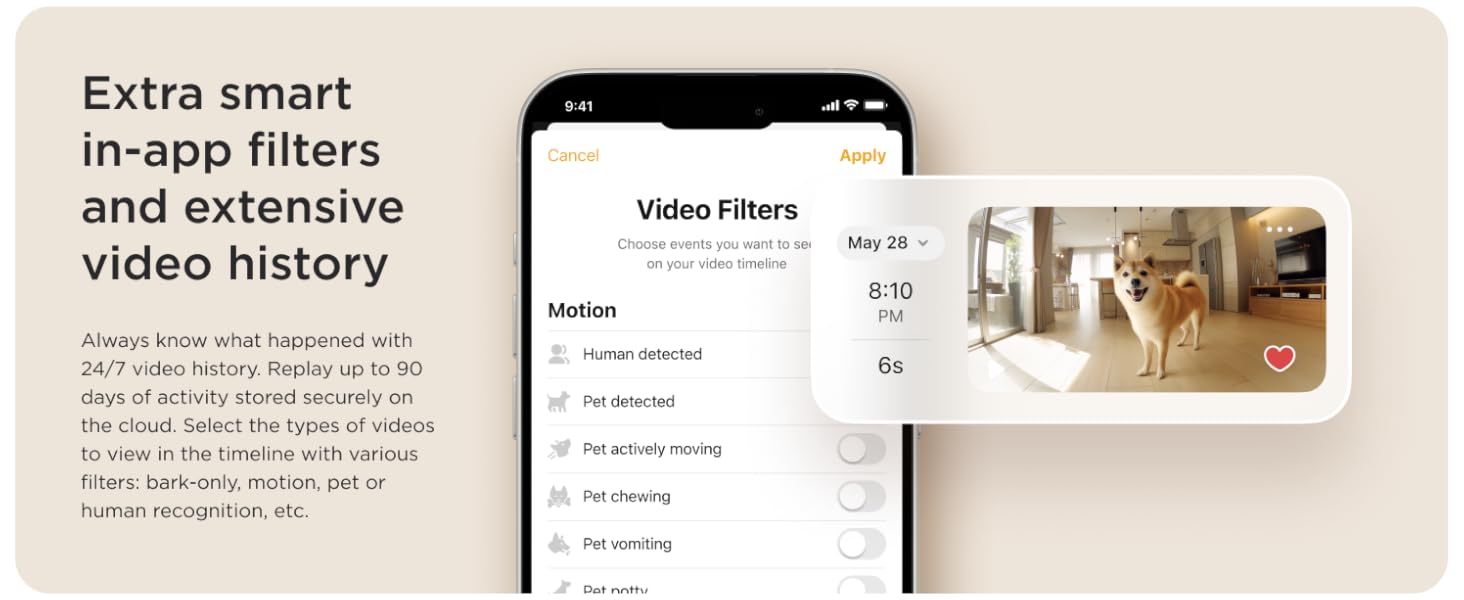
Receive AI-powered instant sound and motion alerts directly to your phone. These alerts feature real-time identification for humans and pets. With an optional Petcube Care subscription, you can access up to 90 days of video history, save your favorite moments, and utilize smart filters for specific events like barking, motion, or pet recognition.

유지
To ensure optimal performance and longevity of your Petcube Cam, regular maintenance is recommended:
- 청소: Gently wipe the camera lens and body with a soft, dry, lint-free cloth. Avoid using harsh chemicals or abrasive materials that could damage the device.
- 소프트웨어 업데이트: Keep your Petcube app and camera firmware updated to the latest versions. Updates often include performance improvements, new features, and security enhancements. The app will typically notify you when an update is available.
- 전원 주기: If you experience minor issues, try unplugging the camera from the power outlet for 10-15 seconds and then plugging it back in. This can often resolve temporary glitches.
문제 해결
If you encounter issues with your Petcube Cam, refer to the following common troubleshooting tips:
- 카메라 오프라인:
- Ensure the camera is properly plugged into a working power outlet.
- Check your Wi-Fi connection. The camera requires a stable 2.4GHz Wi-Fi network.
- Wi-Fi 라우터를 다시 시작하세요.
- 신호 강도를 개선하려면 카메라를 Wi-Fi 라우터에 더 가까이 옮기세요.
- 낮은 비디오 품질:
- Verify your internet speed. A stable and fast internet connection is crucial for HD streaming.
- 카메라 렌즈가 깨끗하고 먼지나 얼룩이 없는지 확인하세요.
- 카메라 시야에 방해물이 있는지 확인하세요. view.
- 2-Way Audio Issues:
- Check the microphone and speaker settings within the Petcube app.
- 휴대전화 볼륨이 켜져 있는지 확인하세요.
- Minimize background noise near the camera for clearer audio.
- 알림을 받지 못했습니다:
- Check your app's notification settings and your phone's system notification settings for the Petcube app.
- Ensure the camera is in an active monitoring mode (e.g., Petcube Care Awake mode if subscribed).
- Adjust the sensitivity settings for motion and sound detection in the app.
For further assistance, please refer to the Petcube app's help section or contact Petcube customer support.
명세서
| 특징 | 세부 사항 |
|---|---|
| 모델명 | Petcube Cam |
| 모델 번호 | CC10US |
| 비디오 캡처 해상도 | 1080p HD |
| View잉 각도 | 110도 |
| 디지털 줌 | 8x |
| 나이트 비전 범위 | 30 피트 |
| 오디오 | 2-웨이 오디오 |
| 연결 기술 | 무선(Wi-Fi) |
| Wi-Fi 호환성 | 2.4GHz(5GHz를 지원하지 않음) |
| 실내/실외 사용 | 실내 |
| 전원 | 코드식 전기 |
| 장착 유형 | Wall Mount (with 3M tape) |
| 치수(길이 x 너비 x 높이) | 2.13 x 2.39 x 3.22 인치 |
| 품목 무게 | 8.4 온스 |
| 한국어: | 854592007318 |
보증 및 지원
For information regarding the product warranty, please refer to the documentation included with your Petcube Cam or visit the official Petcube website. For technical support, troubleshooting assistance beyond this manual, or any other inquiries, please contact Petcube customer support directly through their website or the Petcube app.
Ask a question about this manual
Ask about setup, troubleshooting, compatibility, parts, safety, or missing instructions. Manuals+ will review the question and use this page’s manual context to help answer it.