
1. 서론
The HUAWEI MateDock 3 is a compact and versatile docking station designed to expand the connectivity options of your compatible devices. It provides multiple ports including HDMI, VGA, USB-A, USB-C, an integrated microSD card reader, and a LAN (RJ45) connection. This manual provides instructions for setting up, operating, and maintaining your MateDock 3.

이미지 1.1: 상단 view of the HUAWEI MateDock 3, showcasin컴팩트한 디자인과 통합 USB-C 케이블이 특징입니다.
2. 패키지 내용
패키지에 모든 품목이 들어 있는지 확인하세요.
- HUAWEI MateDock 3 Multi-Port Docking Station
- 사용 설명서 (본 문서)
3. 제품 오버view
The MateDock 3 features a range of ports to enhance your device's connectivity. Familiarize yourself with the port layout:

Image 3.1: Detailed diagram of the HUAWEI MateDock 3 ports, including LAN, USB-A, HDMI, VGA, microSD, and USB-C.
- USB-C 입력 케이블: 호스트 장치(노트북, 태블릿, 스마트폰)에 연결됩니다.
- HDMI 포트 : Connects to an external display for video and audio output.
- VGA 포트: Connects to an external display for video output.
- USB-A 포트: Connects to USB peripherals such as keyboards, mice, or external storage.
- USB-C 포트: For power delivery to the host device or connecting other USB-C peripherals.
- LAN(RJ45) 포트: Provides wired Ethernet network connectivity.
- microSD 카드 리더기: microSD 카드에 데이터를 읽고 쓰는 데 사용합니다.
4. 설정 및 설치
The HUAWEI MateDock 3 is designed for plug-and-play functionality, requiring no driver installation for most operating systems.
- 호스트 장치에 연결: Plug the integrated USB-C cable of the MateDock 3 into an available USB-C port on your laptop, tablet, or smartphone.
- 전원 연결(선택 사항): If your host device requires charging or if you are connecting power-intensive peripherals, connect a USB-C power adapter to the USB-C port on the MateDock 3.
- 주변기기 연결: Connect your desired external devices (monitor, keyboard, mouse, Ethernet cable, microSD card) to the corresponding ports on the MateDock 3.
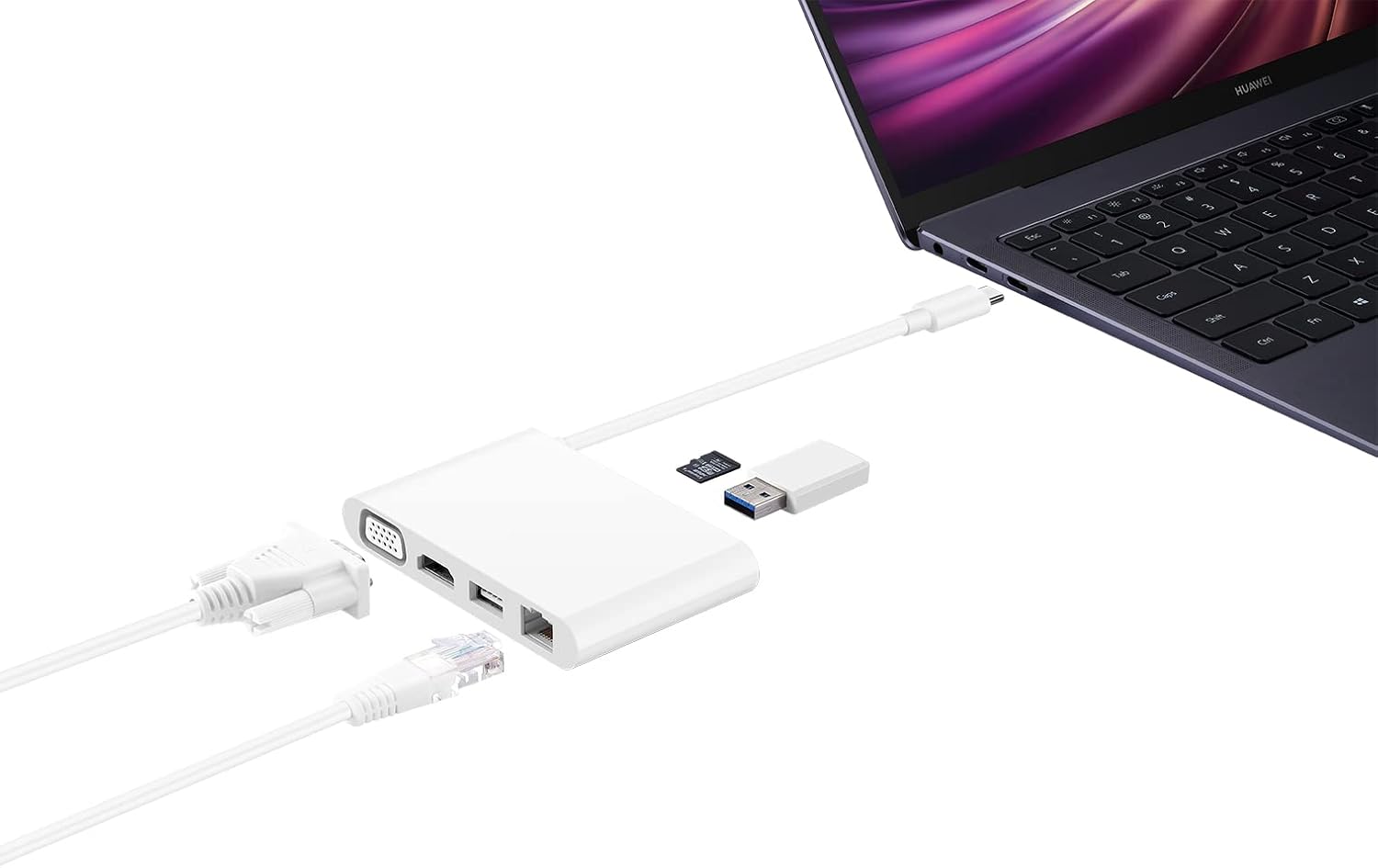
Image 4.1: The MateDock 3 in use, connected to a laptop, demonstrating connections for a monitor, Ethernet, and USB devices.
5. 사용 설명서
5.1. Video Output (HDMI / VGA)
- Connect an HDMI cable from your monitor/TV to the HDMI port on the MateDock 3.
- Alternatively, connect a VGA cable from your monitor/projector to the VGA port on the MateDock 3.
- Your host device should automatically detect the external display. You may need to adjust display settings (e.g., mirror, extend) in your operating system.
- 메모: Only one video output (HDMI or VGA) can be used at a time.
5.2. USB Peripherals (USB-A / USB-C)
- Plug your USB-A devices (e.g., mouse, keyboard, USB flash drive) into the USB-A port.
- The USB-C port on the dock can be used for power delivery to your host device or for connecting other USB-C peripherals.
5.3. Network Connection (LAN)
- Connect an Ethernet cable from your router or network switch to the LAN (RJ45) port on the MateDock 3.
- Your host device will establish a wired network connection.
5.4. microSD 카드 리더기
- Insert a microSD card into the designated slot on the MateDock 3.
- The card will appear as a removable drive on your host device, allowing you to access its contents.
6. 유지관리 및 관리
- Keep the MateDock 3 clean and dry. Avoid exposure to liquids or excessive humidity.
- 장치를 극한 온도에 노출시키지 마십시오.
- Clean the exterior with a soft, dry cloth. Avoid abrasive cleaners.
- 내장된 USB-C 케이블은 손상을 방지하기 위해 조심스럽게 다루십시오.
7. 문제 해결
- 디스플레이 출력 없음:
- Ensure the MateDock 3's USB-C cable is securely connected to your host device.
- Verify that the HDMI or VGA cable is firmly connected to both the dock and the display.
- 호스트 장치의 디스플레이 설정을 확인하여 외부 모니터가 올바르게 감지되고 구성되었는지 확인하십시오.
- Try connecting only one video output (HDMI or VGA) at a time.
- USB 장치가 작동하지 않음:
- Ensure the USB device is properly inserted into the USB-A or USB-C port.
- If the device requires external power, ensure the MateDock 3 is connected to a power source via its USB-C port.
- Test the USB device directly with your host device to rule out device-specific issues.
- 네트워크 연결 없음:
- Verify that the Ethernet cable is securely connected to both the MateDock 3 and your router/switch.
- Check your host device's network settings.
- 라우터/스위치가 제대로 작동하는지 확인하십시오.
- microSD Card Not Detected:
- Ensure the microSD card is fully inserted into the slot.
- Check if the card is formatted correctly and readable by your host device.
8. 사양
| 특징 | 세부 사항 |
|---|---|
| 모델 번호 | 55031424 |
| 치수(길이 x 너비 x 높이) | 9.4 x 5.9 x 1.4cm |
| 무게 | 86g |
| 하드웨어 인터페이스 | HDMI, VGA, USB-A, USB-C, LAN (RJ45), microSD |
| 포트 수 | 5 (excluding input USB-C cable and microSD slot) |
| 호환 장치 | Devices with USB-C ports supporting video output and power delivery |
| 색상 | 하얀색 |
9. 보증 정보
For detailed warranty information, please refer to the warranty card included with your product packaging or visit the official Huawei web사이트. 보증 청구를 위해 구매 증빙 자료로 구매 영수증을 보관하세요.
10. 고객 지원
If you encounter any issues or have questions not covered in this manual, please contact Huawei customer support through their official web사이트 또는 제품 설명서에 제공된 연락처 정보를 참조하세요.