
1. 서론
Thank you for choosing the DELUX M625BU(3050) RGB Wired Gaming Mouse. This manual provides detailed instructions for setting up, operating, and maintaining your gaming mouse to ensure optimal performance and an enhanced gaming experience. Please read this manual thoroughly before use.
2. 패키지 내용
- DELUX M625BU(3050) RGB Wired Gaming Mouse
- 사용자 설명서
3. 제품 오버view
The DELUX M625BU(3050) is an ergonomic wired gaming mouse designed for precision and customization. It features a high-performance A3050 PixArt optical sensor, 7 programmable buttons, and customizable RGB lighting.
3.1 마우스 레이아웃 및 버튼
Familiarize yourself with the buttons and their default functions:

Image: DELUX M625BU(3050) Gaming Mouse Button Layout
- 왼쪽 버튼: 주요 클릭 기능.
- 오른쪽 버튼: 2차 클릭 기능.
- 스크롤 휠: 위/아래로 스크롤하고 가운데 버튼을 클릭하세요.
- DPI 버튼: DPI 설정을 순환합니다.
- 앞으로 버튼: 앞으로 이동합니다 web 브라우저/애플리케이션.
- 뒤로 버튼: 뒤로 탐색합니다 web 브라우저/애플리케이션.
- 발사 버튼: Rapid-fire function (default).
3.2 인체공학적 디자인
The mouse features an ergonomic streamline structure and non-slip rubber sides, designed to fit comfortably in your palm for extended gaming sessions.
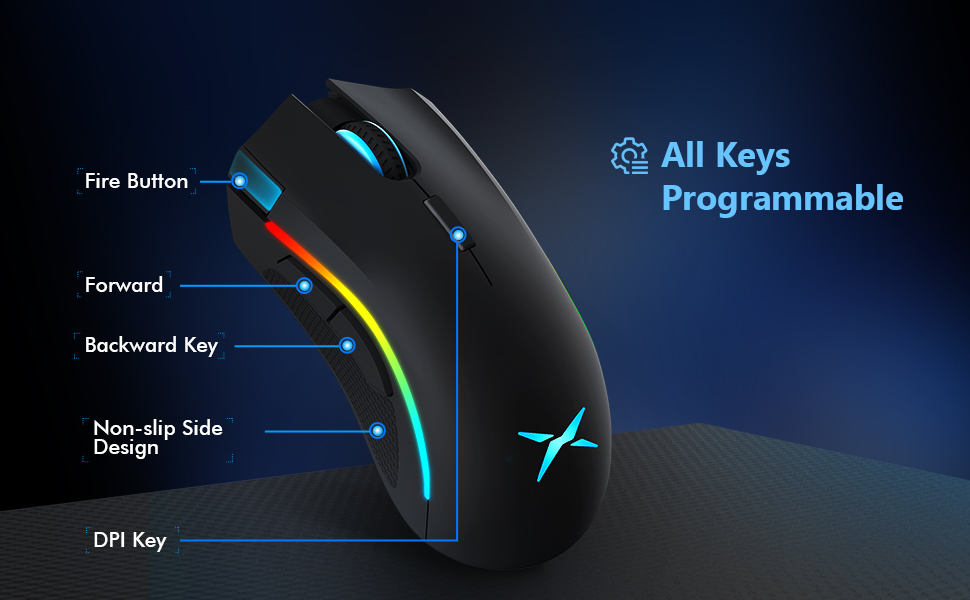
Image: Ergonomic Design Features
4. 설정
The DELUX M625BU(3050) mouse is a plug-and-play device, requiring no additional drivers for basic functionality.
- 마우스 연결: Plug the USB connector of the mouse's 1.8m braided cable into an available USB port on your computer.
- 시스템 인식: Your operating system (Windows XP, Vista, 7, 8, or 10) will automatically detect and install the necessary drivers.
- 선택적 소프트웨어 설치: For advanced customization of buttons, DPI, and RGB lighting, download and install the DELUX Pro Game Software from the official DELUX web대지.

Image: Plug and Play Connectivity
5. 사용 설명서
5.1 DPI(인치당 도트 수) 조정
The mouse features an A3050 PixArt optical sensor with adjustable DPI settings. You can cycle through preset DPI levels by pressing the DPI button located behind the scroll wheel.

Image: DPI Adjustment Levels
- Available DPI levels: 800, 1600, 3200, 4000.
- Each press of the DPI button will switch to the next level.
- The current DPI level may be indicated by a specific LED color or pattern (refer to software for detailed customization).
5.2가지 RGB 조명 효과
The mouse features customizable RGB lighting with various effects.
- 조명 모드 변경: Press the Left Button, Scroll Wheel, and Right Button simultaneously for 3 seconds to cycle through different lighting modes (e.g., full lighting, breathing, floating).
- 소프트웨어를 통한 맞춤 설정: Use the DELUX Pro Game Software to customize RGB backlight effects from 16.8 million colors, adjust lighting direction, and speed.
5.3 프로그래밍 가능한 버튼 및 소프트웨어
All 7 buttons on the M625BU(3050) mouse are programmable using the DELUX Pro Game Software.
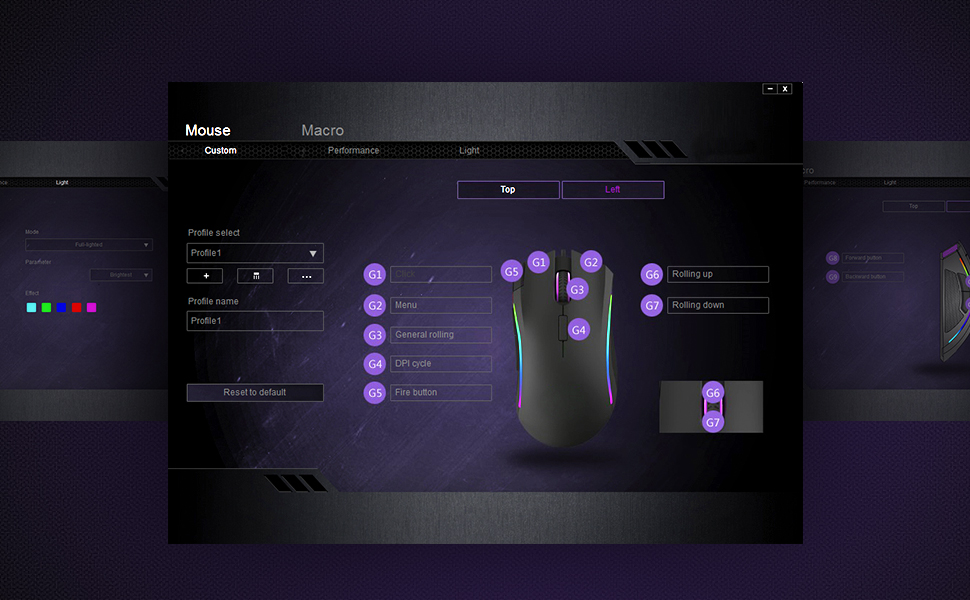
Image: Pro Game Software Interface for Customization
- 버튼 기능: Reassign any button to perform different functions, including keyboard keys, multimedia controls, or specific file 실행.
- 매크로: Create and assign complex macro sequences to buttons for automated actions.
- Sensitivity and Polling Rate: Fine-tune pointer speed, DPI sensitivity, and polling rate (125/250/500/1000Hz) for precise control.
6. 유지관리
To ensure the longevity and optimal performance of your DELUX M625BU(3050) gaming mouse, follow these maintenance guidelines:
- 청소: 부드럽고 마른 천을 사용하여 마우스 표면을 닦으세요. 잘 지워지지 않는 오염의 경우, 가볍게 두드리세요.amp천에 물이나 순한 세척액을 묻혀 닦으세요. 강한 화학 물질은 피하세요.
- 센서 관리: 마우스 아랫면의 광학 센서에 먼지나 이물질이 묻지 않도록 깨끗하게 유지하십시오. 필요한 경우 면봉을 사용하십시오.
- 케이블 관리: 손상을 방지하기 위해 꼬임 케이블을 급격하게 구부리거나 과도하게 당기지 마십시오.
- 저장: 마우스를 사용하지 않을 때는 깨끗하고 건조한 곳에 보관하십시오.
7. 문제 해결
If you encounter issues with your DELUX M625BU(3050) mouse, refer to the following common solutions:
| 문제 | 가능한 해결책 |
|---|---|
| 마우스가 응답하지 않음 |
|
| Cursor movement is erratic or imprecise |
|
| RGB 조명이 작동하지 않거나 올바르지 않습니다. |
|
| Programmable buttons not functioning |
|
| Scroll wheel behaves erratically (e.g., scrolls opposite direction) |
|
8. 사양
| 특징 | 세부 사항 |
|---|---|
| 모델 번호 | M625BU(3050) |
| 연결성 | Wired (1.8m Braided Cable) |
| 감지기 | A3050 PixArt Optical Sensor |
| DPI 설정 | 800 / 1600 / 3200 / 4000 DPI |
| 폴링 속도 | 125 / 250 / 500 / 1000Hz |
| 버튼 | 7개의 프로그래밍 가능한 버튼 |
| 조명 | 사용자 지정 가능한 RGB 조명 효과 |
| 인간 공학 | Ergonomic Streamline Structure, Non-slip Rubber Side |
| 제품 치수 | 5.14 x 2.71 x 1.67 인치 |
| 품목 무게 | 3.53 온스 |
| 호환성 | 윈도우 XP, 비스타, 7, 8, 10 |
9. 보증 및 지원
All DELUX products include a 12개월 보증 from the date of purchase. Additionally, DELUX provides 평생 무료 기술 지원 이 제품에 대해서.
For warranty claims, technical assistance, or further inquiries, please contact DELUX customer support through the official DELUX web사이트 또는 소매점.