
Wasp WPL308
Wasp WPL308 데스크탑 바코드 프린터 사용 설명서
Model: WPL308 | Brand: Wasp
제품 끝view
The Wasp WPL308 Desktop barcode printer is a versatile medium-duty barcode printer designed for various printing applications. It features a durable double-wall clamshell design and a 3.5-inch color TFT display with a real-time clock. This printer supports both thermal transfer and direct thermal printing methods, achieving print speeds of up to 8 inches per second at a 203 DPI resolution. It is equipped with 128 MB Flash memory and 128 MB SDRAM, suitable for producing high-volume 4x6 shipping labels, high-resolution product marking, and graphic solutions, including labels for electronics marking applications.
Standard connectivity options include USB 2.0, USB-A Host, 10/100 Mbps Ethernet, and Serial interfaces. An optional 802.11a/b/g/n Wi-Fi interface is also available.
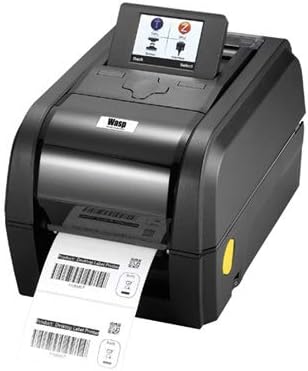
Image: The Wasp WPL308 Desktop Barcode Printer, showcasing its compact design and front-facing label output.
주요 특징
- Up to 203 mm (8 in) per sec. print speed
- 128 MB Flash memory and 128 MB SDRAM memory
- microSD Flash memory expansion up to 32 GB
- User-friendly clamshell design
- Serial, internal Ethernet USB 2.0 & USB host interfaces standard
- 3.5 inches TFT Display
- Label capacity up to 127 mm (5 inches) OD
- Ribbon capacity up to 300 m (984 feet)
- WPL firmware for plug-n-play ease
- ENERGY STAR® 인증
패키지 내용
Before beginning installation, please verify that all items are present and undamaged:
- Wasp WPL308 Barcode Printer
- 203 dpi Thermal Printhead (pre-installed)
- 전원 케이블

Image: The Wasp WPL308 printer with its clamshell cover open, revealing the internal mechanism for loading a roll of labels.
설치 가이드
- 짐 풀기: 프린터와 모든 부속품을 포장에서 조심스럽게 꺼내십시오. 나중에 운반하거나 보관할 때를 대비하여 포장재를 보관해 두십시오.
- 전원 연결: Connect the provided power cable to the printer's power input port and then to a suitable electrical outlet.
- 데이터 연결: Connect the printer to your computer or network using a USB, Ethernet, or Serial cable as required by your setup. Ensure the cable is securely connected to both the printer and the host device.
- 드라이버 설치: Install the necessary printer drivers and software from the manufacturer's website or any included media. Follow the on-screen instructions for a complete installation.
- 미디어 로딩: Open the printer's clamshell cover. Load the label roll onto the media supply spindle, ensuring it feeds smoothly through the guides and under the printhead. For thermal transfer printing, install the ribbon according to the printer's internal diagrams, ensuring it is taut and correctly aligned. Close the cover securely.
작업
Once the printer is set up and connected, power it on. The 3.5-inch color TFT display will illuminate, showing the printer's status and menu options. Use the display and control buttons to navigate settings, perform calibrations, and monitor print jobs. Ensure your labels and ribbon (if applicable) are correctly loaded and aligned before sending print commands. Initiate print jobs from your computer application, ensuring the WPL308 is selected as the target printer.
유지
Regular maintenance is crucial for extending the life of your WPL308 printer and ensuring consistent print quality.
- 프린트 헤드 청소: 보풀 없는 천으로 가볍게 닦아주세요.ampened with isopropyl alcohol to gently wipe the printhead surface. Perform this cleaning regularly, especially after replacing a roll of labels or ribbon.
- Platen Roller Cleaning: Clean the platen roller with isopropyl alcohol to remove any adhesive or dust buildup. Rotate the roller manually to clean the entire surface.
- 일반 청소: Periodically clean the exterior and interior of the printer with a soft, dry cloth to remove dust and debris. Avoid using abrasive cleaners or solvents.
- Replacing Supplies: Replace label rolls and ribbons as they are depleted. Always use Wasp-approved supplies for optimal performance and to prevent damage to the printer.
일반적인 문제 해결
- 프린터가 응답하지 않음: Check that the power cable is securely connected and the printer is powered on. Verify that the data cable (USB, Ethernet, Serial) is properly connected to both the printer and the computer/network. Ensure printer drivers are correctly installed and updated.
- 인쇄 품질 불량: Clean the printhead as described in the Maintenance section. Verify that the labels and ribbon (if used) are compatible with the printer and are loaded correctly. Adjust print darkness settings if necessary.
- 라벨이 제대로 부착되지 않음: Ensure the label roll is properly seated on the media supply spindle and that labels are threaded correctly through the guides. Check for any obstructions in the label path.
- 표시되는 오류 메시지: Refer to the printer's 3.5-inch TFT display for specific error codes or messages. Consult the Wasp support website or the full user manual for detailed explanations and solutions for each error.
기술 사양
| 사양 | 세부 사항 |
|---|---|
| 상표 | 말벌 |
| 모델명 | WPL308 Barcode Printer |
| 인쇄 기술 | Thermal (Direct Thermal/Thermal Transfer) |
| 최대 인쇄 속도(흑백) | 초당 8인치(203mm/s) |
| 제품 치수 | 13.1 x 8.9 x 7.8 인치 |
| 품목 무게 | 8.27파운드 |
| 메모리 저장 용량 | 128MB 플래시, 128MB SDRAM |
| 하드웨어 인터페이스 | Ethernet, Serial Interface, USB |
| 연결 기술 | Networkable, USB |
| 포함된 구성 요소 | 203 dpi Thermal Printhead, WPL308 Power Cable |
| 인쇄 매체 | 라벨 |
| 특징 | Energy Star 인증 |
보증 및 지원
The Wasp WPL308 printer includes a 2-year manufacturer's warranty that covers material defects. For enhanced protection and coverage beyond the standard warranty, WaspProtect extended service plans are available, which can also cover accidental breakage.
For technical assistance, troubleshooting, or to inquire about warranty claims and WaspProtect plans, please contact Wasp Barcode Technologies customer service. Visit the official Wasp Barcode Technologies web최신 지원 정보 및 연락처는 해당 사이트를 참조하십시오.
Ask a question about this manual
Ask about setup, troubleshooting, compatibility, parts, safety, or missing instructions. Manuals+ will review the question and use this page’s manual context to help answer it.