
소개
The EOTECH 558.A65 Holographic Weapon Sight is designed for rapid target acquisition and precision aiming. This sight is compatible with all Gen I-III night vision devices and features an adjustable, locking, quick-detach mount for versatile application. This manual provides essential information for the proper setup, operation, and maintenance of your 558.A65 sight.
제품 끝view
Familiarize yourself with the key components of the EOTECH 558.A65 Holographic Weapon Sight.
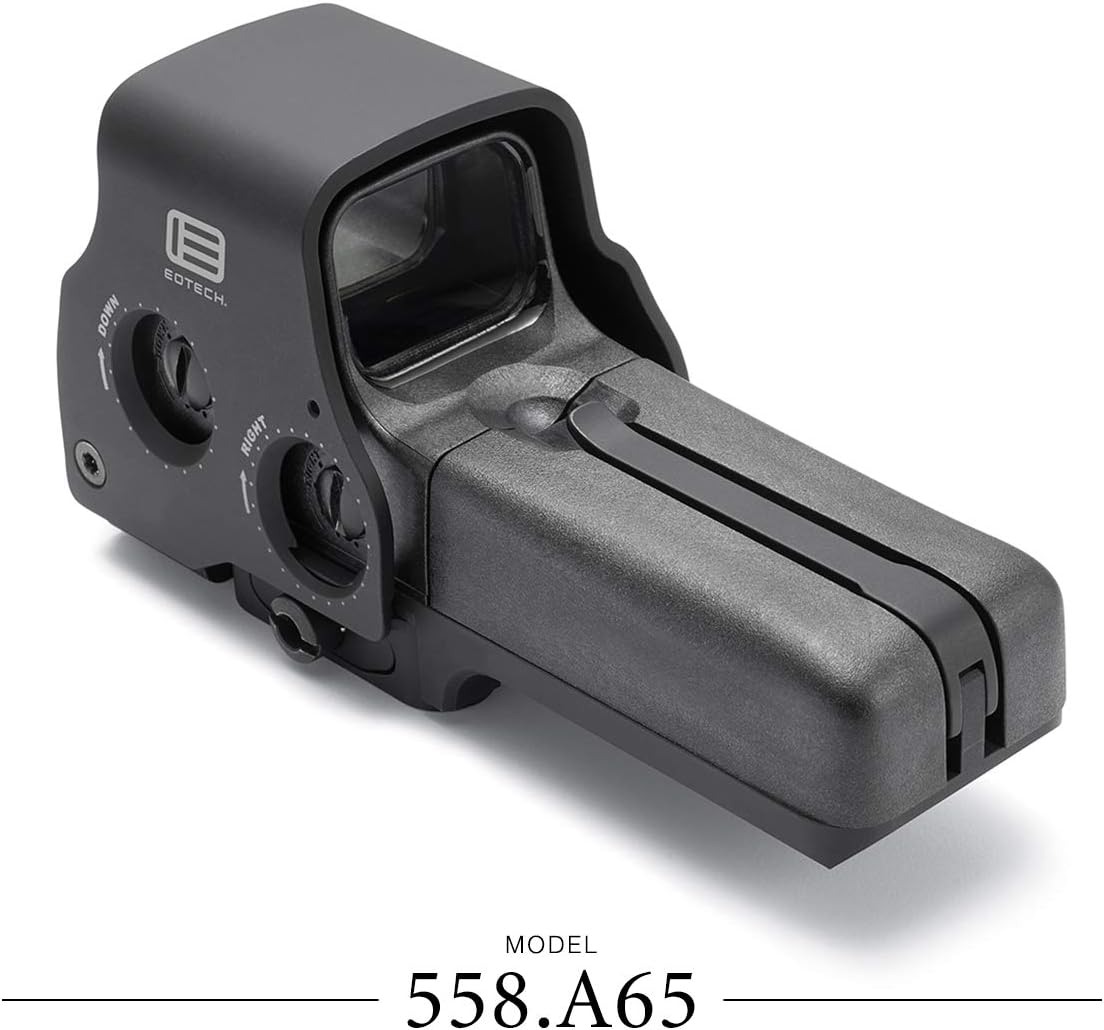
그림 1: 옆 view of the EOTECH 558.A65 sight, highlighting the battery cap latch, aluminum hood, removable battery compartment, and quick detach lever.
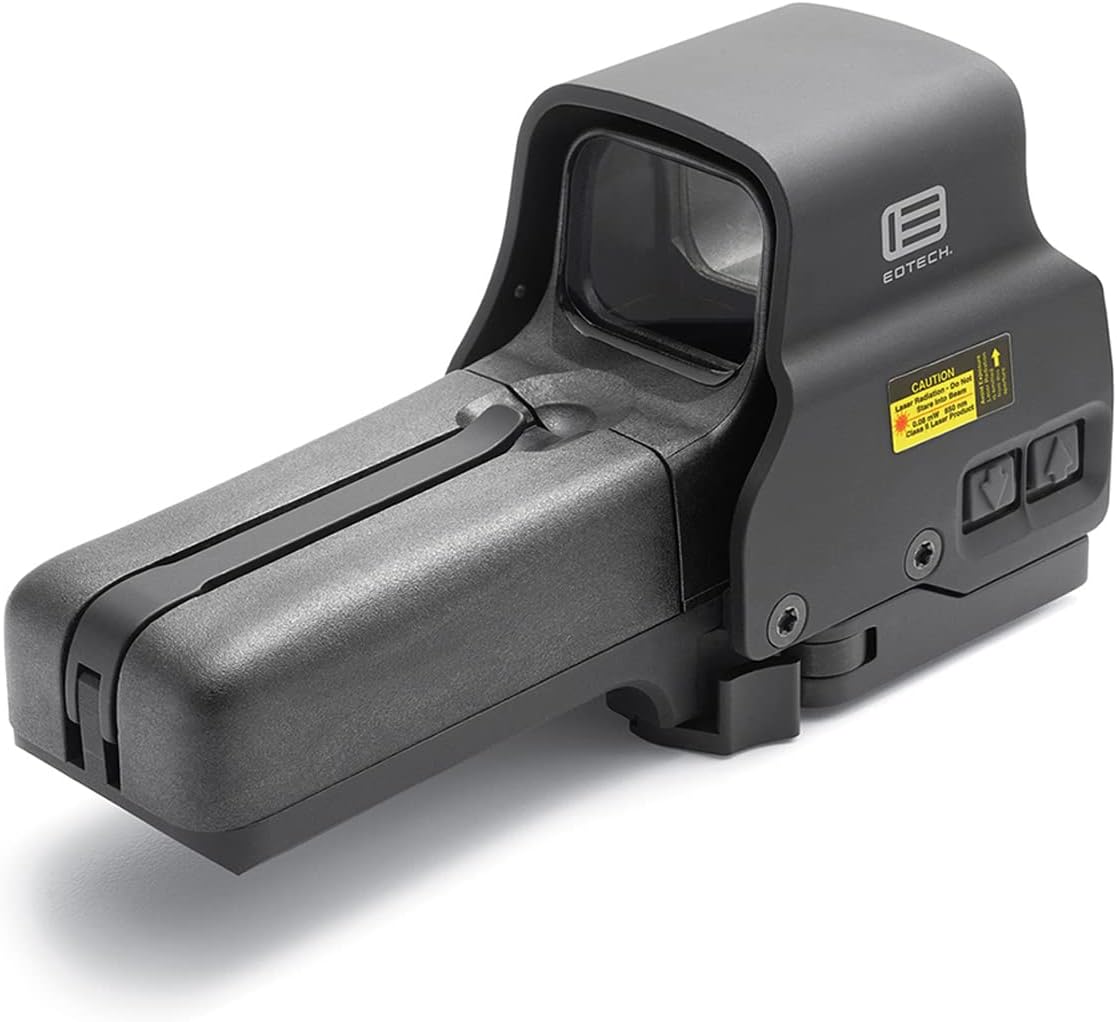
그림 2: 위에서 아래로 view of the EOTECH 558.A65 sight, showing the windage and elevation adjustment dials.
설정
1. 배터리 설치
- Locate the battery compartment on the side of the sight.
- Unlatch the battery cap latch and open the removable battery compartment.
- Insert two (2) AA batteries, ensuring correct polarity. The sight supports both lithium and alkaline AA batteries.
- 배터리함을 닫고 걸쇠를 고정합니다.
2. 조준경 장착
The 558.A65 features a quick-detach mount compatible with both 1" Weaver and MIL-STD-1913 (Picatinny) rails.
- Ensure the quick-detach lever is in the open position.
- Align the sight's base with the rail on your firearm.
- Press the sight firmly onto the rail and close the quick-detach lever until it locks securely.
- Verify that the sight is firmly attached and does not wobble. Adjust the tension of the quick-detach lever if necessary.
작동 지침
1. 전원 켜기/끄기
- To power on, press either the UP or 아래에 밝기 조절 버튼.
- To power off, press both the UP 그리고 아래에 buttons simultaneously. The sight will also automatically power off after 8 hours if the last button pressed was UP, or after 4 hours if the last button pressed was 아래에.
2. 밝기 조정
The sight offers 30 brightness settings, including 10 settings specifically for night vision compatibility. The side-button operation is ideal for use with a magnifier.
- 를 누르세요 UP button to increase reticle brightness.
- 를 누르세요 아래에 button to decrease reticle brightness.
3. 나이트 비전 모드
The 558.A65 is fully compatible with Gen I-III night vision devices.
- To activate night vision mode, press the NV button. The reticle brightness will automatically adjust to the lowest night vision setting.
- 사용하세요 UP 그리고 아래에 buttons to cycle through the 10 night vision brightness settings.
- To exit night vision mode, press the NV button again. The sight will return to its previous daylight brightness setting.
4. Reticle Pattern
The sight features a 68 MOA ring with a 1 MOA dot reticle, designed for fast target acquisition and precise aiming.

그림 3: The 68 MOA ring and 1 MOA dot reticle pattern.
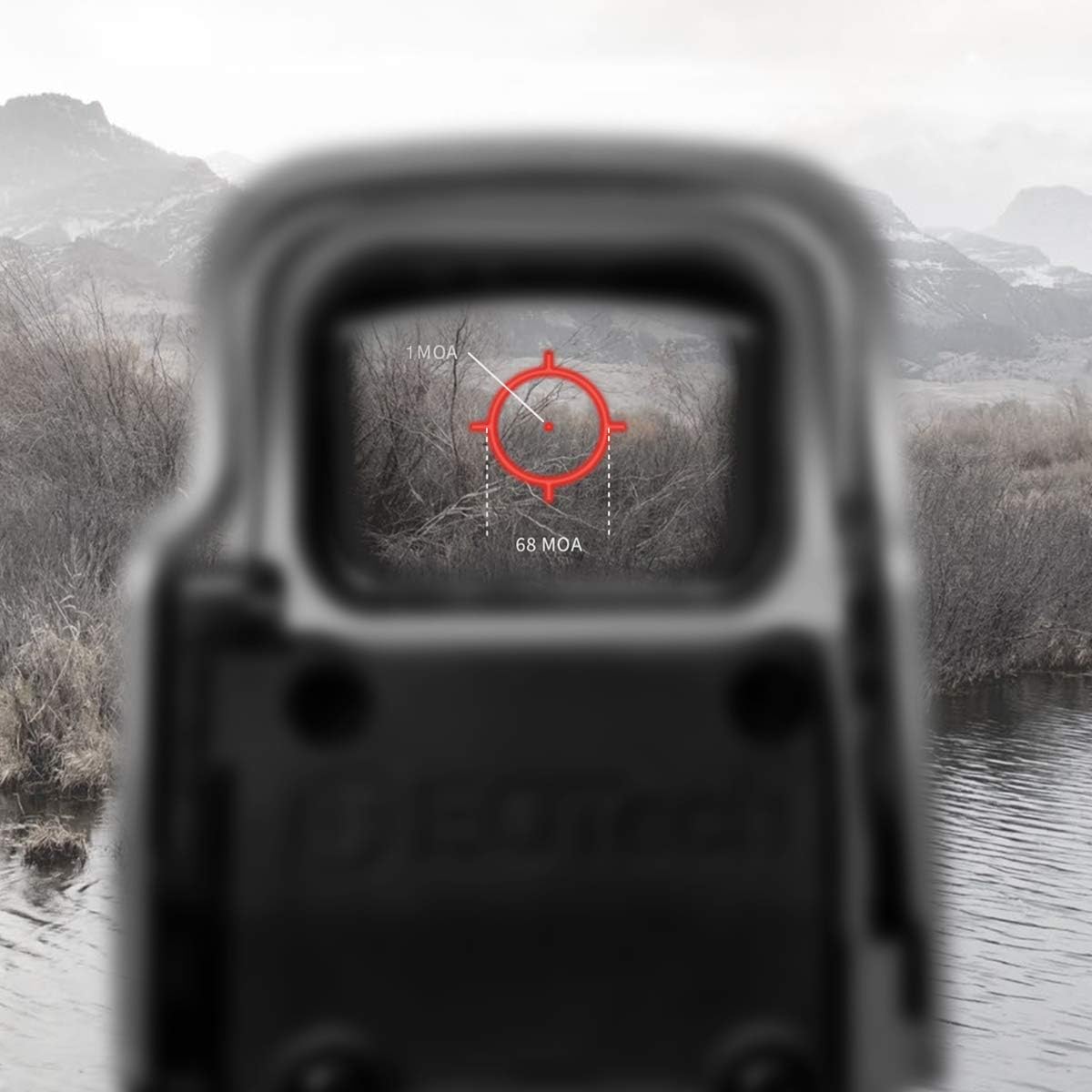
그림 4: The reticle as seen through the sight, demonstrating its appearance in an operational environment.
5. Zeroing the Sight (Windage and Elevation)
To achieve optimal accuracy, the sight must be zeroed to your firearm. This process adjusts the point of impact to match your point of aim.
- Mount the sight securely on your firearm.
- Using a stable shooting rest, fire a group of shots at a target at your desired zeroing distance.
- 탄착 지점을 조준점과 비교하여 살펴보십시오.
- Use a flat-head screwdriver or a coin to adjust the windage (left/right) and elevation (up/down) adjustment dials located on the side and top of the sight.
- 돌리다 UP arrow on the elevation dial moves the point of impact up.
- 돌리다 아래에 arrow on the elevation dial moves the point of impact down.
- 돌리다 오른쪽 arrow on the windage dial moves the point of impact right.
- 돌리다 왼쪽 arrow on the windage dial moves the point of impact left.
- Make small adjustments and fire additional groups until the point of impact consistently matches your point of aim.
유지
1. 청소
- Use a soft, clean cloth to wipe down the exterior of the sight.
- For lenses, use a lens cleaning pen or a soft lens cloth with a small amount of lens cleaning solution. Avoid abrasive materials or harsh chemicals.
- Ensure no debris enters the battery compartment.
2. 배터리 교체
Replace batteries when the reticle begins to dim or flash, indicating low power. Battery life is approximately 2500 continuous hours with lithium batteries or 2200 continuous hours with alkaline batteries at nominal setting 12.
- 설정 섹션에 설명된 배터리 설치 단계를 따르십시오.
- 항상 새롭고 품질 좋은 AA 배터리를 사용하십시오.
문제 해결
- Reticle is dim or not visible:
- 배터리 잔량을 확인하고 필요한 경우 교체하십시오.
- 밝기를 높이려면 다음을 사용하세요 UP 단추.
- Ensure the sight is not in night vision mode during daylight use.
- Reticle appears blurry or distorted:
- This can sometimes be caused by astigmatism in the user's eye. Try lowering the brightness setting; a lower brightness can sometimes make the reticle appear clearer for individuals with slight astigmatism.
- Ensure the sight's lenses are clean.
- Sight does not power on:
- Verify batteries are correctly installed with proper polarity.
- 배터리를 새 것으로 교체하십시오.
- 배터리 접점이 깨끗하고 부식되지 않았는지 확인하세요.
- Sight is loose on the rail:
- Ensure the quick-detach lever is fully closed and locked.
- Adjust the tension of the quick-detach lever if it feels loose even when locked.
명세서
The following table outlines the key specifications for the EOTECH 558.A65 Holographic Weapon Sight.
| 특징 | 사양 |
|---|---|
| 치수 | 5.6" L x 2.2" W x 2.9" H (Product Description) / 7.5" L x 6.65" W x 3.6" H (Specifications) Note: Discrepancy in source data. Refer to manufacturer's official product page for precise dimensions. |
| 무게 | 13.8 oz (Product Description) / 1.25 Pounds (Specifications) Note: Discrepancy in source data. 1.25 lbs = 20 oz. Refer to manufacturer's official product page for precise weight. |
| 방수성 | 33피트(10m) |
| 색상 | 검은색 |
| 산 | Quick Detach fits both 1" Weaver and MIL-STD-1913 Rail |
| 밝기 설정 | 30 total (10 for night vision) |
| 전원 | 2 x AA 배터리 |
| 배터리 수명 | Up to 2500 continuous hours (lithium) or 2200 continuous hours (alkaline) at nominal setting 12 |
| 십자선 | 68 MOA ring with 1 MOA dot |
| 나이트 비전 호환 | Yes (Gen I-III) |
| 재료 | 알류미늄 |
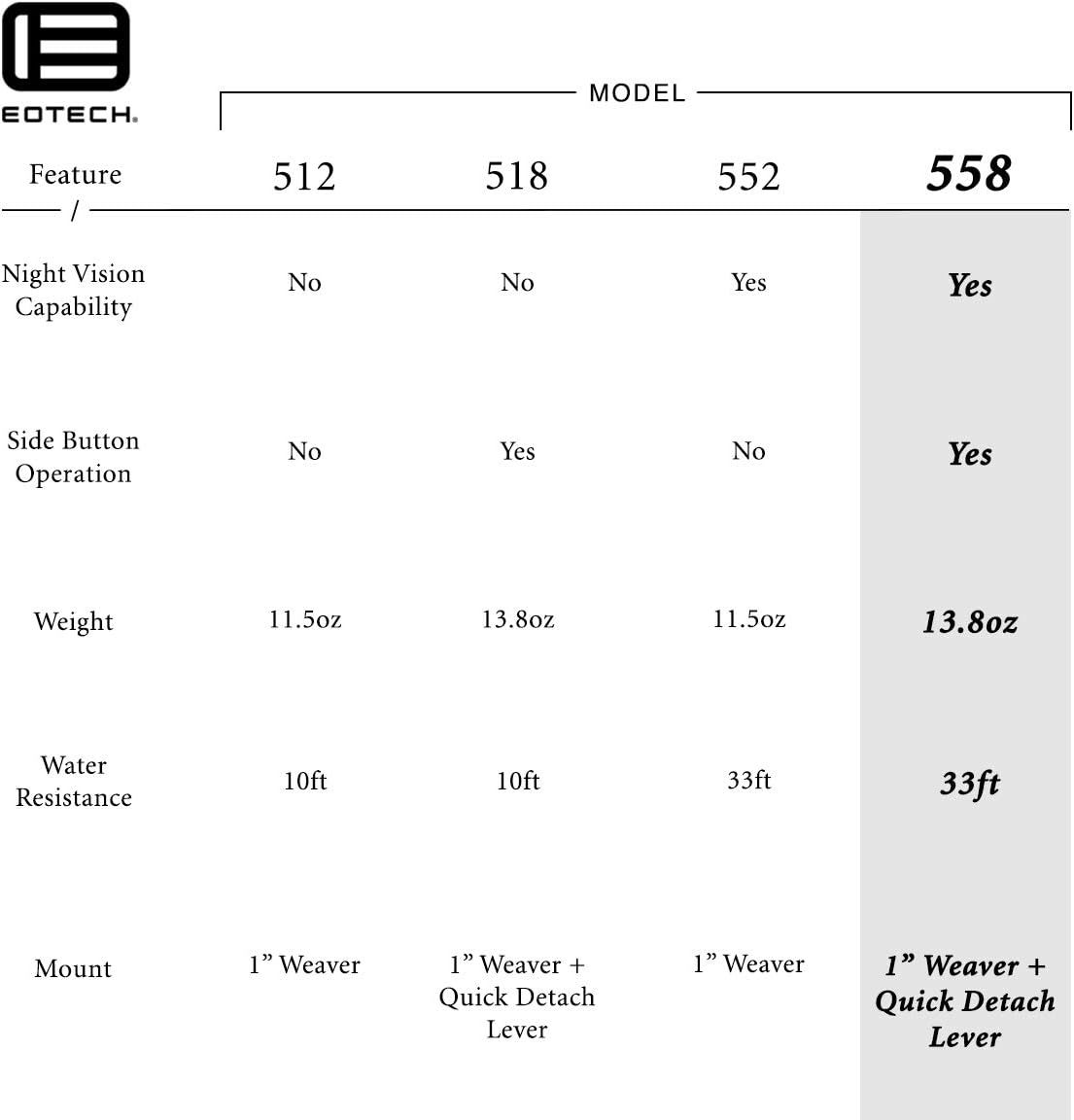
그림 5: Feature comparison table for various EOTECH HWS models, with the 558.A65 features highlighted.
보증
The EOTECH 558.A65 Holographic Weapon Sight comes with the EOTECH HWS Prestige Warranty, which is a 10-year limited warranty. For full details regarding warranty coverage, terms, and conditions, please refer to the official EOTECH manufacturer's web사이트를 방문하거나 고객 지원팀에 직접 문의하세요.
지원하다
For further assistance, technical support, or service inquiries, please contact EOTECH customer support. Refer to the official EOTECH web최신 연락처 정보와 지원 리소스를 제공하는 사이트입니다.
- 제조업체: EOTech
- Web대지: www.eotechinc.com (전ample, actual link not provided in JSON)