
1. 서론
The ScopeAround MS450 Digital Otoscope Ear Camera is designed to provide a clear and detailed view of the ear canal and eardrum. This device features a 4.5-inch IPS screen, a high-definition camera with adjustable LED lights, and an intelligent gyroscope for image stabilization. It is intended for personal ear inspection and can assist in monitoring ear health. This manual provides essential information for the safe and effective use of your otoscope.
2. 안전 정보
- Do not insert the otoscope too deeply into the ear canal. Excessive insertion can cause injury to the eardrum or inner ear structures.
- Always use the provided ear specula to prevent over-insertion and protect the ear canal.
- Clean the camera lens and ear specula thoroughly before and after each use with alcohol wipes to prevent infection.
- This device is for observation and minor earwax removal only. For significant earwax impaction or ear infections, consult a medical professional.
- 어린이의 손이 닿지 않는 곳에 보관하십시오. 어린이에게 사용할 경우 반드시 어른의 감독이 필요합니다.
- Avoid using the device if you experience pain, discomfort, or bleeding during examination. Seek medical attention immediately.
- 기기를 분해하거나 개조하지 마십시오. 보증이 무효화되고 안전 위험이 발생할 수 있습니다.
3. 패키지 내용
패키지에 모든 품목이 들어 있는지 확인하세요.
- MS450 Otoscope Camera Unit
- 충전 케이블(USB Type-C)
- 사용자 설명서
- 4 x Silicone Ear Spoons (various types)
- 3 x Ear Specula (protective cones)
- 1 Pack of Alcohol Prep Pads
- 32GB MicroSD Memory Card (pre-installed or included separately)

4. 제품 오버view
The MS450 otoscope consists of a main display unit and a connected camera probe. Familiarize yourself with the components and controls:

- 디스플레이 유닛 : Features a 4.5-inch IPS screen for real-time view주고받음.
- 카메라 프로브: Equipped with an HD camera, 6 adjustable LED lights, and a gyroscope.
- 제어 버튼: Power, Photo/Video, Light Control, Mode Switch, Navigation (Up/Down), OK, and Settings.
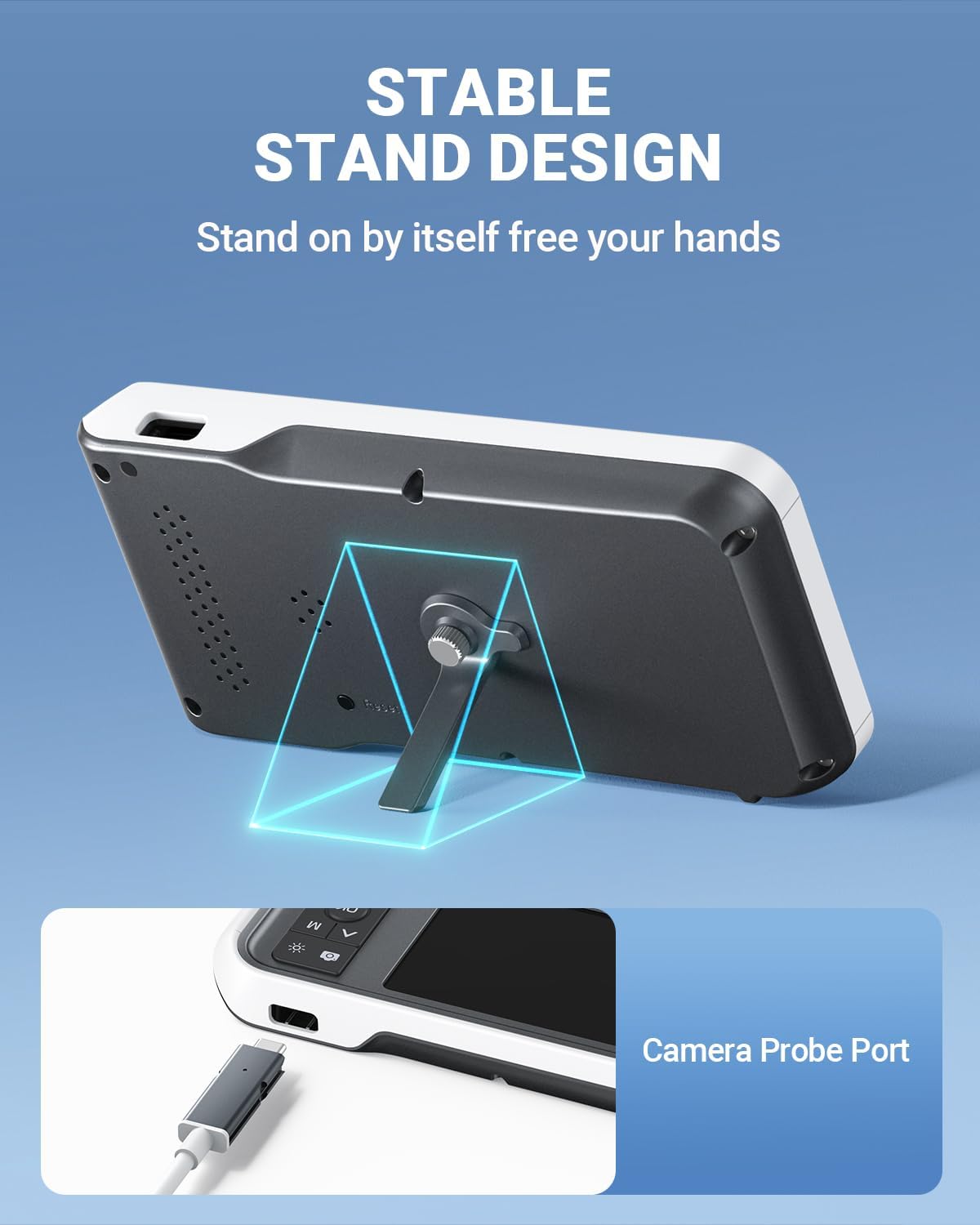
- 포트: USB Type-C Charging Port, TF Card Slot, Camera Probe Connector.
- 통합 스탠드: 손을 대지 않고도 작동할 수 있습니다.
5. 설정
- 기기 충전: Before first use, fully charge the otoscope using the provided USB Type-C cable and a compatible power adapter (not included). The charging port is located on the side of the display unit. A full charge provides over 4 hours of continuous use.
- MicroSD 카드 삽입: Ensure the 32GB MicroSD card is properly inserted into the TF Card Slot. This card is used to store photos and videos.
- Attach Camera Probe: Connect the camera probe cable securely to the Camera Probe Connector on the display unit.
- Select and Attach Specula/Ear Spoon: Choose an appropriate ear speculum (protective cone) or silicone ear spoon. Gently push it onto the tip of the camera probe until it is secure. Always use a speculum to protect the ear canal.


6. 사용 설명서
- 전원 켜기: Press and hold the Power Button (blue button) for a few seconds until the screen turns on.
- LED 밝기 조정: Use the Light Control Button (sun icon) to cycle through 3 levels of LED brightness to achieve optimal illumination for your ear canal.
- 위치: Gently insert the camera probe into the ear canal. The 4.5-inch IPS screen will display a real-time view. The intelligent directional gyroscope helps stabilize the image, preventing disorientation.
- 핸즈프리 작동: Utilize the integrated stand on the back of the display unit to position the device on a flat surface, allowing for hands-free viewing and easier manipulation of the probe.
- 사진/동영상 촬영:
- Press the Mode Switch Button (M) to switch between photo and video modes.
- In photo mode, press the Photo/Video Button (camera icon) once to take a picture.
- In video mode, press the Photo/Video Button once to start recording, and press again to stop.
- Review 메디아: Use the navigation buttons (Up/Down) to browse captured photos and videos. Press the OK button to view 선택한 항목.
- 전송 데이터: Connect the device to a computer using the USB Type-C cable to transfer photos and videos from the MicroSD card. Alternatively, remove the MicroSD card and insert it into a card reader.
- 전원 끄기 : 화면이 꺼질 때까지 전원 버튼을 길게 누르세요.

7. 유지관리
- 카메라 렌즈 청소하기: After each use, gently wipe the camera lens with an alcohol prep pad or a soft, dry cloth. Ensure no residue remains.
- Cleaning Ear Spoons/Specula: Wash reusable ear spoons and specula with soap and water, then sterilize with alcohol prep pads. Replace disposable specula after each use.
- 장치 청소: Wipe the main unit with a soft, dry cloth. Do not immerse the main unit in water. The camera probe is waterproof and can be cleaned with water and alcohol.
- 저장: Store the otoscope in a clean, dry place at room temperature, away from direct sunlight and extreme temperatures.
- 배터리 관리 : 배터리 수명을 연장하려면 기기를 자주 완전히 방전하지 마세요. 장시간 사용하지 않더라도 정기적으로 충전하세요.

8. 문제 해결
| 문제 | 가능한 원인 | 해결책 |
|---|---|---|
| 장치의 전원이 켜지지 않습니다. | 배터리가 부족하여 기기가 멈췄습니다. | Charge the device fully. If unresponsive, press the Reset button with a pin. |
| 화면에 이미지가 나오지 않습니다. | Camera probe not connected; faulty probe. | Ensure camera probe is securely connected. If problem persists, contact support. |
| 이미지가 흐릿합니다. | Dirty lens; incorrect focal distance. | Clean the camera lens. Ensure the probe is within the optimal focal distance (approx. 1 inch / 2.5 cm). |
| 사진/동영상 촬영이 불가능합니다. | MicroSD card full or not inserted; incorrect mode. | Check MicroSD card status and ensure it is inserted. Verify device is in photo or video mode. |
| LED 조명이 작동하지 않습니다. | Lights turned off or set to lowest brightness. | Press the Light Control Button to adjust brightness levels. |
9. 사양
- 모델: MS450
- 표시하다: 4.5인치 IPS 화면
- 카메라 해상도: Full HD (1080P for images, 720P for video)
- 빛의 출처: 6 adjustable LED lights (3 brightness levels)
- 배터리: 2500mAh 리튬 폴리머(충전식)
- 배터리 수명: 약 4시간 연속 사용
- 저장: 32GB MicroSD 카드 (포함)
- 초점 거리: Approximately 1 inch (2.5 cm)
- 자이로 스코프 : Intelligent directional gyroscope for image stabilization
- 연결성: 충전 및 데이터 전송용 USB Type-C
- 제품 크기: 5.9 x 2.9 x 0.79 인치
- 품목 무게: 12 온스
- 재료: Glass (lens), other components as specified by manufacturer
10. 보증
ScopeAround products are covered by a limited manufacturer's warranty against defects in materials and workmanship. Please refer to the warranty card included in your package or visit the official ScopeAround web자세한 보증 약관은 해당 사이트를 참조하세요. 보증 청구를 위해 구매 증빙 자료를 보관하세요.
11. 지원
For technical assistance, troubleshooting, or product inquiries, please contact ScopeAround customer support:
- Web대지: Visit the official ScopeAround webFAQ 및 지원 리소스를 위한 사이트입니다.
- 이메일: 제품 포장이나 공식 문서를 참조하세요. web고객 서비스 이메일 주소입니다.
- 핸드폰: 제품 포장이나 공식 문서를 참조하세요. web고객 서비스 전화번호 안내 사이트입니다.
Our US-based after-sales support team is available to assist you.