
유피 T2521
eufy HomeVac H11 Instruction Manual
모델 : T2521
1. 서론
The eufy HomeVac H11 is a lightweight and compact handheld vacuum designed for quick cleanups. Its cordless design and powerful suction make it suitable for various small tasks, including cleaning vehicle interiors and household spills.

Image: The eufy HomeVac H11 handheld vacuum cleaner, showcasin세련되고 컴팩트한 디자인이 특징입니다.
2. 상자 안에 무엇이 들어있나요?
모든 구성품이 포장에 들어 있는지 확인하세요.
- eufy HomeVac H11 unit
- 2-in-1 틈새 도구
- USB to Micro-USB 케이블
- 사용 설명서 (본 문서)

Image: The eufy HomeVac H11 with its 2-in-1 crevice tool and USB charging cable.
3. 설정
3.1 초기 충전
Before first use, fully charge the HomeVac H11. Connect the provided USB to Micro-USB cable to the charging port on the vacuum and to a compatible USB power adapter (not included). The charging indicator lights will illuminate during charging and turn off when fully charged. Charging typically takes approximately 90 minutes.
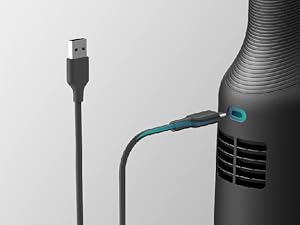
Image: Close-up of the eufy HomeVac H11 showing the Micro-USB charging port with a cable connected.
3.2 액세서리 부착하기
The 2-in-1 crevice tool can be attached to the nozzle for extended reach and specialized cleaning. Simply push the tool firmly onto the vacuum's suction opening until it clicks into place.
4. 사용 설명서
4.1 전원 켜기/끄기
Press the power button located on the handle to turn the vacuum on. Press it again to turn the vacuum off.
4.2 표면 청소
Direct the nozzle towards the debris you wish to clean. For general surfaces, use the standard nozzle. For tight spaces, corners, or between car seats, attach the 2-in-1 crevice tool.

Image: The eufy HomeVac H11 being used to clean crumbs from a car seat and a table surface.
4.3 흡입력
The HomeVac H11 provides 5,500Pa of suction power, effective for picking up dust, crumbs, and small debris. For optimal performance, ensure the dust collector is not full and the filter is clean.

Image: An illustration showing the internal suction mechanism of the eufy HomeVac H11, highlighting its 5,500Pa suction capability.
4.4 배터리 수명
A full charge provides approximately 13 minutes of runtime. The LED indicators on the vacuum show the remaining battery level.
Video: Official eufy demonstration of the HomeVac H11's features and usage.
5. 유지관리
5.1 집진기 비우기
To maintain optimal suction, empty the dust collector regularly. Twist the dust collector counter-clockwise to detach it from the main unit. Dispose of the collected debris and reattach the dust collector by twisting it clockwise until secure.
5.2 필터 청소
The filter should be cleaned periodically, especially after vacuuming fine dust or pet hair. Remove the filter from the dust collector and tap it gently to remove loose dirt. For a more thorough cleaning, rinse the filter under running water. Ensure the filter is completely dry before reinserting it into the dust collector and reattaching it to the vacuum.

Image: Close-up of the eufy HomeVac H11's internal filter, showing its design for trapping dust.
6. 문제 해결
| 문제 | 가능한 원인 | 해결책 |
|---|---|---|
| 전원이 켜지지 않음 / 켜지지 않음 | 배터리가 소진되었습니다. | 제공된 USB 케이블을 사용하여 진공청소기를 완전히 충전하십시오. |
| 흡입력이 약하다 | Dust collector is full or filter is clogged. | Empty the dust collector and clean the filter. Ensure the filter is completely dry before reassembly. |
| 배터리 수명이 짧음 | 배터리가 완전히 충전되지 않았거나 배터리가 노후되었습니다. | Ensure the vacuum is fully charged before use. If the issue persists after full charge, contact customer support. |
| 진공이 예기치 않게 멈춤 | 배터리가 소진되었습니다. | 진공을 재충전하세요. |
7. 사양
| 특징 | 세부 사항 |
|---|---|
| 상표 | 유피 |
| 모델명 | eufy HomeVac H11 |
| 모델 번호 | T2521 |
| 특징 | 컴팩트하고 가벼움 |
| 필터 유형 | 탄약통 |
| 전원 | Battery Powered, Cordless |
| 용량 | 16 온스 |
| 권장 사용 | Car, Small household messes |
| 색상 | 검은색 |
| 소음 수준 | 80데시벨 |
| 권tage | 12 볼트 |
| 왓tage | 40 와트 |
| 품목 무게 | 1.3파운드 |
| 치수(길이 x 너비 x 높이) | 13.19인치 x 2.91인치 x 2.91인치 |
| 배터리 유형 | 리튬이온 |
| 배터리 충전 시간 | 약 90분 |
| 실행 시간 | 13 분 |
| 연결성 | USB |
8. 보증 및 지원
The eufy HomeVac H11 comes with a 2-year manufacturer warranty. For warranty claims, technical support, or further assistance, please refer to the official eufy support channels or the contact information provided in your purchase documentation.
공식 사용자 매뉴얼(PDF)도 다운로드할 수 있습니다. PDF 매뉴얼 다운로드
관련 문서T2521


Ask a question about this manual
Ask about setup, troubleshooting, compatibility, parts, safety, or missing instructions. Manuals+ will review the question and use this page’s manual context to help answer it.