
소개
The Intel Core i5-10400 is a 10th Generation desktop processor designed for a balanced performance across gaming, content creation, and general productivity tasks. This processor is part of the Intel 400 Series Chipset family and comes with a cooler included in the box, simplifying the setup process for users.
Key features include 6 Cores and 12 Threads, offering efficient multitasking capabilities, and a maximum clock speed of up to 4.3 GHz. It is built on the LGA1200 socket type, ensuring compatibility with a range of modern motherboards.
설정 및 설치
Proper installation of your Intel Core i5-10400 processor is crucial for optimal performance and system stability. Please follow these guidelines carefully.
호환성 확인
Ensure your motherboard is compatible with the LGA1200 socket and is based on an Intel 400 series chipset. This processor is exclusively designed for these chipsets.
Processor Handling
Always handle the processor by its edges. Avoid touching the gold contacts or the top surface to prevent damage from static electricity or oils from your skin.

Image: The Intel Core i5-10400 processor, shown in its protective packaging, ready for installation. Note the integrated heat spreader on top and the contact pins on the bottom.
설치 단계
- 마더보드 준비: Open the CPU retention arm and lift the load plate on the LGA1200 socket.
- 프로세서 삽입: Carefully align the triangular marker on the processor with the corresponding marker on the motherboard socket. Gently lower the processor into the socket without forcing it.
- 보안 프로세서: 적재판을 닫고 고정 암이 딸깍 소리가 나면서 제자리에 고정될 때까지 아래로 누르십시오.
- 써멀 페이스트를 도포하십시오 (미리 도포되어 있지 않은 경우): If your cooler does not have pre-applied thermal paste, apply a small pea-sized amount to the center of the processor's integrated heat spreader.
- 쿨러 설치: Mount the included Intel cooler onto the motherboard, ensuring all four push-pins are securely fastened. Connect the cooler's fan cable to the CPU_FAN header on the motherboard.
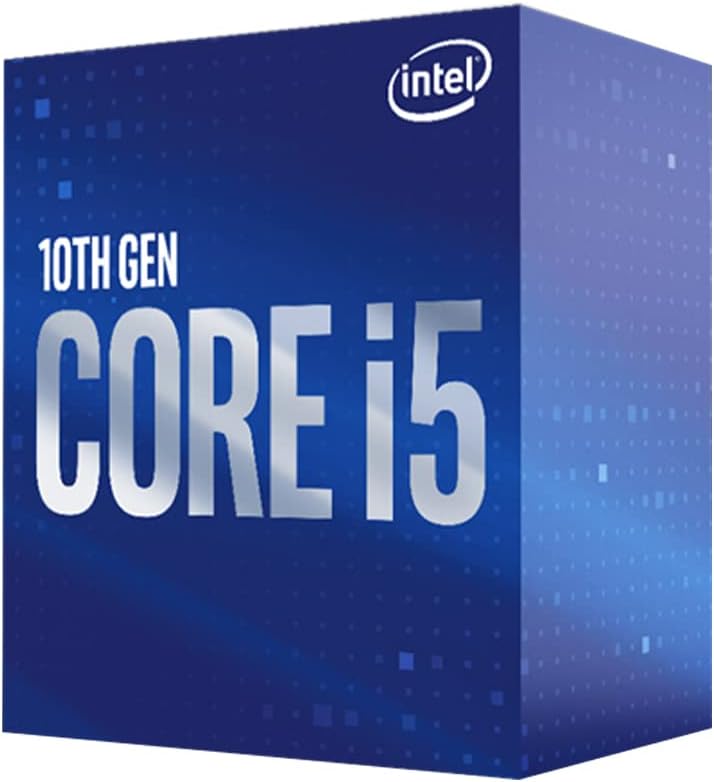
Image: The retail packaging for the 10th Generation Intel Core i5 processor, indicating its generation and model.

Image: A close-up of the Intel Core i5-10400 processor, highlighting its key features such as clock speed, Hyper-Threading Technology, and Quick Sync Video capabilities.

Image: Visual representation of the Intel Core i5-10400's specifications: up to 4.3 GHz max clock speed, 6 cores, and 12 threads.
Official Product Video: 10th Gen Intel Core Boxed Processor Family
영상: 공식 발표view of the 10th Generation Intel Core Boxed Processor Family, showcasing their features and benefits for various computing needs.
작동 원리 및 특징
The Intel Core i5-10400 processor leverages Intel's advanced architecture to deliver robust performance for everyday computing and demanding applications.
- 6코어/12스레드: Provides excellent multi-threaded performance for applications that can utilize multiple cores, such as video editing, 3D rendering, and heavy multitasking.
- Socket Type LGA 1200: Ensures compatibility with the latest Intel 400 series chipset motherboards, offering a stable and high-bandwidth platform.
- Up to 4.3 GHz Max Turbo Frequency: Dynamically increases clock speed when needed, providing a performance boost for single-threaded applications and gaming.
- 인텔 옵테인 메모리 지원: Enhances storage performance by accelerating traditional hard drives, reducing boot times and improving overall system responsiveness.
- Cooler Included: A stock cooler is provided in the box, suitable for typical usage scenarios and ensuring adequate thermal management without requiring an immediate aftermarket purchase.
성능 오버view
The Intel Core i5-10400 is optimized to provide a smooth experience across various computing tasks:
- 노름: Capable of running popular game titles at good frame rates, especially when paired with a capable graphics card. Its 6 cores and 12 threads contribute to stable performance in many modern games.
- 콘텐츠 생성: Handles tasks like photo editing, video rendering, and graphic design efficiently due to its multi-core architecture and Hyper-Threading technology.
- 생산력: Excels in everyday tasks such as web browsing, office applications, and virtual meetings, providing a responsive and fluid user experience.

Image: A performance metric showing up to 51% more FPS when playing PUBG on a 10th Gen Intel Core i5-10400 powered desktop compared to a 5-year old PC.
유지
To ensure the longevity and continued performance of your Intel Core i5-10400 processor, consider the following maintenance tips:
- 먼지 제거: Regularly clean your computer case and CPU cooler to prevent dust buildup, which can impede airflow and lead to higher temperatures. Use compressed air for best results.
- 열전도 페이스트: Over time, thermal paste can dry out. If you notice consistently high CPU temperatures, consider reapplying fresh thermal paste to the CPU and cooler contact surface.
- 공기 흐름: Ensure your PC case has adequate airflow. Proper fan placement (intake and exhaust) helps dissipate heat effectively from the processor and other components.
- 소프트웨어 업데이트: Keep your operating system, motherboard drivers (especially chipset drivers), and BIOS/UEFI updated. These updates often include performance optimizations and bug fixes that can affect CPU operation.
문제 해결
If you encounter issues with your Intel Core i5-10400 processor, refer to the table below for common problems and potential solutions.
| 문제 | 가능한 원인 | 해결책 |
|---|---|---|
| 시스템 부팅이 안 됨 / 화면이 안 나옴 | Improper CPU installation, incompatible motherboard, bent pins on CPU/socket. | Re-seat CPU, verify motherboard compatibility, check for bent pins (handle with extreme care). |
| Overheating / System shutdowns | Improper cooler installation, insufficient thermal paste, poor case airflow, dust buildup. | Ensure cooler is properly seated, reapply thermal paste, clean dust, improve case airflow. |
| Poor performance / Lag | Outdated drivers, background processes, insufficient RAM, thermal throttling. | Update chipset and graphics drivers, close unnecessary background applications, ensure adequate RAM, check CPU temperatures. |
| 시스템 불안정/충돌 | Overheating, corrupted drivers, faulty RAM, power supply issues. | Monitor temperatures, update drivers, test RAM modules, check power supply connections. |
For more detailed troubleshooting or complex issues, please consult Intel's official support resources or a qualified technician.
명세서
| 특징 | 세부 사항 |
|---|---|
| 프로세서 기본 주파수 | 2.9GHz |
| 최대 터보 주파수 | 4.3GHz |
| 코어/스레드 | 6코어 / 12스레드 |
| 소켓 타입 | LGA 1200 |
| 호환 칩셋 | Intel 400 시리즈 칩셋 |
| 열전도율 | 65와트 |
| 인텔 옵테인 메모리 지원 | 예 |
| 쿨러 포함 | 예 |
| 품목 모델 번호 | BX8070110400 |
| 품목 무게 | 9.3 온스 |
| 제품 치수 | 2.91 x 4.17 x 4.72 인치 |
보증 및 지원
Intel provides a standard warranty for its boxed processors. For specific warranty terms and conditions, please refer to the documentation included with your product or visit the official Intel web대지.
기술 지원, 드라이버 다운로드 및 기타 자료는 다음 웹사이트를 방문하십시오. 인텔 지원 Web대지. You may also find helpful information and community support on the 아마존의 인텔 스토어.