
1. 제품 오버view
The Alecto WS-1560 is a wireless weather station designed to provide accurate indoor and outdoor environmental data. Featuring a clear color display and a remote outdoor sensor, it offers comprehensive weather information and additional useful functions for your home.
주요 특징:
- 실내외 온도와 습도를 측정합니다.
- Long-range wireless outdoor sensor (up to 100 meters).
- 5.7-inch well-lit color display with animated weather forecast icons.
- Temperature and ice alarm functions.
- 스누즈 기능이 있는 알람시계.
- Memory function for latest and highest readings.
- Moon phase indicator, date, day, and time display.
- Battery-operated main unit and outdoor sensor with backup batteries.

Figure 1.1: Alecto WS-1560 Main Unit and Wireless Outdoor Sensor.
2. 패키지 내용
Ensure all components are present and in good condition upon unpacking:
- Alecto WS-1560 Main Unit (Indoor Display)
- 무선 옥외용 센서
- 사용자 설명서
- (Power adapter and batteries may be included depending on package)
Video 2.1: Illustrative video showing typical weather station components and basic setup. (Note: This video is for a related product and may not show the exact Alecto WS-1560 model.)
3. 설정 및 설치
3.1. 배터리 설치
Both the main unit and the outdoor sensor require batteries for operation. Ensure you use the correct type and polarity.
- 실외 센서:
- 무선 실외 센서 뒷면의 배터리 칸을 엽니다.
- AA 배터리 2개(별매)를 극성 표시(+/-)에 맞춰 삽입합니다.
- 배터리 칸을 단단히 닫으세요.
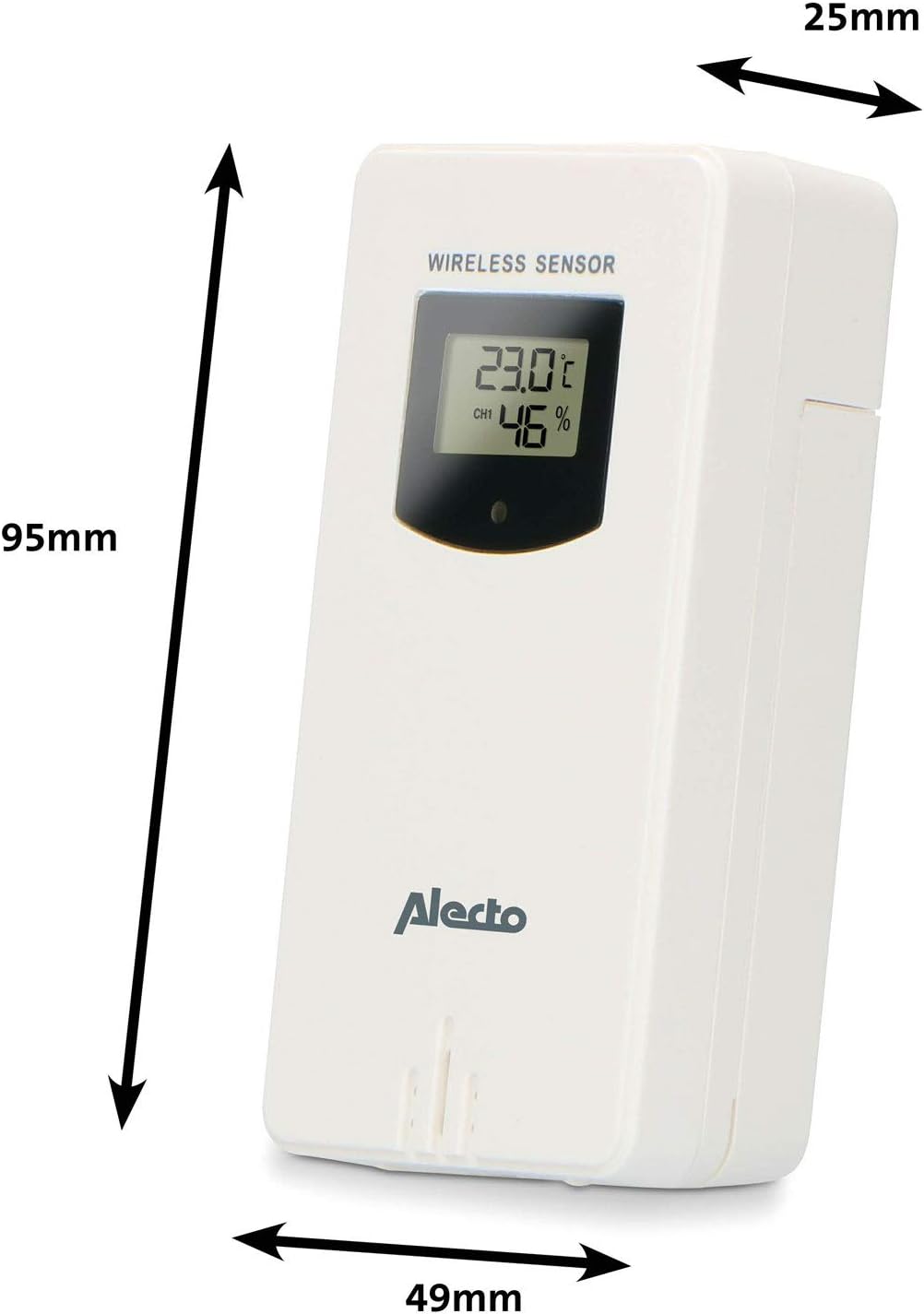
Figure 3.1: Wireless Outdoor Sensor dimensions and battery compartment location.
- 메인 유닛:
- 본체 뒷면의 배터리함을 여세요.
- Insert 2x AA batteries (not included) according to the polarity markings (+/-). These serve as backup batteries.
- 배터리 칸을 단단히 닫으세요.
- Connect the main unit to a power outlet using the provided power adapter (if included).

Figure 3.2: Main Unit dimensions and power input.
3.2. 센서 배치
For accurate outdoor readings, proper placement of the wireless sensor is crucial:
- Place the sensor in a shaded area, away from direct sunlight, to prevent inaccurate temperature readings.
- Ensure good air circulation around the sensor.
- 센서를 지면에서 약 1.5~2.5미터(5~8피트) 높이에 수직으로 설치하십시오.
- Avoid placing the sensor near heat sources (e.g., vents, windows) or moisture sources.
- The maximum transmission range is 100 meters (328 feet) in open air. Walls and other obstacles will reduce this range.

그림 3.3: 예ample of outdoor sensor placement on a wall.
3.3. 센서와 본체 페어링
The main unit and sensor should automatically pair once both are powered on. If pairing does not occur:
- 두 장치 모두 새 배터리가 장착되어 있고 통신 범위 내에 있는지 확인하십시오.
- Press the "TX" button inside the outdoor sensor's battery compartment to manually send a signal.
- On the main unit, you may need to initiate a search for the outdoor sensor (refer to the "Operation" section for specific button functions).
4. 운영
4.1. 디스플레이 레이아웃
The 5.7-inch color display provides a clear overview of all measured data. Key areas include:
- 실외 온도 및 습도: Displays current outdoor conditions.
- 실내 온도 및 습도: 현재 실내 환경을 표시합니다.
- Animated Weather Forecast: Icons predict upcoming weather (sunny, partly cloudy, cloudy, rainy, snowy).
- 시간 및 날짜 : 현재 시간, 요일 및 날짜.
- 기압: 현재 대기압.
- 문 페이즈: 현재 달의 위상을 그래프로 나타낸 것입니다.
- Temperature/Ice Alarm Indicators: Alerts for specific temperature thresholds or potential ice conditions.

그림 4.1: 상세 view of the main unit's color display.
4.2. 버튼 기능
The main unit features several buttons for setting and adjusting functions. Common buttons include:
- 세트: Enters setup mode for time, date, and other settings.
- 오시는 길 : Switches between display modes or confirms settings.
- UP/DOWN (or +/-): Adjusts values during setup or cycles through channels.
- 경보: 알람 기능을 설정하거나 활성화합니다.
- MEM : Displays maximum/minimum temperature and humidity records. Long press to clear records.
- 스누즈/라이트: Activates snooze during an alarm or adjusts backlight brightness.
Video 4.2: Illustrative video demonstrating various features and settings of a weather station. (Note: This video is for a related product and may not show the exact Alecto WS-1560 model.)
4.3. 시간 및 날짜 설정
- "SET" 버튼을 시간 표시가 깜빡일 때까지 길게 누르세요.
- Use the "UP" or "DOWN" buttons to adjust the hour, then press "SET" to confirm and move to minutes.
- 분, 년, 월, 일에 대해서도 반복합니다.
- Press "SET" again to exit the setting mode.
4.4. 알람 설정
- Press the "ALARM" button once to view 알람 시간.
- 알람 시간이 깜빡일 때까지 "알람" 버튼을 길게 누르세요.
- Use the "UP" or "DOWN" buttons to set the desired alarm hour and minute.
- 확인하려면 "알람"을 누르세요.
- To activate/deactivate the alarm, press the "ALARM" button briefly when the alarm time is displayed. An alarm icon will appear/disappear.
4.5. 최대/최소 기록
The weather station automatically records the maximum and minimum temperature and humidity values over a 24-hour period.
- Press the "MEM" button briefly to view 기록된 최대값.
- Press "MEM" again to view 기록된 최소값.
- Press "MEM" a third time to return to current readings.
- To clear the records, press and hold the "MEM" button for a few seconds.
5. 유지관리
- 청소: 디스플레이와 본체 표면을 부드러운 천으로 닦으십시오.amp 천. 연마성 세척제나 용매를 사용하지 마십시오.
- 배터리 교체: 디스플레이에 배터리 부족 표시등이 켜지면 본체와 실외 센서의 배터리를 모두 교체하십시오. 모든 배터리는 항상 동일한 종류의 새 배터리로 동시에 교체해야 합니다.
- 센서 관리: Periodically check the outdoor sensor for debris or obstructions that might affect its readings. Ensure it remains in a shaded, well-ventilated area.
6. 문제 해결
| 문제 | 가능한 원인 | 해결책 |
|---|---|---|
| No outdoor temperature/humidity reading (or "---" displayed) |
|
|
| 부정확한 온도/습도 측정값 |
|
|
| 디스플레이가 어둡거나 비어 있습니다. |
|
|
7. 사양
| 모델 번호 | WS-1560 |
| 상표 | 알렉토 |
| 전원(주 장치) | Power Adapter (if included) + 2x AA batteries (backup) |
| 전원(실외 센서) | AA 배터리 2개 |
| 제품 치수(본체) | 5.1 x 16.5 x 12.3cm |
| 제품 무게 | 440g |
| 무선 센서 범위 | 최대 100m (야외) |
| 디스플레이 크기 | 5.7인치 / 14.5cm |
| 기원 | 중국 |
8. 보증 및 지원
보증 정보, 기술 지원 또는 서비스 문의는 제품에 동봉된 보증 카드를 참조하거나 알렉토 공식 웹사이트를 방문하십시오. web사이트. 구매 증빙 자료로 구매 영수증을 보관하세요.
알렉토 Web대지: www.alecto.nl (General Alecto web사이트, 특정 지원 페이지는 다를 수 있음)