
1. 제품 오버view
The ProCase Wireless Keyboard (Model PC-08362168) is a compact and portable Bluetooth keyboard designed for multi-device compatibility. It offers a comfortable typing experience with low-profile, quiet keys and an ergonomic design, suitable for use with iOS, Android, and Windows operating systems.

Image: The ProCase Wireless Keyboard, a slim black keyboard with a standard QWERTY layout, designed for portability and multi-device use.
2. 패키지 내용
- ProCase Wireless Keyboard (Model PC-08362168)
- 사용 설명서 (본 문서)
참고: 작동을 위해서는 AAA 배터리 2개가 필요하며, 패키지에는 포함되어 있지 않습니다.
3. 설정 가이드
3.1. 배터리 설치
- 키보드 뒷면에 있는 배터리함을 찾으세요.
- 배터리 덮개를 엽니다.
- 올바른 극성(+/-)을 확인하여 AAA 배터리 2개(2)를 삽입합니다.
- 배터리 덮개를 단단히 닫으세요.

Image: Underside of the keyboard showing the ON/OFF switch, Connect button, and the battery compartment for two AAA batteries.
3.2. 전원 켜기 / 끄기
Slide the ON/OFF switch, located on the back of the keyboard, to the "ON" position to power on the device. Slide it to "OFF" when not in use to conserve battery life.
3.3. 블루투스 페어링
- 키보드의 전원이 켜져 있는지 확인하세요.
- Press the "Connect" button on the back of the keyboard. The Bluetooth indicator light (usually blue) on the keyboard will start blinking, indicating it is in pairing mode.
- On your device (tablet, smartphone, computer), navigate to its Bluetooth settings.
- Bluetooth를 활성화하고 사용 가능한 장치를 검색합니다.
- Select "ProCase Keyboard" (or similar name) from the list of found devices.
- Follow any on-screen prompts to complete the pairing process. A successful connection will be indicated by the Bluetooth light on the keyboard turning solid or turning off, depending on the model.

Image: Diagram illustrating wide compatibility with Android, Windows, and iOS devices, including iPads, Android tablets, Microsoft Surface, and smartphones. It also notes that a USB drive is not included and only Bluetooth connection is supported.
4. 사용 설명서
4.1. 기본 타이핑
The keyboard features a standard QWERTY layout. Simply begin typing after successful pairing with your device.
4.2. Function Keys (F1-F12) and Hot Keys
The top row of keys serves dual functions: standard F-keys (F1-F12) and special hot keys for media control, volume, and other system functions. To use the F-keys (F1, F2, etc.), you must hold down the Fn key simultaneously with the desired F-key. Pressing the key without holding Fn will activate its associated hot key function.
- FN + F1: 집
- FN + F2: 검색
- FN + F3모두 선택
- FN + F4: 복사
- FN + F5: 반죽
- FN + F6: 자르다
- FN + F7: 이전 트랙
- FN + F8: 재생/일시정지
- FN + F9: 다음 트랙
- FN + F10: 무음
- FN + F11: 볼륨 다운
- FN + F12: 볼륨 업

이미지: 클로즈업 view of a keyboard key, illustrating the scissor-cross mechanism for comfortable and responsive keystrokes.

Image: A person typing on the ProCase Wireless Keyboard, positioned next to a tablet, highlighting the comfortable and quiet typing experience.
5. 유지관리
5.1. 청소
To clean the keyboard, gently wipe the surface with a soft, dry, lint-free cloth. For stubborn dirt, slightly dampen the cloth with water or a mild cleaning solution. Avoid excessive moisture and do not spray cleaners directly onto the keyboard.
5.2. 보관
When not in use for extended periods, power off the keyboard to conserve battery life. Store it in a cool, dry place away from direct sunlight and extreme temperatures.
6. 문제 해결
- 키보드가 연결되지 않음:
- 키보드 전원이 켜져 있고 새 배터리가 들어 있는지 확인하십시오.
- Press the "Connect" button on the back of the keyboard to enter pairing mode.
- Verify Bluetooth is enabled on your device and try re-pairing.
- 키보드를 장치에 더 가까이 이동하십시오.
- 키보드(전원 껐다 켜기)와 기기를 모두 재시작하세요.
- 키가 응답하지 않음:
- 배터리 잔량을 확인하고 필요한 경우 교체하십시오.
- 키보드가 Bluetooth를 통해 올바르게 연결되었는지 확인하세요.
- 키 주변의 이물질을 청소하세요.
- Function (F) keys not working as expected:
- Remember that to activate F1-F12 functions, you must hold down the Fn key simultaneously. Without holding Fn, the keys will activate their assigned hot key functions (e.g., media control). This behavior cannot be changed.
- 짧은 배터리 수명:
- Ensure the keyboard is powered off when not in use.
- The keyboard features a sleep mode to conserve power during inactivity.
- 고품질 AAA 배터리를 사용하세요.
7. 사양
| 특징 | 세부 사항 |
|---|---|
| 모델 번호 | PC-08362168 |
| 치수(길이 x 너비 x 높이) | 11.5 x 4.7 x 0.29인치(29.2 x 11.9 x 0.74cm) |
| 무게 | 10 온스(283.5그램) |
| 연결성 | 블루투스 무선 |
| 전원 | AAA 배터리 2개(포함되지 않음) |
| 재료 | 아크릴로니트릴 부타디엔 스티렌(ABS) |
| 색상 | 검은색 |
| 호환되는 운영 체제 | iOS, Android, Windows (Note: Does not support Windows 8 Mobile) |
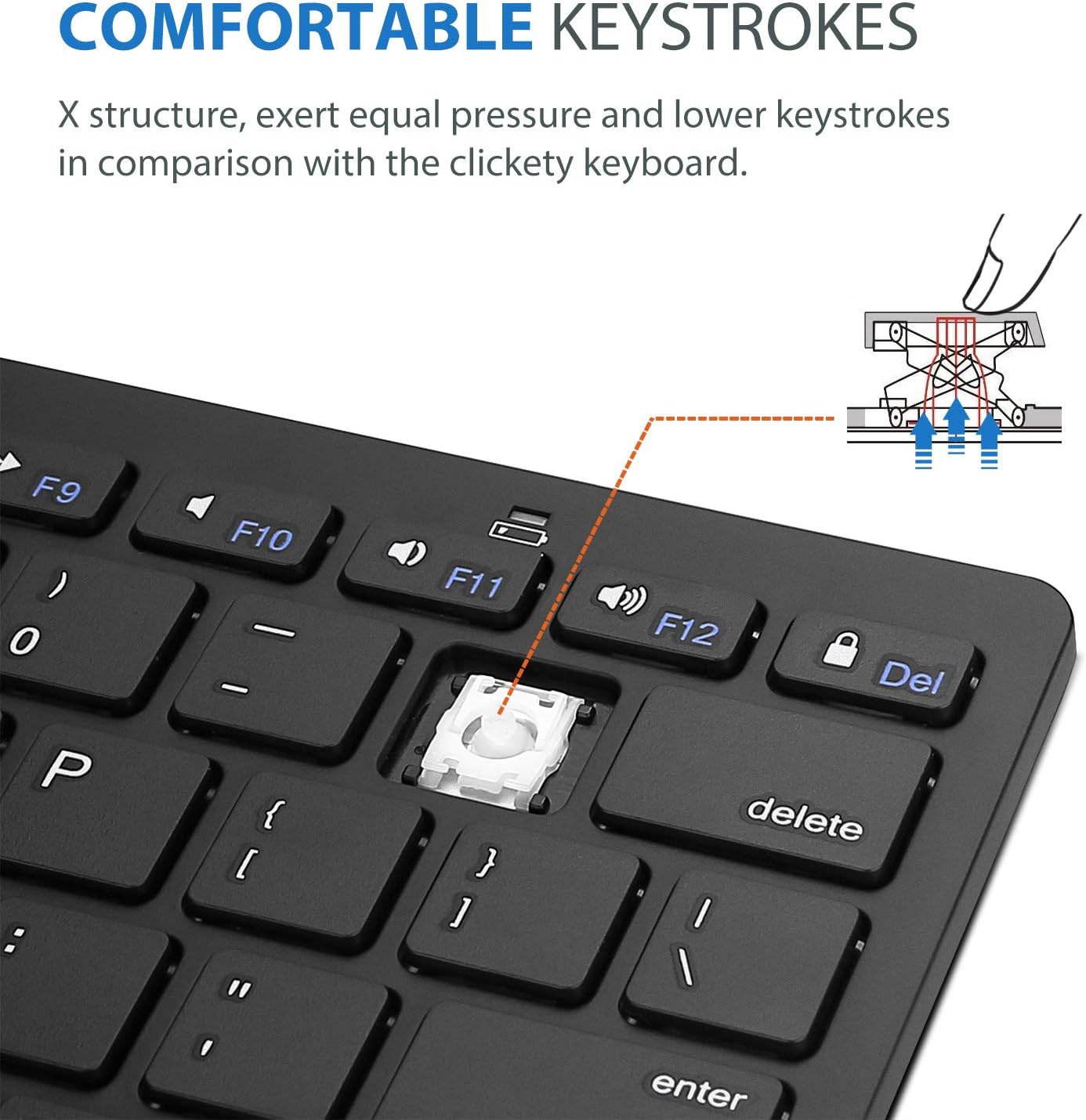
Image: Diagram showing the ultra-slim design and dimensions of the ProCase Wireless Keyboard, measuring 11.2 inches in length, 4.7 inches in width, and 0.19 inches in thickness.
8. 보증 및 지원
8.1. 보증 정보
ProCase products are designed for reliability and performance. For specific warranty details regarding your ProCase Wireless Keyboard, please refer to the warranty card included with your purchase or visit the official ProCase web사이트. 보증 청구를 위해 구매 증빙 자료를 보관하세요.
8.2. 고객 지원
If you encounter any issues or have questions not covered in this manual, please contact ProCase customer support. You can find contact information on the official ProCase web사이트나 구매 플랫폼을 통해서도 구매하실 수 있습니다.
자세한 내용은 다음을 방문하세요. ProCase Store on Amazon.