

1. 서론
Thank you for choosing the ROMOSS Large Capacity Portable Charger. This device is designed to provide reliable and efficient power to your mobile devices on the go. Please read this manual carefully before use to ensure proper operation and to maximize the lifespan of your product.
2. 안전 정보
부상이나 기기 손상을 방지하기 위해 다음 안전 수칙을 준수해 주십시오.
- 모바일 기기를 극한의 온도(60°C/140°F 이상 또는 0°C/32°F 이하)에 노출시키지 마세요.
- 기기를 떨어뜨리거나, 분해하거나, 직접 수리하려고 하지 마세요.
- 물, 습기, 가연성 물질로부터 멀리하세요.
- 인증된 충전 케이블과 어댑터만 사용하세요.
- 어린이의 손이 닿지 않는 곳에 보관하세요.
- 현지 규정에 따라 책임감 있게 제품을 폐기하십시오.
3. 제품 오버view
The ROMOSS Large Capacity Portable Charger features multiple ports for versatile charging and an LED indicator for battery status.
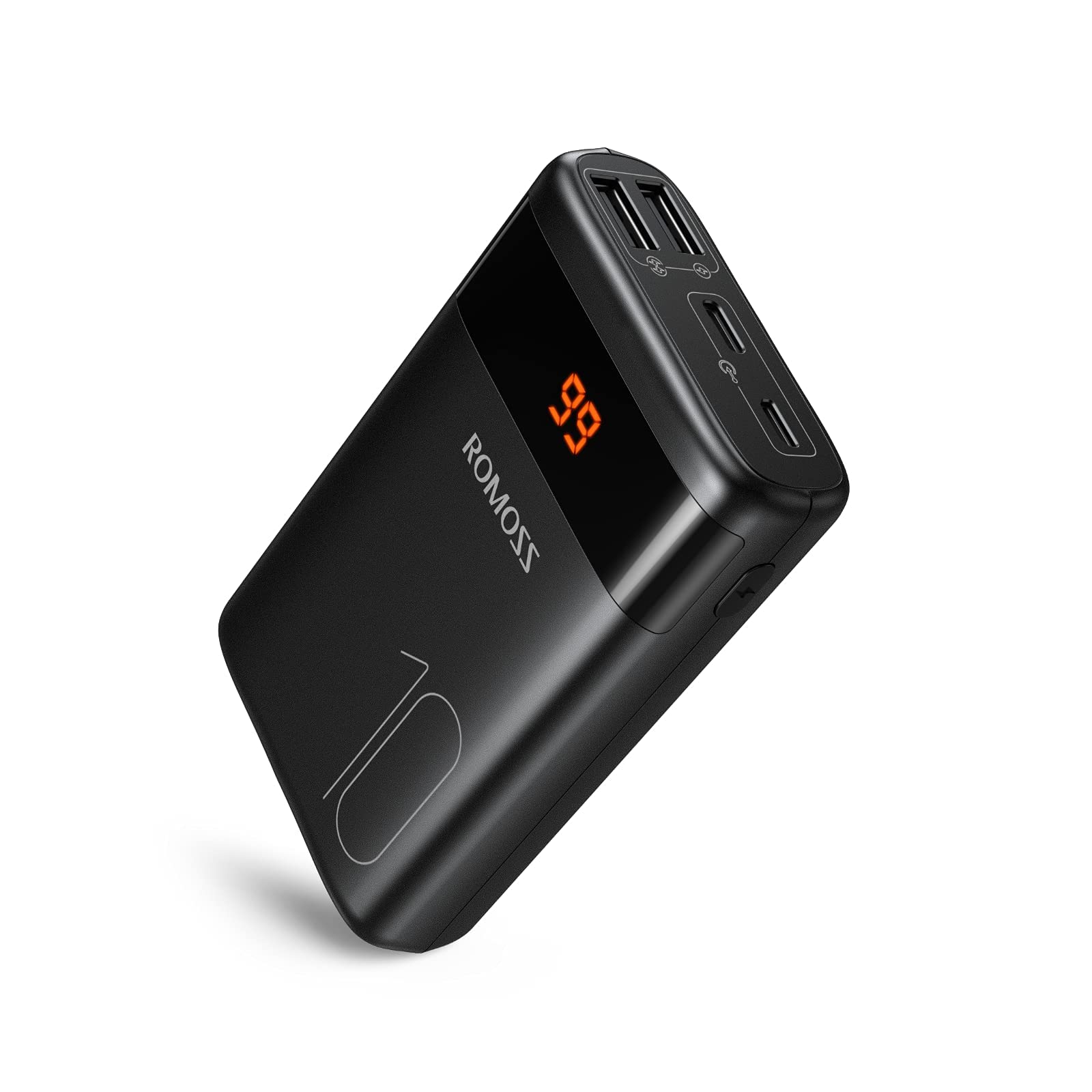
이미지: 앞면 view of the ROMOSS Portable Charger, showing input/output ports and LED battery indicators.
구성 요소:
- 전원 버튼: Press once to check battery level, press and hold to activate/deactivate (if applicable).
- LED 표시등: Display the remaining battery capacity.
- 입력 포트 : Used to charge the portable charger itself (e.g., Type-C, Micro USB, Lightning).
- 출력 포트: Used to charge other devices (e.g., USB-A, Type-C).
4. 설정
4.1 초기 충전
Before first use, fully charge your ROMOSS portable charger. This ensures optimal battery performance and accuracy of the battery indicator.
- Connect the portable charger to a power source (e.g., wall adapter, computer USB port) using a compatible charging cable (e.g., Type-C cable).
- 충전 진행 상황을 보여주기 위해 LED 표시등이 켜집니다.
- Once all LED indicators are solid, the portable charger is fully charged. Disconnect it from the power source.
5. 사용 설명서
5.1 장치 충전
To charge your mobile phone, tablet, or other USB-powered devices:
- Connect your device to an output port on the portable charger using its charging cable.
- The portable charger should automatically begin charging your device. If not, press the power button once.
- The LED indicators will show the remaining battery level of the portable charger during charging.
- Once your device is fully charged, disconnect it from the portable charger.
5.2 배터리 잔량 확인
To check the remaining battery capacity of the portable charger:
- 전원 버튼을 한 번 누르세요.
- The LED indicators will light up, showing the current battery level. For example, four solid LEDs typically indicate a full charge, while one blinking LED indicates a low battery.
6. 유지관리
6.1 청소
Wipe the portable charger with a soft, dry cloth. Do not use harsh chemicals or abrasive materials.
6.2 보관
Store the portable charger in a cool, dry place away from direct sunlight and extreme temperatures. If storing for an extended period, charge the device to approximately 50-75% capacity every three months to maintain battery health.
6.3 배터리 관리
To prolong battery life, avoid fully discharging the portable charger frequently. It is recommended to recharge it before it completely runs out of power.
7. 문제 해결
| 문제 | 가능한 원인 | 해결책 |
|---|---|---|
| Portable charger not charging | Cable issue, power source issue, or charger fault. | Try a different charging cable and wall adapter. Ensure the power source is active. |
| Device not charging from portable charger | Portable charger is out of power, cable issue, or device compatibility. | Recharge the portable charger. Try a different charging cable. Ensure your device is compatible with USB charging. |
| 느린 충전 | Cable quality, device input limit, or portable charger output limit. | Use a high-quality charging cable. Check if your device supports faster charging. Ensure the portable charger's output port supports the desired speed. |
| LED 표시기가 작동하지 않음 | 장치 오류입니다. | If the device is still charging/discharging normally, this might be a minor fault. If not, contact customer support. |
If you encounter issues not listed here or if the problem persists, please contact ROMOSS customer support.
8. 사양
| 특징 | 세부 사항 |
|---|---|
| 상표 | 로모스 |
| 모델 | Large Capacity Portable Charger |
| ASIN | B085RSRFQS |
| 입력 | Type-C (specific voltage/current not provided in source data) |
| 산출 | USB-A, Type-C (specific voltage/current not provided in source data) |
| 인증 | PSE 인증 |
| 첫 판매 가능일 (Amazon.co.jp) | 25년 2019월 XNUMX일 |
9. 보증 및 지원
ROMOSS products come with a standard warranty. For detailed warranty information, please refer to the warranty card included with your product or visit the official ROMOSS website. For technical support, troubleshooting assistance, or warranty claims, please contact ROMOSS customer service through their official channels.
자세한 정보와 연락처는 다음에서 확인할 수 있습니다. ROMOSS Brand Store on Amazon.