
소개
Welcome to the user manual for the BUFFALO BS-GU2105 5-Port Gigabit Unmanaged Switch. This document provides essential information for the proper installation, operation, and maintenance of your device. Please read this manual thoroughly before using the product to ensure safe and efficient operation.
제품 끝view
The BUFFALO BS-GU2105 is a Layer2 unmanaged switch designed for business environments, offering reliable high-speed network connectivity. It features five Gigabit-compatible ports and a robust metal housing with an integrated power supply.
주요 특징:
- 5 Gigabit Ethernet Ports (10/100/1000 BaseT(X))
- Metal Housing with Built-in Power Supply
- Loop Prevention Function (ON/OFF switchable)
- EEE (Energy Efficient Ethernet, 802.3az) Function (ON/OFF switchable)
- 작동 온도 범위: 0°C ~ 50°C(32°F ~ 122°F)
- Equipped with Anti-Theft Security Slots
- Flexible Installation: Horizontal or Wall-Mountable
패키지 내용
Please verify that all items are present in your package. If any items are missing or damaged, contact your vendor or BUFFALO support.
- BUFFALO BS-GU2105 5-Port Gigabit Unmanaged Switch
- 장착용 자석
- AC Cable Prevention Band
- Power Cord (integrated power supply)
설정 및 설치
1. 물리적 배치
The BS-GU2105 switch can be placed horizontally on a flat surface or mounted on a wall. Ensure adequate ventilation around the device to prevent overheating. Avoid placing the switch near heat sources or in direct sunlight.

이미지: 앞면 view of the BUFFALO BS-GU2105 switch, displaying its indicators and switches.
For enhanced security, the switch is equipped with anti-theft security slots. A compatible security cable (not included) can be used to secure the device to a fixed object, preventing unauthorized removal.
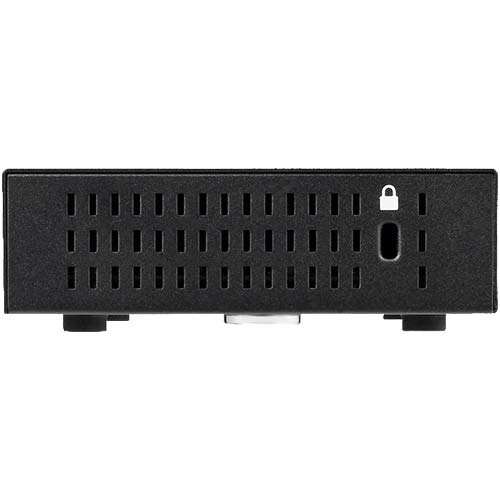
이미지: 측면 view of the BUFFALO BS-GU2105 switch, highlighting the security slot.

Image: BUFFALO BS-GU2105 switch with an optional security cable lock installed.
2. 네트워크 케이블 연결
Connect your network devices (computers, servers, network printers, or other switches) to the RJ-45 ports (1-5) on the rear of the switch using standard Ethernet cables. The switch automatically detects the speed and duplex mode of the connected devices.

이미지: 후면 view of the BUFFALO BS-GU2105 switch, showing the five RJ-45 ports and AC power input.
3. 전원 연결
Connect the power cord to the AC-IN port on the rear of the switch and then to a standard power outlet. The switch has a built-in power supply. Use the included AC cable prevention band to secure the power cord, preventing accidental disconnection.
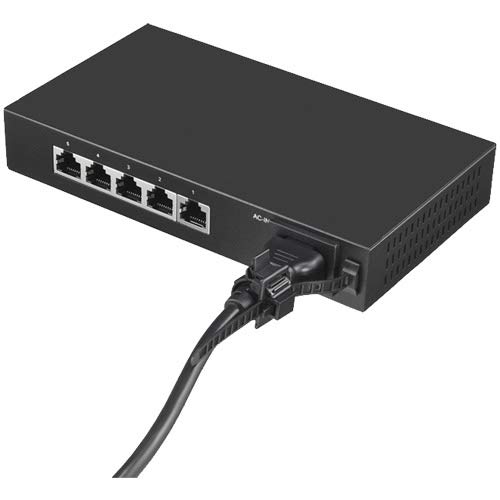
Image: Power cord connected to the BUFFALO BS-GU2105 switch, secured with the AC cable prevention band.
스위치 조작
LED 표시등
스위치 전면 패널에는 상태 정보를 제공하는 여러 개의 LED 표시등이 있습니다.
- 전원 LED : 스위치에 전원이 들어오면 불이 들어옵니다.
- LINK/ACT LEDs (1-5): For each port, this LED indicates network activity and connection status.
- 솔리드 그린: A device is connected and operating at 1000 Mbps (Gigabit).
- 녹색 깜박임: Data is being transmitted or received at 1000 Mbps.
- 호박색: A device is connected and operating at 10/100 Mbps.
- 깜박이는 호박색: Data is being transmitted or received at 10/100 Mbps.
- 끄다: 연결된 장치가 없거나 연결된 장치의 전원이 꺼져 있습니다.
Loop Prevention Function
The BS-GU2105 includes a loop prevention function to avoid network loops that can cause broadcast storms and network instability. This function can be enabled or disabled using the "LOOP PREVENTION" ON/OFF switch on the front panel.
- 에: Loop prevention is active. If a network loop is detected, the affected port will be temporarily disabled to prevent network disruption.
- OFF : Loop prevention is inactive.
EEE (Energy Efficient Ethernet) Function
The Energy Efficient Ethernet (EEE) function (IEEE 802.3az) allows the switch to reduce power consumption during periods of low data activity. This function can be enabled or disabled using the "EEE" ON/OFF switch on the front panel.
- 에: EEE is active, reducing power consumption when network traffic is low.
- OFF : EEE is inactive.
유지
To ensure optimal performance and longevity of your BUFFALO BS-GU2105 switch, follow these maintenance guidelines:
- 기기를 깨끗하고 먼지 없는 환경에 보관하십시오.
- Ensure proper ventilation and do not block the air vents.
- 부드럽고 마른 천으로 스위치 외부를 닦으세요. 액체나 에어로졸 세척제는 사용하지 마세요.
- 케이블 연결 상태를 주기적으로 점검하여 안전하게 연결되어 있는지 확인하십시오.
문제 해결
If you encounter issues with your BS-GU2105 switch, refer to the following common troubleshooting steps:
- 전원 없음: Ensure the power cord is securely connected to both the switch and a working power outlet. Check if the power outlet is functional.
- 링크/활동 LED 없음: Verify that the Ethernet cable is properly connected to both the switch port and the network device. Ensure the connected device is powered on and functioning correctly. Try a different cable or port.
- 네트워크 속도가 느립니다: Check the LINK/ACT LED color. Green indicates Gigabit speed, while amber indicates 10/100 Mbps. Ensure all connected devices and cables support Gigabit Ethernet for optimal performance.
- Network Instability (if Loop Prevention is OFF): If you experience network instability or broadcast storms, ensure the "LOOP PREVENTION" switch is set to ON.
If problems persist after attempting these steps, please contact technical support.
명세서
| 특징 | 설명 |
|---|---|
| 상표 | 물소 |
| 모델 | BS-GU2105 |
| 포트 수 | 5 x 10/100/1000 BaseT(X) RJ-45 |
| 스위치 유형 | Unmanaged, Layer2 |
| 주택 | 금속 |
| 전원 공급 장치 | 내장형 |
| 작동 온도 | 0°C - 50°C (32°F - 122°F) |
| 치수(길이 x 너비 x 높이) | 10.04 x 5.71 x 2.76인치(25.5 x 14.5 x 7.0cm) |
| 무게 | 0.8킬로그램(1.76파운드) |
| 특별 기능 | Loop Prevention, EEE (802.3az), Anti-theft Security Slot, Magnet for mounting, AC Cable Prevention Band |
보증 정보
The BUFFALO BS-GU2105 switch comes with a 5-year limited warranty. This includes a standard 3-year warranty, which can be extended by an additional 2 years upon user registration on the official BUFFALO website. Please retain your proof of purchase for warranty claims and refer to the official BUFFALO warranty policy for full terms and conditions.
기술 지원
For technical assistance, troubleshooting, or further inquiries regarding your BUFFALO BS-GU2105 switch, please visit the official BUFFALO support website or contact their customer service department. Up-to-date contact information and resources can typically be found on the BUFFALO brand's official channels.
BUFFALO Store: Visit the BUFFALO Store on Amazon