
소개
This manual provides essential information for the safe and efficient operation of your Domo DO157A Tower Fan. Please read these instructions carefully before use and retain them for future reference.
The Domo DO157A is a versatile appliance combining the functions of an air cooler, fan, and humidifier, designed to enhance your indoor comfort.

이미지: 앞면 view of the Domo DO157A Tower Fan.
안전 정보
화재, 감전, 신체 상해의 위험을 줄이려면 전기 제품을 사용할 때 항상 기본적인 안전 예방 조치를 준수하세요.
- 볼륨을 확보하세요tag기기에 표시된 e는 해당 지역의 주 전원에 해당합니다.tag연결하기 전에 e를 누르세요.
- 제품, 플러그, 코드를 물이나 기타 액체에 담그지 마십시오.
- 사용하지 않을 때, 청소하기 전, 또는 기기를 옮기기 전에는 콘센트에서 플러그를 뽑아 두세요.
- 어린이의 손이 닿지 않는 곳에 보관하세요.
- 코드나 플러그가 손상된 경우 또는 기기가 오작동하거나 어떤 식으로든 손상된 경우에는 기기를 작동하지 마십시오.
- Refer to the official safety document for detailed safety guidelines: 안전 정보 (PDF).
제품 구성 요소
Familiarize yourself with the main parts of your Domo DO157A Tower Fan:
- Main Unit (Tower Fan)
- 7 리터 물 탱크
- Washable Filter System (Honeycomb Cooling Membrane)
- 원격 제어
- Coolpack (for enhanced cooling)
- LED 디스플레이가 있는 제어판
영상: View of the tower fan with the filter system removed, showing the honeycomb cooling membrane.
설정
- 짐 풀기: Carefully remove the appliance from its packaging. Retain packaging for storage or disposal.
- 놓기: Place the tower fan on a firm, level surface. Ensure there is adequate space around the unit for proper airflow.
- 물탱크 채우기:
- 장치 뒷면 하단에서 물탱크를 빼냅니다.
- Fill the 7-liter water tank with clean, cold water. For enhanced cooling, place the included Coolpack (after freezing) into the water tank.
- Ensure the water level does not exceed the maximum fill line.
- 물탱크를 딸깍 소리가 나면서 제자리에 고정될 때까지 본체 안으로 다시 밀어 넣으세요.
- 전원 연결: 전원 코드를 적합한 콘센트(230V)에 꽂으세요.
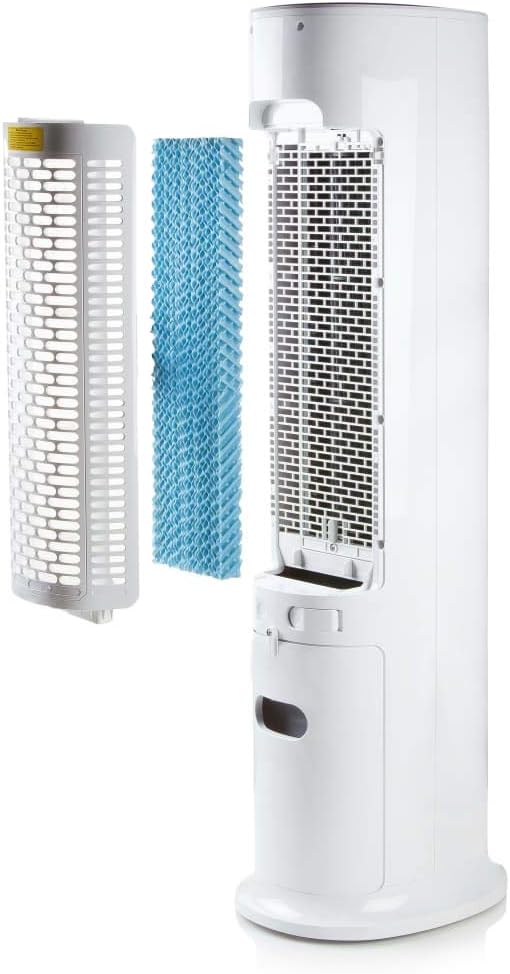
Image: Demonstrating the process of filling the water tank of the tower fan.
작동 지침
The Domo DO157A can be operated using the control panel on top of the unit or the included remote control.
제어판 및 원격 제어 기능

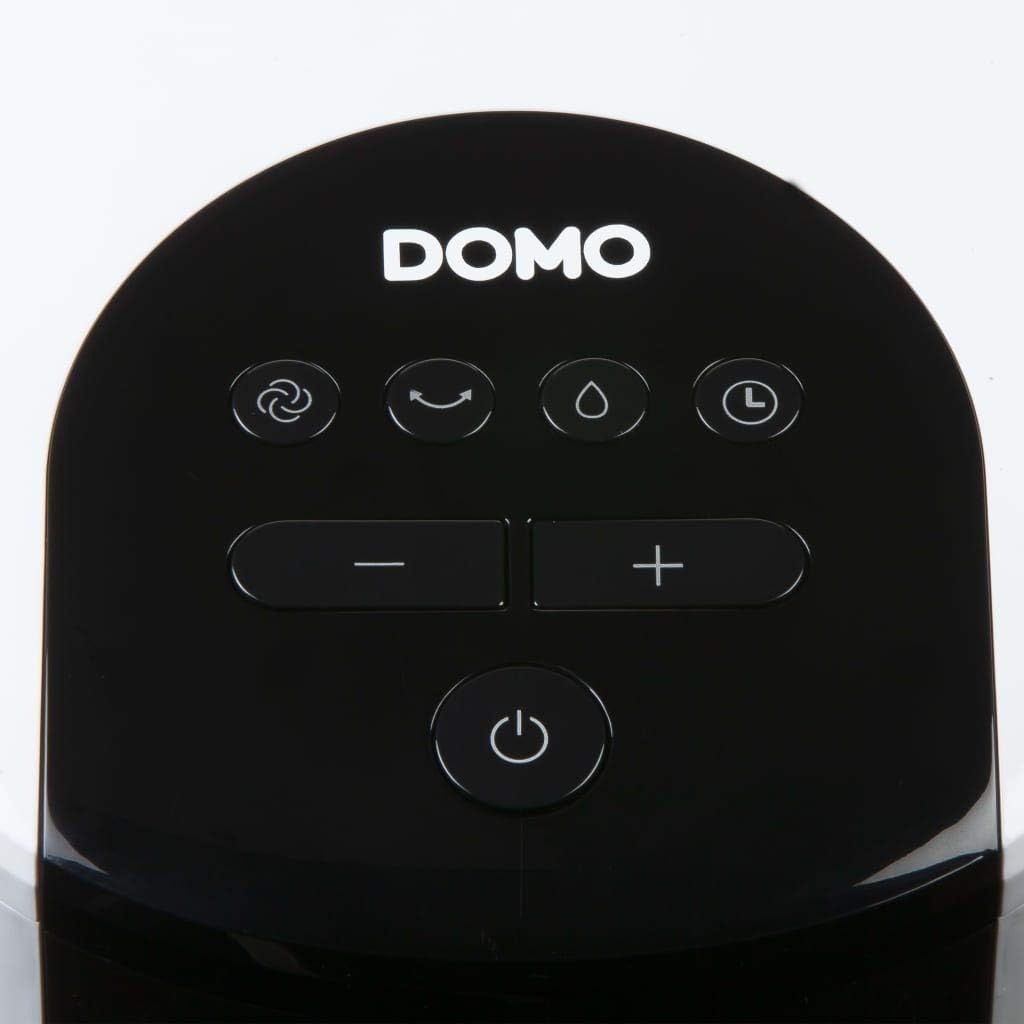
이미지: 클로즈업 view of the control panel on the top of the tower fan.
- 전원 버튼 (⏻): 장치를 켜거나 끕니다.
- 모드 버튼(☺): Cycles through 3 ventilation modes:
- 정상: 선택한 속도로 일정한 공기 흐름.
- 자연스러운: 다양한 팬 속도로 자연스러운 바람을 시뮬레이션합니다.
- 잠: Reduces fan speed and noise for quiet operation during sleep.
- 속도 버튼(− / +): 선풍기 속도를 4단계로 조절할 수 있습니다.
- Cooling/Humidifier Button (💧): Activates or deactivates the air cooling and humidifying function. This function requires water in the tank.
- 타이머 버튼(⏱): Sets the operating timer for up to 10 hours. Each press adds 1 hour.
- 진동 버튼(↻): Activates or deactivates the oscillation function, allowing the fan to rotate and distribute air over a wider area.
초기 운영
- Press the Power button to turn on the unit. The default mode is usually Normal.
- Use the Speed buttons to select your desired fan speed (1-4).
- To activate cooling/humidifying, press the Cooling/Humidifier button. Ensure the water tank is filled.
- Select a ventilation mode (Normal, Natural, Sleep) using the Mode button.
- Press the Oscillation button for wider air distribution.
- Set the timer if desired using the Timer button.

Image: The tower fan operating in a living room, illustrating the airflow direction.
유지
정기적인 유지관리를 통해 최적의 성능을 보장하고 가전제품의 수명을 연장할 수 있습니다.
외부 청소
- 청소하기 전에는 항상 장치의 플러그를 뽑으세요.
- 부드러운 d로 외부 표면을 닦으십시오.amp 천. 연마성 세척제나 용매를 사용하지 마십시오.
- 내부 구성품에 물이 들어가지 않도록 주의하세요.
물탱크 청소
- 장치에서 물탱크를 제거하세요.
- 남아 있는 물을 모두 버리세요.
- Clean the tank with mild soap and water. Rinse thoroughly.
- 탱크를 완전히 자연 건조시킨 후 다시 삽입하세요.
- Clean the water tank regularly, especially if using the humidifying function frequently, to prevent mold or mildew buildup.
필터 시스템 청소
- The high-quality filter system is washable.
- Carefully remove the filter (honeycomb cooling membrane) from the unit as shown in the "Product Components" section.
- 흐르는 물에 필터를 헹구어 먼지와 이물질을 제거하세요.
- 필터를 완전히 말린 후 장치에 다시 삽입하세요.
- Regular cleaning of the filter is recommended, especially for allergy sufferers, to maintain hygiene and efficiency.
문제 해결
If you encounter issues with your Domo DO157A, refer to the following common problems and solutions:
| 문제 | 가능한 원인 | 해결책 |
|---|---|---|
| 기기가 켜지지 않습니다. | 전원 공급이 없습니다. | 전원 코드가 작동하는 콘센트에 단단히 꽂혀 있는지 확인하세요. |
| 냉각 효과가 없습니다. | 물탱크가 비어 있거나 냉방 기능이 작동 중이 아닙니다. | Fill the water tank. Press the Cooling/Humidifier button to activate the function. Ensure Coolpack is frozen and placed in the tank if desired. |
| 공기 흐름이 약함. | Fan speed is too low; air filter is dirty. | Increase the fan speed. Clean the air filter as per maintenance instructions. |
| 불쾌한 냄새. | Stagnant water in the tank or dirty filter. | Empty and clean the water tank. Clean the filter. Use fresh water. |
명세서
| 특징 | 세부 사항 |
|---|---|
| 상표 | 도모 |
| 모델명/번호 | DO157A |
| 유형 | Tower Fan, Air Cooler, Humidifier |
| 재료 | 플라스틱 |
| 장착 유형 | 독립형 |
| 색상 | 하얀색 |
| 공기 흐름 용량 | 294.29 Cubic Feet per Minute (500 m³/h) |
| 제어 유형 | 원격 제어, 본체 제어 패널 |
| 물탱크 용량 | 7리터 |
| 권장 바닥 면적 | 25 제곱미터 |
| 제품 무게 | 11.2 킬로그램 |
| 왓tage | 65와트 |
| 소음 수준 | 40데시벨 |
| 속도의 수 | 4 |
| 권tage | 230 볼트 |
| 치수(D x W x H) | 34cm x 26cm x 106.5cm |
| 시간제 노동자 | 최대 10시간 |
| 환기 모드 | 일반, 자연, 수면 |
| 특별 기능 | Sleep mode, Washable filter system, Oscillation, Coolpack included |
보증 및 지원
For warranty information, please refer to the documentation provided with your purchase or contact Domo customer support. Keep your proof of purchase for warranty claims.
If you require further assistance or have questions not covered in this manual, please contact Domo customer service through their official web웹사이트 또는 제품과 함께 제공된 연락처 정보를 확인하세요.