
1. 서론
Thank you for choosing the Spacetronik SPE-114 Electric Height Adjustable Desk Frame. This manual provides essential information for the safe and efficient assembly, operation, and maintenance of your new desk frame. Please read these instructions carefully before use and retain them for future reference.
This electric height adjustable desk frame is designed to promote a healthier work environment by allowing seamless transitions between sitting and standing positions. Its advanced features, including memory presets, ensure a personalized and ergonomic workspace.
2. 안전 지침
- Ensure all components are present and undamaged before assembly. Do not use if any parts are missing or faulty.
- 작동 중에는 움직이는 부품으로 인한 부상을 방지하기 위해 어린이와 애완동물이 책상에 가까이 가지 않도록 하십시오.
- Do not place hands or other body parts near the moving parts of the frame to avoid pinching.
- Ensure the power cord is not damaged or pinched. Only use the provided power adapter.
- 책상에 과부하를 주지 마십시오. 최대 하중 용량은 제품 사양을 참조하십시오.
- Avoid placing liquids directly on the control panel or motor housing.
- If the desk frame makes unusual noises, stops moving, or shows error codes, discontinue use and consult the troubleshooting section or contact customer support.
- 본 제품은 실내에서만 사용하도록 설계되었습니다.
3. 패키지 내용
패키지에 다음 구성품이 모두 포함되어 있는지 확인해 주십시오. 누락되거나 손상된 부품이 있는 경우 고객 지원 센터로 문의해 주십시오.
- Desk Frame Legs (2)
- 가로대/지지대
- 모터 어셈블리
- 제어판
- 전원 어댑터 및 케이블
- 하드웨어 키트(나사, 볼트, 공구)
- 사용자 설명서
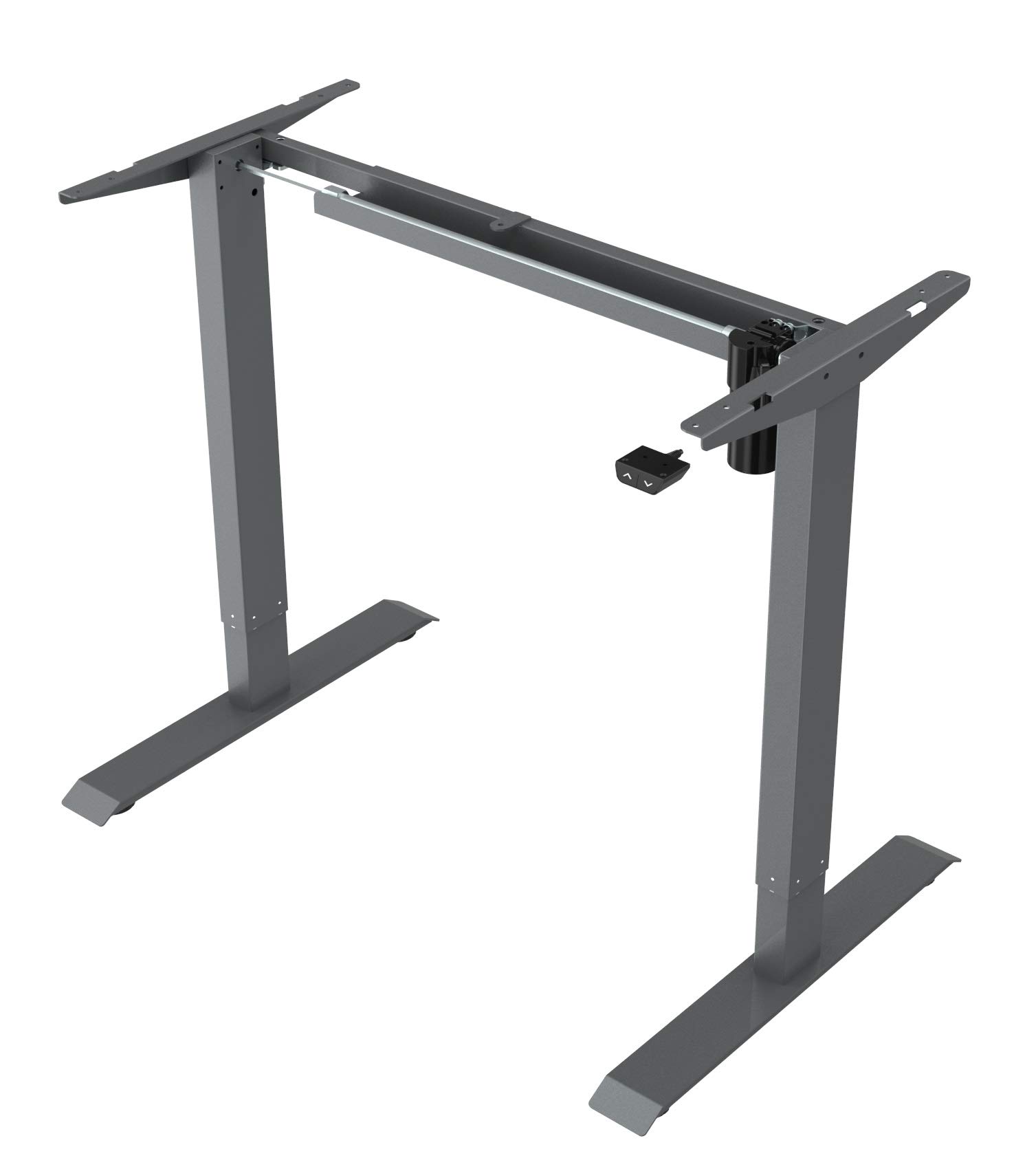
This image displays the main components of the Spacetronik SPE-114 electric height adjustable desk frame, including the legs, crossbar, and motor assembly, ready for assembly.
4. 설치 및 조립
Assembly typically requires two people. Ensure you have enough space and the necessary tools (usually included in the hardware kit).
- 구성 요소 풀기: 모든 부품을 포장에서 조심스럽게 꺼낸 후 긁힘을 방지하기 위해 깨끗하고 부드러운 표면에 놓으세요.
- 다리와 크로스바 조립: Attach the desk legs to the crossbar/support beam using the provided screws and tools. Ensure all connections are secure.
- 모터 및 제어 상자 설치: Mount the motor assembly and control box to the designated positions on the frame, following the diagrams in the detailed assembly guide (if provided separately).
- 제어판 부착: Secure the control panel to the underside of your chosen desktop or to the frame in an easily accessible location.
- 케이블 연결: Connect the motor cable, control panel cable, and power adapter to the control box. Ensure all connections are firm.
- Mount Desktop (Not Included): Carefully place your desktop onto the assembled frame. Align the desktop with the pre-drilled holes (if applicable) or mark and drill new pilot holes. Secure the desktop to the frame using appropriate screws.
- 초기 전원 켜기: Plug the power adapter into a wall outlet. The desk may perform an initial reset or calibration.

각진 view of the fully assembled Spacetronik SPE-114 desk frame, showcasing its sturdy construction and grey finish.
5. 사용 설명서
5.1 제어판 이상view

자세한 view of the control panel for the Spacetronik SPE-114 desk, featuring up/down buttons and memory preset buttons for three height positions.
The control panel typically features:
- 위쪽(▲) / 아래쪽(▼) 버튼: Press and hold to adjust the desk height. Release to stop.
- 메모리 사전 설정(1, 2, 3): Buttons to save and recall preferred height settings.
- 표시하다: Shows the current desk height in centimeters or inches.
5.2 높이 조절
To adjust the desk height, press and hold the 위로(▲) or 아래로(▼) button until the desk reaches your desired height. Release the button to stop the movement.
5.3 메모리 사전 설정
The desk frame allows you to save up to three preferred height positions:
- 위/아래 버튼을 사용하여 책상 높이를 원하는 대로 조절하세요.
- Press the 'M' or 'SET' button (if available, otherwise proceed to step 3). The display may flash.
- Immediately press one of the memory preset buttons (1, 2, or 3). The current height is now saved to that button.
- Repeat for other desired height positions.
5.4 Recalling Memory Presets
To move the desk to a saved height, simply press the corresponding memory preset button (1, 2, or 3). The desk will automatically move to the saved position.

A person is shown working at a Spacetronik height adjustable desk while using an under-desk exercise bike, illustrating the desk's support for active work styles.
6. 유지관리
- 청소: 부드러운 천으로 책상 프레임을 닦으세요.amp cloth. Avoid abrasive cleaners or solvents that could damage the finish. Ensure the desk is unplugged before cleaning.
- 케이블 관리 : Regularly check all cables for wear or damage. Ensure they are neatly organized to prevent tripping hazards or accidental disconnections.
- 패스너 점검: 모든 나사와 볼트가 단단히 조여져 있는지 정기적으로 점검하세요. 필요하면 다시 조이세요.
- 매끄럽게 하기: The moving parts of the desk frame are generally maintenance-free and do not require lubrication.
7. 문제 해결
| 문제 | 가능한 원인 | 해결책 |
|---|---|---|
| 책상이 움직이지 않습니다. | 전원 케이블이 분리되었거나, 모터 케이블이 헐거워졌거나, 과부하가 걸렸거나, 시스템 오류가 발생했습니다. | Check all cable connections. Reduce weight on the desk. Perform a reset (unplug for 30 seconds, then plug back in). |
| 책상이 고르지 않게 움직입니다. | Uneven weight distribution, loose fasteners, or calibration issue. | Distribute weight evenly. Check and tighten all fasteners. Perform a system reset. |
| 오류 코드가 표시되었습니다. | 특정 시스템 오류. | Refer to the detailed error code list in a separate technical manual (if available) or contact customer support with the specific code. Often, a power cycle (unplug, wait, plug in) can resolve minor errors. |
| 책상이 움직이는 도중에 멈춤. | Overheat protection, obstruction, or power interruption. | Allow the motor to cool down for 20 minutes. Check for any obstructions. Ensure stable power supply. |
8. 사양
- 제품 크기(길이 x 너비 x 높이): 65 x 129 x 121cm(25.6 x 50.8 x 47.6인치)
- 무게: 22.5kg(49.6파운드)
- 제조업체: 스페이스트로닉
- ASIN: B084HFPW2N
- 제품 모델 번호: SPE-243
- 부품 번호: SPE114
- 상표: 스페이스트로닉
- 모양: 직사각형
- 색상: 회색
- 특별 기능: Ergonomic, Electric height adjustment
- 서랍 수 : 1 (Note: This specification might refer to an optional accessory or a complete desk model, as the product is a frame without a worktop.)
- 필요한 조립: 예
9. 보증 및 지원
Spacetronik products are manufactured to high-quality standards. For information regarding warranty coverage, please refer to the warranty card included with your purchase or visit the official Spacetronik web대지.
If you encounter any issues or have questions not covered in this manual, please contact Spacetronik customer support for assistance. Have your model number (SPE-243) and purchase details ready when contacting support.