
1. 서론
Thank you for choosing the SUNSHINE P-1503T Analog Power Supply. This manual provides essential information for the safe and efficient operation, setup, maintenance, and troubleshooting of your device. Please read this manual thoroughly before using the product and keep it for future reference.
The SUNSHINE P-1503T is a versatile 15-volt, 3-amp analog power supply designed primarily for mobile phone maintenance. It features touch-sensitive controls and includes two USB ports for convenient mobile testing and charging.
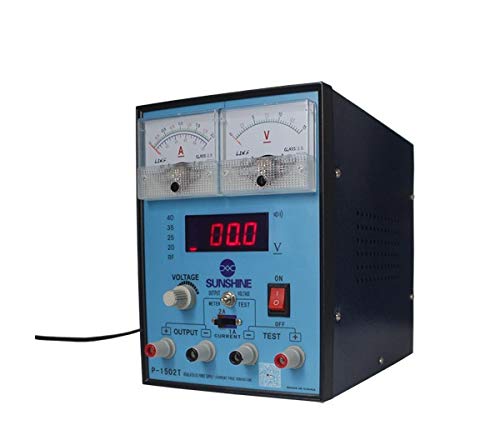
그림 1: 전면 view of the SUNSHINE P-1503T Analog Power Supply. This image shows the device's display, control knobs, and output terminals, including the two USB ports.
2. 안전 정보
경고: 이러한 안전 지침을 따르지 않을 경우 감전, 화재 또는 심각한 부상이 발생할 수 있습니다.
- 전원 공급 장치는 항상 접지된 전기 콘센트에 연결하세요.
- 물기가 있거나 습기가 있는 곳에서 장치를 작동하지 마십시오.amp 정황.
- 과열을 방지하기 위해 적절한 환기를 유지하세요. 환기구를 막지 마세요.
- c를 열지 마세요asin전원 공급 장치의 g 부분입니다. 내부에는 사용자가 수리할 수 있는 부품이 없습니다. 모든 수리는 자격을 갖춘 전문가에게 맡기십시오.
- 장치의 전원이 켜져 있을 때 출력 단자를 만지지 마십시오.
- Disconnect the power cord from the outlet before cleaning or if the device will not be used for an extended period.
- 지정된 입력 볼륨만 사용하십시오.tage (15 Volts) as indicated on the device.
3. 설정
3.1 풀기
- 전원 공급 장치를 포장에서 조심스럽게 꺼내십시오.
- Inspect the device for any signs of damage during transit. If damaged, do not use and contact your supplier.
- Ensure all accessories are present (e.g., power cord, test leads if included).
3.2 전원 연결
- Place the power supply on a stable, level surface with adequate ventilation.
- Connect the provided power cord to the power input socket on the rear of the device.
- 전원 코드의 다른 쪽 끝을 적절한 접지형 콘센트에 꽂으십시오.
4. 사용 설명서
4.1 전원 켜기/끄기
- To power on the device, press the power switch located on the front panel. The display will illuminate.
- 전원을 끄려면 전원 스위치를 다시 누르세요.
4.2 Adjusting Output
The P-1503T is an analog power supply, typically meaning voltage and current are set via rotary knobs.
- 사용하세요 권tage 조정 노브 원하는 출력 볼륨을 설정하려면tage. Monitor the voltag전자 디스플레이.
- 사용하세요 전류 조정 노브 to set the desired current limit. Monitor the current display.
- The device emits a sound upon touch, indicating interaction with its controls.
4.3 USB 포트 사용
The power supply features two USB ports on the front panel:
- USB Port 1 (Mobile Testing): Connect a mobile device here for diagnostic purposes. This port is designed to provide stable power for testing mobile phone circuits.
- USB Port 2 (Mobile Charging): Connect a mobile device here for charging. This port delivers power suitable for recharging mobile phone batteries.
Note: Always ensure the output voltage and current settings are appropriate for the device being connected to prevent damage.
5. 유지관리
5.1 청소
- Ensure the power supply is turned off and disconnected from the main power outlet before cleaning.
- 부드럽고 마른 천으로 기기 외부를 닦으세요.
- Do not use liquid cleaners, aerosols, or solvents, as these may damage the casing 또는 내부 구성 요소.
- 환기구에 먼지나 이물질이 없도록 깨끗하게 유지하세요.
5.2 보관
When not in use, store the power supply in a cool, dry place, away from direct sunlight and extreme temperatures.
6. 문제 해결
| 문제 | 가능한 원인 | 해결책 |
|---|---|---|
| 장치의 전원이 켜지지 않습니다. |
|
|
| 출력 볼륨 없음tag전자/전류. |
|
|
| USB 포트가 작동하지 않습니다. |
|
|
7. 사양
| 특징 | 세부 사항 |
|---|---|
| 상표 | 햇빛 |
| 모델 | P-1503T |
| 호환 장치 | 모바일 폰 |
| 커넥터 유형 | 에이티엑스 |
| 폼 팩터 | 에이티엑스 |
| 냉각 방식 | 공기 |
| 최대 입력 볼륨tage | 15 볼트 |
| 최소 입력 볼륨tage | 15 볼트 |
| 제조업체 | 햇빛 |
| System Bus Connector Type | 커넥터 2 |
| 전원 | 외부 |
| ASIN | B0847QS2FX |
8. 보증 및 지원
This product is covered by a standard manufacturer's warranty. Please refer to the warranty card included with your purchase for specific terms and conditions. For technical support, service, or warranty claims, please contact your retailer or the manufacturer directly.
For the latest information and support, please visit the official SUNSHINE web사이트(가능한 경우).