
제품 끝view
The DinoFire Wireless Presenter Remote with Air Mouse is a versatile tool designed to enhance your presentations. It combines the functionality of a traditional presentation clicker with a wireless air mouse, offering seamless control over your computer from a distance. This device is ideal for professionals, educators, and anyone who needs to deliver dynamic and engaging presentations.

Image: The DinoFire Wireless Presenter Remote, showcasing its sleek black design and ergonomic shape. An icon of a computer mouse is also visible, indicating its air mouse functionality.
주요 특징:
- Integrated Presenter and Air Mouse: Combines slide control with full mouse functionality, allowing for easy navigation of your computer without being tethered to it.
- 충전식 배터리: Built-in 300mAh rechargeable battery provides weeks of use on a single 3-hour charge, with an automatic sleep mode to conserve power.
- 다기능 제어: Supports black/full screen, page flip, volume control, video start/pause, hyperlink/website opening, and window switching.
- Bright Red Light Pointer: A highly visible red light pointer effectively highlights key points on your slides.
- 장거리 제어: Offers extended wireless range for freedom of movement during presentations.
- 폭넓은 호환성: Compatible with Windows 2003/XP/Vista/7/8/10+, Mac OS, Linux, Android, and software like PowerPoint, Excel, Prezi, Keynote, Numbers, Pages, and web 브라우저.
- 휴대성 있는 디자인: Features magnetic storage for the USB dongle and a pen clip style for easy carrying.
설치 가이드
Follow these steps to set up your DinoFire Wireless Presenter Remote:
- Charge the Presenter: Before first use, fully charge the presenter using the included micro USB cable. Connect the cable to the presenter's USB charging port and a power source (e.g., computer USB port, USB wall adapter). A full charge takes approximately 1.5 hours and provides up to 10 hours of use.
- USB 수신기 삽입: Locate the USB receiver stored magnetically within the presenter. Gently pull it out.
- 컴퓨터에 연결: Plug the USB receiver into an available USB port on your computer. The system will automatically detect and install the necessary drivers (Plug & Play).
- 전원 켜기: Slide the power switch on the side of the presenter to the 'On' position. The indicator light will illuminate, signifying it's ready for use.

Image: The DinoFire Wireless Presenter connected to a laptop via a USB cable for charging, illustrating its rechargeable feature. Text indicates "Use for 10 Hours" and "1.5H Charging".

Image: A diagram showing the DinoFire Wireless Presenter and its USB receiver, highlighting the plug-and-play setup process. Icons represent Left/Right Mouse Keys, Page Up/Down, Full/Black Screen, Play Videos, and Volume Control.
작동 지침
The DinoFire Wireless Presenter offers various functions for effective presentation control:
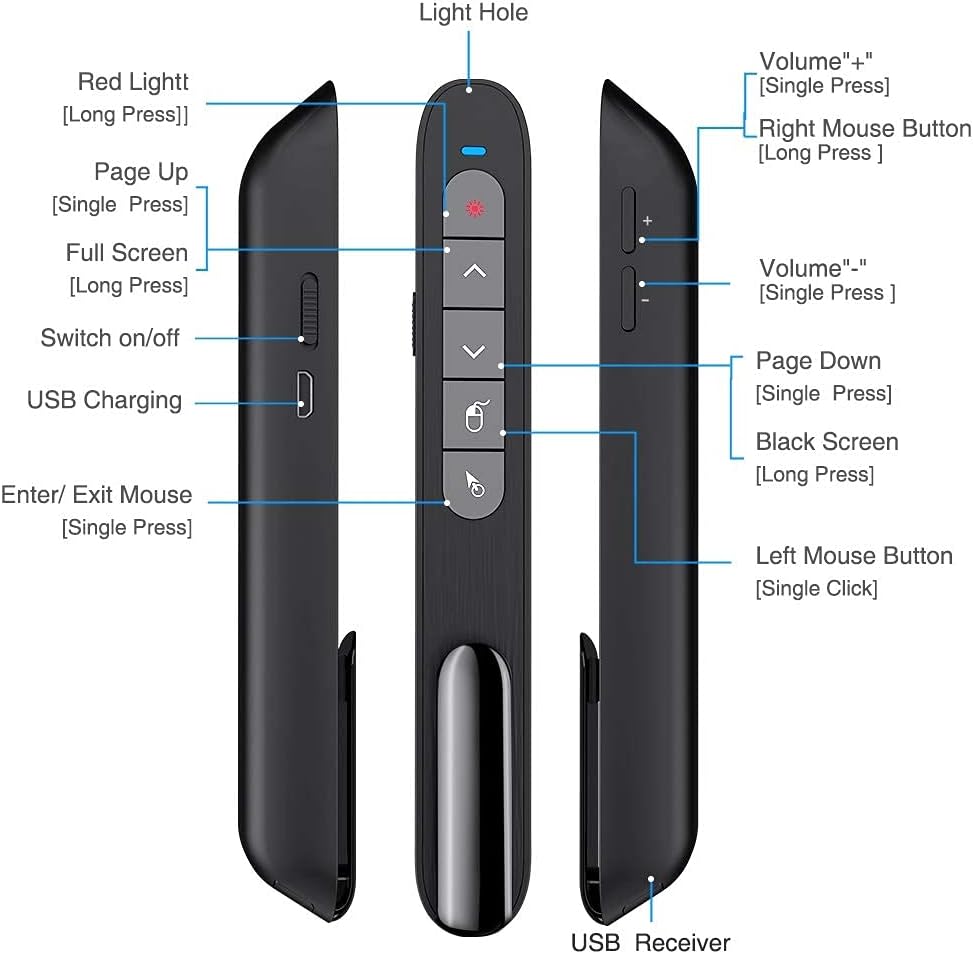
Image: A detailed diagram of the DinoFire Wireless Presenter, labeling each button and port, including Red Light, Page Up, Full Screen, Switch on/off, USB Charging, Enter/Exit Mouse, Volume buttons, Right Mouse Button, Page Down, Black Screen, Left Mouse Button, and USB Receiver.
- Red Light Pointer: Press the button with the red light icon (usually at the top) to activate the laser pointer. Release to turn off. The red light is bright and visible against various backgrounds.
- 페이지 위로/아래로: Use the dedicated Page Up (▲) and Page Down (▼) buttons to navigate through your presentation slides.
- 전체 화면/검은 화면: Long press the 'Full Screen' button to toggle between full screen mode and normal view. Long press the 'Black Screen' button to black out the screen, useful for focusing audience attention on the speaker.
- 에어 마우스 기능:
- 활성화/비활성화: Press the 'Enter/Exit Mouse' button (often depicted with a mouse icon) to enable or disable the air mouse function. When active, you can control the cursor by moving the presenter in the air.
- 왼쪽/오른쪽 클릭: Use the 'Left Mouse Button' (single click) and 'Right Mouse Button' (long press) to perform corresponding mouse clicks.
- 6-Axis G-Sensor Control: The built-in 3-axis G-sensor and 3-axis gyroscope provide sensitive and reliable control for the wireless cursor function.

Image: A screenshot of a video player with a blue mouse cursor, illustrating the use of the DinoFire Wireless Presenter's air mouse function to control media playback. Text highlights "Left & Right Mouse Buttons Control".

Image: A person holding the DinoFire Wireless Presenter in front of a projected presentation, demonstrating the 6-Axis G-sensor control for the air mouse function.
- 볼륨 조절: Use the '+' and '-' buttons on the side of the presenter to adjust the system volume.
- Hyperlink/Website Control: The air mouse function allows you to click on hyperlinks and open websites directly from your presentation.
- 창 전환: The presenter can also be used to switch between open application windows on your computer.

Image: The DinoFire Wireless Presenter emitting a red laser beam onto a projection screen, demonstrating its pointer function. Text indicates Air Mouse distance (80 ft), Wireless distance (30-50 ft), and Light distance (328 ft).
호환성:
The DinoFire Wireless Presenter is widely compatible with various operating systems and presentation software:
- 운영 체제: Windows 2003/XP/Vista/7/8/10 or above, Mac OS, Linux, Android.
- 소프트웨어: PowerPoint, Excel, Prezi, iWork (Keynote & Numbers & Pages), PDF view어, 그리고 web 브라우저.
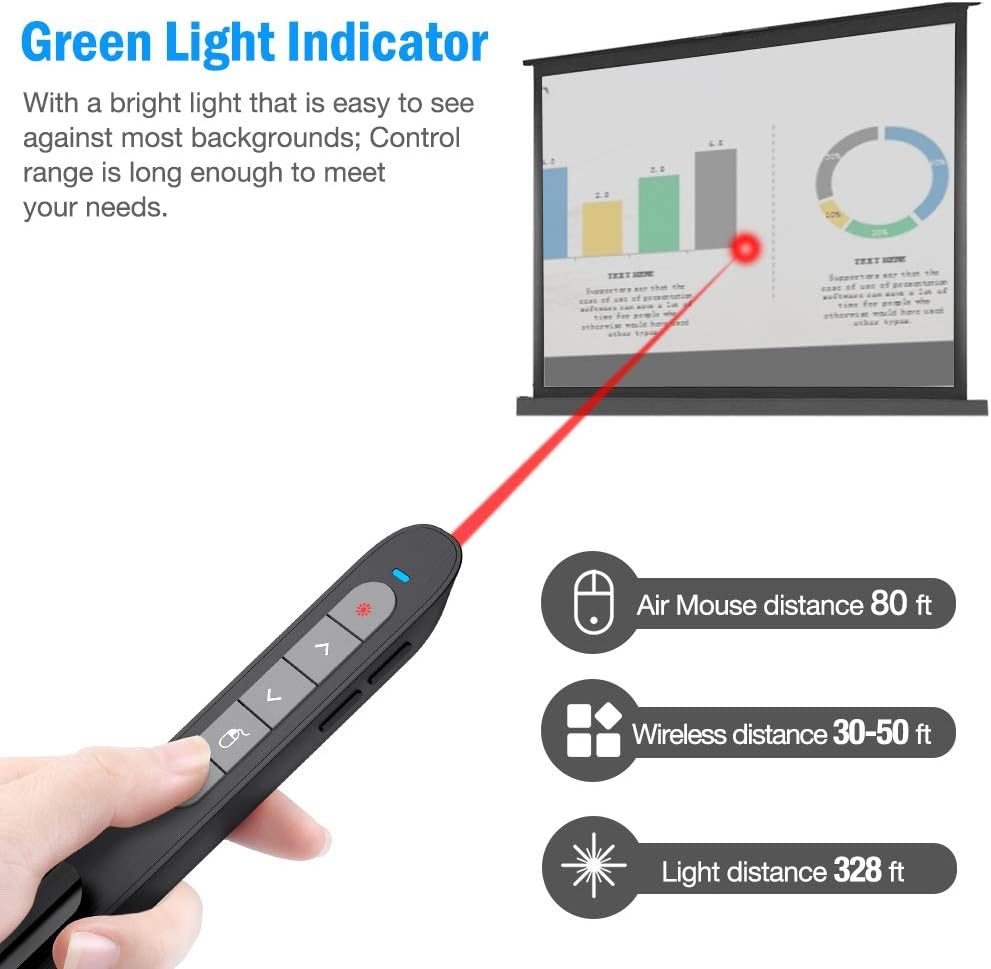
Image: A graphic illustrating the broad compatibility of the DinoFire Wireless Presenter with various operating systems (Windows, Mac, Android) and software applications (PowerPoint, Word, Excel, Keynote, Prezi, etc.).
유지
To ensure the longevity and optimal performance of your DinoFire Wireless Presenter, follow these maintenance guidelines:
- 청소: Use a soft, dry cloth to wipe the surface of the presenter. Avoid using harsh chemicals, solvents, or abrasive cleaners.
- 배터리 관리 : Recharge the device regularly, even if not in frequent use, to maintain battery health. Avoid fully discharging the battery for extended periods.
- 저장: When not in use, store the USB receiver securely in its magnetic slot within the presenter to prevent loss. Store the presenter in a cool, dry place away from direct sunlight and extreme temperatures.
- 낙하 방지: Handle the presenter with care to prevent damage from accidental drops or impacts.
문제 해결
If you encounter issues with your DinoFire Wireless Presenter, refer to the following common problems and solutions:
| 문제 | 가능한 원인 / 해결책 |
|---|---|
| Presenter is unresponsive or not detected. |
|
| Laser pointer is not working. |
|
| Air mouse cursor is erratic or not moving smoothly. |
|
| Presenter stops responding after an extended idle time. |
|
| Buttons are not performing expected functions. |
|
명세서
| 특징 | 세부 사항 |
|---|---|
| 모델 번호 | 티케이701 |
| 연결성 | RF 2.4GZ Wireless |
| 배터리 유형 | 1개의 리튬 폴리머 배터리(포함) |
| 충전 시간 | 약 1.5시간 |
| 품목 무게 | 2.08 온스(59그램) |
| 패키지 크기 | 6.38 x 1.57 x 1.06인치(16.2 x 4.0 x 2.7cm) |
| 레이저 컬러 | 빨간색 |
| 제조업체 | DinoFire LLC |
| 첫 번째 가능한 날짜 | 24년 2020월 XNUMX일 |
보증 및 지원
DinoFire products are designed for reliability and performance. For any issues or inquiries, please refer to the following information:
- 보증: This product is typically covered by a 30-day refund/replacement policy from the date of purchase. Please retain your proof of purchase for warranty claims. Specific warranty terms may vary by region or retailer.
- 고객 지원: For technical assistance, troubleshooting beyond this manual, or warranty inquiries, please visit the official DinoFire website or contact the seller from whom you purchased the product.
- 온라인 리소스: Check the DinoFire brand store on Amazon (DinoFire Store) for additional product information and updates.
참고: 제공된 데이터에서 '판매자' 제작자 유형의 공식 제품 동영상을 찾을 수 없어 본 설명서에 포함할 수 없었습니다.