
cimetech KF003-Grey
cimetech 2.4GHz Wireless Keyboard User Manual
Model: KF003-Grey
Brand: cimetech
소개
This manual provides comprehensive instructions for the setup, operation, maintenance, and troubleshooting of your cimetech 2.4GHz Wireless Keyboard. Designed for seamless compatibility with various operating systems including Windows, iOS, and Android, this full-size keyboard offers a comfortable and efficient typing experience for laptop, desktop PC, and tablet users.
최적의 성능과 긴 수명을 보장하기 위해 키보드를 사용하기 전에 이 설명서를 꼼꼼히 읽어 주십시오.

Figure 1: cimetech 2.4GHz Wireless Keyboard (KF003-Grey) with USB receiver.
설치 가이드
1. 패키지 내용
- cimetech 2.4GHz Wireless Keyboard
- 나노 USB 수신기
- AAA 배터리 2개(포함)
2. 배터리 설치
- 키보드 뒷면에 있는 배터리함을 찾으세요.
- 배터리 커버를 제거합니다.
- 올바른 극성(+/-)을 확인하여 AAA 배터리 2개(2)를 삽입합니다.
- 배터리 덮개를 단단히 닫으세요.
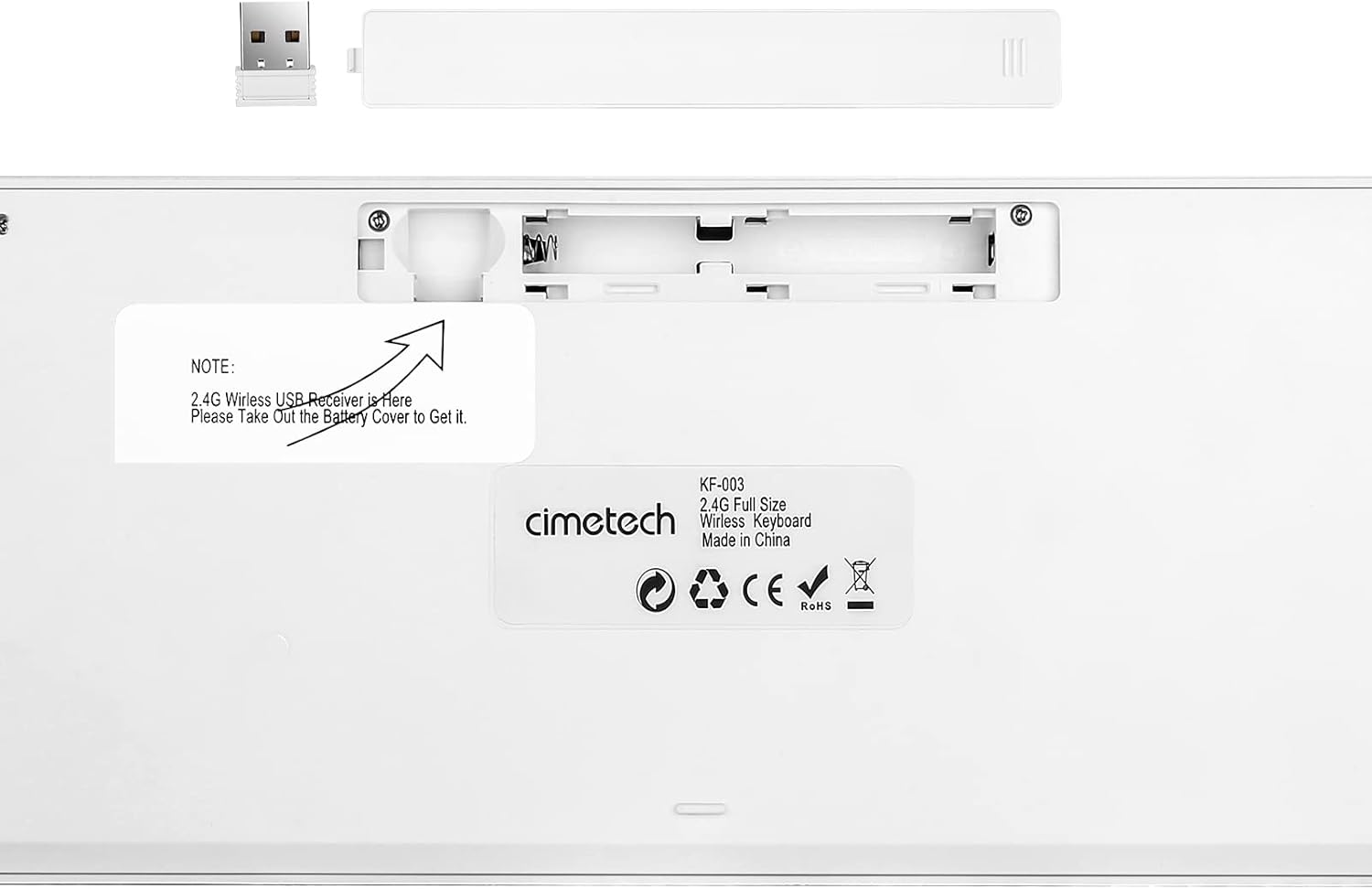
Figure 2: Back of the keyboard indicating battery compartment and USB receiver storage.
3. 키보드 연결
The cimetech wireless keyboard utilizes 2.4G wireless technology for a stable and clutter-free connection.
- Locate the Nano USB receiver, typically stored within the battery compartment on the back of the keyboard (refer to Figure 2).
- USB 수신기를 보관 슬롯에서 꺼내십시오.
- Insert the Nano USB receiver into an available USB-A port on your computer, laptop, or tablet.
- The keyboard should automatically connect within a few seconds. No additional drivers are required for most operating systems.

Figure 3: 2.4G Wireless Plug and Play connection diagram.
작동 지침
1. 키보드 레이아웃 및 기능
The cimetech KF003-Grey keyboard features a full-size layout with 110 keys, including a dedicated numeric pad and 17 shortcut keys for enhanced productivity.

Figure 4: Keyboard layout with dimensions (43.5cm x 12.3cm).
The ergonomic keycaps are designed for comfortable and quiet typing, reducing noise and providing a smooth tactile feel. Rubber pads on the back ensure stability during use.

Figure 5: Detail of the scissor-switch key mechanism for responsive and smooth typing.
2. 표시등
The keyboard features three indicator lights located above the numeric pad:
- NUM 표시기: Lights up when the Number Lock (Num Lock) function is active.
- CAPS 지표: Lights up when the Caps Lock function is active.
- 전원 표시기: Indicates battery status. It will light up when the keyboard is turned on and may flash when battery power is low.

Figure 6: Location of NUM, CAPS, and POWER indicator lights.
3. Function (Fn) Keys and Multimedia Shortcuts
The keyboard includes a Function (Fn) key that, when pressed in combination with the F1-F12 keys, activates various multimedia and system shortcuts. This allows for quick access to common functions without needing to use a mouse.
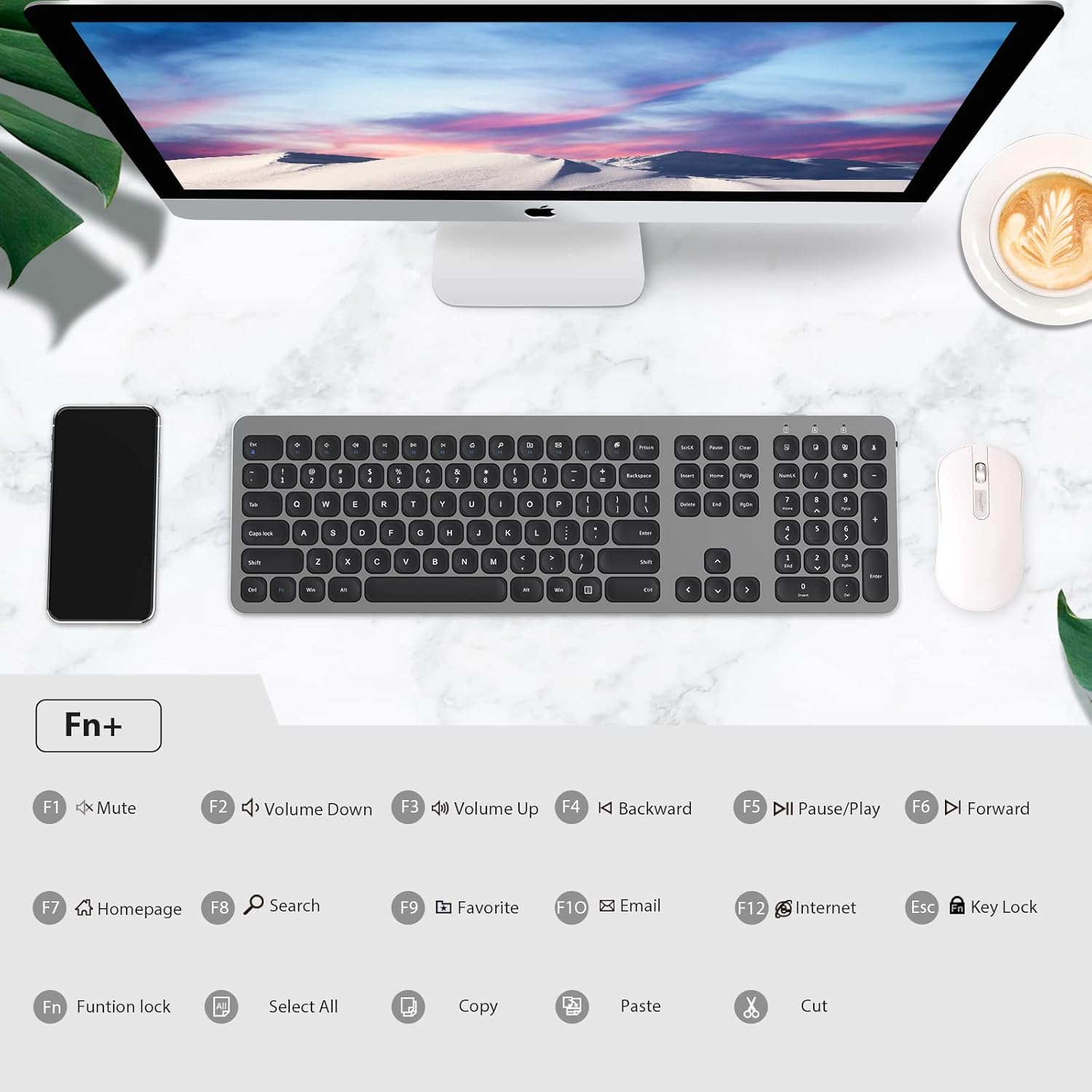
Figure 7: Fn key combinations for multimedia and system shortcuts.
| 키 조합 | 기능 |
|---|---|
| FN + F1 | 오디오 음소거 |
| FN + F2 | 볼륨 낮추기 |
| FN + F3 | 볼륨을 높이다 |
| FN + F4 | Backward (Media) |
| FN + F5 | Pause/Play (Media) |
| FN + F6 | Forward (Media) |
| FN + F7 | 홈페이지 |
| FN + F8 | 검색 |
| FN + F9 | 가장 좋아하는 |
| FN + F10 | 이메일 |
| FN + F11 | 인터넷 브라우저 |
| FN + F12 | 키 잠금 |
| FN + ESC | Function Lock (toggles F1-F12 to act as standard function keys or multimedia keys) |
| 에프앤에이 | 모두 선택 |
| 에프앤씨 | 복사 |
| Fn+V | 반죽 |
| FN + X | 자르다 |
유지
1. 키보드 청소
키보드의 청결과 기능을 유지하려면 다음 사항을 준수하십시오.
- 부드럽고 털이 없는 천을 살짝 사용하세요.amp물 또는 순한 세척액으로 세척하십시오.
- 키보드에 액체를 직접 뿌리지 마십시오.
- 연마성 세척제, 용제 또는 에어로졸 스프레이를 사용하지 마십시오.
- 키 사이의 먼지와 이물질을 제거하려면 압축 공기를 사용하세요.
2. 배터리 수명 및 절전
The keyboard is designed for long-term operation with its power-saving features:
- The keyboard has a separate ON/OFF switch located on the back. Turn off the keyboard when not in use for extended periods to conserve battery life.
- A smart auto-sleep feature activates after a period of inactivity to save power. Press any key to wake the keyboard.
- Replace the AAA batteries when the POWER indicator light flashes or the keyboard becomes unresponsive.
문제 해결
If you encounter issues with your cimetech wireless keyboard, please refer to the following common solutions:
| 문제 | 가능한 원인 / 해결책 |
|---|---|
| Keyboard is unresponsive or not typing. |
|
| Lag or delayed response when typing. |
|
| Certain keys or multimedia functions are not working. |
|
| 키보드 연결이 자주 끊깁니다. |
|
명세서
| 특징 | 세부 사항 |
|---|---|
| 모델 | KF003-Grey |
| 연결 기술 | 2.4GHz Wireless (RF), USB-A Receiver |
| 작동 거리 | 최대 10미터(33피트) |
| 키의 개수 | 110 |
| 전원 | AAA 배터리 2개(포함) |
| 호환 장치 | 노트북, PC, 태블릿 |
| 운영 체제 | Windows XP / Vista / 7 / 8 / 10, iOS, Android, Mac OS |
| 제품 치수 | 14.57 x 5.12 x 0.79인치(37 x 13 x 2cm) |
| 품목 무게 | 1.1파운드(0.5kg) |
| 특별 기능 | Portable, Ergonomic, Lightweight, Hotkeys and Media Keys, Quiet Click |
보증 및 지원
For information regarding warranty coverage, technical support, or customer service, please refer to the warranty card included with your product packaging or visit the official cimetech web대지. 보증 청구를 위해 구매 영수증을 보관하십시오.
추가 지원이 필요한 경우, 제품을 구매한 플랫폼을 통해 판매자에게 직접 문의할 수도 있습니다.
Ask a question about this manual
Ask about setup, troubleshooting, compatibility, parts, safety, or missing instructions. Manuals+ will review the question and use this page’s manual context to help answer it.