
Andoer HDV-201LM
Andoer HDV-201LM 1080p Digital Video Camera User Manual
Model: HDV-201LM
1. 서론
This manual provides detailed instructions for the safe and effective use of your Andoer HDV-201LM Digital Video Camera. Please read this manual thoroughly before operating the device and retain it for future reference.
The Andoer HDV-201LM is a 1080p Full HD digital video camera featuring a 5-megapixel CMOS sensor, capable of capturing video at 1920x1080p at 30 frames per second and still images up to 24 megapixels (interpolated). It includes a 16X digital zoom, a 3.0-inch TFT-LCD screen with 270-degree rotation, and supports external accessories via a hot shoe mount.
2. 패키지 내용
아래 나열된 모든 품목이 패키지에 포함되어 있는지 확인하세요. 품목이 누락되었거나 손상된 경우 판매점에 문의하세요.
- 1 x Andoer HDV-201LM Digital Video Camera
- 카메라 가방 1개
- 2 x Rechargeable 3.7V 800mAh Batteries (one pre-installed)
- 1 x USB 케이블
- 1 x AV 케이블
- 1 x 원격 제어
- 1 x Camera User Manual (English)
- 1 x 0.39X Wide-Angle Lens
- 1 x 외부 마이크
- 1 x Microphone Connection Cable
- 1 x Microphone User Manual (Chinese)
Note: A memory card is not included. A Class 10 or higher SD card (up to 32GB) is strongly recommended for optimal performance.
3. 부품 식별
Familiarize yourself with the various components of your digital video camera.

그림 3.1: 전면 view of the Andoer HDV-201LM camera with attached wide-angle lens and external microphone.

그림 3.2: 상세 views highlighting the hot shoe mount, control buttons, battery compartment, and 1/4-inch tripod thread.
- 렌즈: 이미지와 비디오를 캡처하는 주요 광학 부품입니다.
- LCD 화면: 3.0-inch TFT-LCD display for viewing and menu navigation. Rotates 270 degrees.
- 전원 버튼: 카메라를 켜거나 끕니다.
- 녹화/정지 버튼: 동영상 녹화를 시작하거나 중지합니다.
- 사진 버튼: 정지 이미지를 캡처합니다.
- 줌 레버(W/T): Adjusts digital zoom (Wide/Telephoto).
- 메뉴 버튼: 카메라 설정에 접근합니다.
- 탐색 버튼: 메뉴 탐색 및 선택에 사용됩니다.
- 핫슈 마운트: 마이크나 LED 조명과 같은 외부 액세서리를 부착하는 데 사용합니다.
- 삼각대 스레드: 1/4-inch thread for mounting the camera on a tripod.
- 배터리 칸: 충전식 배터리를 수용합니다.
- SD 카드 슬롯: 메모리 카드를 삽입하려면.
- USB 포트: For connecting to a computer or charging.
- AV 출력 : 텔레비전에 연결하기 위한 용도입니다.
- LED 보조 조명: 어두운 환경에서 추가적인 조명을 제공합니다.
4. 설정
4.1. 배터리 충전
- 배터리 덮개를 엽니다.
- Insert the provided 3.7V 800mAh battery, ensuring correct polarity. If an insulator tab is present, remove it before insertion.
- 배터리 덮개를 닫습니다.
- Connect the camera to a power source using the USB cable. The charging indicator will illuminate.
- 완전히 충전되면 표시등이 바뀌거나 꺼집니다.
4.2. 메모리 카드 삽입
- 카메라의 전원이 꺼져 있는지 확인하세요.
- SD 카드 슬롯을 찾으세요.
- 클래스 10 이상의 SD 카드(최대 32GB)를 딸깍 소리가 날 때까지 슬롯에 삽입하십시오.
- 제거하려면 카드가 튀어나올 때까지 살짝 누르세요.
4.3. Attaching the Wide-Angle Lens
- Remove the protective cap from the camera lens.
- Carefully screw the 0.39X wide-angle lens onto the camera's main lens thread until secure.

Figure 4.1: The camera with the 0.39X super wide-angle lens attached, demonstrating its expanded field of view.
4.4. Attaching the External Microphone
- Slide the external microphone into the hot shoe mount on top of the camera.
- Connect the microphone cable to the camera's external microphone input port.
5. 카메라 작동
5.1. 전원 켜기 / 끄기
- To power on, open the LCD screen or press the 힘 단추.
- To power off, close the LCD screen or press and hold the 힘 단추.
5.2. 비디오 녹화
- Ensure the camera is in video mode (indicated on the LCD screen). If not, press the 방법 버튼을 전환합니다.
- 를 누르세요 녹음/중지 button to start recording. A red indicator will typically flash.
- 를 누르세요 녹음/중지 버튼을 다시 눌러 녹음을 중지합니다.
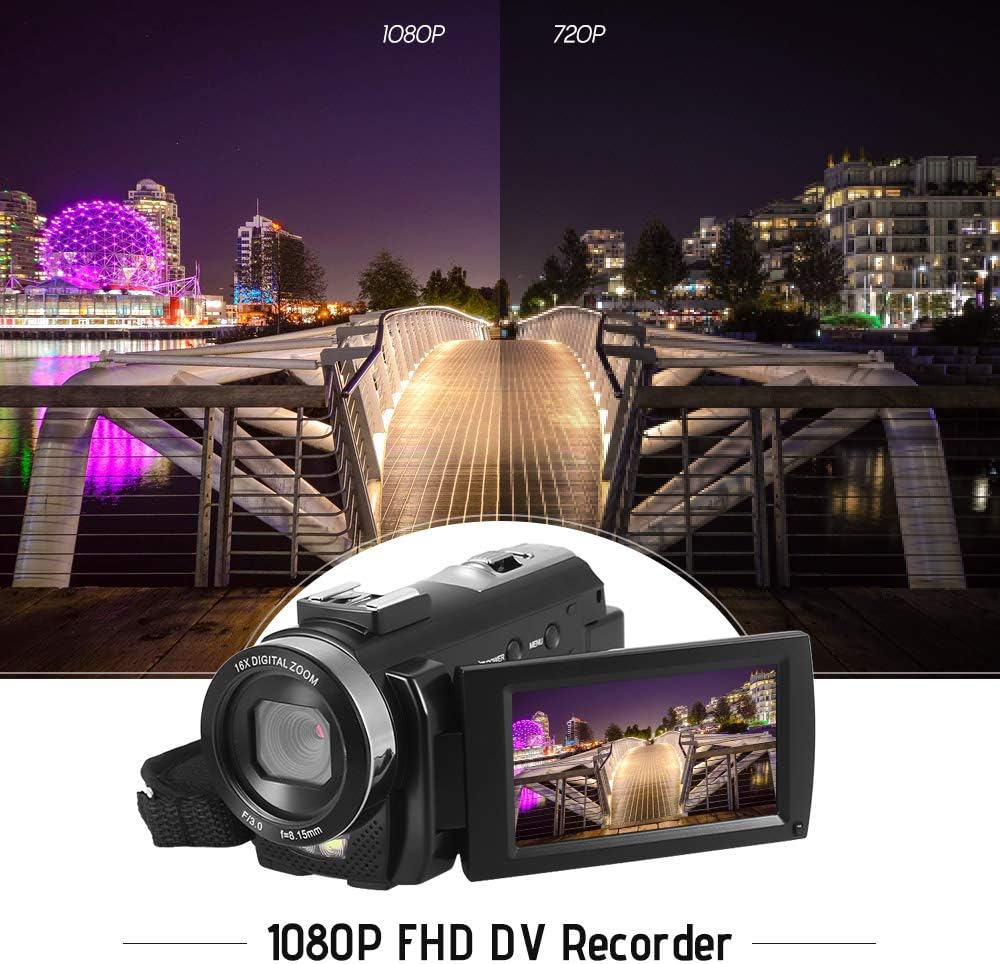
Figure 5.1: The camera is capable of recording in 1080p Full HD and 720p HD resolutions.
5.3. 사진 찍기
- Ensure the camera is in photo mode. If not, press the 방법 버튼을 전환합니다.
- LCD 화면을 사용하여 사진의 구도를 잡으세요.
- 를 누르세요 사진 이미지를 캡처하는 버튼입니다.
5.4. 디지털 줌 사용
- 사용하세요 W (와이드) 그리고 T (망원) lever to adjust the 16X digital zoom.

Figure 5.2: The camera's 16X digital zoom allows for closer view주제의 수.
5.5. 메뉴 설정
- 를 누르세요 메뉴 설정에 접근하는 버튼입니다.
- Use the navigation buttons to scroll through options such as:
- 화이트 밸런스: Auto, Daylight, Cloudy, Fluorescent, Tungsten.
- 장면 모드: Auto, Night, Portrait, Landscape, Backlight, Sport, Party, Beach, High Sensitivity.
- 촬영 모드: Single, Continuous.
- 노출: Adjust ±3.0EV.
- 셀프타이머: Off, 2s, 5s, 10s.
- 자동 전원 끄기: Off, 1min, 3min, 5min.
- 언어: English, German, French, Spanish, Italian, Turkish, Russian, Portuguese, Dutch, Simplified Chinese, Traditional Chinese, Japanese, Polish.
- 기타 기능: Face Detection, Smile Capture, Beauty Face, Anti-Shake.
- 를 누르세요 OK or 녹음/중지 버튼을 눌러 선택 사항을 확인하세요.
- 를 누르세요 메뉴 종료하려면 다시 버튼을 누르세요.
5.6. TV에 연결하기
- Use the provided AV cable to connect the camera's AV output to your television's AV input.
- Select the correct AV input channel on your TV to view camera content.
6. 유지관리
6.1. 카메라 청소
- 부드럽고 마른 천을 사용하여 카메라 본체를 청소하세요.
- 렌즈와 LCD 화면의 경우, 특수 렌즈 세척용 천과 세척액을 사용하세요. 독한 화학 물질은 피하세요.
6.2. 보관
- 카메라는 직사광선과 극한의 온도를 피해 시원하고 건조한 곳에 보관하세요.
- 장시간 카메라를 사용하지 않을 경우에는 배터리를 제거하세요.
7. 문제 해결
| 문제 | 가능한 원인 | 해결책 |
|---|---|---|
| 카메라의 전원이 켜지지 않습니다. | 배터리가 방전되었거나 올바르게 삽입되지 않았습니다. | Charge the battery fully. Ensure the battery is inserted with correct polarity and the insulator tab is removed. |
| 동영상 녹화나 사진 촬영이 불가능합니다. | 메모리 카드가 가득 찼거나, 삽입되지 않았거나, 손상되었습니다. | 메모리 카드를 삽입하세요. 불필요한 파일을 삭제하세요. file카드를 포맷하거나 포맷하십시오(이렇게 하면 모든 데이터가 삭제됩니다). 카드가 손상된 경우 교체하십시오. |
| 영상/이미지 품질이 좋지 않습니다. | 조명이 부족하거나, 렌즈가 더럽거나, 설정이 잘못되었습니다. | Ensure adequate lighting. Use the LED fill light if necessary. Clean the lens. Adjust white balance and scene mode settings. |
| 카메라가 정지되거나 반응하지 않습니다. | 소프트웨어 오류 또는 배터리 부족. | Remove and reinsert the battery to reset the camera. Ensure the battery is charged. |
8. 사양
| 특징 | 사양 |
|---|---|
| 상표 | 안도어 |
| 모델 | HDV-201LM |
| 이미지 센서 | 5만 화소 CMOS 센서 |
| 비디오 해상도 | 1920x1080P (FHD 30fps), 1280x720 (HD 30fps), 640x480 (VGA 30fps), 320x240 (VGA 30fps) |
| 비디오 형식 | 아비(AVI) |
| 이미지 해상도 | 24MP (Interpolated), 20MP (Interpolated), 16MP (Interpolated), 12MP (Interpolated), 10MP (Interpolated), 7M Wide (Interpolated), 5MP, 3MP, 2M Wide, VGA |
| 이미지 형식 | 사진 |
| 디지털 줌 | 16X |
| 렌즈 | ff (F/3.0 f=8.15mm) |
| 최대 조리개 | 8.15 화씨 |
| LCD 화면 | 3.0-inch TFT-LCD (16:9), 270-degree rotation |
| 저장 | SD Card (up to 32GB, Class 10 recommended) |
| 연결성 | USB 2.0, AV Output (NTSC/PAL) |
| 전원 공급 장치 | 1 x 3.7V 800mAh 충전식 배터리 |
| 리모컨 배터리 | 3V CR2025 배터리 1개 |
| 운영 체제 지원 | 윈도우 XP/비스타/7/8/10 |
| 특별 기능 | Anti-shake, Face Detection, Smile Capture, Beauty Face, Self-Timer, LED Fill Light, Hot Shoe Mount |
| 치수 | 13.5 X 5.5 X 6.5 cm (5.3 X 2.2 X 2.6에서) |
| 무게 | 273g (9.6oz) with battery |
| 색상 | 검은색 |
9. 보증 및 지원
보증 정보 및 기술 지원에 대한 자세한 내용은 구매 시 제공된 설명서를 참조하거나 판매점에 문의하십시오. 보증 청구를 위해 구매 증빙 자료를 보관하십시오.
Ask a question about this manual
Ask about setup, troubleshooting, compatibility, parts, safety, or missing instructions. Manuals+ will review the question and use this page’s manual context to help answer it.