
Amazon Basics L6LM-N-G
Amazon Basics 고속 충전 USB-A-Lightning 나일론 브레이드 충전 케이블 사용 설명서
Model: L6LM-N-G
1. 서론
This user manual provides essential information for the safe and effective use of your Amazon Basics Fast Charging USB-A to Lightning Nylon Braided Charger Cable. This MFi certified cable is designed for charging and syncing Apple devices with a Lightning port to devices with a USB-A port.

Figure 1: Amazon Basics USB-A to Lightning Nylon Braided Charger Cable.
2. 안전 정보
- Do not expose the cable to liquids or extreme temperatures.
- 케이블, 특히 커넥터 부근을 과도하게 구부리거나 비틀지 마십시오. 손상을 방지할 수 있습니다.
- 케이블을 분해하거나 개조하지 마십시오.
- 어린이의 손이 닿지 않는 곳에 보관하세요.
- Disconnect the cable from power sources when not in use.
- If the cable shows signs of damage (e.g., fraying, exposed wires), discontinue use immediately.
3. 설정 및 연결
The Amazon Basics USB-A to Lightning cable is designed for simple plug-and-play operation.
- Locate a compatible USB-A port on your charging adapter, computer, or other power source.
- Insert the USB-A end of the cable (그림 2a) firmly into the USB-A port.
- Locate the Lightning port on your Apple iPhone, iPad, or iPod.
- Insert the Lightning end of the cable (그림 2b) firmly into the Lightning port of your device.
- Ensure both connections are secure for proper charging and data transfer.

그림 2: 클로즈업 view of the USB-A and Lightning connectors.
Figure 2a: The USB-A connector (left) and Figure 2b: The Lightning connector (right).

Figure 3: Proper connection of the Lightning cable to a smartphone.
4. 사용 설명서
4.1 장치 충전
Once connected to a power source, the cable will begin charging your Apple device. This cable supports fast charging up to 2.4 amps, allowing for efficient power delivery.
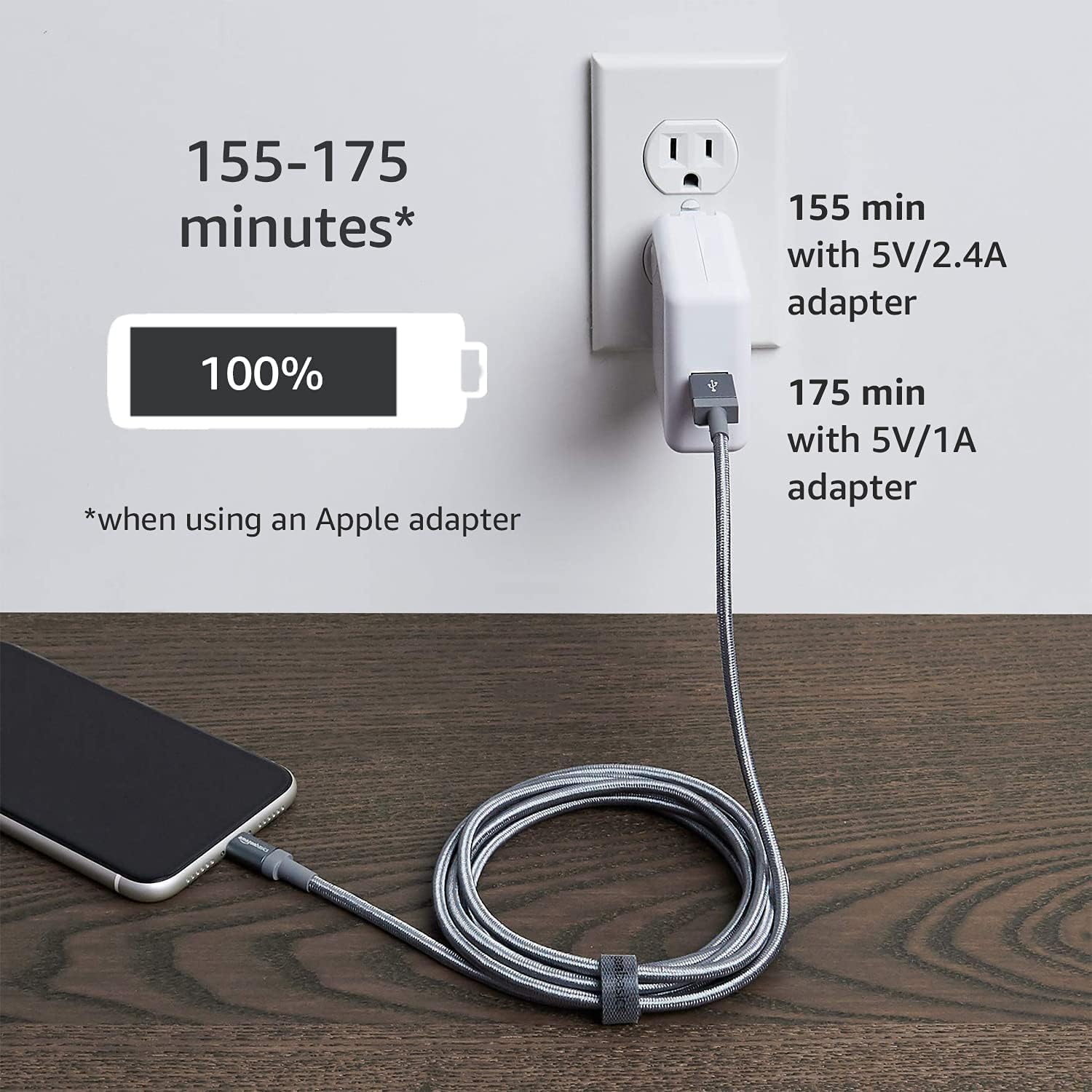
Figure 4: Illustrates charging times using different power adapters. For example, a 5V/2.4A adapter can charge a device to 100% in approximately 155 minutes, while a 5V/1A adapter takes about 175 minutes.
4.2 데이터 전송
Connect the USB-A end of the cable to a computer's USB-A port and the Lightning end to your Apple device. You can then transfer data such as music, photos, and videos at speeds up to 480 Mbps.

Figure 5: The cable connected to a laptop, demonstrating its capability for high-speed data transfer.
4.3 호환성
This cable is MFi certified, ensuring compatibility with a wide range of Apple devices. Refer to the specifications section for a detailed list of compatible models.

Figure 6: Illustrates the diverse compatibility of the cable with various Apple devices (iPhone, iPad, iPod) and power sources (charger, desktop, laptop).
5. 유지관리
- Clean the cable and connectors periodically with a dry, soft cloth.
- Avoid pulling the cable by the cord; always grasp the connector when plugging or unplugging.
- 케이블은 직사광선과 극한 온도 변화를 피해 서늘하고 건조한 곳에 보관하십시오.
- Do not coil the cable too tightly to prevent internal wire damage.
6. 문제 해결
| 문제 | 가능한 원인 | 해결책 |
|---|---|---|
| 장치가 충전되지 않습니다. | Loose connection, faulty power source, damaged cable, incompatible device. | Ensure both ends of the cable are securely connected. Try a different USB-A port or power adapter. Inspect the cable for visible damage. Verify device compatibility. |
| 느린 충전. | Low-power USB port, non-fast charging adapter. | Use a power adapter that supports 2.4A output. Connect to a high-power USB port (e.g., on a wall charger or dedicated charging port on a computer). |
| 데이터 전송 문제. | Loose connection, driver issues on computer, device not recognized. | Reconnect the cable. Restart your computer and Apple device. Ensure your computer's drivers are up to date. Check if your device prompts for "Trust This Computer." |
| Cable fraying or damage. | 마모, 부적절한 취급. | Discontinue use immediately to prevent electrical hazards. Replace the cable. |
7. 사양
| 특징 | 세부 사항 |
|---|---|
| 상표 | 아마존 기본 정보 |
| 모델명 | MFi Certified Charger for Apple iPhone - Nylon |
| 모델 번호 | L6LM-N-G |
| 커넥터 유형 | 라이트닝, USB-A |
| 케이블 유형 | USB |
| 데이터 전송 속도 | 최대 480Mbps |
| 충전 전류 | 최대 2.4개 Amps |
| 겉감 소재 | 나일론 브레이디드 |
| 색상 | 다크 그레이 |
| 길이 | 3피트(0.9미터) |
| MFi 인증 | 예 |
| 호환 장치 | iPhone 14/13/12/11/X/XR/XS/8/7/6/6s/5/5s/5c, iPhone Pro 14/13/12/11, IPhone Pro Max 14/13/12/11/XS, iPhone Plus 14/8/7/6/6s, iPhone SE 1st Gen/2nd Gen/3rd Gen, iPhone mini 13/12, iPad Pro 10.5 in/9.7 in, iPad Air 3/2/1, iPad mini 5/4/3/2/1, iPad 9th Gen and older, iPod Touch 5th Gen and older, iPod nano 7th Gen and Beats Pill+ |
8. 보증 및 지원
보증 정보 및 고객 지원에 대해서는 아마존 베이직스 공식 웹사이트를 참조하십시오. web해당 사이트를 방문하거나 아마존 고객 서비스에 문의하세요.
- 공식적인 Web대지: amazon.com/AmazonBasics
- 보증서: A PDF document for warranty information may be available for download. Please check the product page on Amazon.com for the latest version.
- 고객 서비스: For direct assistance, please visit the Amazon customer service portal.

Figure 7: Product packaging displaying the Amazon Basics website address for support and information.
Ask a question about this manual
Ask about setup, troubleshooting, compatibility, parts, safety, or missing instructions. Manuals+ will review the question and use this page’s manual context to help answer it.