
1. 제품 오버view
The Bitmain Antminer S17 Pro is an ASIC (Application-Specific Integrated Circuit) miner designed for cryptocurrency mining, specifically using the SHA256 algorithm for currencies like Bitcoin. This powerful device is engineered for high hash rates and efficiency in a dedicated mining environment.
주요 특징은 다음과 같습니다.
- High Hash Rate: Pro 56TH for efficient mining.
- Optimized Power Consumption: Ranging from 1600W to 2212W, with a power efficiency of 93.88%±10%.
- Compact Dimensions: Measuring 298mm (L) x 178mm (W) x 296mm (H).
- Effective Cooling: Equipped with two 12038 fans to maintain optimal operating temperatures.

그림 1: 전면 view of the Bitmain Antminer S17 Pro, showcasin컴팩트한 디자인과 냉각 팬이 특징입니다.
2. 안전 정보
Please read and understand all safety warnings before operating the Antminer S17 Pro. Failure to follow these instructions may result in electric shock, fire, or serious injury, and may damage the product.
- 전원 공급 장치: 입력 볼륨을 확인하세요tage matches the miner's requirements. Wrong input voltage may cause permanent damage to the miner.
- 통풍: Operate the miner in a well-ventilated area to prevent overheating. Do not block the air inlets or outlets.
- 환경: Keep the miner away from water, moisture, and excessive dust. Operate within recommended temperature and humidity ranges.
- 손질: Handle the miner with care. Avoid dropping or subjecting it to strong impacts.
- 유지: Only qualified personnel should perform maintenance or repairs. Do not attempt to open the casing or modify the hardware.
3. 법적 고지사항
Breaking down cryptocurrencies involves inherent financial risks. These risks include, but are not limited to, fluctuations in cryptocurrency exchange rates and changes in the algorithms used for mining. Users are advised to carefully consider these factors before making a purchase. Please note that refund requests for orders of this batch may not be accepted.
4. 기술 사양
| 특징 | 세부 사항 |
|---|---|
| 모델명 | Antminer S17 Pro |
| 해시 비율 | 56TH/초 |
| 연산 | 샤256 |
| 전력 소비 | 1600W - 2212W |
| 전력 효율성 | 93.88 % ± 10 % |
| 치수(길이 x 너비 x 높이) | 298mm x 178mm x 296mm(11.74 x 7.01 x 11.68인치) |
| 무게 | 9.53kg(21파운드) |
| 냉각 방식 | Air Cooling (2x 12038 fans) |
| 호환 장치 | Personal Computer (for configuration) |
| 커넥터 유형 | 올인원 |
| 제조업체 | 비트메인 |

그림 2: 전면 view of the Antminer S17 Pro, highlighting the cooling fans and power input ports.

Figure 3: Two Antminer S17 Pro units, demonstrating their physical footprint and design.
5. 설정 가이드
Follow these steps to set up your Antminer S17 Pro:
- 포장 풀기 및 검사: Carefully remove the miner from its packaging. Inspect for any visible damage during transit. Ensure all components are present.
- 놓기: Choose a location with adequate ventilation and stable power supply. The environment should be cool, dry, and free from excessive dust. Maintain sufficient clearance around the miner for airflow.
- 전원 연결: Connect the power cables to the miner's power input ports. Ensure the power supply unit (PSU) is rated appropriately for the miner's power consumption (up to 2212W). Use high-quality power cables.
- 네트워크 연결 : Connect an Ethernet cable from your router or network switch to the miner's Ethernet port. A stable internet connection is crucial for mining operations.
- 초기 전원 켜기: Once power and network are connected, power on the miner. The indicator lights should illuminate, and fans will start spinning.
- 접근하기 Web 인터페이스:
- Locate the miner's IP address. This can often be found through your router's connected devices list or by using an IP scanner tool on your network.
- 열기 web 동일한 네트워크에 연결된 컴퓨터의 브라우저.
- Enter the miner's IP address into the browser's address bar.
- Log in using the default credentials (refer to the manufacturer's documentation for default username and password, typically "root" for both).
- 구성:
- Navigate to the "Miner Configuration" or "Pool Settings" section within the web 인터페이스.
- Enter your mining pool URL, worker name, and password. You will need to register with a mining pool beforehand.
- 설정을 저장하고 메시지가 표시되면 마이너를 다시 시작하십시오.
- 확인: After restarting, monitor the miner's status in the web interface to ensure it is connected to the mining pool and submitting shares.
6. 운영
Once configured, the Antminer S17 Pro operates continuously to mine cryptocurrency. Regular monitoring is recommended to ensure optimal performance.
- Monitoring Hash Rate: Check the miner's web interface or your mining pool dashboard to monitor the actual hash rate. This indicates the mining power of your device.
- 온도 모니터링: Pay attention to the temperature readings of the hash boards and chips within the web interface. High temperatures can lead to reduced performance or damage.
- 팬 속도: The miner's fans will adjust their speed based on temperature. Ensure they are operating correctly and not obstructed.
- 네트워크 연결성: Verify that the miner maintains a stable connection to the internet and the mining pool.
- 전력 소비량: While the miner is designed for efficiency, be aware of its power consumption and ensure your electrical infrastructure can support it.
7. 유지관리
Proper maintenance extends the lifespan and ensures stable operation of your Antminer S17 Pro.
- 먼지 제거: Regularly clean dust from the miner's fans and heat sinks using compressed air. Dust accumulation can impede airflow and cause overheating. Perform this at least once a month, or more frequently in dusty environments.
- 환경 제어: Maintain a clean, cool, and dry operating environment. Avoid areas with high humidity or extreme temperature fluctuations.
- 케이블 검사: Periodically inspect all power and network cables for wear, damage, or loose connections. Replace any damaged cables immediately.
- 펌웨어 업데이트: Bitmain 공식 홈페이지를 확인하세요 website for firmware updates. Updates can improve performance, stability, or security. Follow the manufacturer's instructions carefully when performing updates.
- 전원 주기: If the miner becomes unresponsive or experiences minor issues, a simple power cycle (turning it off and on again) can sometimes resolve the problem.
8. 문제 해결
This section addresses common issues you might encounter with your Antminer S17 Pro.
| 문제 | 가능한 원인 | 해결책 |
|---|---|---|
| Miner not powering on | Loose power cable, faulty PSU, incorrect voltage. | Check all power connections. Verify power outlet is functional. Ensure correct input voltage. Test with a different PSU if available. |
| 네트워크 연결 없음 | Loose Ethernet cable, router issue, incorrect IP settings. | Ensure Ethernet cable is securely connected. Restart router. Check miner's IP configuration in the web 인터페이스. |
| Low hash rate or no shares | Incorrect pool settings, network issues, overheating, faulty hash board. | 마이닝 풀을 확인하세요 URL, worker name, and password. Check network stability. Monitor temperatures. If a hash board is faulty (as reported by some users), contact support. |
| 과열 | Poor ventilation, dust accumulation, fan malfunction. | Improve airflow around the miner. Clean fans and heat sinks. Check if fans are spinning correctly. |
| Miner frequently goes down | Unstable power, hardware issue (e.g., loose screws, faulty components). | Ensure stable power supply. Inspect for any loose internal components if comfortable and authorized to do so (otherwise, contact support). |
9. 인증
The Bitmain Antminer S17 Pro complies with various international standards and certifications, ensuring its quality and safety.

Figure 4: Technical Compliance Statement for FCC and ISED Test Report, indicating compliance with relevant regulations.
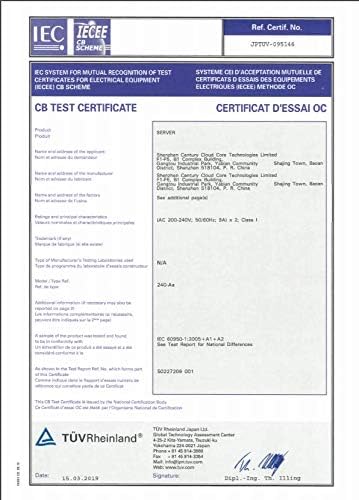
Figure 5: IECEE CB Test Certificate, demonstrating compliance with international electrical equipment safety standards.

Figure 6: Registration of Broadcasting and Communication Equipment, confirming regulatory approval for communication aspects.

Figure 7: Technical Compliance for EMC Directive, ensuring electromagnetic compatibility.

Figure 8: Technical Compliance for LVD Directive, confirming compliance with low voltage directive standards.
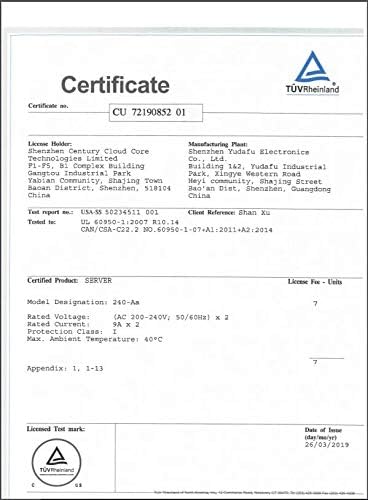
Figure 9: TÜV Rheinland Certificate, indicating product safety and quality assurance by an independent body.
10. 보증 및 지원
For specific warranty terms and conditions, please refer to the documentation provided by your seller or contact Bitmain directly. It is important to note the legal disclaimer regarding refund requests for this product batch.
For technical support, troubleshooting beyond this manual, or inquiries about repairs, please contact Bitmain's official support channels or the authorized reseller from whom you purchased the product.
- 제조업체: 비트메인
- 제품 모델: Antminer S17 Pro