
Kitvision KVACTLAP4K
KitVision 4K 액션 카메라 어드벤처 팩 사용 설명서
Model: KVACTLAP4K
소개
The KitVision 4K Action Camera Adventure Pack is designed to capture your most thrilling moments in stunning 4K resolution. This comprehensive kit provides all the essential tools for recording high-quality videos and photos, whether on land or underwater. With its robust design and versatile accessories, you can document every adventure with clarity and ease.
패키지 내용
Before you begin, please ensure all components listed below are present in your KitVision 4K Action Camera Adventure Pack:
- KitVision 4K Action Camera
- 32GB 메모리 카드
- Waterproof Housing (up to 30m)
- Floating Grip
- 확장 폴
- 스마트 폰 어댑터
- 마이크로 화이버 렌즈 천
- USB 충전 케이블
- 충전식 리튬이온 배터리

Image: All components of the KitVision 4K Action Camera Adventure Pack, including the camera, waterproof case, various mounts, memory card, and charging cable.
설치 가이드
1. 배터리 충전
The camera comes with a rechargeable Lithium-ion battery. For first use, fully charge the battery. Insert the battery into the camera's battery compartment. Connect the camera to a USB power source using the provided USB cable. The charging indicator light will typically show the charging status and turn off or change color when fully charged.
2. 메모리 카드 삽입
The KitVision 4K Action Camera supports SDHC memory cards. A 32 GB memory card is included in your pack. Locate the memory card slot on the camera, usually on the side or bottom. Insert the memory card with the gold contacts facing the correct direction until it clicks into place. Ensure the camera is powered off before inserting or removing the memory card.
3. Assembling with Waterproof Housing
For underwater use or protection against dust and impact, place the camera inside the waterproof housing. Ensure the housing is clean and free of debris, and the rubber seal is properly seated. Close the latch securely. The housing allows for operation of the camera's buttons.

이미지: 앞면 view of the KitVision 4K Action Camera, showing the lens and mode button.
4. 액세서리 부착
The Adventure Pack includes several accessories for versatile mounting:
- Floating Grip: Attach the camera (preferably in its waterproof housing) to the floating grip using the standard action camera mount. This accessory helps keep your camera afloat in water.
- 확장 폴: Extend your reach for selfies or wider shots. Attach the camera (with or without housing) to the top of the extension pole.
- 스마트폰 어댑터: This adapter allows you to mount your smartphone onto the extension pole, useful for remote viewing or capturing different perspectives.
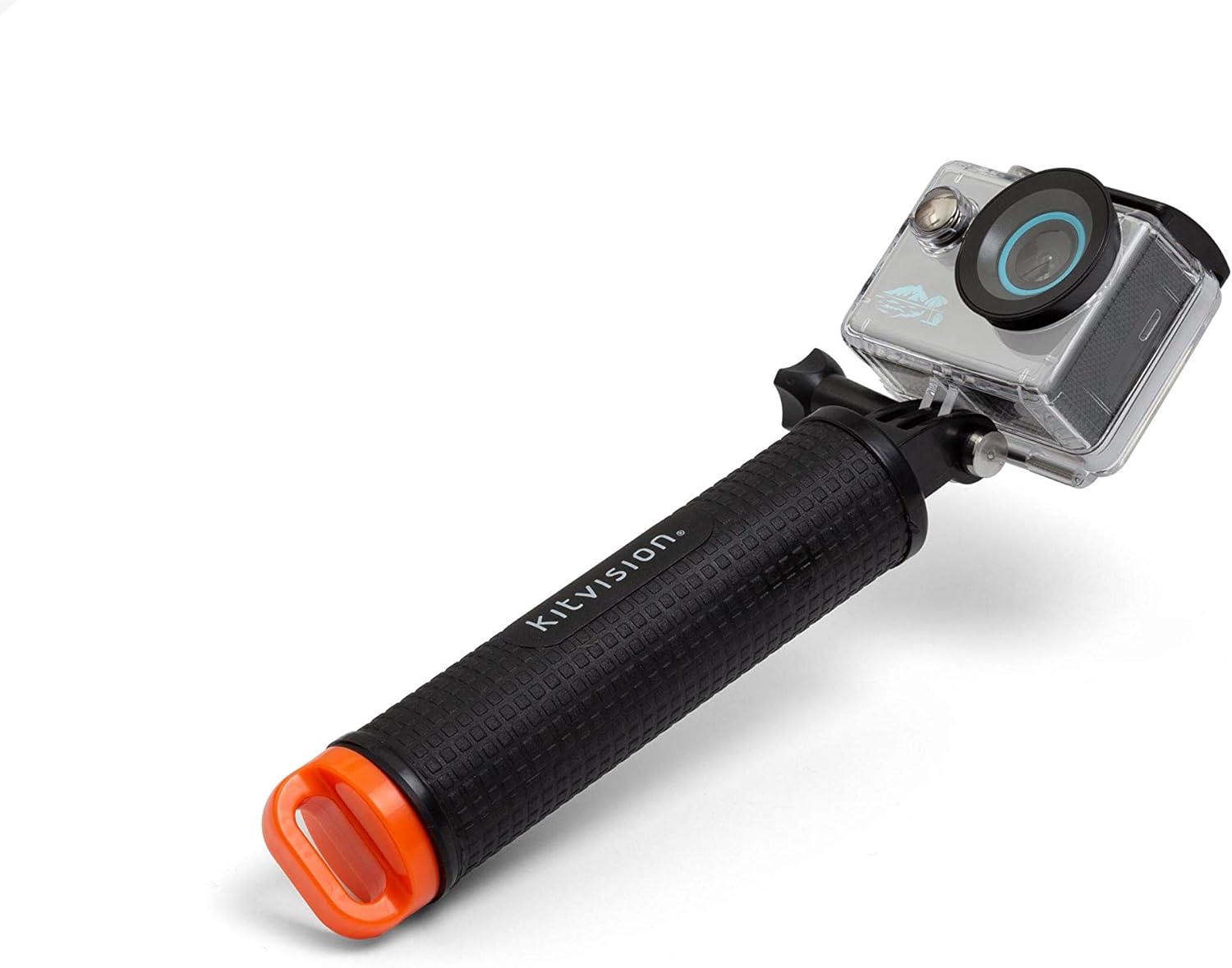
Image: The KitVision 4K Action Camera, enclosed in its waterproof housing, securely mounted on the floating grip.

Image: The KitVision 4K Action Camera, inside its waterproof housing, attached to the extension pole for extended reach.

Image: A smartphone mounted on the extension pole using the provided smartphone adapter.
작동 지침
전원 켜기/끄기
To power on the camera, press and hold the Power/Mode button (usually on the front or top) for a few seconds until the LCD screen illuminates. To power off, press and hold the same button until the screen turns off.
모드 선택
Press the Power/Mode button repeatedly to cycle through different modes: Video Recording, Photo Capture, Playback, and Settings. The current mode will be displayed on the 2-inch LCD screen.
Video Recording (4K)
In Video Recording mode, press the Shutter/OK button (usually on the top) to start recording. Press it again to stop recording. The camera records in 4K (2160p) resolution, capturing high-definition video with a 140-degree wide-angle lens.
사진 캡처
In Photo Capture mode, press the Shutter/OK button to take a still photograph. The camera's high-resolution sensor ensures clear and detailed images.
Using the 2-inch LCD Screen
The integrated 2-inch LCD screen provides a live preview of your shot, allowing you to frame your videos and photos accurately. It also serves as a display for navigating menus, reviewing captured content, and adjusting settings.
Connectivity (Bluetooth, USB)
The camera supports Bluetooth and USB connectivity. Use the USB cable to transfer files to a computer or for charging. Bluetooth can be used for remote control via a compatible smartphone app (if available, refer to camera settings for pairing instructions).
수중 작업
When using the camera with the waterproof housing, ensure all seals are clean and properly closed. The housing is rated for depths up to 30 meters. Buttons on the housing allow you to operate the camera's functions underwater.
유지
- 청소: Use the provided microfiber lens cloth to clean the camera lens and LCD screen. For the waterproof housing, rinse with fresh water after saltwater use and allow to air dry. Do not use harsh chemicals.
- 배터리 관리 : Store the battery in a cool, dry place when not in use. Avoid extreme temperatures. If storing for extended periods, charge the battery to about 50% capacity.
- 저장: Store the camera and accessories in a protective case to prevent damage from dust, moisture, and impacts.
문제 해결
| 문제 | 가능한 원인 / 해결책 |
|---|---|
| 카메라의 전원이 켜지지 않습니다. | Battery is depleted. Charge the battery fully. Ensure battery is inserted correctly. |
| 영상을 녹화하거나 사진을 찍을 수 없습니다. | Memory card is full or not inserted correctly. Format the memory card (this will erase all data). Ensure camera is in the correct mode. |
| 비디오/사진 품질이 좋지 않습니다. | Lens may be dirty. Clean with microfiber cloth. Ensure sufficient lighting. Check resolution settings. |
| Water inside waterproof housing. | Housing not properly sealed. Check for debris on the rubber seal. Ensure latch is securely closed. Do not exceed 30m depth limit. |
명세서
| 특징 | 세부 사항 |
|---|---|
| 상표 | KitVision |
| 모델명 | KVACTLAP4K |
| 비디오 녹화 해상도 | 2160p(4K) |
| 포토 센서 기술 | 영상 |
| 플래시 메모리 유형 | SDHC |
| 화면 크기 | 2인치(LCD) |
| 연결 기술 | 블루투스, USB |
| 색상 | 회색 |
| 광학 줌 | 1x |
| 포함된 구성 요소 | Camera Body & Accessories (32 GB Memory Card, Waterproof Housing, Floating Grip, Extension Pole, Smartphone Holder, Microfiber Lens Cloth) |
| 배터리 | 1개의 리튬 이온 배터리(포함) |
| 패키지 크기 | 24.7 x 17.1 x 6.4 cm; 470g |
| 첫 번째 가능한 날짜 | 15년 2020월 XNUMX일 |
보증 및 지원
KitVision cameras and accessories are designed for life's adventures and come with a 1년 보증 구매일로부터 유효합니다. 본 보증은 제조상의 결함에 적용됩니다. 보증 청구를 위해 구매 증빙 자료를 보관해 주십시오.
For technical support, troubleshooting assistance, or warranty inquiries, please visit the official KitVision web사이트 또는 고객 서비스 부서에 문의하세요. 연락처 정보는 일반적으로 제품 포장이나 제조업체의 web대지.
Ask a question about this manual
Ask about setup, troubleshooting, compatibility, parts, safety, or missing instructions. Manuals+ will review the question and use this page’s manual context to help answer it.