
Pebblebee PB-514-B
Pebblebee Finder 2.0
제품 사용 설명서
소개
Welcome to the user manual for your Pebblebee Finder 2.0. This device is designed to help you locate your valuable items quickly and efficiently. With its rechargeable battery and extended range, the Pebblebee Finder 2.0 offers a reliable solution for keeping track of your belongings. Please read this manual thoroughly to ensure proper use and to maximize the benefits of your new device.
안전 정보
- 기기를 분해하거나 개조하지 마십시오. 이는 보증을 무효화하고 기기 손상을 초래할 수 있습니다.
- 기기를 극한 온도, 직사광선, 화염에 가까이 두지 마세요.
- Avoid exposing the device to excessive moisture beyond its IPX6 water resistance rating. Do not submerge.
- 지정된 충전 케이블과 전원만 사용하세요.
- 어린아이와 애완동물의 손이 닿지 않는 곳에 보관하세요.
제품 끝view
The Pebblebee Finder 2.0 is a compact, rechargeable smart tracker designed to help you locate lost items. It connects to your smartphone or tablet via Bluetooth and offers a range of features to enhance your tracking experience.

영상: A multi-pack of Pebblebee Finder 2.0 devices. These are small, round, black trackers with a textured surface and a small loop for attachment.
주요 특징:
- 확장된 범위: Locate items up to 500 feet away.
- 충전식 배터리: Up to 6 months of battery life on a single charge.
- 방수: IPX6 등급으로 강력한 물 분사로부터 보호됩니다.
- Patented CrowdGPS Technology: Helps locate lost items even when they are out of range.
- 음성 비서 호환 가능: Amazon Alexa 및 Google Assistant와 함께 작동합니다.

영상: 자세한 view of a single Pebblebee Finder 2.0, highlighting its textured surface and integrated loop for attaching to items.
설정
1. Charge Your Device:
Before first use, fully charge your Pebblebee Finder 2.0. Connect the included charging cable to the device and a USB power source. The LED indicator will show charging status. A full charge can last up to 6 months.
2. Download the Pebblebee App:
검색 "Pebblebee" in your smartphone's app store (iOS App Store or Google Play Store) and download the official application.
3. Pair Your Finder:
- Open the Pebblebee app and create an account or log in.
- 화면의 지시에 따라 새 장치를 추가하십시오.
- Ensure your Pebblebee Finder 2.0 is powered on and within Bluetooth range of your smartphone.
- The app will guide you through the pairing process. Once paired, you can name your Finder and assign it to an item.
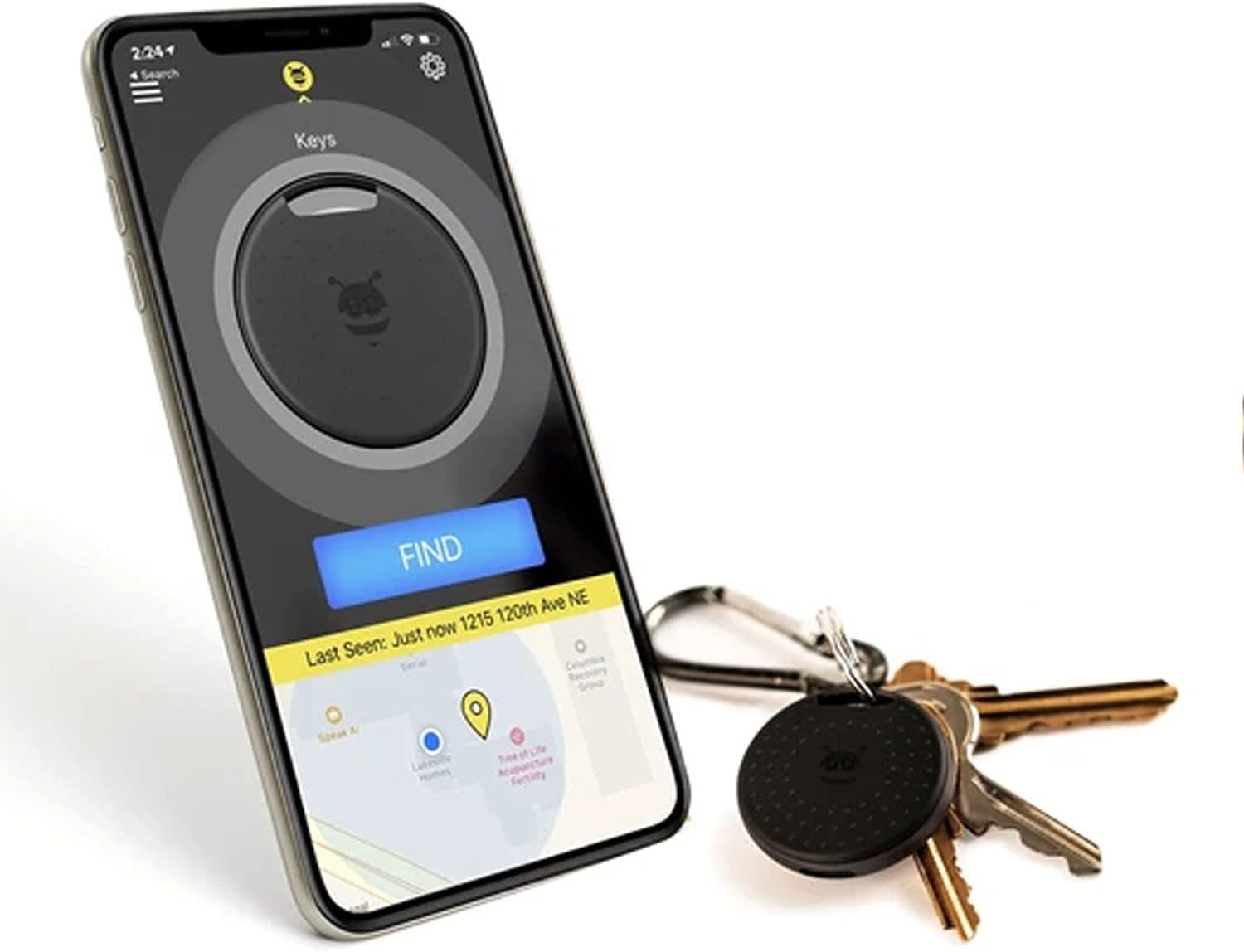
영상: A smartphone displaying the Pebblebee app, showing the location of a tracker on a map and a large "FIND" button. A Pebblebee Finder 2.0 attached to keys is visible next to the phone.
작동 지침
항목 찾기:
To locate an item attached to your Pebblebee Finder 2.0:
- Open the Pebblebee app on your smartphone.
- Select the Finder you wish to locate from your list of devices.
- Tap the "Find" button. Your Pebblebee Finder 2.0 will emit a loud sound, helping you pinpoint its location. The app will also show you the signal strength, guiding you closer to your item.

영상: A Pebblebee Finder 2.0 attached to a keyring with several keys, demonstrating its portability and ease of attachment.
휴대전화 찾기:
If you have your Pebblebee Finder 2.0 but can't find your phone, simply double-press the button on your Finder. Your phone will ring, even if it's on silent mode, helping you locate it.
CrowdGPS Technology:
If your item is out of Bluetooth range, the Pebblebee app leverages its patented CrowdGPS technology. When another Pebblebee user comes within range of your lost item, its location will be anonymously updated on your map, helping you retrieve it.
음성 지원 통합:
You can use Amazon Alexa or Google Assistant to help find your items. Link your Pebblebee account to your voice assistant app and then simply say commands like, "Alexa, ask Pebblebee to find my keys," or "Hey Google, find my wallet."

영상: A Pebblebee Finder 2.0 attached to keys, with the keys partially tucked into a brown leather bag, illustrating how the device can be used to track items within bags.
유지
충전 중:
Recharge your Pebblebee Finder 2.0 when the battery is low. The app will notify you when charging is needed. A full charge provides up to 6 months of use.
청소:
부드럽고 마른 천으로 기기를 닦으세요. 강한 화학 물질이나 연마성 세제는 사용하지 마세요.
방수 기능:
The Pebblebee Finder 2.0 is IPX6 water resistant, meaning it can withstand strong water jets. It is not designed for submersion. Ensure the charging port cover is securely closed to maintain water resistance.
문제 해결
- 장치가 연결되지 않음:
- 스마트폰에서 Bluetooth가 활성화되어 있는지 확인하세요.
- Make sure the Pebblebee Finder 2.0 is charged.
- Restart the Pebblebee app.
- 스마트폰을 다시 시작해 보세요.
- 문제가 지속되면 앱 설정에서 기기 연결을 해제한 후 다시 연결해 보세요.
- 단거리:
- Ensure there are no major obstructions (thick walls, large metal objects) between your phone and the Finder.
- Move closer to the Finder.
- 다른 무선 장치의 간섭을 확인하십시오.
- No Sound from Finder:
- Check if the Finder's battery is critically low.
- Ensure the volume is enabled in the Pebblebee app settings for the specific Finder.
- Phone Not Ringing When Finder Button Pressed:
- Ensure your phone is within Bluetooth range of the Finder.
- Check the app settings to confirm the "Find Phone" feature is enabled.
- Verify that the Pebblebee app has necessary permissions (e.g., notification access) on your phone.
명세서
| 특징 | 세부 사항 |
|---|---|
| 모델 번호 | PB-514-B |
| 연결성 | 블루투스 |
| 범위 | 최대 500피트(약 152미터) |
| 배터리 수명 | 한번 충전으로 최대 6개월 |
| 방수성 | IPX6 (Resistant to strong water jets) |
| 호환 장치 | 스마트폰, 태블릿(iOS, Android) |
| 재료 | 플라스틱, 폴리카보네이트(PC) |
| 무게 | 11그램 |
보증 정보
Pebblebee products typically come with a limited warranty covering defects in materials and workmanship. For specific warranty terms and conditions, please refer to the warranty card included with your product or visit the official Pebblebee web사이트. 보증 청구를 위해 구매 증빙 자료를 보관하세요.
지원하다
For further assistance, technical support, or frequently asked questions, please visit the Pebblebee support page on their official website. You may also find helpful resources within the Pebblebee app.
Ask a question about this manual
Ask about setup, troubleshooting, compatibility, parts, safety, or missing instructions. Manuals+ will review the question and use this page’s manual context to help answer it.