
HUAWEI GT
HUAWEI Watch GT Smartwatch User Manual
Model: GT | Brand: HUAWEI
소개
This manual provides comprehensive instructions for the HUAWEI Watch GT smartwatch. It features a 1.39-inch AMOLED touchscreen, integrated GPS, and a heart rate monitor. This guide will assist you with initial setup, daily operation, maintenance, and understanding the device's capabilities.
The HUAWEI Watch GT is designed for users seeking a blend of style and advanced health and fitness tracking. Its robust build, including a ceramic case and silicone band, ensures durability for various activities.

이미지: 앞면 view of the HUAWEI Watch GT smartwatch with an orange silicone band.
주요 특징
- 1.39-inch AMOLED Touchscreen: 생생한 색상과 뛰어난 시인성을 제공합니다.
- 내장 GPS: Accurate tracking for outdoor activities like running, cycling, and climbing.
- 심박수 모니터: Continuously tracks heart rate for health insights.
- 수면 모니터링: 수면 패턴을 분석하여 수면의 질을 개선하는 데 도움을 줍니다.
- 방수 기능: Rated for 50 meters, suitable for swimming.
- 긴 배터리 수명: Designed for extended use between charges.
- 다양한 스포츠 모드: Supports various activities including triathlon, running, walking, cycling, swimming, and climbing.
- 내구성 있는 구조: Features a ceramic case and silicone band.
설정
1. 언박싱 및 초기 검사
Carefully remove all components from the packaging. Verify that all items are present: the HUAWEI Watch GT, charging cable, and documentation.

Image: The HUAWEI Watch GT smartwatch as it appears when first unboxed.
2. 장치 충전
Before first use, fully charge your HUAWEI Watch GT. Connect the charging cable to the watch's charging port and plug the other end into a USB power adapter (not included) or a computer's USB port. The watch display will indicate charging status.

이미지: 후면 view of the HUAWEI Watch GT, highlighting the heart rate sensor and charging contacts.
3. 스마트폰과 페어링
- Download the HUAWEI Health app from your smartphone's app store (compatible with iOS and Android devices).
- 앱을 열고 화면의 지시에 따라 계정을 만들거나 로그인하세요.
- 스마트폰에서 Bluetooth가 활성화되어 있는지 확인하세요.
- In the HUAWEI Health app, navigate to 'Devices' and select 'Add device'. Choose your HUAWEI Watch GT from the list of available devices.
- 시계와 스마트폰 모두에서 페어링 요청을 확인하세요.
작동 지침
기본 탐색
- 위/아래로 스와이프: Scroll through notifications and quick settings.
- 왼쪽/오른쪽으로 스와이프: Access different widgets like heart rate, weather, and activity data.
- 수도꼭지: 항목을 선택하거나 애플리케이션을 엽니다.
- 상단 버튼을 누르세요: Access the app list or return to the home screen.
- 아래쪽 버튼을 누르세요: Customizable shortcut, typically for workout modes.

Image: The HUAWEI Watch GT displaying a watch face with time and date.
심박수 모니터링
The HUAWEI Watch GT continuously monitors your heart rate. You can view your current heart rate and historical data through the heart rate widget or the HUAWEI Health app. Ensure the watch is snug on your wrist for accurate readings.

Image: A user wearing the HUAWEI Watch GT, which displays heart rate information on its screen.
GPS 추적
The built-in GPS provides precise location tracking for outdoor workouts. Start an outdoor activity mode (e.g., Outdoor Run, Cycling) to activate GPS. The watch will record your route, distance, and pace.

Image: The HUAWEI Watch GT showing GPS signal acquisition, indicating readiness for outdoor tracking.
운동 모드
Select from various pre-installed workout modes to track your activities. Each mode is optimized to provide relevant metrics for that specific exercise. Examples include running, cycling, swimming, and triathlon.

Image: The HUAWEI Watch GT displaying a selection of workout icons, indicating different sport modes.
수면 추적
Wear your watch to bed to automatically track your sleep. The HUAWEI Health app will provide detailed analysis of your sleep stages (deep, light, REM) and offer suggestions for improvement.

Image: The HUAWEI Watch GT displaying sleep duration and quality metrics.
유지
- 청소: 시계와 밴드는 부드러운 천으로 정기적으로 닦아주세요.amp 옷감. 가혹한 화학 물질을 피하십시오.
- 방수 기능: The watch is water resistant up to 50 meters. It is suitable for shallow-water activities like swimming in a pool or ocean. Do not use it for diving, hot showers, or saunas, as steam and hot water can compromise the seals.
- 저장: 시계를 사용하지 않을 때는 서늘하고 건조한 곳에 보관하세요.
- 충전 연락처: 시계 뒷면의 충전 접점을 깨끗하고 건조하게 유지하여 정상적인 충전이 이루어지도록 하십시오.
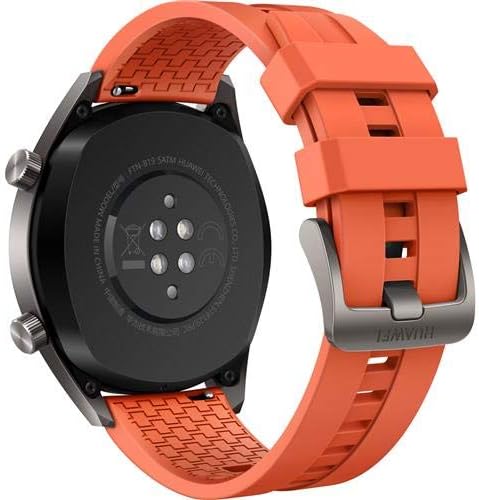
이미지: 후면 view of the HUAWEI Watch GT smartwatch, showing the heart rate sensor and charging pins, important for maintenance.
문제 해결
- 시계가 켜지지 않음: 시계가 완전히 충전되었는지 확인하세요. 충전기에 연결하고 몇 분 정도 기다린 후 전원을 켜보세요.
- 스마트폰과 페어링할 수 없습니다:
- 휴대폰에서 Bluetooth가 활성화되어 있는지 확인하십시오.
- HUAWEI Health 앱이 최신 버전으로 업데이트되었는지 확인하세요.
- 시계와 스마트폰을 모두 다시 시작하세요.
- 앱을 통해 기기의 페어링을 해제하고 다시 페어링해보세요.
- Inaccurate heart rate/GPS data: Ensure the watch is worn snugly on your wrist, not too loose or too tight. For GPS, ensure you are in an open area with a clear view 하늘의.
- 짧은 배터리 수명: Check if features like always-on display or continuous heart rate monitoring are enabled, as these can consume more power. Adjust settings in the HUAWEI Health app to optimize battery life.
명세서
| 특징 | 세부 사항 |
|---|---|
| 상표 | 화웨이 |
| 모델명 | GT |
| 화면 크기 | 1.39 인치 |
| 디스플레이 유형 | 아몰레드 |
| 해결 | 454 x 454 |
| 연결 기술 | 블루투스, Wi-Fi |
| GPS | Built-in GPS (Galileo, Glonass, GPS) |
| 특별 기능 | GPS, 심박수 모니터 |
| 운영 체제 | Android (Compatible with iOS and Android devices) |
| 방수 깊이 | 50 Meters (IP68) |
| 밴드 소재 유형 | 실리콘 |
| 케이스 재질 종류 | 세라믹 |
| 휴먼 인터페이스 입력 | 터치스크린 |
| 측정된 지표 | 광학 심박수 센서 |
보증 및 지원
This HUAWEI Watch GT includes a Canadian Warranty. For specific warranty terms and conditions, please refer to the warranty card included in your product packaging or visit the official HUAWEI support web대지.
For technical support, troubleshooting assistance, or service inquiries, please contact HUAWEI customer support. Manufacturer contact information: Plano, TX 75024, US.
제품 비디오
MayuFit Fitness Tracker Overview
비디오: 이 비디오는 다음을 제공합니다.view of the MayuFit Fitness Tracker, demonstrating its features and functionality. While not specifically the HUAWEI Watch GT, it illustrates general fitness tracker capabilities.
Ask a question about this manual
Ask about setup, troubleshooting, compatibility, parts, safety, or missing instructions. Manuals+ will review the question and use this page’s manual context to help answer it.