
1. 서론
Thank you for choosing the Amcrest 1080P WiFi Pan/Tilt Indoor Security Camera (Model: ASH21-W). This manual provides essential information for setting up, operating, and maintaining your device. This camera offers advanced features such as 1080P Full-HD video, pan/tilt functionality, human and pet detection, motion tracking, two-way audio, and various storage options to ensure comprehensive monitoring of your indoor spaces.
2. 상자 안에 무엇이 들어있나요?
- Amcrest ASH21-W 1080P WiFi Pan/Tilt Camera
- 전원 어댑터
- USB 전원 케이블
- 장착 플레이트
- 장착 나사 및 앵커
- 빠른 시작 가이드
메모: A MicroSD card (up to 256GB) for local storage is not included and must be purchased separately.
3. 설정
3.1 전원 켜기
- USB 전원 케이블을 카메라의 전원 포트에 연결하세요.
- 전원 어댑터를 표준 전기 콘센트에 연결하십시오.
- The camera will power on, and the indicator light will begin to flash.
3.2 앱 다운로드 및 계정 등록
- 다운로드 Amcrest SmartHome App Store(iOS) 또는 Google Play Store(Android)에서 앱을 다운로드하세요.
- 앱을 열고 새 계정을 등록하거나 이미 계정이 있다면 로그인하세요.
3.3 장치 페어링
- In the Amcrest SmartHome app, tap the "Add Device" icon (usually a '+' symbol).
- Select your camera model or choose to scan the QR code.
- 카메라 하단에 있는 QR 코드를 스캔합니다.
- Follow the on-screen prompts to connect the camera to your 2.4GHz Wi-Fi network and set a device password.
- Name your device (e.g., "Living Room Camera", "Baby's Room").
3.4 장착 옵션
The camera can be placed on a tabletop or mounted on a wall or ceiling. Use the provided mounting plate, screws, and anchors for secure installation if mounting is desired.

이미지 1: Amcrest ASH21-W camera on a table, showcasin컴팩트한 디자인입니다.
4. 사용 설명서
4.1 라이브 View 팬/틸트 제어
Once connected, access the live video feed through the Amcrest SmartHome app. Use the on-screen controls to remotely pan (355°) and tilt (80°) the camera lens to view 방의 다른 영역들.

이미지 2: Amcrest ASH21-W camera demonstrating pan and tilt motion with blue arrows, indicating its auto-tracking capability.
4.2 양방향 오디오
The camera features a built-in microphone and speaker, enabling two-way communication. Tap the "Talk" button in the app to speak through the camera, and tap "Listen" to hear audio from the camera's location.

이미지 3: A person using a smartphone to engage in two-way talk through the Amcrest camera, showing the live feed on the phone screen.
4.3 Baby Monitor Mode
Activate Baby Monitor Mode in the app to receive notifications based on adjustable sound thresholds (VOX alarm). This feature is ideal for monitoring infants or pets, alerting you to sounds like crying or barking without requiring constant visual monitoring.
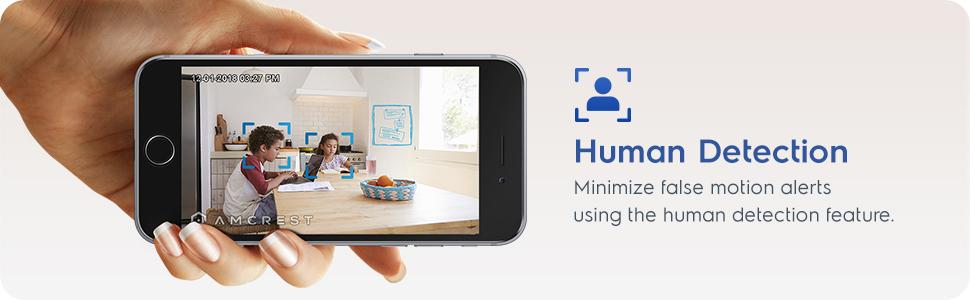
이미지 4: Amcrest ASH21-W camera with a smartphone displaying the baby monitor interface, showing a baby in a crib and audio level graphs.
4.4 Motion Detection & Smart Tracking
Enable motion detection to receive alerts and record footage when movement is detected. Utilize the human detection filter to reduce false alarms. With Smart Tracking enabled, the camera will automatically pan and tilt to follow detected human movement across the room.

이미지 5: Amcrest ASH21-W camera on a table, with a smartphone showing a human detection alert and a 93-degree viewing angle graphic.
4.5 야간 투시경
The camera provides clear night vision up to 33 feet in absolute darkness, ensuring continuous monitoring even in low-light conditions.
4.6 녹음 및 저장
녹음 파일은 여러 가지 방법으로 저장할 수 있습니다.
- MicroSD 카드: 로컬 저장소로 사용하려면 카메라 슬롯에 MicroSD 카드(최대 256GB, 별도 구매)를 삽입하십시오.
- 암크레스트 클라우드: Utilize optional cloud storage services for remote access to recordings.
- 타사 소프트웨어: Compatible with Amcrest NVRs and third-party surveillance software like Blue Iris, Synology, QNAP NAS, Zoneminder, and RTSP.

이미지 6: Amcrest ASH21-W camera highlighting the MicroSD card slot and showing icons for Amcrest Smart Home Cloud and MicroSD Card storage options.
4.7 Alerts & Notifications
Receive instant notifications on your smartphone when motion or human detection events occur. Review event playback directly from the app.
동영상 1 : Official Amcrest video demonstrating the Smart Home WiFi Pan/Tilt Baby Monitor Camera's features, including setup, app interface, baby monitor mode, human detection, smart tracking, night vision, and storage options.
5. 유지관리
- 청소: 카메라 렌즈와 본체는 부드럽고 마른 천으로 닦으십시오. 강한 화학 약품이나 연마성 재질은 사용하지 마십시오.
- 펌웨어 업데이트: Regularly check the Amcrest SmartHome app for firmware updates to ensure optimal performance and security.
- 놓기: Ensure the camera is placed in a location with good Wi-Fi signal strength and away from direct heat sources or extreme temperatures.
6. 문제 해결
- 연결 문제: Ensure your Wi-Fi network is 2.4GHz. Check your router's signal strength and try restarting both the camera and your router.
- 라이브 없음 View: Verify the camera is powered on and connected to Wi-Fi. Check the app for any error messages.
- 허위 경보: Adjust motion detection sensitivity settings in the app. Utilize human detection filters to minimize alerts from non-human movement.
- 이미지 품질이 좋지 않음: Ensure the camera lens is clean. Check your internet connection speed.
- 양방향 오디오 문제: Check volume settings on your phone and in the app. Ensure there is no obstruction to the camera's microphone or speaker.
7. 사양
| 특징 | 세부 사항 |
|---|---|
| 비디오 캡처 해상도 | 1080p |
| 팬/틸트 범위 | 팬 355 °, 틸트 80 ° |
| View잉 각도 | 93도 |
| 나이트 비전 범위 | 최대 33피트 |
| 저장 옵션 | MicroSD (up to 256GB), Amcrest Cloud, NVR/3rd Party Software |
| 연결성 | 와이파이(2.4GHz) |
| 양방향 오디오 | 예 (마이크 및 스피커 내장) |
| 동작 감지 | Yes (Human & Pet Detection, Motion-Tracking) |
| 호환 장치 | 아마존 알렉사 |
| 전원 | 유선 전기 (5V DC, 5W) |
| 치수(길이 x 너비 x 높이) | 4.17 x 3.04 x 3.04 인치 |
| 품목 무게 | 0.53파운드(8.4온스) |
| 재료 | 플라스틱 |
| 실내/실외 사용 | 실내 |
8. 보증 및 지원
The Amcrest ASH21-W camera comes with a full 미국 내 1년 보증. For any technical assistance or support, please contact Amcrest directly. Lifetime technical support is provided by Amcrest, a United States-based company headquartered in Houston, TX.
For further assistance, please refer to the Amcrest SmartHome app's support section or visit the official Amcrest web대지.