
1. 서론
This manual provides comprehensive instructions for the IMILAB CMSXJ16A Smart Home Security Camera, a product of XIAOMI. It covers setup, operation, maintenance, and troubleshooting to ensure optimal performance and security monitoring. Please read this manual carefully before using the product and retain it for future reference.
2. 제품 오버view
2.1 패키지 내용
패키지에 모든 품목이 들어 있는지 확인하세요.
- IMILAB Home Security Camera Basic x 1
- 사용설명서 x 1
- 전원 케이블 x 1
- Power Adapter (UK/EU/US) x 1
- Wall Mounting Package x 1 (includes screws and wall plugs)
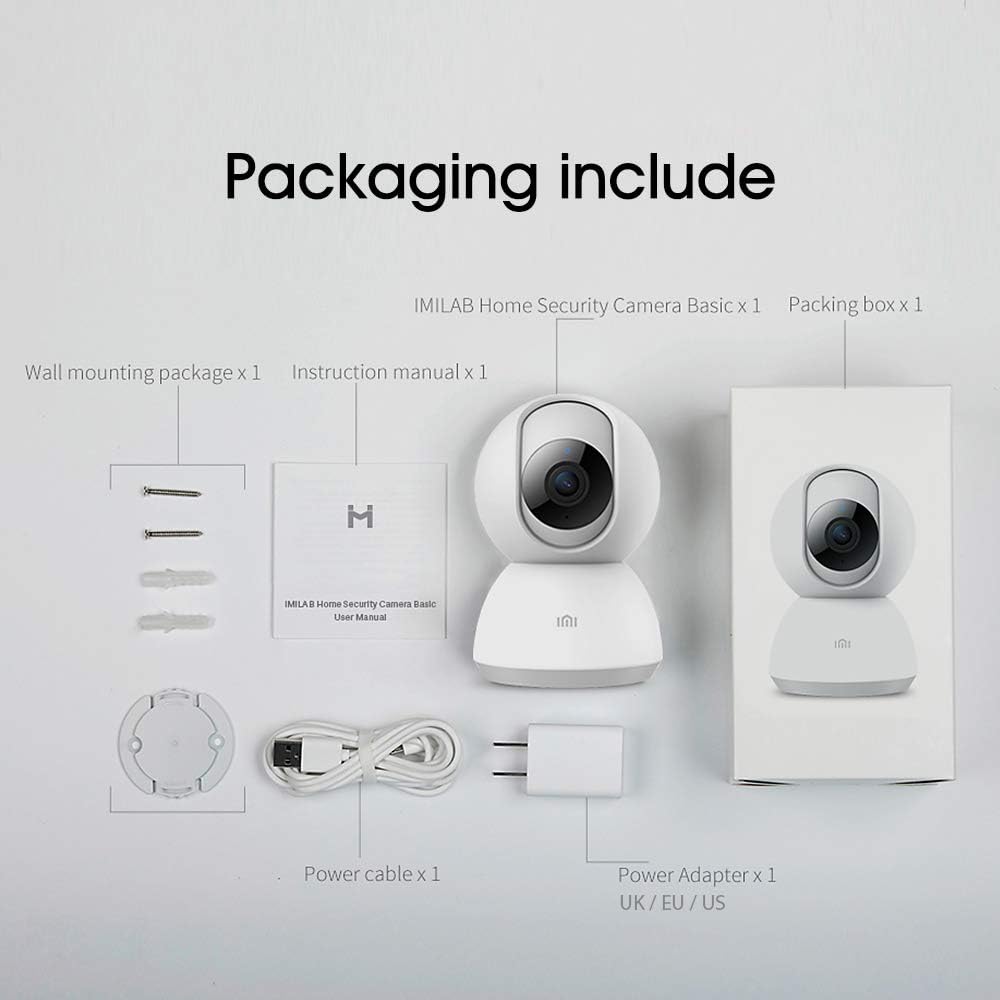
Image: Contents of the IMILAB CMSXJ16A camera package.
2.2 카메라 구성 요소
The IMILAB CMSXJ16A camera features a compact, spherical design with a rotating base for 360-degree coverage. Key components include the lens, microphone, speaker, status indicator light, and power port.

이미지: 앞면 view of the IMILAB CMSXJ16A camera.
2.3 주요 특징
- FHD (1080P) Resolution: Provides clear and detailed image quality.
- 360° 회전: 파노라마 제공 viewing for comprehensive area coverage.
- Glare-Free Night Vision: Equipped with F2.1 aperture and 8x 940mm infrared LEDs for a visible distance of 10m.
- 트루 컬러 야간 투시경: Maintains full color in low light conditions, even at 100 lumens.
- AI 인간 감지: Advanced AI reduces unnecessary alerts by 70% for more accurate notifications.
- Crying Baby Notification: Alerts you to the sound of a crying baby.
- 다양한 저장 옵션: Supports cloud storage, up to 64GB Micro TF card, and NAS storage.
- H.265 비디오 인코딩: Efficiently compresses video, saving storage space while maintaining quality.
3. 설정
3.1 전원 켜기
- 카메라의 전원 포트에 전원 케이블을 연결하세요.
- 전원 어댑터를 표준 전기 콘센트에 연결하십시오.
- The camera will power on, and the status indicator light will begin to flash, indicating it is ready for connection.
3.2 앱 설치
Download the official IMILAB Home Security app from your smartphone's app store. The app is compatible with Android 4.4 and above, and iOS 8.0 and above.
- 검색 "IMILAB Home Security" in the Google Play Store (for Android) or Apple App Store (for iOS).
- 앱을 다운로드하고 설치하세요.
- 앱을 열고 화면의 지시에 따라 계정을 만들거나 로그인하세요.
3.3 Wi-Fi에 연결하기
Follow the in-app instructions to connect your camera to your home Wi-Fi network. This typically involves scanning a QR code generated by the app with the camera's lens.
3.4 카메라 장착
The camera supports wall mounting. Use the provided wall mounting package for secure installation.
- 설치에 적합한 위치를 선택하여 시야가 확보되도록 하십시오. view 전원 콘센트를 이용할 수 있습니다.
- Use the mounting base as a template to mark drill holes on the wall.
- 구멍을 뚫고 벽면 플러그를 꽂습니다.
- Secure the mounting base to the wall with screws.
- Attach the camera to the mounting base.
4. 사용 설명서
4.1 라이브 View 및 원격 제어
Once connected, open the IMILAB Home Security app to access the live video feed from your camera. You can remotely control the camera's 360-degree rotation to view different areas of your space.

이미지: 라이브 view of the camera feed on mobile devices, demonstrating H.265 encoding efficiency.
4.2 야간 투시경
The camera automatically switches to night vision mode in low light conditions. It features glare-free infrared night vision and true color night vision for clear visibility even in very dim environments.

Image: Demonstration of glare-free and true color night vision capabilities.
4.3 AI Human Detection and Notifications
The camera utilizes AI to detect human movement, significantly reducing false alarms from pets or other non-human movements. You will receive precise notifications on your smartphone when human activity is detected.

Image: AI movement notification interface in the mobile application.
4.4 Crying Baby Detection
Enable the crying baby detection feature in the app to receive alerts if the camera detects the sound of a baby crying, providing an additional layer of monitoring for nurseries.
4.5 비디오 녹화 및 저장
The camera supports real-time video recording with multiple storage options:
- 클라우드 스토리지: Subscribe to cloud services for secure off-site storage of your recordings.
- 마이크로 TF 카드: Insert a Micro TF card (up to 64GB, not included) into the camera for local storage.
- NAS 저장 장치: Connect the camera to a Network Attached Storage (NAS) device for expanded local storage capabilities.
4.6 H.265 비디오 인코딩
The camera uses H.265 video encoding, which allows for more efficient compression of video files. This means you can save the same quality video with approximately 50% less file size compared to H.264, optimizing storage and bandwidth usage.
5. 유지관리
카메라의 수명과 최적의 성능을 유지하려면 다음 유지 관리 지침을 따르십시오.
- 청소: 부드럽고 마른 천으로 카메라 렌즈와 본체를 부드럽게 닦으세요. 강한 화학 물질이나 연마성 세척제는 사용하지 마세요.
- 놓기: Ensure the camera is placed in a stable environment, away from direct sunlight, extreme temperatures, and high humidity.
- 펌웨어 업데이트: 카메라에 최신 기능과 보안 강화 기능이 적용되도록 정기적으로 앱에서 펌웨어 업데이트를 확인하세요.
6. 문제 해결
If you encounter issues with your IMILAB CMSXJ16A camera, refer to the following common solutions:
- 카메라가 연결되지 않음: Ensure your Wi-Fi network is 2.4GHz (5GHz is not supported). Check Wi-Fi signal strength. Restart the camera and your router.
- 이미지 품질이 좋지 않음: Clean the camera lens. Ensure adequate lighting in the environment. Check your internet connection speed.
- 알림 없음: Verify that notifications are enabled in both the camera app settings and your smartphone's system settings. Check network connectivity.
- 카메라 오프라인: Check the power connection. Ensure your Wi-Fi network is active and the camera is within range. Restart the camera.
- Micro TF Card Not Detected: Ensure the card is inserted correctly. Format the card through the app if it's new or has issues. Use a compatible Micro TF card (up to 64GB).
7. 사양
| 특징 | 사양 |
|---|---|
| 모델 번호 | CMSXJ16A |
| 치수(길이 x 너비 x 높이) | 10.8 x 7.6 x 7.6cm |
| 무게 | 211그램 |
| 비디오 해상도 | 1080p (FHD) |
| 분야 View / Angle of View | 360도 |
| 야간 시야 거리 | 10 미터 |
| 적외선 LED | 8 x 940mm |
| 구멍 | F2.1 |
| 연결 기술 | Wired, Wireless (Wi-Fi 2.4GHz) |
| 전원 | Mains Powered (via 5V, 5W adapter) |
| 호환 장치 | 스마트폰 (안드로이드 4.4 이상, iOS 8.0 이상) |
| 저장 옵션 | Cloud, Micro TF Card (max 64GB), NAS |
| 비디오 캡처 형식 | MP4 (H.265 인코딩) |
| 실내/실외 사용 | 실내 |
| 장착 유형 | 벽걸이형 |
8. 보증 및 지원
For warranty information and technical support, please refer to the official IMILAB web사이트를 방문하거나 고객 서비스에 문의하세요. 보증 청구를 위해 구매 증빙 자료로 구매 영수증을 보관하세요.