
RAPOO H1030
Rapoo H1030 블루투스 스테레오 헤드셋 사용 설명서
Model: H1030 | Brand: RAPOO
1. 서론
Thank you for choosing the Rapoo H1030 Bluetooth Stereo Headset. This manual provides detailed instructions to help you set up, operate, and maintain your headset for optimal performance. Please read this manual thoroughly before using the product.
2. 제품 오버view
The Rapoo H1030 is a wireless over-ear stereo headset designed for comfortable audio listening and communication. It features Bluetooth connectivity, an integrated microphone, and volume controls.

그림 2.1: 앞쪽 view of the Rapoo H1030 Bluetooth Stereo Headset. This image shows the overall design of the headset, with both earcups and the headband visible from the front.

그림 2.2: 옆 view of the Rapoo H1030 Bluetooth Stereo Headset, illustrating the adjustable headband and the design of the over-ear cushions.
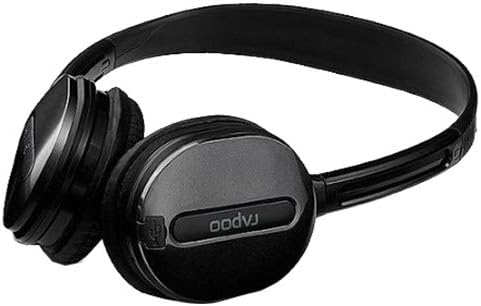
그림 2.3: 클로즈업 view of an earcup, highlighting the integrated controls and the "rapoo" branding. This image details the buttons for volume and playback control, and potentially the charging port or microphone location.
2.1 주요 특징
- Wireless Bluetooth connectivity (2.4 GHz, up to 10 meters / 33 feet range)
- Over-ear design for comfort
- Built-in omni-directional microphone with noise cancelling
- 통합 볼륨 제어
- 충전식 리튬 배터리(360mAh)
- 조절 가능한 헤드밴드
3. 설정
3.1 헤드셋 충전
Before initial use, fully charge the headset. The Rapoo H1030 features a built-in 360mAh rechargeable lithium battery.
- Locate the charging port on the headset (refer to Figure 2.3 for general control area).
- Connect the charging cable (typically Micro-USB) to the headset and the other end to a USB power source (e.g., computer USB port, USB wall adapter).
- The charging indicator light will illuminate (color may vary, refer to product packaging for specifics).
- 완전 충전에는 약 2시간이 소요됩니다. 충전이 완료되면 표시등이 켜지거나 꺼집니다.
A fully charged headset provides approximately 6 hours of usage time.
3.2 블루투스 페어링
The headset uses smart connection technology for easy pairing.
- 헤드셋이 충전되어 있고 전원이 꺼져 있는지 확인하세요.
- Press and hold the power button (or pairing button, if separate) on the headset until the indicator light begins to flash rapidly, indicating it is in pairing mode.
- 기기(스마트폰, 태블릿, 컴퓨터)에서 Bluetooth를 활성화하고 사용 가능한 기기를 검색하세요.
- Select "RAPOO H1030" (or similar name) from the list of found devices.
- Once connected, the indicator light on the headset will typically stop flashing and remain solid, or turn off.
- The headset is now ready for use. It should automatically reconnect to the last paired device when powered on and within range.
4. 사용 설명서
4.1 전원 켜기/끄기
- 전원 켜기: 전원 표시등이 켜질 때까지 전원 버튼을 약 3초간 길게 누르세요.
- 전원 끄기 : 전원 표시등이 꺼질 때까지 전원 버튼을 약 3~5초간 길게 누르세요.
4.2 볼륨 조절
The headset features integrated volume controls.
- 볼륨 증가: 볼륨 높이기 버튼을 누르세요.
- 볼륨 감소: 볼륨 낮추기 버튼을 누르세요.
4.3 통화 관리
When connected to a smartphone, the headset can manage phone calls.
- 전화 받기/종료: Press the Multi-function button (often the power button or a dedicated call button) once.
- 전화 거부: 다기능 버튼을 약 2초간 길게 누릅니다.
- 마지막 번호 재다이얼: 다기능 버튼을 두 번 누릅니다.
4.4 음악 재생
When playing music from a connected device, use the headset controls.
- 재생/일시 중지: 다기능 버튼을 한 번 누릅니다.
- 다음 트랙: Press and hold the Volume Up button (or a dedicated 'Next' button).
- 이전 트랙 : Press and hold the Volume Down button (or a dedicated 'Previous' button).
5. 유지관리
- 청소: 부드럽고 마른 천을 사용하여 헤드셋을 닦으세요. 연마성 세제나 용제는 사용하지 마세요.
- 저장: Store the headset in a cool, dry place away from direct sunlight and extreme temperatures. When not in use, consider folding the headset (refer to Figure 5.1) to save space and protect it.
- 배터리 관리 : 배터리 수명을 연장하려면 배터리를 자주 완전히 방전시키지 마십시오. 헤드셋을 계속 사용하지 않더라도 정기적으로 충전하십시오.
- 물 노출: 헤드셋은 방수가 되지 않습니다. 물이나 과도한 습기에 노출되지 않도록 주의하세요.

그림 5.1: The Rapoo H1030 headset in a folded position, demonstrating its portability and ease of storage. This compact form helps protect the earcups and headband when not in use.
6. 문제 해결
| 문제 | 가능한 원인 | 해결책 |
|---|---|---|
| 헤드셋의 전원이 켜지지 않습니다. | 배터리가 부족합니다. | 헤드셋을 최소 2시간 동안 충전하세요. |
| 기기와 페어링할 수 없습니다. | 헤드셋이 페어링 모드가 아닙니다. 기기에서 블루투스가 비활성화되었습니다. 기기가 너무 멀리 떨어져 있습니다. | Ensure headset is in pairing mode (flashing light). Enable Bluetooth on your device. Move headset closer to the device (within 10 meters). Try restarting both devices. |
| 소리가 나지 않거나 볼륨이 작습니다. | Volume too low on headset or device; headset not properly connected. | 헤드셋과 연결된 기기의 볼륨을 모두 높이세요. 헤드셋을 다시 페어링하세요. |
| 음질이 좋지 않거나 연결이 끊깁니다. | 간섭; 기기 범위 이탈; 배터리 부족. | Move closer to the connected device. Avoid obstacles between headset and device. Charge the headset. Avoid environments with strong Wi-Fi or other 2.4 GHz signals. |
7. 사양
| 모델 | H1030 |
| 상표 | 라푸 |
| 연결성 | Wireless (Bluetooth, 2.4 GHz) |
| 전송 범위 | 최대 10미터(33피트) |
| 헤드폰 유형 | 오버이어 |
| 마이크로폰 | Built-in, Omni-Directional, Noise Cancelling |
| 배터리 유형 | 충전식 리튬 배터리 |
| 배터리 용량 | 360mAh |
| 충전 시간 | 약 2시간 |
| 사용 시간 | 약 6시간 |
| 치수(길이 x 너비 x 높이) | 6.85 x 5.43 x 2.17 인치 |
| 무게 | 80g |
| 색상 | 검은색 |
| 재료 | 금속, 고무 |
8. 보증 및 지원
For warranty information and technical support, please refer to the warranty card included with your product or visit the official RAPOO web사이트. 보증 청구를 위해 구매 증빙 자료로 구매 영수증을 보관하세요.
제조업체: 라푸
Ask a question about this manual
Ask about setup, troubleshooting, compatibility, parts, safety, or missing instructions. Manuals+ will review the question and use this page’s manual context to help answer it.